DISCLAIMER: THE ALL-IN-ONE (AIO) OCP DEPLOYMENT IS AN UNSUPPORTED OCP 3.11.x CONFIGURATION INTENDED FOR TESTING OR DEMO PURPOSES.
A common request from customers is how to run the actual Red Hat OpenShift Container Platform (OCP) bits in a single node. This request often comes from customers that need to support training environments, dedicated single-user development environments or from technical architects wanting to validate concepts without deploying a full multi-node cluster. There are many options available for developers, from Minishift to CodeReady Workspaces. These are supported options which are a great solution for application developers that want to deploy to the platform. The use cases not addressed with these solutions are more platform and infrastructure related.
For example, use cases well suited for this OCP AIO configuration arelike:
- Training OCP operations teams.
- Enabling and managing multiple identity providers.
- Configuring and managing NetworkPolicy objects.
- Configuring advanced inbound traffic options, such as the usage of ExternalIPs, etc.
- Testing certain OpenShift-SDN features or other CNI plugins.
In short, use cases around platform operations and administrative tasks.
There are more business related use cases where an All-in-One installation of OpenShift can be useful, such as:
- Using OCP as universal CPE (uCPE) platform.
- Using OCP for Cloud-Native far Edge setups.
- Using OCP for Cloud-Native network appliances.
NOTE: At the time of this writing, OCP AIO it is not a commercially supported deployment. This blog explores the intended use case for this project so architects and others can begin experimenting with the possibilities of a single node installation of OpenShift.
The Design
The following conceptual diagram illustrates the design constructs. This is a single machine running OCP and hosting an NFS server to use as the persistent storage provider for the platform and applications.
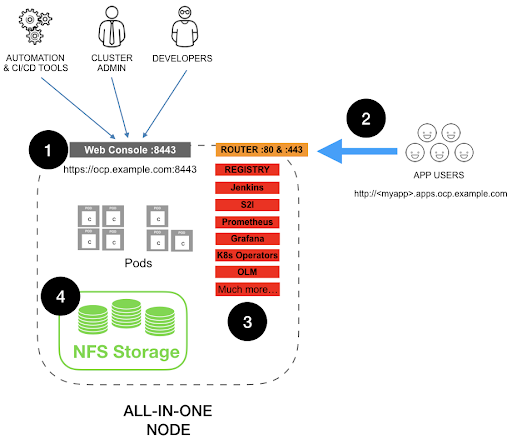
The host characteristics that I tested are:
- VM or bare-metal
- 6 vCPU (should work with fewer, but services like Prometheus and ElasticSearch should be configured with a lower limit of milicores)
- RHEL 7.6 minimal install
- 8GB RAM
- 40GB Drive (the OS with the full OCP installation consume ~16GB but you may want to have enough for your apps and containers)
The OCP setup for the All-in-One (AIO) used the following parameters:
- AIO node name: ocp.example.com
- AIO node IP: 192.168.1.30
- App wildcard subdomain: *.apps.ocp.example.com
- NFS Server configured to export: /srv/nfs
- Deployment can use docker or CRI-O as container runtime
- Configure AIO node with DNS resolving the Node FQDN and wildcard subdomain.
DNSMASQ as Lab DNS
Since OCP requires FQDN with proper DNS resolution, I configured an external dnsmasq instance with the following entry:
$ cat /etc/dnsmasq.d/ocp.example.com.confaddress=/ocp.example.com/192.168.1.30
Due to the way dnsmasq works this will resolve any subdomain under the *.ocp.example.com to the host IP enabling the *.apps.ocp.example.com to also work.
The AIO Inventory file
Note: Since this configuration is intended for lab use, some of the services (i.e. Prometheus, ElasticSearch, Metrics, etc) have been configured to use ephemeral storage.
The core section of the inventory file is as follows:
############################################################################## OpenShift Hosts
###########################################################################
[OSEv3:children]
nfs
masters
etcd
nodes
[nfs]
ocp.example.com
[masters]
ocp.example.com
[etcd]
ocp.example.com
[nodes]
## All-In-One with CRI-O
#ocp.example.com openshift_node_group_name='node-config-all-in-one-crio' openshift_node_problem_detector_install=true
## All-In-One with Docker
ocp.example.com openshift_node_group_name='node-config-all-in-one' openshift_node_problem_detector_install=true
Note: For a complete reference inventory file, refer to this GitHub repo.
Preparing the AIO environment
- Ensure the AIO node can ssh passwordless to itself.
$ ssh-keygen$ ssh-copy-id ocp.example.com
- Register the host
# register each host with RHSMsubscription-manager register --username=<user_name> --password=<password>
# pull subscriptions
subscription-manager refresh
# identify the available OpenShift subscriptions
subscription-manager list --available --matches '*OpenShift*'
# assign a subscription to the node
subscription-manager attach --pool=<pool_id>
# Disable all RHSM repositories
subscription-manager repos --disable="*"
# Enable only repositories required by OpenShift
subscription-manager repos \
--enable="rhel-7-server-rpms" \
--enable="rhel-7-server-extras-rpms" \
--enable="rhel-7-server-ose-3.11-rpms" \
--enable="rhel-7-server-ansible-2.6-rpms"
- Update system to latest patches
# Update RHELyum -y update
# Reboot with updated Kernel
reboot
- Install required installation tools
<span>$ yum -y install atomic-openshift-clients openshift-ansible</span>
Installing the AIO environment
The inventory file can either go into /etc/ansible/hosts or into any folder you have access to. For the purpose of this blog, I assume the inventory file is in the local directory ./inventory_aio.
Note: For the setup documented in this blog I’m using NFS as the OCP AIO persistent storage and the ansible playbook will assume /srv/nfs is the NFS server path.
- Install prerequisites
<span>ansible-playbook -i inventory_aio /usr/share/ansible/openshift-ansible/playbooks/prerequisites.yml</span>
- Deploy OCP AIO
<span>ansible-playbook -i inventory_aio /usr/share/ansible/openshift-ansible/playbooks/deploy_cluster.yml</span>
Summary
OpenShift (OCP) as a superset of Kubernetes brings many additional integrations and capabilities to this container native infrastructure. When considering non-traditional use cases of Kubernetes, integrations with additional tools and functionalities not offered by the core Kubernetes will be required. Fortunately, OpenShift is extremely modular, so you can add or remove functionality as you go.
In this blog, we have a documented process to install the full OCP featuresets and capabilities in an AIO configuration. You may want to use this simply as a practice platform, where configurations can be tested, or for training classes. You could even explore ways to use OCP on universal CPE environments. The only limits are your imagination.
저자 소개

유사한 검색 결과
과거의 운영 방식에서 벗어나 IT의 미래 구축
AI의 다음 변곡점: 에이전트를 엔터프라이즈 슈퍼유저로 전환
Crack the Cloud_Open | Command Line Heroes
Edge computing covered and diced | Technically Speaking
채널별 검색

오토메이션
기술, 팀, 인프라를 위한 IT 자동화 최신 동향

인공지능
고객이 어디서나 AI 워크로드를 실행할 수 있도록 지원하는 플랫폼 업데이트

오픈 하이브리드 클라우드
하이브리드 클라우드로 더욱 유연한 미래를 구축하는 방법을 알아보세요

보안
환경과 기술 전반에 걸쳐 리스크를 감소하는 방법에 대한 최신 정보

엣지 컴퓨팅
엣지에서의 운영을 단순화하는 플랫폼 업데이트

인프라
세계적으로 인정받은 기업용 Linux 플랫폼에 대한 최신 정보

애플리케이션
복잡한 애플리케이션에 대한 솔루션 더 보기

가상화
온프레미스와 클라우드 환경에서 워크로드를 유연하게 운영하기 위한 엔터프라이즈 가상화의 미래
