
Goals
- Benefits of Fuse on OpenShift Benefits
- Understanding administrative tasks for Fuse on OpenShift
- Explaining how to start developing for Fuse on OpenShift
Benefits of Fuse on OpenShift
- Native integration with Docker, Kubernetes, OpenShift
- Transparency in platform changes for developers
- Self-service, scaling, CI/CD for administrators
- Application runtime built for microservice deployments
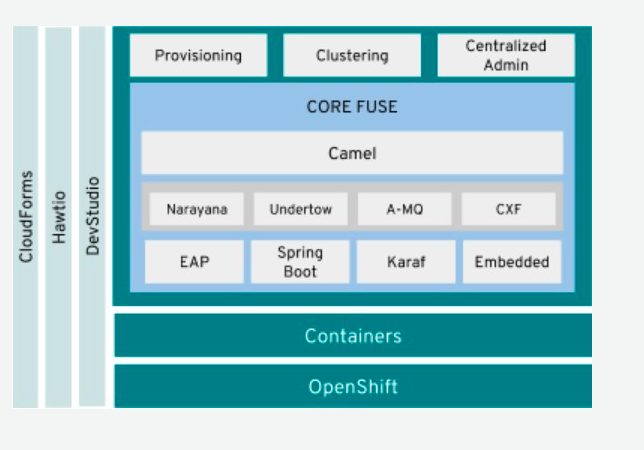
Administrator Tasks
The main administrative tasks will typically be:
Installing Fuse imagestreams and templates on the OpenShift 4.x server
- Setting up the Fuse Console on OpenShift 4.x
- Installing API Designer on OpenShift 4.x - (Apicurio) (Optional, through OperatorHub)
Installing Fuse imagestreams and templates on the OpenShift 4.x server
ImageStrams is an OpenShift API object that represents single virtual view of related images.
- For Installing Fuse imagestreams and templates, you must have the administrator role for the OpenShift project.
- Type of Red Hat Fuse 7 images:
- Install Red Hat Fuse 7 images:
You can refer to script for installing image streams and templates. - fuse-karaf-openshift: Camel applications based on Karaf
- fuse-java-openshift: Camel applications based on standalone Java™ flat file or Spring Boot
- fuse-eap-openshift: Camel applications based on JBoss EAP
Setting up the Fuse Console on OpenShift 4.x
On OpenShift 4.x, you can choose one of these Fuse Console deployment options:
Cluster — The Fuse Console can discover and connect to Fuse applications deployed across multiple namespaces (projects) on the OpenShift cluster. To deploy this template, you must have the administrator role for the OpenShift cluster.
- Namespace — The Fuse Console has access to a specific OpenShift project (namespace). To deploy this template, you must have the administrator role for the OpenShift project.
Getting Started for Developers
Maven Archetypes
Used to generate new project with required resources and POM dependencies
Archetype catalog located in Maven repositories:
Archetype types
Karaf & Spring Boot 1.5
Example command to create project:
mvn org.apache.maven.plugins:maven-archetype-plugin:2.4:generate \ -DarchetypeCatalog=https://maven.repository.redhat.com/ga/io/fabric8/archetypes/archetypes-catalog/2.2.0.fuse-750020-redhat-00002/archetypes-catalog-2.2.195.redhat-000032-archetype-catalog.xml \ -DarchetypeGroupId=org.jboss.fuse.fis.archetypes \ -DarchetypeVersion=2.2.0.fuse-750020-redhat-00002 \ -DarchetypeArtifactId=<archetype-name>
Table 1. Available Archetypes
|
Archetype Name |
Template Application Created
|
|
spring-boot-camel-archetype |
Demonstrates how to use Apache Camel with Spring Boot based on a fabric8 Java base image. |
|
spring-boot-camel-amq-archetype |
Demonstrates how to connect a Spring Boot application to an ActiveMQ broker and use JMS messaging between two Camel routes using Kubernetes or OpenShift. |
|
spring-boot-camel-config-archetype |
Demonstrates how to configure a Spring Boot application using Kubernetes ConfigMaps and Secrets. |
|
spring-boot-camel-drools-archetype |
Demonstrates how to use Apache Camel to integrate a Spring Boot application running on Kubernetes or OpenShift with a remote Kie Server. |
|
spring-boot-camel-infinispan-archetype |
Demonstrates how to connect a Spring Boot application to a JBoss Data Grid or Infinispan server using the Hot Rod protocol. |
|
spring-boot-camel-rest-3scale-archetype |
Demonstrates how to use Camel’s REST DSL to expose a RESTful API and expose it to 3scale. |
|
spring-boot-camel-rest-sql-archetype |
Demonstrates how to use SQL via JDBC along with Camel’s REST DSL to expose a RESTful API. |
|
spring-boot-camel-xa-archetype |
Spring Boot, Camel, and XA Transactions. This example demonstrates how to run a Camel Service on Spring Boot that supports XA transactions on two external transactional resources: a JMS resource (A-MQ) and a database (PostgreSQL). This quickstart requires the PostgreSQL database and the A-MQ broker have been deployed and running first; one simple way to run them is to use the templates provided in the Openshift service catalog. |
|
spring-boot-camel-xml-archetype |
Demonstrates how to configure Camel routes in Spring Boot via a Blueprint configuration file. |
|
spring-boot-cxf-jaxrs-archetype |
Demonstrates how to use Apache CXF with Spring Boot based on a fabric8 Java base image. The quickstart uses Spring Boot to configure an application that includes a CXF JAXRS endpoint with Swagger enabled. |
|
spring-boot-cxf-jaxws-archetype |
Demonstrates how to use Apache CXF with Spring Boot based on a fabric8 Java base image. The quickstart uses Spring Boot to configure an application that includes a CXF JAXWS endpoint. |
|
karaf2-cxf-rest-archetype |
RESTful web service example using CXF |
|
karaf2-camel-rest-sql-archetype |
Camel example using REST DSL with SQL database |
|
karaf2-camel-amq-archetype |
ActiveMQ and Camel example |
|
karaf2-camel-log-archetype |
Camel log example |
Spring Boot 2

|
|
Example command to create project:
mvn org.apache.maven.plugins:maven-archetype-plugin:2.4:generate \ -DarchetypeCatalog=https://maven.repository.redhat.com/ga/io/fabric8/archetypes/archetypes-catalog/2.2.0.fuse-sb2-750011-redhat-00006/archetypes-catalog-2.2.0.fuse-sb2-750011-redhat-00006-archetype-catalog.xml \ -DarchetypeGroupId=org.jboss.fuse.fis.archetypes \ -DarchetypeVersion=2.2.0.fuse-sb2-750011-redhat-00006 \ -DarchetypeArtifactId=<archetype-name>
Table 2. Available Archetypes
|
Archetype Name |
Template Application Created
|
|
spring-boot-camel-archetype |
Demonstrates how to use Apache Camel with Spring Boot based on a fabric8 Java base image. |
|
spring-boot-camel-amq-archetype |
Demonstrates how to connect a Spring Boot application to an ActiveMQ broker and use JMS messaging between two Camel routes using Kubernetes or OpenShift. |
|
spring-boot-camel-drools-archetype |
Demonstrates how to use Apache Camel to integrate a Spring Boot application running on Kubernetes or OpenShift with a remote Kie Server. |
|
spring-boot-camel-infinispan-archetype |
Demonstrates how to connect a Spring Boot application to a JBoss Data Grid or Infinispan server using the Hot Rod protocol. |
|
spring-boot-camel-rest-3scale-archetype |
Demonstrates how to use Camel’s REST DSL to expose a RESTful API and expose it to 3s750029cale. |
|
spring-boot-camel-rest-sql-archetype |
Demonstrates how to use SQL via JDBC along with Camel’s REST DSL to expose a RESTful API. |
|
spring-boot-camel-xml-archetype |
Demonstrates how to configure Camel routes in Spring Boot via a Blueprint configuration file. |
|
spring-boot-cxf-jaxrs-archetype |
Demonstrates how to use Apache CXF with Spring Boot based on a fabric8 Java base image. The quickstart uses Spring Boot to configure an application that includes a CXF JAXRS endpoint with Swagger enabled. |
|
spring-boot-cxf-jaxws-archetype |
Demonstrates how to use Apache CXF with Spring Boot based on a fabric8 Java base image. The quickstart uses Spring Boot to configure an application that includes a CXF JAXWS endpoint. |
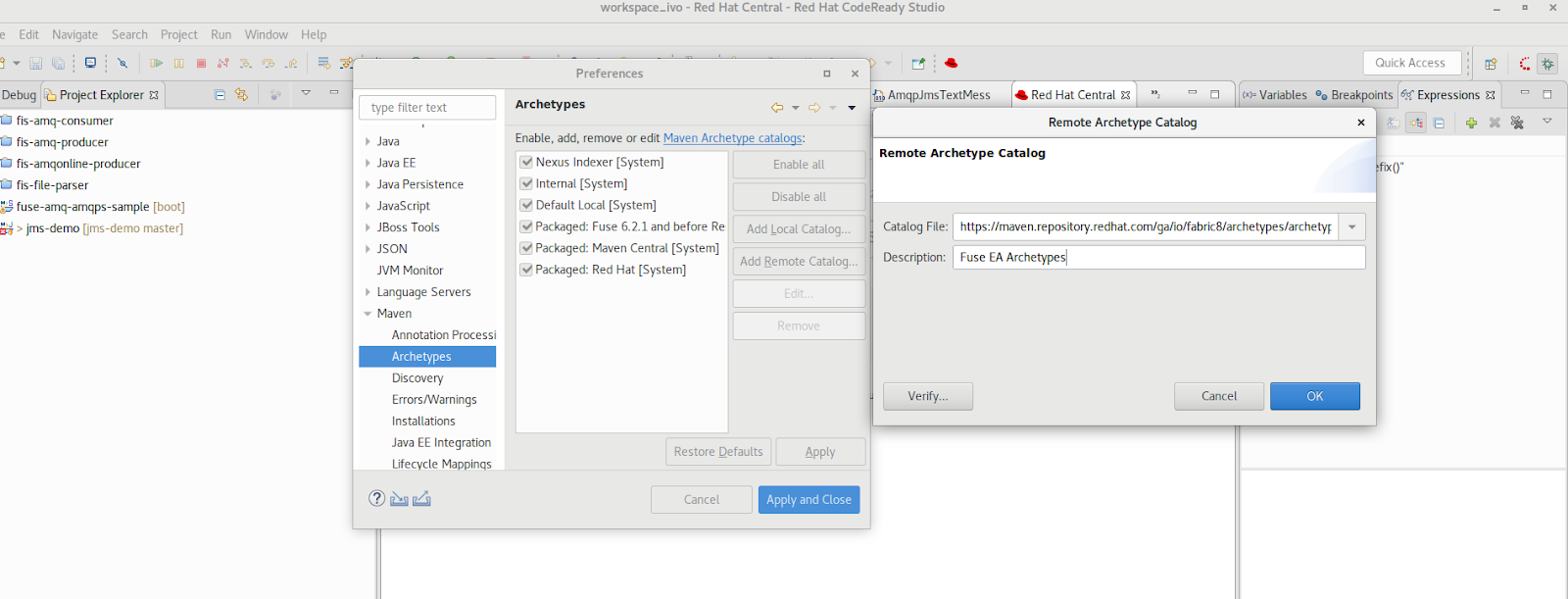
Set Up Maven Archetype Catalog in JBoss Developer Studio/Code Ready
- From JBoss Developer Studio, select Preferences.
- Select Maven → Archetypes.
- Select Add Remote Catalog and complete the fields with these values:
- Catalog File: https://maven.repository.redhat.com/ga/io/fabric8/archetypes/archetypes-catalog/2.2.0.fuse-000092-redhat-2/archetypes-catalog-2.2.0.fuse-000092-redhat-2-archetype-catalog.xml
- Description: Fuse EA Archetypes
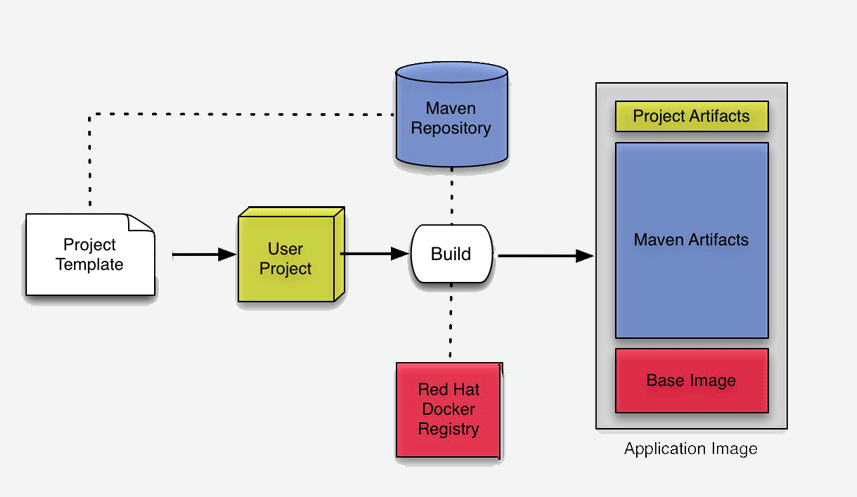
Packaging Process
Deployment with S2I
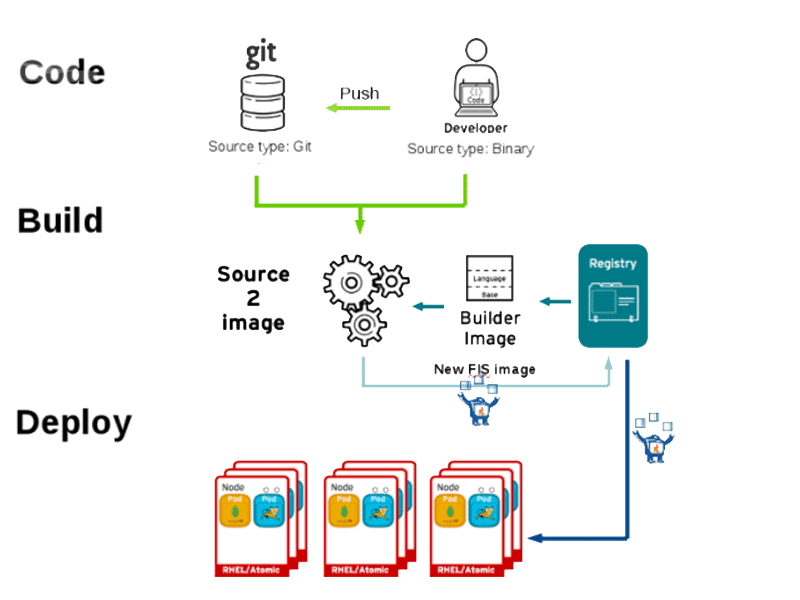
Workflow process for S2I Code Workflow
- Code pulled from Git repository, or from developer machine after compression, and copied onto S2I builder image
- S2I builder image pulled from registry into node where build takes place
- Maven build takes place, pulling required dependencies and generating application artifacts
- Docker image created, based on Red Hat Fuse S2I image and containing application artifacts
- Docker image pushed into OpenShift registry
- Container started on OpenShift node
Workflow process for S2I Binary Workflow
It is called binary because you bypass Git repository, and do the build on your local machine and then push the generated binary directly to OpenShift.
Table 3. S2I Binary Build Types
|
Build Type |
Build From |
Note
|
|
|
from-dir |
Specified directory |
|
|
|
from-repo |
Local Git repository |
|
|
|
from-file |
Project JAR archive |
|
Fabric8
Fabric8 makes it easy to create Microservices, build, test, and deploy them via Continuous Delivery pipelines then run and manage them with Continuous Improvement and ChatOps.
- Fabric8 maven plugin can be used to perform S2I binary build and deploy, allowing developers to deploy directly from their desktop to OpenShift.
- Fabric 8 CICD fabric8 provides Continuous Integration and Continuous Delivery (CI and CD) infrastructure built as a set of Kubernetes resources, which are easy to Install.
- Jenkins Pipeline Library to help reuse Jenkins Pipeline functions and steps across projects.
- Jenkinsfile Library is a library of reusable Jenkinsfile files you can copy into your project.
저자 소개
유사한 검색 결과
Red Hat OpenShift 4.22가 엔터프라이즈 AI의 수익성에 미치는 영향
Red Hat 파트너가 최고의 통신 비즈니스 자산인 이유
Crack the Cloud_Open | Command Line Heroes
Edge computing covered and diced | Technically Speaking
채널별 검색

오토메이션
기술, 팀, 인프라를 위한 IT 자동화 최신 동향

인공지능
고객이 어디서나 AI 워크로드를 실행할 수 있도록 지원하는 플랫폼 업데이트

오픈 하이브리드 클라우드
하이브리드 클라우드로 더욱 유연한 미래를 구축하는 방법을 알아보세요

보안
환경과 기술 전반에 걸쳐 리스크를 감소하는 방법에 대한 최신 정보

엣지 컴퓨팅
엣지에서의 운영을 단순화하는 플랫폼 업데이트

인프라
세계적으로 인정받은 기업용 Linux 플랫폼에 대한 최신 정보

애플리케이션
복잡한 애플리케이션에 대한 솔루션 더 보기

가상화
온프레미스와 클라우드 환경에서 워크로드를 유연하게 운영하기 위한 엔터프라이즈 가상화의 미래
