
The real-time kernel capability has existed for more than a decade in the open-source ecosystem. Similarly, Red Hat Enterprise Linux (RHEL) support for the real-time kernel has been available for several years. Still, many system administrators misinterpret its core concepts and actual operational behavior. In this article, I describe some of its key features, differences from the standard kernel, and quick installation steps.
Initially, Red Hat introduced a product called "Red Hat Enterprise MRG," where MRG stood for Messaging, Real-time, and Grid. MRG 2 was based on RHEL 5 and RHEL 6 versions, whereas MRG 3 was based entirely on RHEL 6. From RHEL 7 onward, the MRG product was deprecated, and "RHEL for Real-Time" was introduced as a separate product.
What is the real-time kernel?
A real-time kernel is not necessarily superior or better than a standard kernel. Instead, it meets different business or system requirements. It is an optimized kernel designed to maintain low latency, consistent response time, and determinism. By way of comparison, a standard RHEL kernel focuses on throughput-oriented operations and fair scheduling of tasks. The real-time kernel is also known as kernel-rt or preempt-rt.
The simplest way to identify a real-time kernel is to execute the uname -r command on the terminal, and then look for the rt keyword in the kernel version. If rt is missing, then the system uses the standard kernel.
The following output is an example:
#uname -r
3.10.0-1127.10.1.rt56.1106.el7
Some important kernel-rt mechanisms include:
- A task's priority is checked (1-99) under heavy load.
- High priority (99) tasks are given preference for CPU execution.
- Does not use the Completely Fair Scheduling (CFS) policy.
- Scheduling policies in-use are SCHED_FIFO or SCHED_RR.
- Maintains low latency execution time.
- Offers an opportunity to measure, record, and configure response time.
To further understand how kernel-rt is different from a standard kernel, the following diagram explains how using kernel-rt maintains low latency and response times in the system.
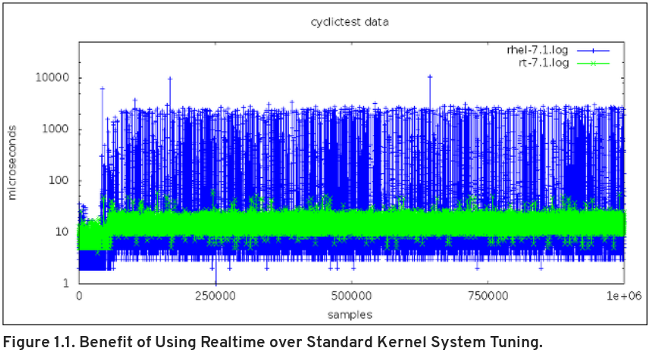
In the above diagram, blue plots represent response time(ms) on a tuned standard RHEL7 kernel, whereas green points represent response time(ms) on a tuned RHEL7 kernel-rt. The green section shows consistency, low latency, and low response time. To study this graph and the related testing in further detail, please refer to the Red Hat official guide "Why Use Red Hat Enterprise Linux for Real Time to Optimize Latency."
Below I have listed some other differences vital to comparing RHEL for Real Time with standard RHEL:
- Kexec and vmcore - Installation and configuration are the same as standard RHEL.
- Third-party modules - All modules must be recompiled with
kernel-rtbefore being used. irqbalancedaemon - Disabled by default.- Scheduling policy - Only SCHED_FIFO or SCHED_RR is used.
- Interrupt (IRQs) - Uses dedicated CPUs to isolate processes from each other.
Install RHEL for real-time
Let's perform a quick installation and observe the other packages that are part of a kernel-rt installation. A separate ISO image of kernel-rt is available for fresh provisioning. A user/admin can also install the kernel-rt RPM package on an existing standard RHEL system, followed by a reboot.
Step 1: Download the ISO image named RHEL for Real-Time from the Red Hat customer portal and provision. You may also use an existing standard RHEL box and enable the rhel-7-server-rt repository to fetch kernel-rt packages.

Step 2: Perform a group installation to install all RT specific packages simultaneously.

Step 3: Verify all dependent packages.
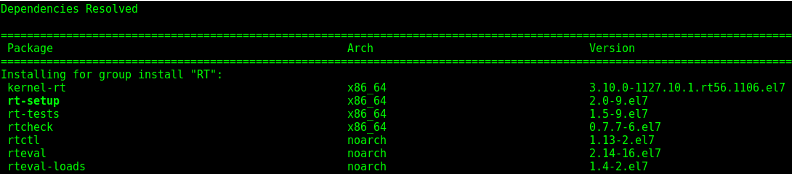
Step 4: Reboot the system, and then select kernel-rt from the boot console.
Users should perform the RT group installation, as it provides all necessary kernel-rt dependent packages. The following table displays brief dependent package details:
- kernel-rt - Real-time kernel
- rt-setup - Most critical package for RT environment setup.
- rtctl - Configures scheduling priorities for kernel thread.
- rt-test, rt-checks, rteval - Used to test system capabilities and loads.
Let me give you a very brief real scenario illustrating why RT group installation is crucial. One of the leading telecom customers was running real-time RHEL kernel (3.10.0-693.11.1.rt56.632.el7) as a three-blade cluster environment on HP ProLiant BL460c Gen9 machine. They observed traffic delays and timeouts in the cluster environment. A large number of UDP self-heartbeat (HB) packets were missing or dropped. We observed that there were no issues with network cards or cluster modules once we analyzed pcap and strace packets. Further diagnosis showed that the rt-setup package was missing because kernel-rt was installed forcefully without any of its dependent packages.
| Environment | Missed HB's in 7 days | Missed HB's in 7 days with rt-setup |
|---|---|---|
| hostname-a12 | 138 | 0 |
| hostname-a13 | 113 | 0 |
| hostname-a14 | 118 | 5 |
This rt-setup package is responsible for configuring and running the rt-entsk daemon, which prevents IPI generation and delay of real-time tasks.
The following bullet points display some of the key features of rt-setup (v2.0-6):
- Creates real-time groups.
- Adds real-time limits configuration for PAM.
- Adds
/usr/bin/rt-setup-kdumpto configure kdump in RT. - Adds udev-specific rules for threaded irqs and
/dev/rtcaccess. - Adds
/usr/bin/slub_cpu_partial_offto turn offcpu_partialsin SLUB. - Adds net-socket timestamp static key daemon (
rt-entsk).
Wrap up
It is worth the effort to run a real-time kernel and evaluate its potential as many applications can benefit from it. Kernel-rt can be tuned to further reduce performance issues. Tools such as ftrace are provided with RHEL for Real-Time and are very useful for analyzing and debugging latency issues. However, those details are out of the scope of this article.
The real-time kernel has been around for a long time, but many sysadmins are not sure how to work with it. In this article, I defined what the real-time kernel does. I also provided you with information on how to install it. Perhaps the real-time kernel will help your organization realize even greater Linux performance!
[ Free online course: Red Hat Enterprise Linux technical overview. ]
저자 소개
Amit is a Red Hat engineer and is passionate about the Linux kernel, containers, and hybrid cloud. He is a strong believer that new innovation and technology can add value to society and change many lives.
유사한 검색 결과
Red Hat Enterprise Linux Long-Life Add-On: 지원 종료 걱정 없는 RHEL 소개
인프라를 Red Hat Lightspeed에 어떻게 연결해야 할까요?
Infrastructure At The Edge | Compiler
Operating System Management | Compiler
채널별 검색

오토메이션
기술, 팀, 인프라를 위한 IT 자동화 최신 동향

인공지능
고객이 어디서나 AI 워크로드를 실행할 수 있도록 지원하는 플랫폼 업데이트

오픈 하이브리드 클라우드
하이브리드 클라우드로 더욱 유연한 미래를 구축하는 방법을 알아보세요

보안
환경과 기술 전반에 걸쳐 리스크를 감소하는 방법에 대한 최신 정보

엣지 컴퓨팅
엣지에서의 운영을 단순화하는 플랫폼 업데이트

인프라
세계적으로 인정받은 기업용 Linux 플랫폼에 대한 최신 정보

애플리케이션
복잡한 애플리케이션에 대한 솔루션 더 보기

가상화
온프레미스와 클라우드 환경에서 워크로드를 유연하게 운영하기 위한 엔터프라이즈 가상화의 미래
