
Starting in Red Hat OpenShift 4.9 release, we are extending the infrastructure provider integration experience to a new platform, Azure Stack Hub, from Microsoft’s Azure Stack portfolio of products.
This will allow Microsoft customers to deploy Red Hat OpenShift on a user-provisioned infrastructure in Azure Stack Hub. Red Hat is planning to support full-stack automated deployments in coming releases. As part of this new provider integration certification, Red Hat makes Azure Resource Manager templates available to the customer to simplify the process of creating the required infrastructure where to deploy OpenShift.
Azure Stack Hub extends Azure services and capabilities to your environment of choice, letting you run OpenShift in an on-premise environment and deliver Azure services and OpenShift capabilities in your data centre. For many customers, due to technological and regulatory obstacles, their workloads must remain on-premises. This integration will help customers to build their hybrid cloud strategy leveraging OpenShift to run their workloads on-premises, keeping the same processes and user experience as they were running these workloads in the Azure public cloud.
Deploying OpenShift on Azure Stack Hub using user-provisioned infrastructure
Detailed instructions on how to deploy OpenShift on Azure Stack Hub are available in docs.openshift.com as they are for other platforms. This post is doing a high-level overall overview of the steps required.
For this release, the user will need to provide the required infrastructure where OpenShift will be deployed. For customers who want to leverage infrastructure as code Azure provides a solution called Azure Resource Manager templates. As part of the instructions, we are providing opinionated templates as a reference architecture to easily create all the required infrastructure components for OpenShift, such as networking, storage, compute and others.

When using user-provisioned infrastructure the steps are the same as any other provider. An install-config.yaml needs to be created with the specific information for the Azure Stack Hub environment where we are deploying OpenShift. The documentation already provides a sample that the user will customize to match their needs.
Using the OpenShift installation program we will generate the Kubernetes manifest for the cluster:
$ openshift-install create manifests
INFO Credentials loaded from file "/home/mak/.azure/osServicePrincipal.json"
INFO Consuming Install Config from target directory
WARNING Making control-plane schedulable by setting MastersSchedulable to true for Scheduler cluster settings
INFO Manifests created in: manifests and openshift
As we are deploying the cluster using an infrastructure provisioned by the user, we need to do some additional changes to the generated manifests. We are going to remove the manifest files that define the control plane and worker machines as we are going to manually manage those.
The next step is to manually create the cloud credentials from the release image the installation program is built to use:
$ oc adm release extract quay.io/openshift-release-dev/ocp-release:4.9.0-rc.8-x86_64 --credentials-requests --cloud=azure --to=credentials-request
$ ll credentials-request/
total 20
-rw-rw-r-- 1 mak mak 568 Oct 18 21:39 0000_26_cloud-controller-manager-operator_14_credentialsrequest-azure.yaml
-rw-rw-r-- 1 mak mak 591 Oct 18 21:39 0000_30_machine-api-operator_00_credentials-request.yaml
-rw-rw-r-- 1 mak mak 656 Oct 18 21:39 0000_50_cluster-image-registry-operator_01-registry-credentials-request-azure.yaml
-rw-rw-r-- 1 mak mak 641 Oct 18 21:39 0000_50_cluster-ingress-operator_00-ingress-credentials-request.yaml
-rw-rw-r-- 1 mak mak 611 Oct 18 21:39 0000_50_cluster-storage-operator_03_credentials_request_azure.yaml
We need to generate now the corresponding Secrets using the secretRef information from each CredentialsRequest file, and after that, we can create the Ignition configuration files:
$ openshift-install create ignition-configs
INFO Consuming Worker Machines from target directory
INFO Consuming Common Manifests from target directory
INFO Consuming Master Machines from target directory
INFO Consuming Openshift Manifests from target directory
INFO Consuming OpenShift Install (Manifests) from target directory
INFO Ignition-Configs created in: . and auth
We are now ready to create all the required infrastructure using the provided Azure Resource Manager templates and bootstrap the cluster:
$ openshift-install wait-for bootstrap-complete --log-level debug
DEBUG OpenShift Installer 4.9.0-rc.8
DEBUG Built from commit 6e5b992ba719dd4ea2d0c2a8b08ecad45179e553
INFO Waiting up to 20m0s for the Kubernetes API at https://api.mak-blog.ppe.upi.azurestack.devcluster.openshift.com:6443...
INFO API v1.22.0-rc.0+894a78b up
INFO Waiting up to 30m0s for bootstrapping to complete...
DEBUG Bootstrap status: complete
INFO It is now safe to remove the bootstrap resources
DEBUG Time elapsed per stage:
DEBUG Bootstrap Complete: 10m42s
DEBUG                API: 1s
INFO Time elapsed: 10m42s
At this point the OpenShift Cluster will be ready to use and worker nodes can be added to the cluster.
$ oc get clusteroperators
NAME                                    VERSION   AVAILABLE   PROGRESSING   DEGRADED   SINCE   MESSAGE
authentication                          4.9.0-rc.8   True     False      False   29h
baremetal                               4.9.0-rc.8   True     False      False   4d17h
cloud-controller-manager                4.9.0-rc.8   True     False      False   4d17h
cloud-credential                        4.9.0-rc.8   True     False      False   4d17h
cluster-autoscaler                      4.9.0-rc.8   True     False      False   4d17h
config-operator                         4.9.0-rc.8   True     False      False   4d17h
console                                 4.9.0-rc.8   True     False      False   29h
csi-snapshot-controller                 4.9.0-rc.8   True     False      False   4d17h
dns                                     4.9.0-rc.8   True     False      False   4d17h
etcd                                    4.9.0-rc.8   True     False      False   4d17h
image-registry                          4.9.0-rc.8   True     False      False   4d17h
ingress                                 4.9.0-rc.8   True     False      False   4d16h
insights                                4.9.0-rc.8   True     False      False   4d17h
kube-apiserver                          4.9.0-rc.8   True     False      False   4d17h
kube-controller-manager                 4.9.0-rc.8   True     False      False   4d17h
kube-scheduler                          4.9.0-rc.8   True     False      False   4d17h
kube-storage-version-migrator           4.9.0-rc.8   True     False      False   4d17h
machine-api                             4.9.0-rc.8   True     False      False   4d17h
machine-approver                        4.9.0-rc.8   True     False      False   4d17h
machine-config                          4.9.0-rc.8   True     False      False   4d17h
marketplace                             4.9.0-rc.8   True     False      False   4d17h
monitoring                              4.9.0-rc.8   True     False      False   4d16h
network                                 4.9.0-rc.8   True     False      False   4d17h
node-tuning                             4.9.0-rc.8   True     False      False   4d17h
openshift-apiserver                     4.9.0-rc.8   True     False      False   29h
openshift-controller-manager            4.9.0-rc.8   True     False      False   4d17h
openshift-samples                       4.9.0-rc.8   True     False      False   4d17h
operator-lifecycle-manager              4.9.0-rc.8   True     False      False   4d17h
operator-lifecycle-manager-catalog      4.9.0-rc.8   True     False      False   4d17h
operator-lifecycle-manager-packageserver   4.9.0-rc.8   True     False      False   29h
service-ca                              4.9.0-rc.8   True     False      False   4d17h
storage                                 4.9.0-rc.8   True     False      False   4d17h
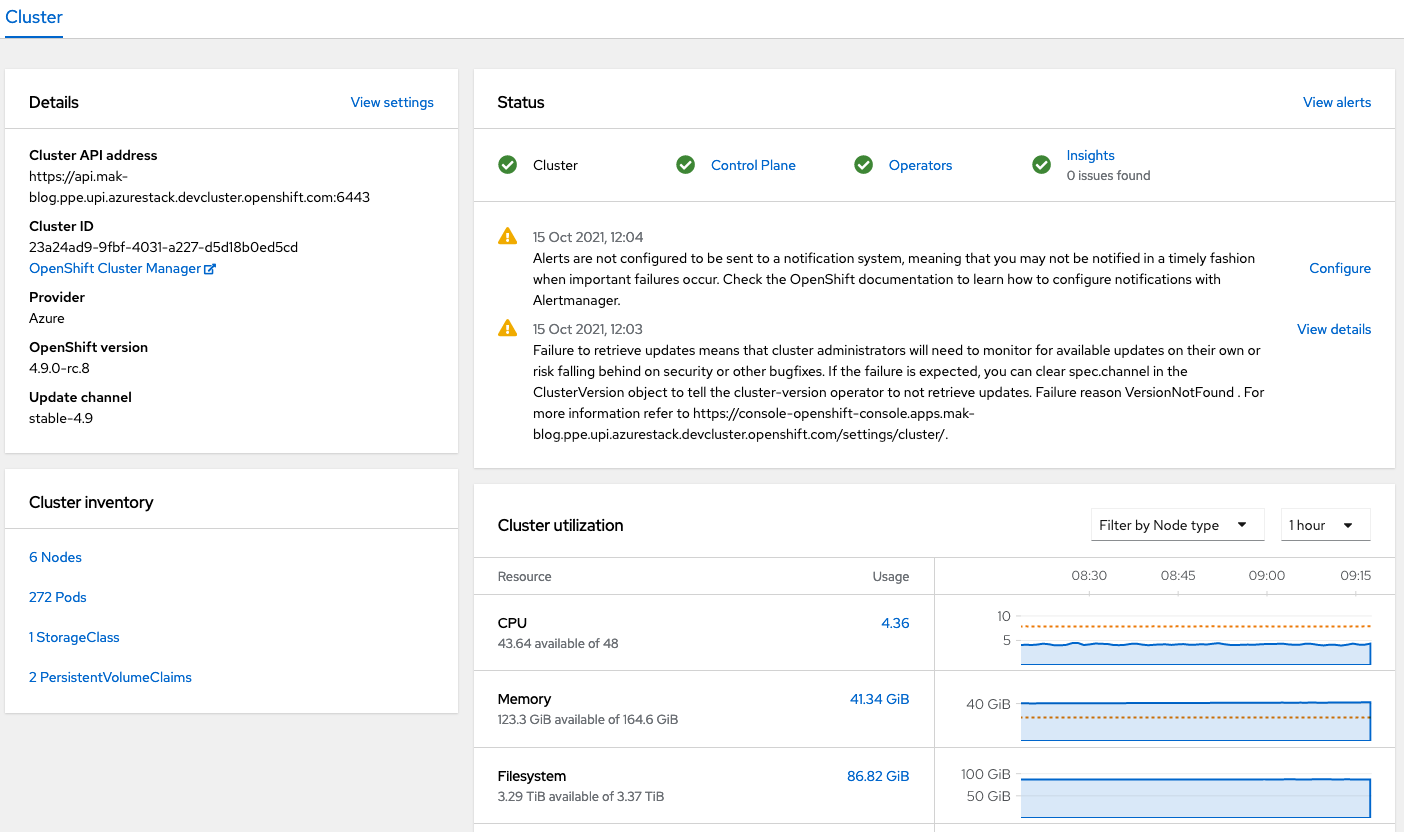
We can log in to the OpenShift Console and check the status of the Cluster.
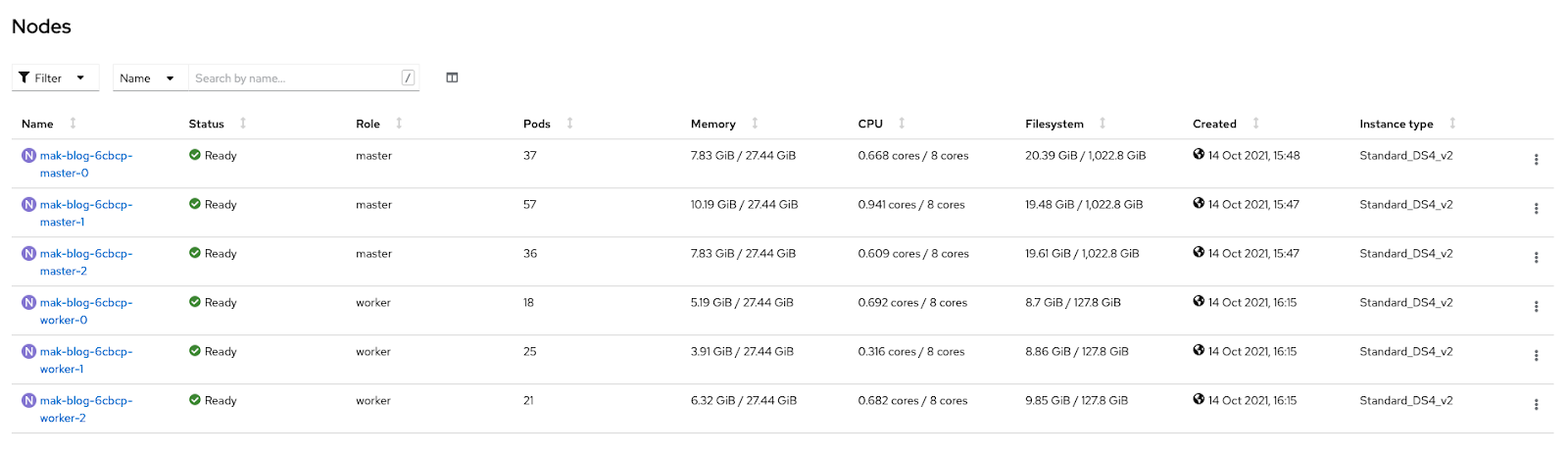
Check if nodes are ready to run workloads.
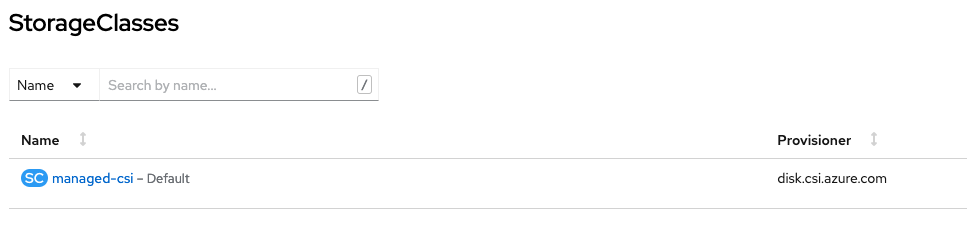
Or check that we can consume storage volumes directly from our Azure Stack Hub environment.

Conclusion
This new provider integration will enable existing or new Azure customers to deploy and run OpenShift clusters on their own autonomous cloud on-premises the same way they were doing on the public cloud.
Red Hat’s hybrid cloud experience will let customers use consistent tools and models while giving them the flexibility to choose between Azure and Azure Stack Hub when building and deploying their applications.
We are really excited to see how customers take advantage of this new feature and continue working with them on their hybrid cloud journey.
저자 소개
Marcos Entenza, a.k.a Mak, works on the core Red Hat OpenShift Container Platform for hybrid and multi-cloud environments to enable customers to run Red Hat OpenShift anywhere. Mak is an experienced Product Manager passionate about building scalable infrastructures and he oversees installation, provider integration, and confidential computing on OpenShift.
유사한 검색 결과
Red Hat이 파트너의 비즈니스 가치 극대화를 지원하는 5가지 새로운 방법
Red Hat OpenShift 4.22가 엔터프라이즈 AI의 수익성에 미치는 영향
Building a foundation for AI models | Technically Speaking
You Can't Automate Buy-In | Code Comments
채널별 검색

오토메이션
기술, 팀, 인프라를 위한 IT 자동화 최신 동향

인공지능
고객이 어디서나 AI 워크로드를 실행할 수 있도록 지원하는 플랫폼 업데이트

오픈 하이브리드 클라우드
하이브리드 클라우드로 더욱 유연한 미래를 구축하는 방법을 알아보세요

보안
환경과 기술 전반에 걸쳐 리스크를 감소하는 방법에 대한 최신 정보

엣지 컴퓨팅
엣지에서의 운영을 단순화하는 플랫폼 업데이트

인프라
세계적으로 인정받은 기업용 Linux 플랫폼에 대한 최신 정보

애플리케이션
복잡한 애플리케이션에 대한 솔루션 더 보기

가상화
온프레미스와 클라우드 환경에서 워크로드를 유연하게 운영하기 위한 엔터프라이즈 가상화의 미래
