

Since the launch of Red Hat Enterprise Linux (RHEL) 8.3 in November of 2020, we have been busy developing new features and adapting the operating system to handle the challenges associated with edge computing. With the launch of RHEL 9.2, we are introducing additional functionality, and this post will provide a deep dive into the new configuration options that we’re bringing to edge images. This post assumes some level of familiarity with using Image Builder, so if you need a good primer, this blog will get you up to speed.
Image Builder blueprint customizations
RHEL 9.2 brings several enhancements to OS configuration. First, Image Builder has added support in the web console for editing blueprint configurations when installed on-prem. While some users will continue to prefer to edit the TOML configurations, this UI will be much simpler for users wanting to make quick edits using a browser.
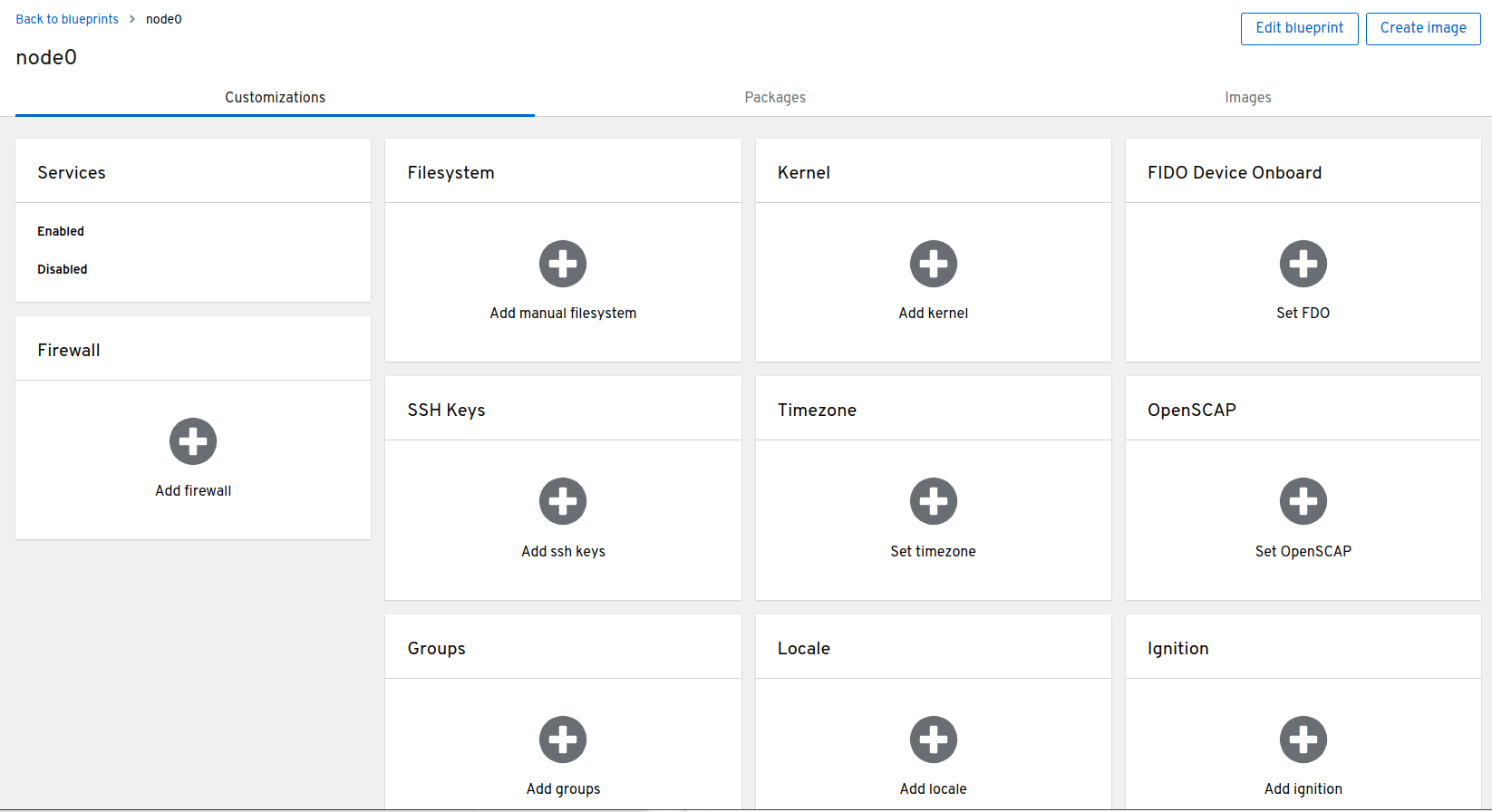
Also, users who are shipping appliances that need to be 100% pre-configured out-of-the-box will love the new ability to inject files and directories into /etc. Previously, editing configuration files in /etc was done using first boot automation or calling an automation tool like Ansible. While these continue to be viable options, it’s often better for embedded environments to be pre-configured on first boot. The example below can be added to a blueprint and will create a systemd drop-in to make the httpd.service restart automatically:
[[customizations.directories]]
path = "/etc/systemd/system/httpd.service.d"

[[customizations.files]]
path = "/etc/systemd/system/httpd.service.d/00-httpd-reboot.conf"
mode = "0644"
user = "root"
group = "root"
data = """[Service]
Restart=always"""
Support for Ignition
Users who prefer using a “golden image” approach and separating their deployment configuration from the image will love that Image Builder now supports Ignition configurations. Ignition has seen broad adoption within the Red Hat ecosystem with RHEL CoreOS in OpenShift and Fedora CoreOS, as well as a number of other distributions. When creating a simplified-installer-image with Image Builder we can pass a base64-encoded ignition configuration into the blueprint using:
[customizations.ignition.embedded]
config =
Certain environments will benefit from having the entire Ignition config passed directly through the blueprint, and others will be better served using a stub config to query an HTTP endpoint for an updated configuration. Both are great options depending on the environment. Ignition also works well when provisioning RAW images. For these, we can pass the following to fetch the desired config:
[customizations.ignition.firstboot]
url = "http://$YOURSERVER/config.ign"
Introducing Quadlet
A related configuration topic that goes beyond the host operating system is how we define and configure containers. RHEL uses Podman as the container engine which, thanks to the integration with systemd, makes running and managing containers as easy as any other service running on the system. RHEL 9.2 includes Podman 4.4 which introduces Quadlet as a technology preview.
Quadlet tightens the integration of Podman and systemd and greatly improves the user experience. Podman has been able to directly generate systemd unit files for some time. One of the challenges with directly generating unit files is that over time they will need to be regenerated to align with newer releases of Podman. Quadlet is a systemd generator which abstracts this configuration.
Now it's much simpler and clearer to define details for how a container is run, and the configs become portable and future proof across fleets of systems. The full documentation is here and the example below will demonstrate how simple it is.
#configs are located here:
/etc/containers/systemd/nginx.container

#example configuration for nginx
[Service]
Restart=always

[Container]
ContainerName=nginx
Image=registry.access.redhat.com/ubi9/nginx-120:latest
Label="io.containers.autoupdate=image"
PublishPort=8080:8080
Exec=nginx -g "daemon off;"

[Install]
WantedBy=default.target

#notify systemd of the new container file
systemctl daemon-reload

#start the container
systemctl start nginx
The unit file that Quadlet generates can be viewed via # systemctl cat nginx. Another thing that’s especially helpful is the optional [Install] section from the example above will automatically enable the container to start on boot. Amazing right? To tie this all together, we can now inject Quadlet configs directly via Image Builder blueprints and/or by using Ignition configurations.
RHEL 9.2 is a significant step forward in helping customers cut through the complexity found in edge environments. Here we've shown you how OS configuration of edge images is simpler and more flexible with Image Builder and Ignition.
For environments and use cases that benefit from maintaining configuration outside of the image, we highly recommend using Red Hat Ansible Automation Platform. The new infra.osbuild collection automates creating an Image Builder server and the creation of edge images and image updates over the life of edge deployments in the field. Be sure to check out this blog for more details.
Users can get started creating and using these images with a no-cost RHEL for Developer Subscription and the Hybrid Cloud Console. If you’d like to install Image Builder in your own environment please take a look at the official documentation or take a look at this demo repository for some examples. Stay tuned for more exciting edge announcements and blog posts coming soon.
저자 소개
Ben Breard is a Senior Principal Product Manager at Red Hat, focusing on Red Hat Enterprise Linux and Edge Offerings.
Antonio started working for Red Hat in 2015. He joined while being the top-most Red Hat contributor to the Docker project, as well as being a maintainer too. He created the skopeo tool, as well as bootstrapping and integrating CRI-O into Red Hat OpenShift. He has led the OpenShift's Machine Config Operator team and he has since moved to lead the RHEL for Edge team. While not working, Antonio loves baking pizza and bread as well as preparing for Triathlons.
유사한 검색 결과
Red Hat Device Edge, 이제 NVIDIA Jetson Orin에서 사용 가능
격차 해소: 데이터 소스에 AI와 쿠버네티스 도입
Infrastructure At The Edge | Compiler
Open Curiosity | Command Line Heroes
채널별 검색

오토메이션
기술, 팀, 인프라를 위한 IT 자동화 최신 동향

인공지능
고객이 어디서나 AI 워크로드를 실행할 수 있도록 지원하는 플랫폼 업데이트

오픈 하이브리드 클라우드
하이브리드 클라우드로 더욱 유연한 미래를 구축하는 방법을 알아보세요

보안
환경과 기술 전반에 걸쳐 리스크를 감소하는 방법에 대한 최신 정보

엣지 컴퓨팅
엣지에서의 운영을 단순화하는 플랫폼 업데이트

인프라
세계적으로 인정받은 기업용 Linux 플랫폼에 대한 최신 정보

애플리케이션
복잡한 애플리케이션에 대한 솔루션 더 보기

가상화
온프레미스와 클라우드 환경에서 워크로드를 유연하게 운영하기 위한 엔터프라이즈 가상화의 미래
