
As a sysadmin, it is imperative to facilitate high availability at all possible levels in a system's architecture and design and the SAP environment is no different. In this article, I discuss how to leverage Red Hat Enterprise Linux (RHEL) Pacemaker for High Availability (HA) of SAP NetWeaver Advanced Business Application Programming (ABAP) SAP Central Service (ASCS)/Enqueue Replication Server (ERS).
[ You might also like: Quick start guide to Ansible for Linux sysadmins ]
SAP has a three-layer architecture:
- Presentation layer—Presents a GUI for interaction with the SAP application
- Application layer—Contains one or more application servers and a message server
- Database layer—Contains the database with all SAP related data (for example, Oracle)
In this article, the main focus is on the application layer. Application server instances provide the actual data processing functions of an SAP system. Based on the system requirement, multiple application servers are created to handle the load on the SAP system. Another main component in the application layer is the ABAP SAP Central Service (ASCS). The central services comprise two main components—Message Server (MS) and Enqueue Server (ES). The Message Server acts as a communication channel between all the application servers and handles the distribution of the load. The Enqueue Server controls the lock mechanism.
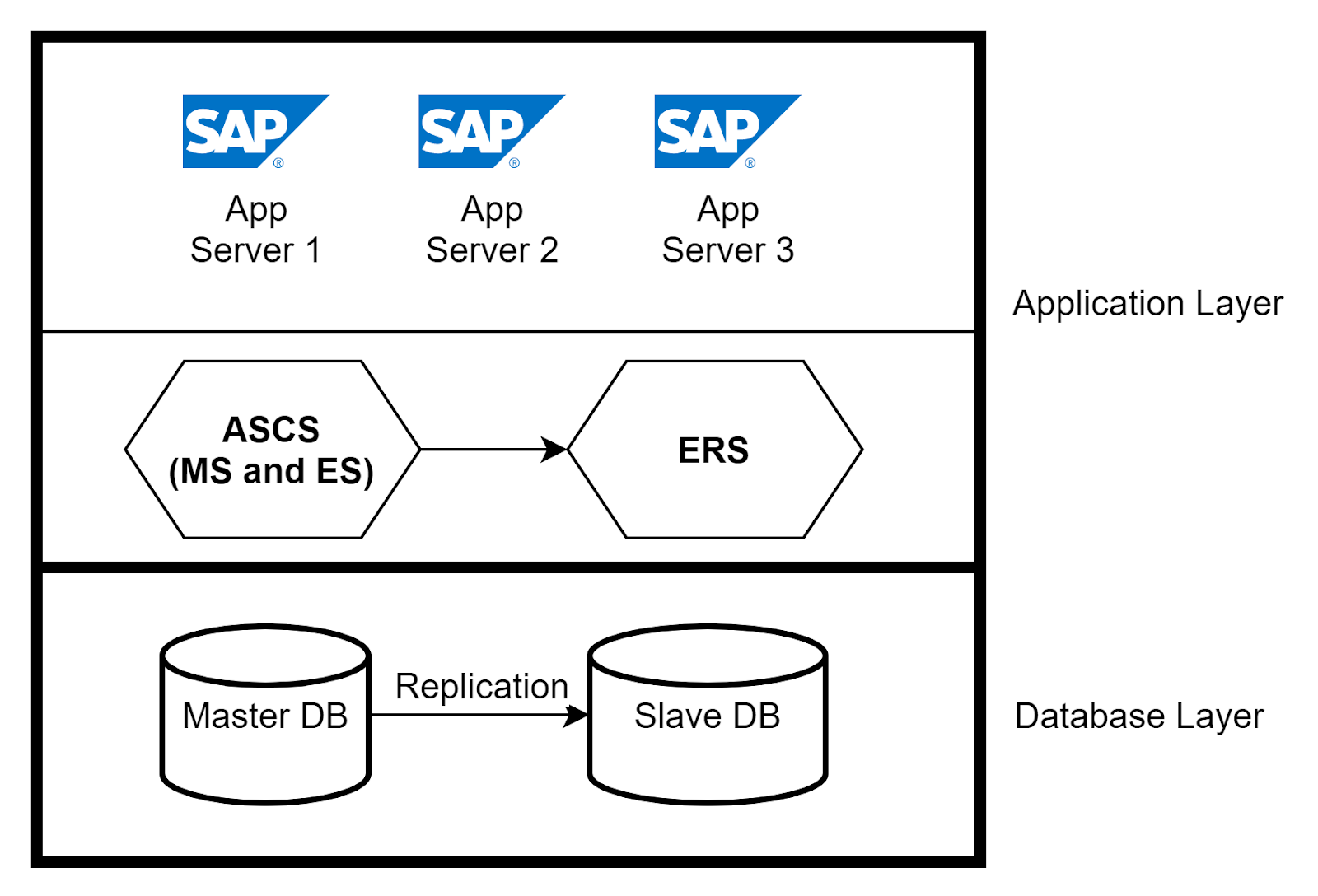
High Availability in Application and Database Layers
You can implement high availability for application servers by using a load balancer and having multiple application servers handle the requests from users. If an application server crashes, only the users connected to that server are impacted. Isolate the crash by removing the application server from the load balancer. For high availability of ASCS, use Enqueue Replication Server (ERS) to replicate the lock table entries. In the database layer, you can set up native database replication between primary and secondary databases to ensure high availability.
Introduction to RHEL High Availability with Pacemaker
RHEL High Availability enables services to failover from one node to another seamlessly within a cluster without causing any interruption in the service. ASCS and ERS can be integrated into a RHEL Pacemaker cluster. In the event of an ASCS node failure, the cluster packages shift to an ERS node where the MS and ES instances will continue to run without bringing the system to a halt. In the event of an ERS node failure, the system is not impacted as MS and ES will continue to run on the ASCS node. In this case, the ERS instance will not run on ASCS node as ES and ERS instances need not run on the same node.
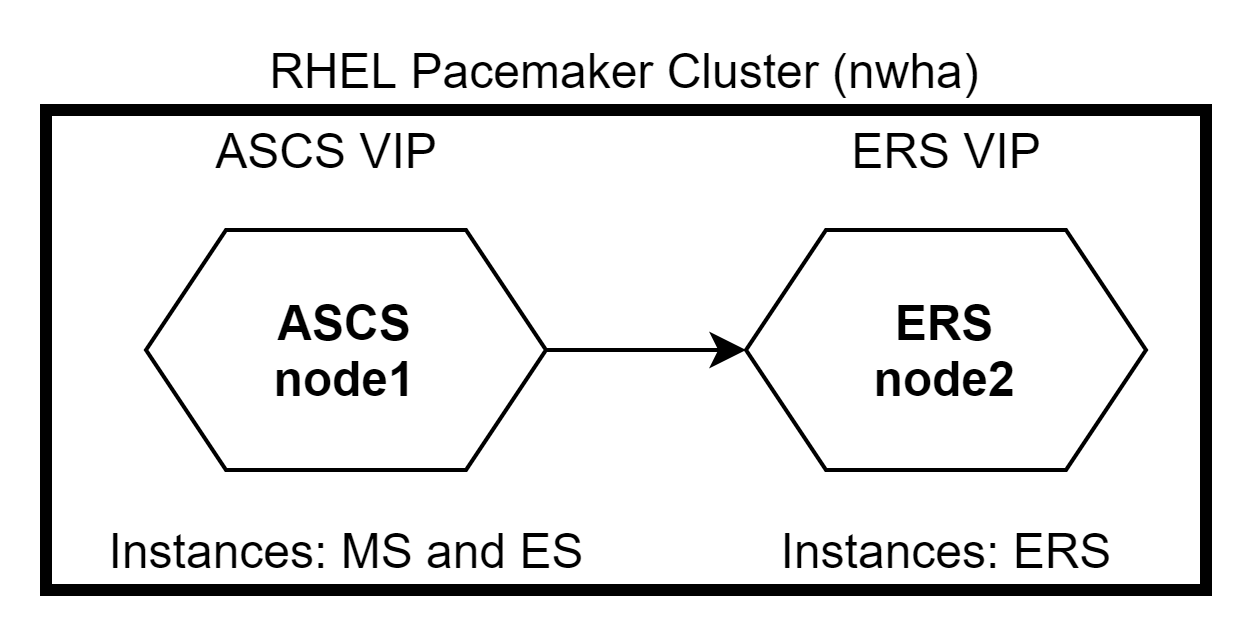
RHEL Pacemaker configuration
There are two ways to configure ASCS and ERS nodes in the RHEL Pacemaker cluster—Primary/Secondary and Standalone. The Primary/Secondary approach is supported in all RHEL 7 minor releases. The Standalone approach is supported in RHEL 7.5 and newer. RHEL recommends the usage of Standalone approach for all new deployments.
Cluster configuration
The broad steps for the cluster configuration include:
Install Pacemaker packages on both nodes of the cluster.
# yum -y install pcs pacemakerCreate the HACLUSTER user ID with.
# passwd haclusterIn order to use
pcsto configure the cluster and communicate among the nodes, you must set a password on each node for the user ID hacluster, which is thepcsadministration account. It is recommended that the password for user hacluster be the same on each node.Enable and start the
pcsservices.# systemctl enable pcsd.service; systemctl start pcsd.serviceAuthenticate
pcswith hacluster user
Authenticate thepcsuser hacluster for each node in the cluster. The following command authenticates user hacluster on node1 for both of the nodes in a two-node cluster (node1.example.com and node2.example.com).# pcs cluster auth node1.example.com node2.example.com Username: hacluster Password: node1.example.com: Authorized node2.example.com: AuthorizedCreate the cluster.
Cluster nwha is created using node1 and node2:# pcs cluster setup --name nwha node1 node2Start the cluster.
# pcs cluster start --allEnable the cluster to auto-start after reboot.
# pcs cluster enable --all
Creating resources for ASCS and ERS instances
Now that the cluster is set up, you need to add the resources for ASCS and ERS nodes. The broad steps include:
Install
resource-agents-sapon all cluster nodes.# yum install resource-agents-sapConfigure shared filesystem as resources managed by the cluster.
The shared filesystem, such as/sapmnt,/usr/sap/trans,/usr/sap/are added as resources auto-mounted on the cluster using the command:SYS # pcs resource create <resource-name> Filesystem device=’<path-of-filesystem>’ directory=’<directory-name>’ fstype=’<type-of-fs>’
Example:# pcs resource create sid_fs_sapmnt Filesystem device='nfs_server:/export/sapmnt' directory='/sapmnt' fstype='nfs'- Configure resource group for ASCS.
For ASCS node, the three required resource groups are as follows (assuming instance ID of ASCS is 00):- Virtual IP address for the ASCS
- ASCS filesystem (for example,
/usr/sap/<SID>/ASCS00) - ASCS profile instance (for example,
/sapmnt/<SID>/profile/<SID>_ASCS00_<hostname>)
- Configure resource group for ERS.
For ERS node, the three required resource groups are as follows (assuming instance ID of ERS in 30):- Virtual IP address for the ERS
- ERS filesystem (for example,
/usr/sap/<SID>/ERS30) - ERS profile instance (for example,
/sapmnt/<SID>/profile/<SID>_ERS30_<hostname>)
- Create the constraints.
Set the ASCS and ERS resource group constraints for the following:- Restrict both resource groups from running on same node
- Make ASCS run on the node where ERS was running in the event of a failover
- Maintain start/stop order sequence
- Ensure cluster is started only after required filesystems are mounted
Cluster Failover Testing
Assuming that ASCS runs on node1 and ERS runs on node2 initially. If node1 goes down, ASCS and ERS both shift to node2. Due to the constraint defined, ERS will not run on node2.
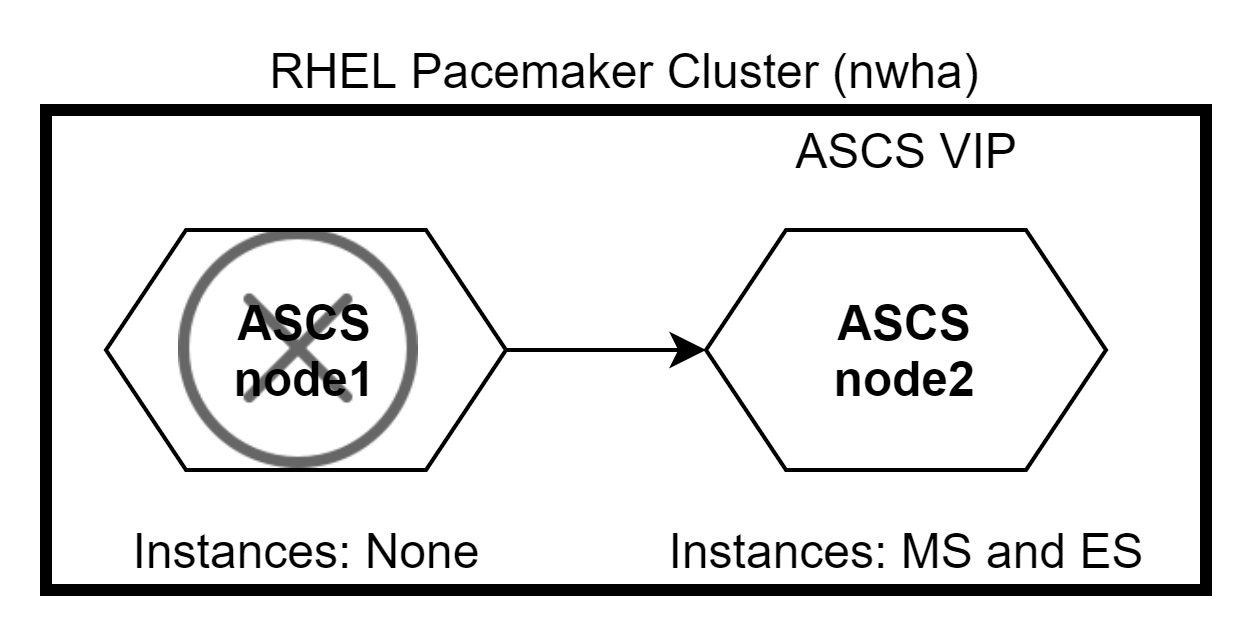
When node1 comes back up, ERS will shift to node1 while ASCS remains on node2. Use the command #pcs status to check the status of the cluster.

[ A free course for you: Virtualization and Infrastructure Migration Technical Overview. ]
Wrap up
RHEL Pacemaker is a great utility to attain a highly available cluster for SAP. You can also perform fencing by configuring STONITH to ensure data integrity and avoid resource utilization by a faulty node in the cluster.
For all the automation enthusiasts, you can make use of Ansible to control your Pacemaker cluster by using the Ansible module pacemaker_cluster. As much as you protect your systems, take care of yourself and stay safe.
저자 소개
Pratheek is a Sysadmin at a Fortune 500 company in India where he specializes in IT automation with Ansible. He has experience in SAP Basis, RHEL Satellite, AWS Cloud, and VMware Administration. An avid reader, cricketer, and artist.
유사한 검색 결과
Red Hat Enterprise Linux Long-Life Add-On: 지원 종료 걱정 없는 RHEL 소개
인프라를 Red Hat Lightspeed에 어떻게 연결해야 할까요?
Infrastructure At The Edge | Compiler
Operating System Management | Compiler
채널별 검색

오토메이션
기술, 팀, 인프라를 위한 IT 자동화 최신 동향

인공지능
고객이 어디서나 AI 워크로드를 실행할 수 있도록 지원하는 플랫폼 업데이트

오픈 하이브리드 클라우드
하이브리드 클라우드로 더욱 유연한 미래를 구축하는 방법을 알아보세요

보안
환경과 기술 전반에 걸쳐 리스크를 감소하는 방법에 대한 최신 정보

엣지 컴퓨팅
엣지에서의 운영을 단순화하는 플랫폼 업데이트

인프라
세계적으로 인정받은 기업용 Linux 플랫폼에 대한 최신 정보

애플리케이션
복잡한 애플리케이션에 대한 솔루션 더 보기

가상화
온프레미스와 클라우드 환경에서 워크로드를 유연하게 운영하기 위한 엔터프라이즈 가상화의 미래
