
Istio.io is an open platform that provides a uniform way to connect, manage, and secure microservices. This article describes installing and running on OpenShift (>=1.5 as of now) only. If you would like to know more theory I encourage you to read this post by @christianposta
Note that some of the permissions mentioned in this article may be more than what is needed. I plan to do further research and publish another article or comments on this post with accurate permissions in the future. For updates follow me on twitter @debianmaster
Run as Cluster Administrator on Master
oc login -u system:admin
Istio installation requires that you are the cluster-admin; you can use any cluster admin user for this purpose.
Choose a Namespace and Provide Permissions
oc project default

oc adm policy add-scc-to-user anyuid -z default

oc adm policy add-scc-to-user privileged -z default

oc patch scc/privileged --patch {\"allowedCapabilities\":[\"NET_ADMIN\"]}
NET_ADMIN privilege is needed for iptable NAT redirect chains updated by Istio.
Install Istio Service Mesh
git clone https://github.com/istio/istio

git checkout 0.1.5
Apply Necessary Permissions
oc adm policy add-cluster-role-to-user cluster-admin -z istio-manager-service-account

oc adm policy add-cluster-role-to-user cluster-admin -z istio-ingress-service-account

oc adm policy add-cluster-role-to-user cluster-admin -z default
oc adm policy add-scc-to-user anyuid -z istio-ingress-service-account
 oc adm policy add-scc-to-user privileged -z istio-ingress-service-account
oc adm policy add-scc-to-user anyuid -z istio-manager-service-account oc adm policy add-scc-to-user privileged -z istio-manager-service-account
Many permissions are needed currently, but this may change. Istio installation creates custom service accounts and they need privileges to be able to create ThirdPartyResources.
Deploying Istio
oc apply -f istio/install/kubernetes/istio.yaml
Install Addons
oc apply -f istio/install/kubernetes/addons/prometheus.yaml

oc apply -f istio/install/kubernetes/addons/grafana.yaml

oc apply -f istio/install/kubernetes/addons/servicegraph.yaml
Deploy Sample App
Install istioctl first
curl -L https://git.io/getIstio | sh -

export PATH="$PATH:/Users/YOUR_USERNAME/istio/istio-0.1.5/bin"
Note: Don't forget to replace with the appropriate value.
Deploy bookInfo App
oc apply -f <(istioctl kube-inject -f istio/samples/apps/bookinfo/bookinfo.yaml)
oc expose svc servicegrap
Test Service Mesh / Using Grafana Pod (or Another Pod)
$ export GRAFANA=$(oc get pods -l app=grafana -o jsonpath={.items[0].metadata.name})

$ oc exec $GRAFANA -- curl -o /dev/null -s -w "%{http_code}\n" http://istio-ingress/productpage

$ open http://$(oc get routes servicegraph -o jsonpath={.spec.host})/dotviz
Conclusion
You should see something like this at the end showing the service graph.
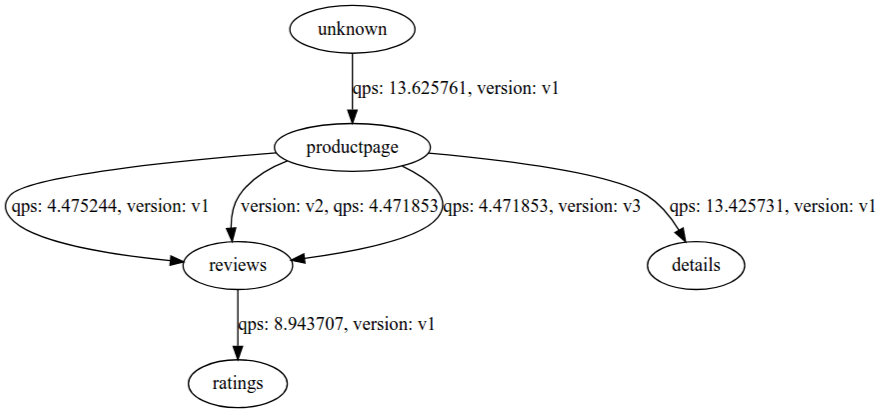
See it in action
저자 소개
유사한 검색 결과
AI 기반 Red Hat Technical Supportability Review를 통한 복잡성 해소 및 신뢰성 확보
Red Hat OpenShift Virtualization으로 Google Cloud에서 가상 머신 현대화
Scaling with Orchestrators | Compiler
SREs on a plane | Technically Speaking
채널별 검색

오토메이션
기술, 팀, 인프라를 위한 IT 자동화 최신 동향

인공지능
고객이 어디서나 AI 워크로드를 실행할 수 있도록 지원하는 플랫폼 업데이트

오픈 하이브리드 클라우드
하이브리드 클라우드로 더욱 유연한 미래를 구축하는 방법을 알아보세요

보안
환경과 기술 전반에 걸쳐 리스크를 감소하는 방법에 대한 최신 정보

엣지 컴퓨팅
엣지에서의 운영을 단순화하는 플랫폼 업데이트

인프라
세계적으로 인정받은 기업용 Linux 플랫폼에 대한 최신 정보

애플리케이션
복잡한 애플리케이션에 대한 솔루션 더 보기

가상화
온프레미스와 클라우드 환경에서 워크로드를 유연하게 운영하기 위한 엔터프라이즈 가상화의 미래
