
SDLPoP is an open-source port of the classic 80s and 90s game Prince of Persia. It's based on the disassembly of the DOS version and documentation provided by the game creator Jordan Mechner. It's licensed under the GPL v3 license.

This classic game features a 2D side scroller with 12 levels filled with puzzles and adventure that will test your logic and abilities. At the time of launch, the game was popular due to the beautiful level design, the fluidity of the character's movement, and the time component.
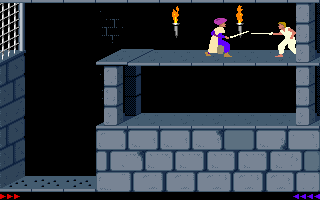
One of the main innovations of the game was including a time component. You had 60 minutes to complete the game, or it was game over, regardless of the point you were in the game. After that, you had to start the game from the beginning again. This component added to the excitement and the difficulty as you not only had to figure out some of the puzzles and beat the levels, but also master them in a short time to complete the game.
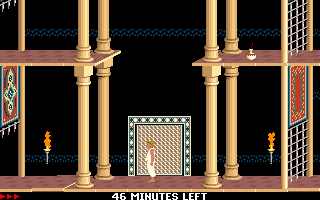
In addition to the classic experience, SDLPoP adds the ability to save and load the game progress, record gameplay, save screenshots, and play "mods" - modified versions of the game.
Let's start by installing SDLPoP on Fedora.
Installing on Fedora 32
SDLPoP is available in the package repository of some Linux distributions. However, on Fedora, to play the game, you need to compile it from the source code. Let's do that.
First, install the required dependencies, libraries, and compiling tools:
$ sudo dnf install -y git make gcc SDL2_image-devel.x86_64 SDL2.x86_64
Then, download the source code for the game from the Github project:
$ git clone https://github.com/NagyD/SDLPoP
Finally, switch to the src directory and compile it:
$ cd SDLPoP/src
$ make all
If you want to launch the game from the Applications menu, you can use make install:
$ sudo make install
The game is now installed. Let's look at an alternative way to compile it.
Installing the modern sysadmin way
Compiling and installing the game requires downloading and installing many dependencies and compiling tools on your Linux machine. If you don't want to do this, you can still compile the game using containers with Podman.
First, clone the source repository:
$ git clone https://github.com/NagyD/SDLPoP
Next, create a container image with the required tools and dependencies to compile the game. Create a subdirectory and a Dockerfile like this:
$ mkdir -p SDLPoP/podman
$ cd  SDLPoP/podman
$ vi Dockerfile
FROM fedora:32

RUN dnf update -y \
    && dnf install -y make gcc SDL2_image-devel.x86_64 \
    && dnf clean all \
    && rm -rf /tmp/* /var/tmp/*

VOLUME [ "/SDLPoP" ]

WORKDIR "/SDLPoP/src"

CMD [ "make", "all" ]
Then, save the file and use podman build to build the new image with the name sdlpop-build:latest:
$ podman build -t sdlpop-build:latest .
Verify that the image was built correctly with podman images:
$ podman images
REPOSITORY                                       TAG     IMAGE ID      CREATED         SIZE
localhost/sdlpop-build                           latest  e4f140a64079  49 seconds ago  494 MB
Now that you have the container image with the required dependencies, use it to compile the game.
$ cd ..
$ ls
data  doc  mods  podman  README.md  SDLPoP.ini  src
$ podman run --rm -v .:/SDLPoP:Z localhost/sdlpop-build
The game is available in the source code directory as prince. You can run the game with ./prince. If you want to install the desktop file to launch the game from Applications menu, switch to the src directory and run the install.sh script with elevated privileges:
$ cd src
$ sudo ./install.sh
The game is ready to play.
Cheats
I remember that back in the early 90s, completing this game was a challenging but rewarding experience. Shortly after completing the game for the first time, I was amazed to learn that you can enable cheats. SDLPoP allows you to do the same. To enable cheats, launch the game with the megahit option:
$ ./prince megahit
With cheats enabled, you can use special keys to change the game flow. For example, use Shift+L to skip a level, + to increase your time, Shift+S to recover energy, and more. Look at the project page for a complete list.
What's next?
Now that you have SDLPoP installed, you can re-live this classic game if you're a veteran or enjoy an exciting adventure as a first-timer.
While you're at it, see if you can beat my time. But no cheats.
[ Free download: Advanced Linux commands cheat sheet. ]
저자 소개
Ricardo Gerardi is a Principal Consultant at Red Hat, having transitioned from his previous role as a Technical Community Advocate for Enable Sysadmin. He's been at Red Hat since 2018, specializing in IT automation using Ansible and OpenShift.
With over 25 years of industry experience and 20+ years as a Linux and open source enthusiast and contributor, Ricardo is passionate about technology. He is particularly interested in hacking with the Go programming language and is the author of Powerful Command-Line Applications in Go and Automate Your Home Using Go. Ricardo also writes regularly for Red Hat and other blogs, covering topics like Linux, Vim, Ansible, Containers, Kubernetes, and command-line applications.
Outside of work, Ricardo enjoys spending time with his daughters, reading science fiction books, and playing video games.
유사한 검색 결과
지금 바로 시작해야 하는 이유: 금융 서비스를 위한 포스트 양자 보안을 지금 시작해야 하는 이유
Red Hat Enterprise Linux Long-Life Add-On: 지원 종료 걱정 없는 RHEL 소개
Infrastructure At The Edge | Compiler
Operating System Management | Compiler
채널별 검색

오토메이션
기술, 팀, 인프라를 위한 IT 자동화 최신 동향

인공지능
고객이 어디서나 AI 워크로드를 실행할 수 있도록 지원하는 플랫폼 업데이트

오픈 하이브리드 클라우드
하이브리드 클라우드로 더욱 유연한 미래를 구축하는 방법을 알아보세요

보안
환경과 기술 전반에 걸쳐 리스크를 감소하는 방법에 대한 최신 정보

엣지 컴퓨팅
엣지에서의 운영을 단순화하는 플랫폼 업데이트

인프라
세계적으로 인정받은 기업용 Linux 플랫폼에 대한 최신 정보

애플리케이션
복잡한 애플리케이션에 대한 솔루션 더 보기

가상화
온프레미스와 클라우드 환경에서 워크로드를 유연하게 운영하기 위한 엔터프라이즈 가상화의 미래
