
Sometimes as admins, we need to share files across systems quickly. For whatever reason, we need to get a single tar or conf file from one system to another, or maybe copy a group of files between systems. We find that we need to install a package or utility to share the files, or we may need to enable a feature to share the content. Regardless of the situation, we can use Python's SimpleHTTPServer module as a quick web server.
Python -m SimpleHTTPServer
The SimpleHTTPServer module is a Python module that enables a developer to lay the foundation for developing a web server. However, as sysadmins, we can use the module to serve files from a directory.
Usage
Python must be installed to use the SimpleHTTPServer module. Python may be installed as a dependency to an application or service that is already running on the system. Run python -V to verify its presence. To use the module for our purposes, run the following command from the directory with the files we want to share:
python -m SimpleHTTPServer
* Note: The module has been renamed http.server in python3
The module loads and serves any files within the directory on port 8000 by default.
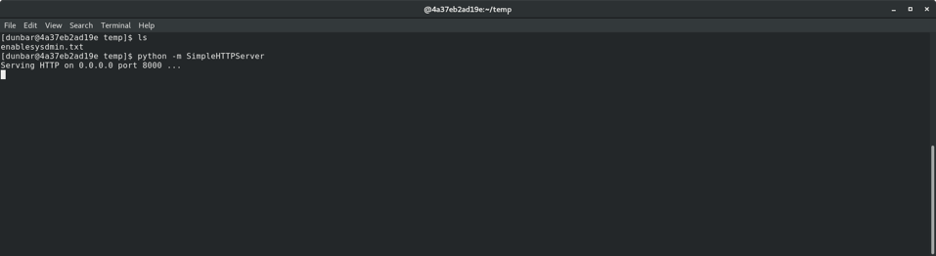
From the remote system, browse to http://<ip> using your browser of choice. A directory listing will be displayed where you can open or download any file.

Another option is to use wget or curl to download the files to the remote system.
wget http://<ip>:8000/filename
curl http://<ip>:8000/filename
This simple local HTTP server is a nice little utility to use in those times when you need to transfer files quickly across systems.
Use cases
This tip is not a replacement for actual file-hosting solutions in business environments. The SimpleHTTPServer module is actually a development tool used as a framework tool to lay the foundation for a full-blown web server with all the necessary security features included. However, we can use the module for our purposes to:
- Quickly serve kickstart files in a pinch - Copy the
/root/anaconda-ks.cfgor/root/original-ks.cfgto a folder and serve withpython -m SimpleHTTPServer. Edit the grub config at boot, and away you go. - Share a file to/from a VM - Copy a file to a folder and serve with
python -m SimpleHTTPServer. - Serve a file on an allowed port of firewall - Copy a file to a folder and serve with
python -m SimpleHTTPServer port
Other options
You can also use a while loop with ncat or /dev/tcp/host/port for transport… but that is another article. I hope you find this option a useful tool in your toolbox.
Gotchas
You may need to open ports in your firewall:
# firewall-cmd --add-port=portnumber/tcp
[ Download now: A sysadmin's guide to Bash scripting. ]
저자 소개
Stephen Wilson is a Principal Architect at Red Hat and a seasoned subject matter expert who thrives at the intersection of open source innovation and mission-critical stability. With a career built on the bedrock of Red Hat Enterprise Linux, Stephen navigates the complexities of modern IT—from orchestrating massive Red Hat OpenShift deployments to streamlining legacy workloads through modern virtualization strategies.
As a strategic guide for organizations, Stephen helps enterprise architects and IT operations leaders bridge the gap between on-premises reliability and cloud agility. His approach focuses on building secure, scalable systems that allow customers to realize the full value of their technology investment. Whether he is hardening information systems or helping teams evolve toward cloud-native ecosystems, Stephen is committed to mentorship and sharing the expertise that comes directly from the source.
A dedicated family man, Stephen lives with his wife and three children. He finds that the principles of a good architect—patience, clear communication, and handling a bit of chaos—apply just as much to parenting as they do to a Kubernetes cluster.
유사한 검색 결과
Red Hat, Google for Startups Cloud Program 참여 기업 대상 RHEL 특별 혜택 확대
지금 바로 시작해야 하는 이유: 금융 서비스를 위한 포스트 양자 보안을 지금 시작해야 하는 이유
Infrastructure At The Edge | Compiler
Operating System Management | Compiler
채널별 검색

오토메이션
기술, 팀, 인프라를 위한 IT 자동화 최신 동향

인공지능
고객이 어디서나 AI 워크로드를 실행할 수 있도록 지원하는 플랫폼 업데이트

오픈 하이브리드 클라우드
하이브리드 클라우드로 더욱 유연한 미래를 구축하는 방법을 알아보세요

보안
환경과 기술 전반에 걸쳐 리스크를 감소하는 방법에 대한 최신 정보

엣지 컴퓨팅
엣지에서의 운영을 단순화하는 플랫폼 업데이트

인프라
세계적으로 인정받은 기업용 Linux 플랫폼에 대한 최신 정보

애플리케이션
복잡한 애플리케이션에 대한 솔루션 더 보기

가상화
온프레미스와 클라우드 환경에서 워크로드를 유연하게 운영하기 위한 엔터프라이즈 가상화의 미래
