

Red Hat Enterprise Linux(RHEL) 시스템 관리자와 개발자는 문제를 진단하기 위해 오랫동안 특정 툴 세트를 사용해 왔으며, 수년간 직관과 경험을 축적해 왔습니다. 그러나 환경이 복잡해짐에 따라 로그를 효과적으로 해석하고 문제를 해결하는 데 필요한 인지적 부담이 증가하고 있습니다.
오늘 RHEL용 새로운 MCP(Model Context Protocol) 서버의 개발자 프리뷰를 발표하게 되어 기쁩니다. 새로운 MCP 서버는 RHEL과 대규모 언어 모델(LLM) 간의 간격을 좁히도록 설계되어 더욱 스마트한 문제 해결의 새로운 시대를 열어줍니다.
RHEL용 MCP 서버란 무엇입니까?
MCP는 AI 모델이 외부 데이터 및 시스템과 상호 작용할 수 있도록 하는 개방형 표준으로, 원래 Anthropic이 출시하여 2025년 12월 Linux Foundation의 Agentic AI Foundation 에 기부되었습니다. RHEL의 새로운 MCP 서버는 현재 개발자 프리뷰 단계에 있으며, Claude Desktop 또는 goose와 같이 MCP 프로토콜을 지원하는 AI 애플리케이션에서 이 프로토콜을 사용하여 RHEL에 직접적이고 상황에 맞는 액세스를 제공합니다.
Red Hat은 이전에 Red Hat Lightspeed와 Red Hat Satellite용 MCP 서버를 릴리스하여 다양한 활용 사례를 지원했습니다. 이 새로운 MCP 서버는 이러한 활용 사례를 확장하고 RHEL 시스템에서 심층적인 문제 해결을 위해 특별히 제작되었습니다.
더욱 스마트한 문제 해결 지원
새로운 MCP 서버를 사용하여 LLM을 RHEL에 연결하면 다음과 같은 활용 사례가 가능합니다.
- 지능형 로그 분석: 로그 데이터를 자세히 검토하는 것은 번거로운 작업입니다. MCP 서버를 통해 LLM은 RHEL 시스템 로그를 수집하고 분석할 수 있습니다. 이 기능은 AI 기반의 근본 원인 분석 및 이상 감지를 통해 원시 로그 데이터를 실행 가능한 정보로 변환하도록 지원합니다.
- 성능 분석: MCP 서버는 CPU 수, 평균 로드, 메모리 정보, 실행 중인 프로세스의 CPU 및 메모리 사용량에 대한 정보에 액세스할 수 있습니다. 이를 통해 LLM 시스템은 시스템의 현재 상태를 분석하고 잠재적인 성능 병목 현상을 식별하며 성능과 관련된 권장 사항을 제시할 수 있습니다.
이러한 새로운 기능을 보다 안전하게 탐색할 수 있도록 이번 개발자 프리뷰에서는 읽기 전용 MCP 지원에 중점을 두고 있습니다. MCP 서버를 사용하면 LLM이 검사 및 권장 사항을 제시할 수 있으며, 인증을 위해 표준 SSH 키를 활용합니다. 로그 파일 및 로그 레벨 액세스에 대한 허용 목록으로 구성할 수도 있습니다. MCP 서버는 MCP 서버에서 실행하는 명령이 사전 검사를 거치므로 RHEL 시스템에 대한 개방형 셸 액세스를 허용하지 않습니다.
활용 사례 예시
이 예에서는 goose AI 에이전트와 MCP 서버를 사용하여 rhel10.example.com이라는 RHEL 10 시스템 중 하나를 사용합니다. Goose는 호스팅된 온라인 공급업체는 물론 로컬 호스팅 공급업체를 포함하여 다양한 LLM 공급업체를 지원합니다. 저는 로컬 호스팅 모델을 사용하고 있습니다.
rhel10.example.com을 사용하여 SSH 키 인증을 설정하고 제 Fedora 워크스테이션에 goose와 MCP 서버를 설치했습니다.
먼저 LLM에 rhel10.example.com 시스템의 상태를 확인하도록 요청하는 프롬프트로 시작하겠습니다.

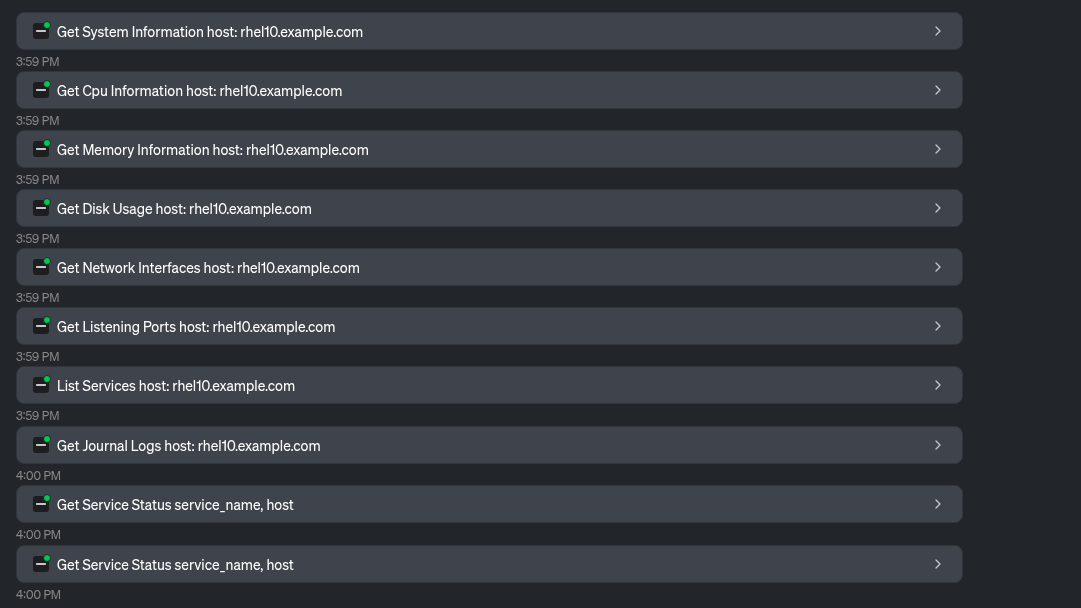
LLM은 MCP 서버에서 제공하는 여러 툴을 사용하여 시스템 정보를 수집합니다.
이를 바탕으로 LLM은 다음 표를 포함하여 시스템과 그 상태에 대한 개요를 제공합니다.
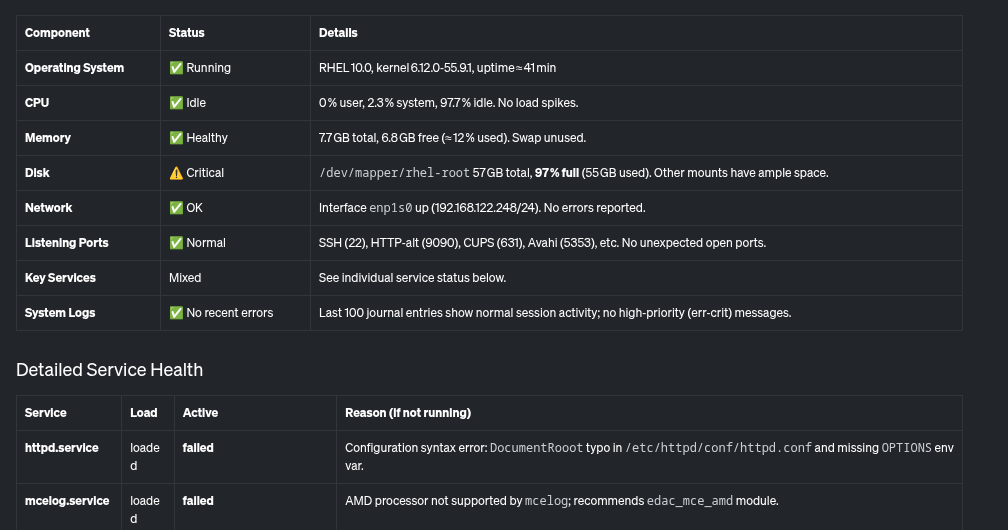
또한 LLM은 거의 가득 찬 루트 파일 시스템, 시스템에서 실패하는 일부 서비스와 같이 해결해야 할 중요한 문제들을 요약하여 제공합니다.

식별된 문제점을 살펴보겠습니다. LLM에 디스크 사용량이 높은 이유를 확인하도록 요청하겠습니다.

LLM은 MCP 서버에서 제공하는 툴을 사용하여 디스크 공간을 가장 많이 사용하고 있는 항목을 확인합니다.

LLM은 이를 기반으로 /home/brian/virtual-machines 디렉터리에 25GB 파일이 있고 /home/brian/.local 디렉터리가 24GB의 공간을 차지하는 것을 확인합니다.

마지막으로 이전에 실패한 것으로 보고된 httpd.service와 관련하여 LLM에 도움을 요청하겠습니다.

LLM은 MCP 서버에서 제공하는 파일 읽기 툴을 사용합니다.

LLM은 이를 기반으로 httpd.service 실패의 잠재적인 원인에 대해 보고합니다.
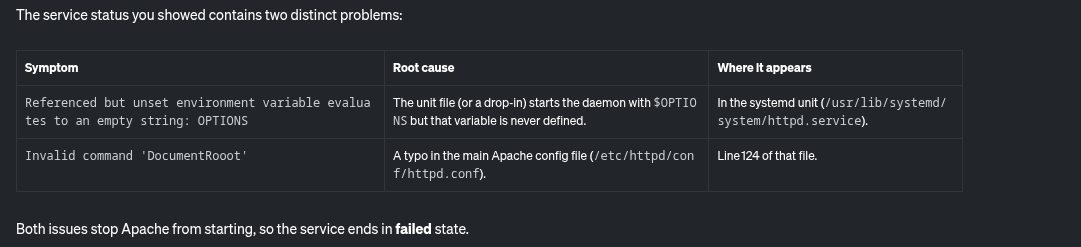
또한 이 문제를 해결하기 위한 단계별 지침도 제공합니다.

RHEL용 MCP 서버를 통해 거의 가득 찬 파일 시스템 및 실패한 httpd 서비스와 관련된 시스템의 잠재적인 문제를 쉽게 식별하고 해결할 수 있었습니다.
다음 단계는 무엇입니까?
읽기 전용 분석으로 시작하여 로드맵에는 추가 사용 사례로 확장하는 내용이 포함되어 있습니다. 개발 프로세스를 계속 지켜보려면 Red Hat의 업스트림 GitHub 리포지토리를 확인하십시오. 업스트림 기여를 환영합니다! 개선 요청, 버그 보고서 등 여러분의 피드백을 기다립니다. GitHub 또는 Fedora AI/ML SIG(Special Interest Group)를 통해 팀에 문의할 수 있습니다.
더욱 스마트한 문제 해결을 경험해 보시겠습니까?
RHEL용 MCP 서버는 현재 개발자 프리뷰로 제공됩니다. LLM 클라이언트 애플리케이션을 연결하고 컨텍스트 인식 AI가 RHEL 관리 방식을 어떻게 변화시키는지 확인해 보십시오. 시작하려면 Red Hat 설명서 및 업스트림 설명서를 참조하십시오.
제품 체험판
Red Hat Enterprise Linux | 제품 체험판
저자 소개
Brian Smith is a product manager at Red Hat focused on RHEL automation and management. He has been at Red Hat since 2018, previously working with public sector customers as a technical account manager (TAM).
Máirín Duffy is a Red Hat Distinguished Engineer and leads the Red Hat Enterprise Linux Lightspeed Incubation team at Red Hat as a passionate advocate for human-centered AI and open source. A recipient of the O’Reilly Open Source Award, Máirín first joined Red Hat as an intern in 2004 and has spent two decades in open source communities focusing on user experience in order to expand the reach of open source. A sought-after speaker and author, Mo holds 19 patents and authored 6 open source coloring books, including The SELinux Coloring Book.
유사한 검색 결과
AI 에이전트 프레임워크만으로는 충분하지 않은 이유: 프로덕션 환경에서 누락된 7가지 플랫폼 기능
asago 소개: 오픈소스 AI 안전 및 거버넌스 오케스트레이션
How Red Hat cleared IT debt for scalable AI
Standardizing the AI stack with PyTorch
채널별 검색

오토메이션
기술, 팀, 인프라를 위한 IT 자동화 최신 동향

인공지능
고객이 어디서나 AI 워크로드를 실행할 수 있도록 지원하는 플랫폼 업데이트

오픈 하이브리드 클라우드
하이브리드 클라우드로 더욱 유연한 미래를 구축하는 방법을 알아보세요

보안
환경과 기술 전반에 걸쳐 리스크를 감소하는 방법에 대한 최신 정보

엣지 컴퓨팅
엣지에서의 운영을 단순화하는 플랫폼 업데이트

인프라
세계적으로 인정받은 기업용 Linux 플랫폼에 대한 최신 정보

애플리케이션
복잡한 애플리케이션에 대한 솔루션 더 보기

가상화
온프레미스와 클라우드 환경에서 워크로드를 유연하게 운영하기 위한 엔터프라이즈 가상화의 미래
