
This is the second post of our blog series on Red Hat OpenShift and Splunk Integration. In the first post, we showed how to send application and system logs to Splunk. The second part is focused on how to use Splunk Kubernetes Objects.
Prerequisites
The prerequisites are the same as defined in the first part.
Architecture
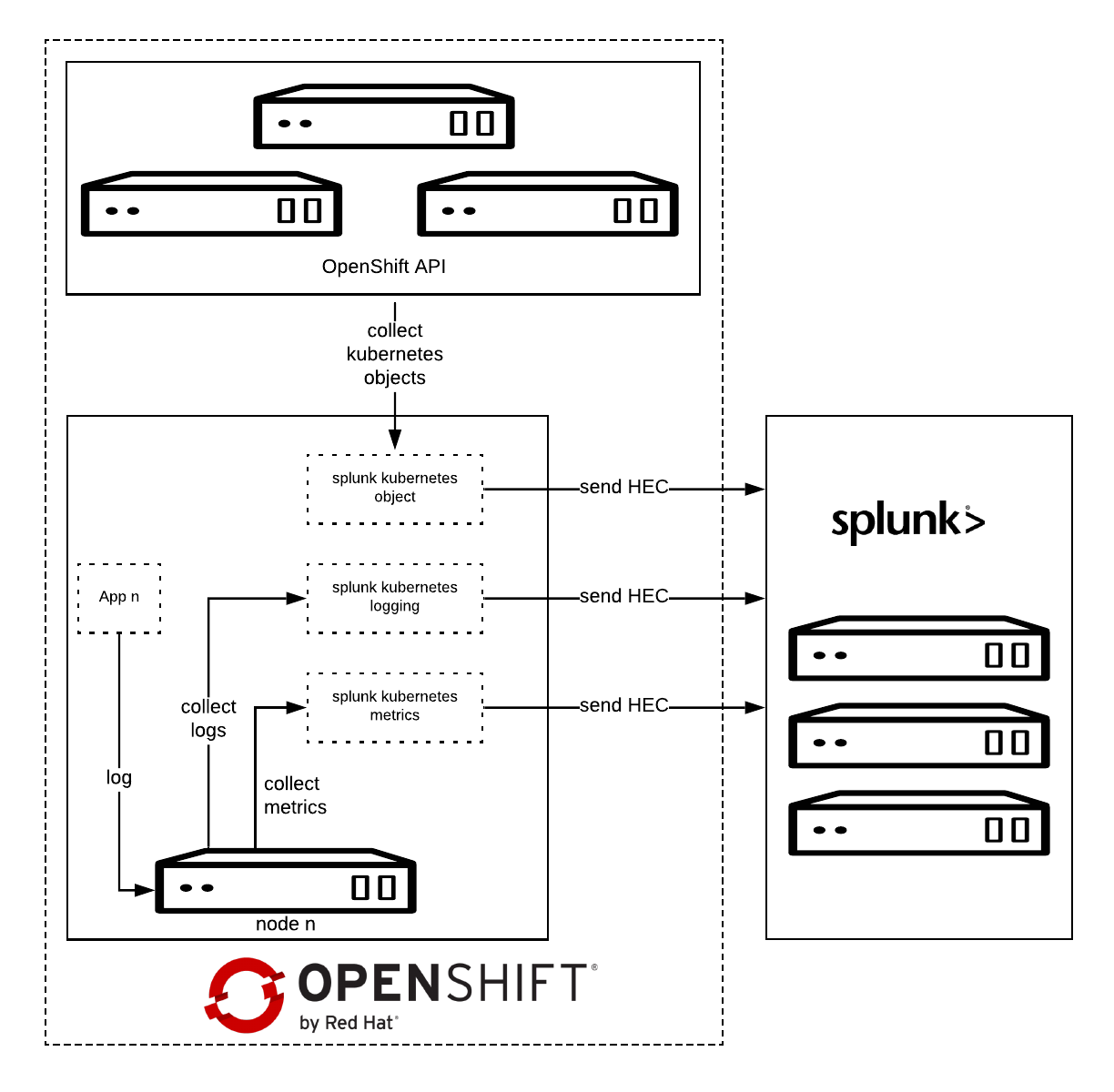
Splunk Connect for Kubernetes deploys:
- One DaemonSet on each OpenShift node for collecting log.
- One DaemonSet on each OpenShift node for collecting metrics.
- One Deployment to collect OpenShift Objects changes.
Installation
Before starting, please make sure you have already configured the Splunk Connect project as described in the first part.
Download the latest Helm Splunk Connect Helm package, which at the time of writing is 1.2.0.
wget <a href="https://github.com/splunk/splunk-connect-for-kubernetes/releases/download/1.1.0/splunk-kubernetes-objects-1.1.0.tgz">https://github.com/splunk/splunk-connect-for-kubernetes/releases/download/1.2.0/splunk-kubernetes-objects-1.2.0.tgz</a>
Download the source code as well; it is necessary to setup fine-grained permission.
wget https://github.com/splunk/splunk-connect-for-kubernetes/archive/1.2.0.zip
unzip 1.2.0.zip
cd splunk-connect-for-kubernetes-1.2.0/
Configure the variables for Helm; you can find sample values for the Splunk Connect on GitHub:
Minimal value example:
global:
  splunk:
    hec:
      host: splunk.openlab.red
      port: 8080
      token: xxxxxx-xxxx-xxxx-xxx-xxxxxxxxx
      protocol: https
rbac:
  create: false
Splunk Kubernetes Objects
Splunk Kubernetes Objects collect Kubernetes objects that can help users access cluster status. Splunk collects the object data by calling the Kubernetes API. This supports two modes:
- Watch mode: the Kubernetes API sends new changes to the plugin. In this mode, only the changed data is collected.
- Pull mode: the plugin queries the Kubernetes API periodically. In this mode, all data is collected.
Setup
1: Assign cluster-reader permission.
oc adm policy add-cluster-role-to-user cluster-reader -z splunk-kubernetes-objects --rolebinding-name=splunk-kubernetes-objects
Or Add fine-grained permission, check objects clusterRole manifests.
oc apply -f manifests/splunk-kubernetes-objects/clusterRole.yaml
oc adm policy add-cluster-role-to-user splunk-kubernetes-objects -z splunk-kubernetes-objects --rolebinding-name=splunk-kubernetes-objects
2: Install Helm package.
helm install --tiller-namespace=splunk-connect --name splunk-kubernetes-objects -f objects-value.yml splunk-kubernetes-objects-1.2.0.tgz
Verify on Splunk

Conclusion
In this article we have explored how we can capture and send to Splunk the entire definition of Kubernetes objects, once they get created or modified.
In the next post will see how to collect OpenShift/Kubernetes metrics to Splunk.
저자 소개
유사한 검색 결과
Red Hat 파트너가 최고의 통신 비즈니스 자산인 이유
에이전틱 패러독스와 하이브리드 AI의 필요성
Machine learning model drift & MLOps pipelines | Technically Speaking
Building a foundation for AI models | Technically Speaking
채널별 검색

오토메이션
기술, 팀, 인프라를 위한 IT 자동화 최신 동향

인공지능
고객이 어디서나 AI 워크로드를 실행할 수 있도록 지원하는 플랫폼 업데이트

오픈 하이브리드 클라우드
하이브리드 클라우드로 더욱 유연한 미래를 구축하는 방법을 알아보세요

보안
환경과 기술 전반에 걸쳐 리스크를 감소하는 방법에 대한 최신 정보

엣지 컴퓨팅
엣지에서의 운영을 단순화하는 플랫폼 업데이트

인프라
세계적으로 인정받은 기업용 Linux 플랫폼에 대한 최신 정보

애플리케이션
복잡한 애플리케이션에 대한 솔루션 더 보기

가상화
온프레미스와 클라우드 환경에서 워크로드를 유연하게 운영하기 위한 엔터프라이즈 가상화의 미래
