The only thing harder than finding a critical Common Vulnerabilities and Exposures (CVE) is fixing it across your entire infrastructure. Red Hat Lightspeed simplifies this challenge by enabling you to address advisor recommendations, content advisories, vulnerability CVEs, and failed compliance rules on your connected Red Hat Enterprise Linux (RHEL) systems using Ansible Playbooks—saving up to 86% of manual remediation time.
We heard your requests for a faster, clearer workflow and have overhauled the experience to be simple yet operationally robust. Here is your crash course on the new, streamlined way to patch critical vulnerabilities in RHEL.
Step 1: Select the fix
Everything starts with identification. Once you've registered your systems with Red Hat Lightspeed:
- Navigate to Security > Vulnerability > CVEs.
- Filter your list by severity (for example, Critical or Important) to focus on the biggest risks.
- Click the CVE ID to open the details.
- Validate that the Remediation type column indicates a Playbook is available. Note: CVEs without available playbooks are not eligible for automated remediation.
- Select the affected systems you want to patch.
- Click the Plan remediation button.
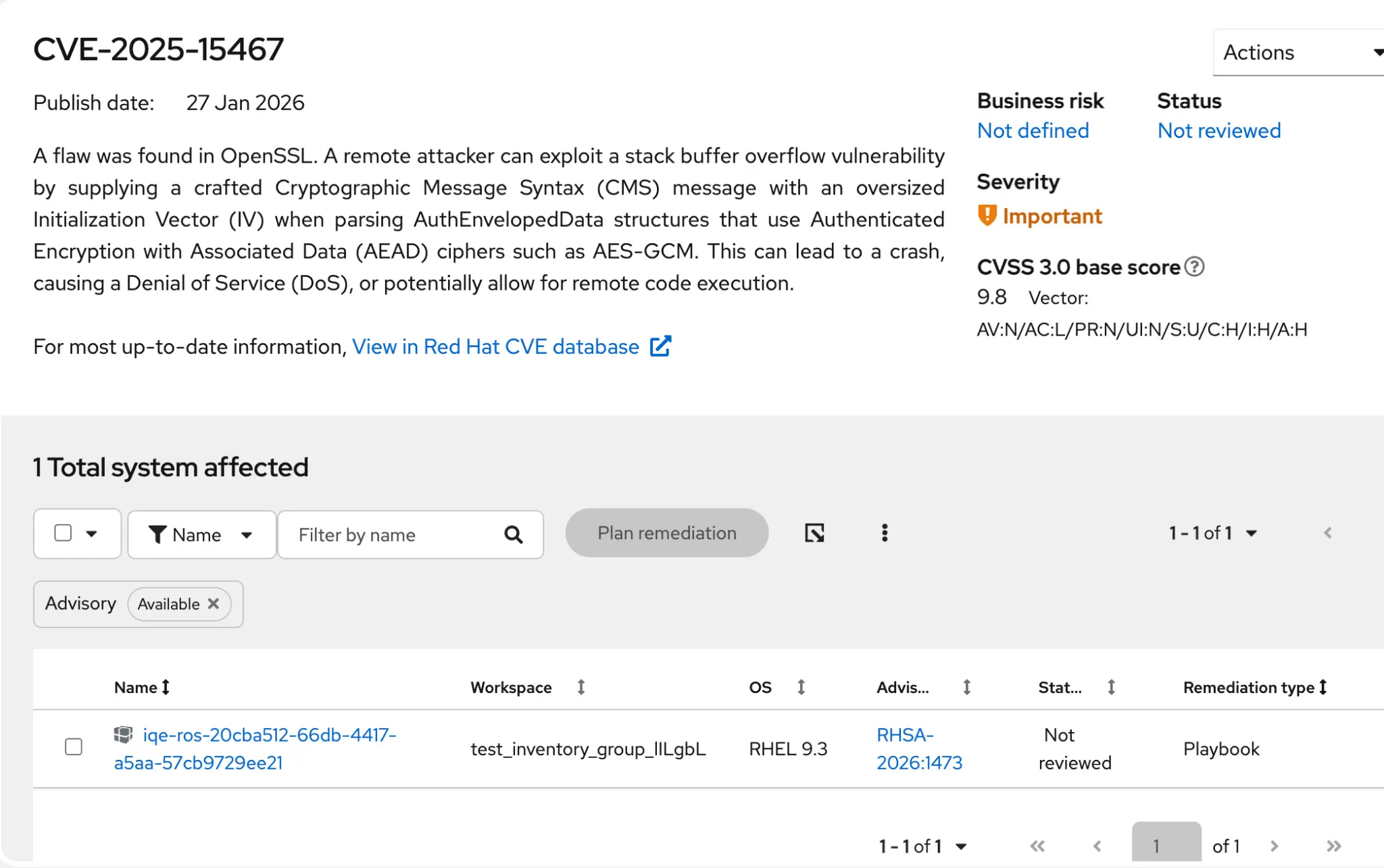
Step 2: The new "single-page" creation
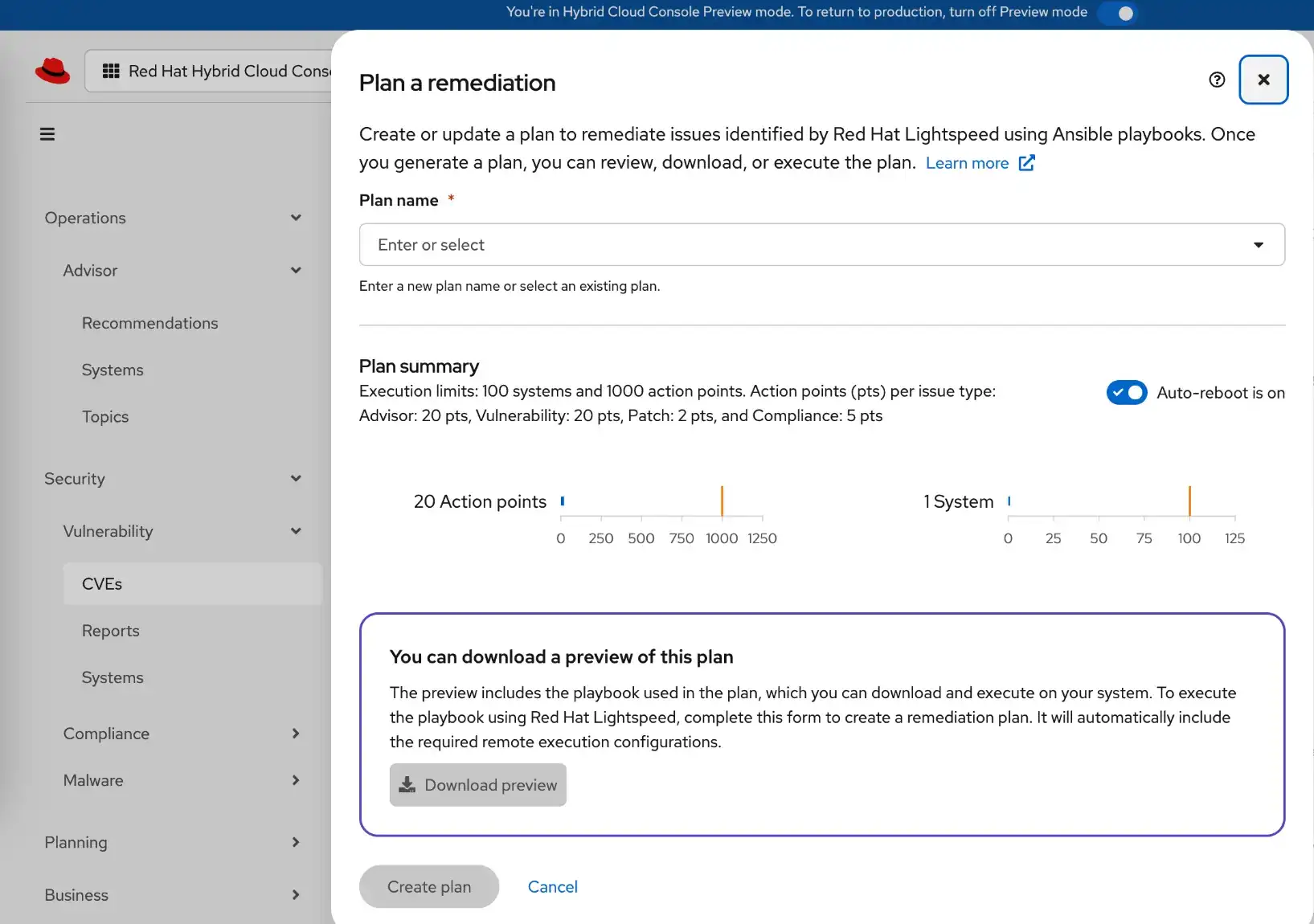
We have replaced the legacy wizard with a single modal to simplify plan creation by half the number of steps:
- Name your plan.
- Validate your Auto-reboot setting. Auto-reboot determines whether the remediation plan can automatically reboot your systems after executing. This setting can be changed later.
- Optional: Select the Download preview button to inspect your Ansible playbook before you create the plan.
- Click Create.
Step 3: Review and refine
You will notice a few workflow changes designed to give you a holistic view of the remediation plan.
Handling multiple resolutions
Sometimes, there are multiple ways to fix a vulnerability (e.g., updating a package vs. applying a mitigation configuration). In the past, you had to decide this upfront. Now, we have moved this decision to the details of a remediation plan so that you can take your time to review the options and select the best fit.
If a CVE in your remediation plan has multiple resolution options, you will see a purple icon next to the action count within the general remediation plan details.
To select a resolution:
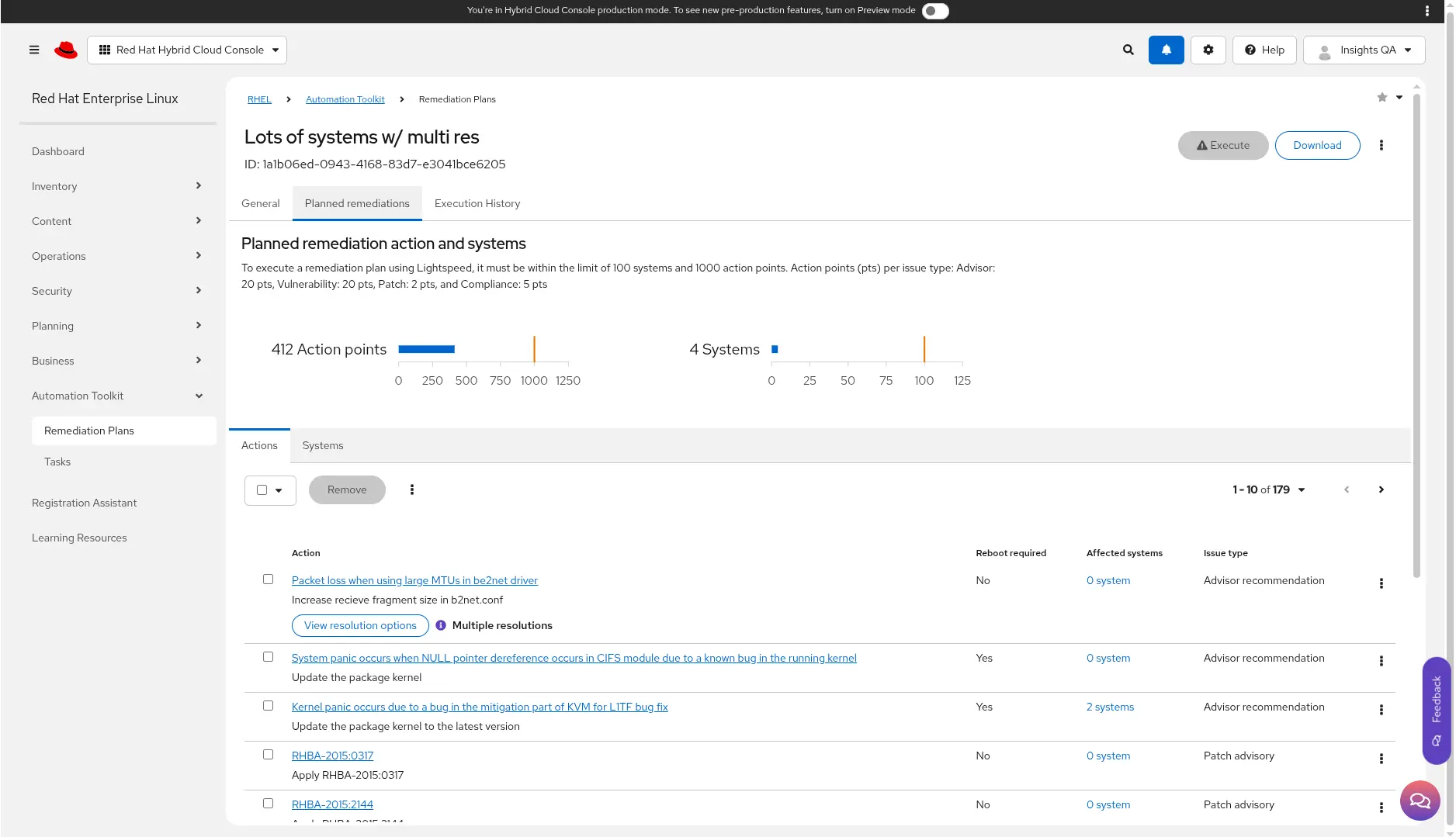
- Navigate to the Planned remediations tab.
- Review your list of Actions for those with the purple Multiple resolutions label.
- Click View resolution options to make your selection. Note: The chosen resolution applies to all systems in your remediation plan.
Step 4: Verify execution readiness
Before you execute your remediation plan, you need to know whether the job will run successfully. We have expanded the Execution Readiness section in the plan details to provide a comprehensive pre-flight check.
Hardened reliability and planned remediations
We have engineered the Red Hat Lightspeed backend to offer consistent, reliable execution for your most critical remediation tasks. To enable performance without timeouts or failures, we have established clear scalability guardrails using a system of action points to calculate the relative complexity and performance impact of your remediation plan.
Red Hat Lightspeed assigns a specific point value to each type of issue and calculates the plan's total size against the platform's performance capabilities:
- Vulnerability: 20 action points per system
- Advisor: 20 action points per system
- Compliance: 5 action points per system
- Patch: 2 action points per system
We now support guaranteed execution reliability for plans up to 1000 action points and 100 systems. You can view a visual representation of your plan's complexity in the new Planned remediations tab of the remediation plan details, which combines the Actions and Systems tabs into a single view.

Need to scale further? Red Hat Lightspeed is optimized for rapid, targeted remediation. However, executing changes across massive infrastructure often requires the advanced orchestration and governance capabilities of Red Hat Ansible Automation Platform.
If your plan exceeds these guardrails, you can seamlessly integrate with Ansible Automation Platform to execute at scale, giving you access to advanced scheduling, role-based access control, and auditing features designed specifically for enterprise-grade execution.
User access permissions
To execute remediation plans on connected remote host systems from within Red Hat Lightspeed, ensure that you have the remediations administrator RBAC role.
You can check your role settings in the console in Settings (⚙) > User Access > Groups. You might need to contact your organization administrator to confirm your user access settings and to apply the required permissions.
Remote host configuration manager
To allow users to execute a remediation plan on a remote system from Red Hat Lightspeed, you must configure the Remote Host Configuration Manager settings in the console under Inventory > System Configurations > Remote Host Configuration.
Systems connected to Red Hat Lightspeed
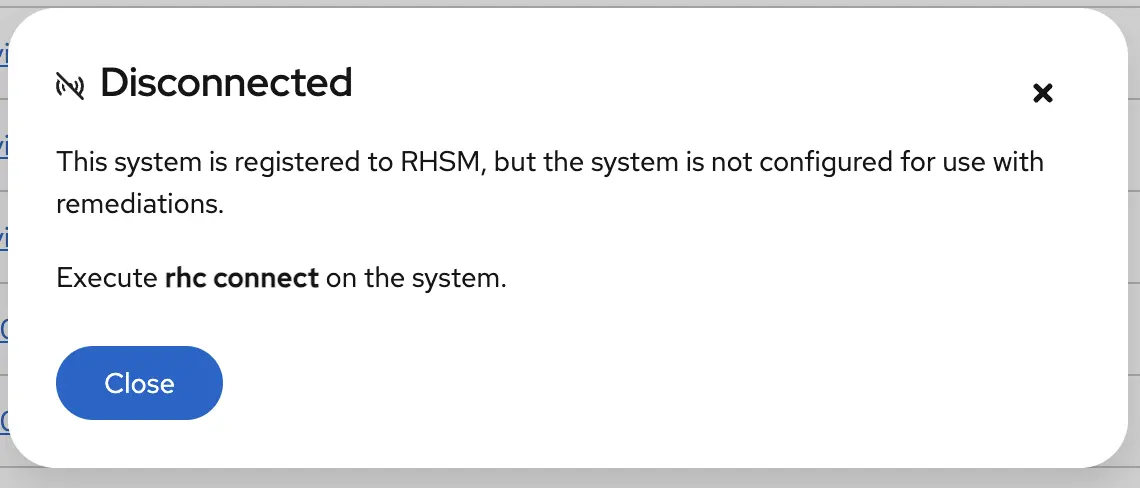
If a system is not reachable by Red Hat Lightspeed, new connection status modals in the Systems table provides specific guidance on how to reconnect them. Click the Not configured or Disconnected connection status to learn more.
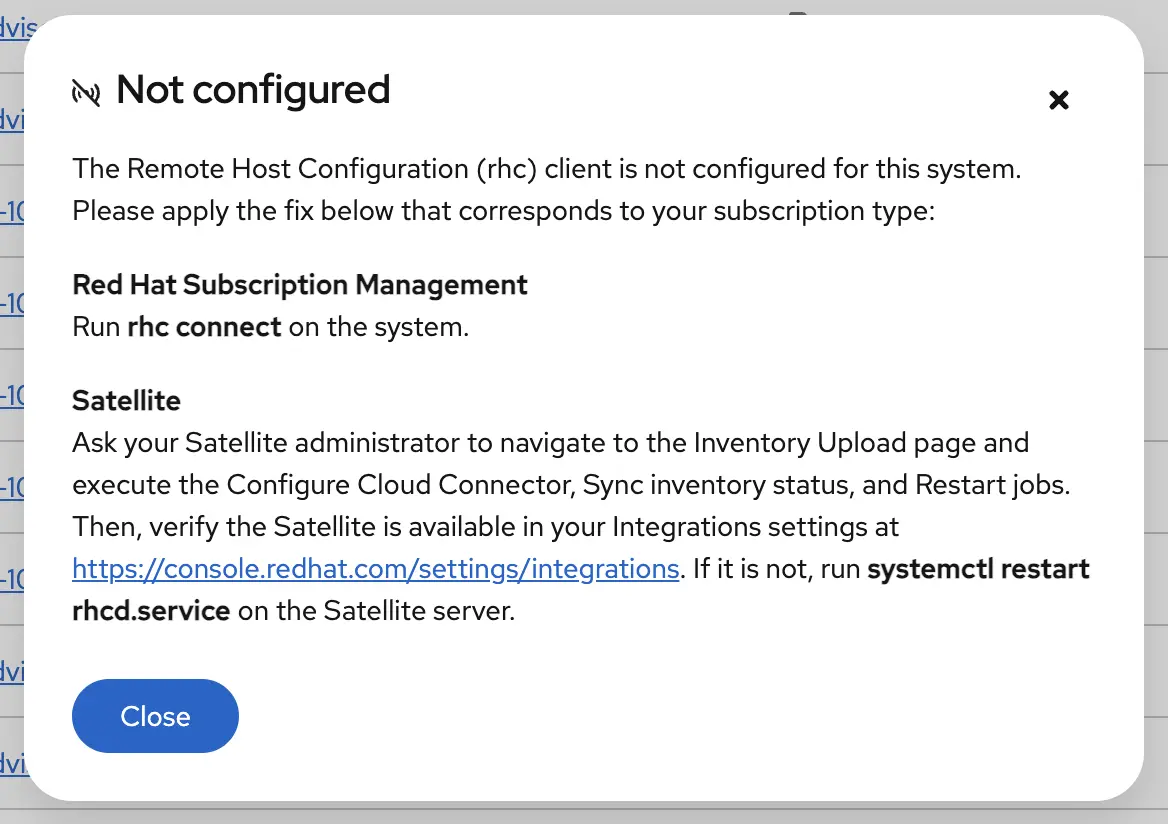
The status may also dislay as Disconnected:
Step 5: Execute and verify
Once your readiness checks pass, you're ready to execute your remediation plan:
- Click Execute.
- Navigate to the Execution History tab to watch the progress in real-time. You can see the status for each system and view the logs if something stalls.
- Return to the Vulnerability service and verify that the CVE is no longer listed for those systems.
Ready to try it?
These updates are about removing friction. You get the intelligence of Red Hat security data combined with the automation of Ansible Playbooks, now with a user experience that respects your time.
Discover how easily you can act on Red Hat Lightspeed findings by visiting the Remediations page on console.redhat.com. As you explore, let us know how it went using the purple feedback tool embedded within the Hybrid Cloud Console.
Learn more about Red Hat Lightspeed remediations in the official documentation.
제품 체험판
Red Hat Enterprise Linux | 제품 체험판
저자 소개

Talia Kaplanian is a Senior Product Manager in Red Hat's Hybrid Cloud Business Unit for Red Hat Lightspeed, focusing on the user journey through data collection, advisor recommendations, and remediation capabilities. Her diverse background spanning software and data engineering, quality assurance, and product management and ownership drives her passion for building holistic and reliable enterprise solutions.
유사한 검색 결과
Supercharging local AI development with RHEL on NVIDIA DGX Spark
Integrating Red Hat Lightspeed with CrowdStrike for enhanced malware detection coverage
The Overlooked Operating System | Compiler: Stack/Unstuck
Linux, Shadowman, And Open Source Spirit | Compiler
채널별 검색

오토메이션
기술, 팀, 인프라를 위한 IT 자동화 최신 동향

인공지능
고객이 어디서나 AI 워크로드를 실행할 수 있도록 지원하는 플랫폼 업데이트

오픈 하이브리드 클라우드
하이브리드 클라우드로 더욱 유연한 미래를 구축하는 방법을 알아보세요

보안
환경과 기술 전반에 걸쳐 리스크를 감소하는 방법에 대한 최신 정보

엣지 컴퓨팅
엣지에서의 운영을 단순화하는 플랫폼 업데이트

인프라
세계적으로 인정받은 기업용 Linux 플랫폼에 대한 최신 정보

애플리케이션
복잡한 애플리케이션에 대한 솔루션 더 보기

가상화
온프레미스와 클라우드 환경에서 워크로드를 유연하게 운영하기 위한 엔터프라이즈 가상화의 미래
