
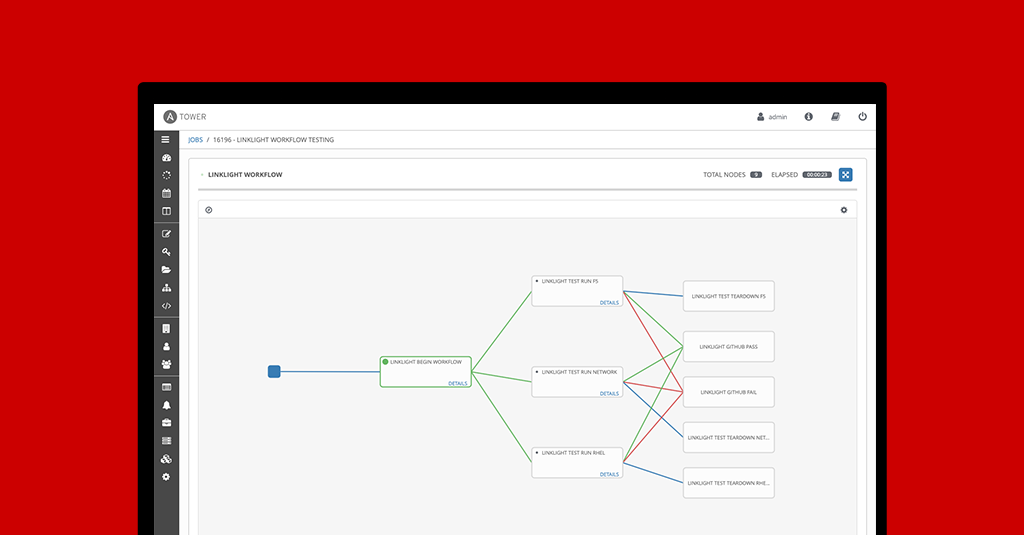
In Red Hat Ansible Tower 3.1 we released a feature called Workflows. The feature, effectively, allowed users to compose job templates into arbitrary graph trees. A simple workflow we saw users creating was a linear pipeline; similar to the workflow below.

The workflow feature also allowed branching. Each branch can run in parallel.
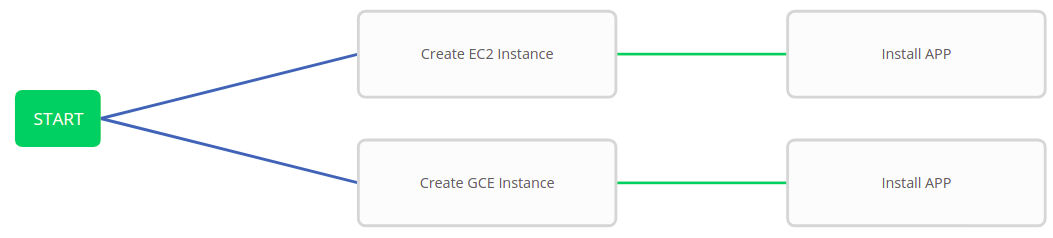
But something was missing. The ability to wait for previous parallel operations to finish before proceeding. If this existed, you could simplify the above workflow (see below).
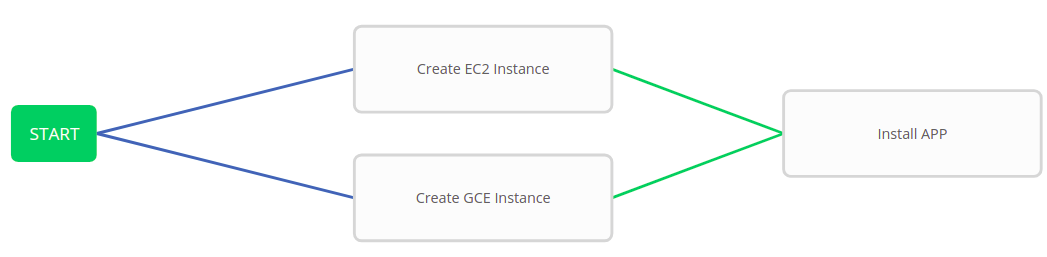
In Red Hat Ansible Tower 3.4 the above workflow is now possible with the introduction of the Workflow Convergence feature.
For you computer sciencey folks, workflows are no longer restricted to a tree, you can create a DAG. More simply, we call this convergence; two nodes are allowed to point to the same downstream node. The concept is best shown through an example. Above, we have a workflow with 3 nodes. The first two job templates run in parallel. When they both finish the 3rd downstream, convergence node, will trigger.
In this blog post we will cover the changes to workflow failure scenarios, how workflow node failure and success propagate, how this affects the runtime graph and how to create a workflow that responds to ALL failures rather than ANY failures. After reading this blog post you will have an understanding for how the Workflows feature chooses to execute the graph and how to, effectively, alter the ANY vs ALL scenario using the utility playbook method.
Workflow Execution Scenario
Prior to the release of Ansible Tower 3.4 a workflow failure or success was determined by the final node’s resulting status. The workflow would get marked fail if either Install APP jobs failed.
Now workflow success or failure works more like exception handling. If 1 or more jobs spawned from a workflow results in a failure WITHOUT a failure handler, then the workflow is marked failed; else it’s marked success. A failure handler is an always or failure path emanating from a node. Below is an example of how a common failure scenario would be handled using a workflow.

The above workflow creates an EC2 instance and deploys our application code. If either of these two jobs fail, then the EC2 instance will be cleaned up by the Delete EC2 Instance job. The workflow job is not marked as failed, because the Delete EC2 Instance is the failure handler. If the Delete EC2 Instance job fails, the workflow will be marked failed and the user knows that manual intervention is required to inspect why the cleanup process fails and to manually delete the, effectively orphaned, EC2 instance.
Now let’s look at a slightly more complex example. In the above workflow, our intent is to run the "Install App" Job Template ONLY if both instance creation jobs succeed. However, the workflow doesn’t work like that. Instead, the "Install App" Job Template will run if either parents succeed. In the next section I will show you how to get the wanted AND behavior instead of OR.
AND vs. OR
Let’s take a look at what I’ve said above, but in more general terms. Consider child nodes with multiple parents connected by a success relationship. If any one of the parents succeed, the child node will run. Sometimes this is the wanted behavior, sometimes though you may want to run a child node only if all parents succeed. So how do we do that? To accomplish this we will create a utility Job Template that we put before the convergence node that we want to make an ALL case (i.e. before the Install App in the previous example).
AND Utility Job Template

Again, our goal is to have Install App run only if both “Create GCE Instance” and “Create EC2 Instance” succeed. To accomplish this goal we have created a new Job Template named “Utility All” and replaced our previous convergence node, “Install App”, with “Utility All”. The playbook associated with “Utility All” is shown below. The playbook gets the parent jobs, loops over them and if any of the parent jobs fail then the playbook itself fails. This achieves our wanted behavior of only running “Install App” when all parent nodes succeed.
# and_util.py
---
- hosts: localhost
  gather_facts: false
  vars:
    this_playbook_should_fail: false
    job_id: "{{ lookup('env', 'JOB_ID') }}"
    tower_base_url: "https://{{ lookup('env', 'TOWER_HOST') }}/api/v2"
    tower_username: "{{ lookup('env', 'TOWER_USERNAME') }}"
    tower_password: "{{ lookup('env', 'TOWER_PASSWORD') }}"
    tower_verify_ssl: "{{ lookup('env', 'TOWER_VERIFY_SSL') }}"
  tasks:
    - name: "Get Workflow job id for which this job belongs"
      shell: tower-cli job get {{ job_id }} -f json | jq ".related.source_workflow_job" | sed 's/\/"$//' | sed 's/.*\///'
      register: workflow_job_id

    - name: "Get Workflow node id for this job"
      uri:
        url: "{{ tower_base_url }}/workflow_job_nodes/?job_id={{ job_id }}"
        validate_certs: "{{ tower_verify_ssl }}"
        force_basic_auth: true
        user: "{{ tower_username }}"
        password: "{{ tower_password }}"
      register: result

    - name: "Get parent workflow nodes for this workflow node"
      uri:
        url: "{{ tower_base_url }}/workflow_job_nodes/?success_nodes={{ result.json.results[0].id }}"
        validate_certs: "{{ tower_verify_ssl }}"
        force_basic_auth: true
        user: "{{ tower_username }}"
        password: "{{ tower_password }}"
      register: result

    - name: "Fail this playbook if a parent node failed"
      fail:
        msg: "Parent workflow node {{ item }} failed"
      when: "item.summary_fields.job.status == 'failed'"
      loop: "{{ result.json.results }}"

Conclusion
In our own testing we found this Workflow Convergence feature mapped better to actual working practices, so we hope you find it as useful for your own needs. In this blog post we have gone over how workflow failure scenarios have changed to accommodate the new convergence node feature, how the run-time graph is created, and how to use and change the default workflow convergence method. I invite you to check out the other workflow enhancements we added in Ansible Tower.
저자 소개
유사한 검색 결과
Ansible Automation Platform 2.7: 시각적 실행 환경 빌더 및 콘텐츠 검색 가이드
안정적인 코드를 재작성하지 마세요: Lightwell로 귀사의 수익과 개발자의 속도를 보호하는 방법
Can agentic AI patch the internet?
Random Acts Of Automation | Compiler
채널별 검색

오토메이션
기술, 팀, 인프라를 위한 IT 자동화 최신 동향

인공지능
고객이 어디서나 AI 워크로드를 실행할 수 있도록 지원하는 플랫폼 업데이트

오픈 하이브리드 클라우드
하이브리드 클라우드로 더욱 유연한 미래를 구축하는 방법을 알아보세요

보안
환경과 기술 전반에 걸쳐 리스크를 감소하는 방법에 대한 최신 정보

엣지 컴퓨팅
엣지에서의 운영을 단순화하는 플랫폼 업데이트

인프라
세계적으로 인정받은 기업용 Linux 플랫폼에 대한 최신 정보

애플리케이션
복잡한 애플리케이션에 대한 솔루션 더 보기

가상화
온프레미스와 클라우드 환경에서 워크로드를 유연하게 운영하기 위한 엔터프라이즈 가상화의 미래
