
This is a guest post by Pushkar Patil,Principal Product Manager at Citrix.
Many times, customers start on their Kubernetes journey with a single control plane node, where Kubernetes control plane components are all running on the same node. As they start to plan how to take their cluster to production, one of the first steps is to start looking for how to implement an HA control plane, where multiple nodes are used for high availability of the control plane components. In this blog post, we will explore how Citrix ADC can make it very easy for customers, through automation, to load balance the OpenShift control plane.
Here is the Kubernetes recommended control plane configuration for a highly available, production cluster:

As you see, a highly available Kubernetes cluster requires a load balancer to provide uninterrupted access to the control plane in the event a node fails and to balance the load into the control plane.
To achieve this configuration using the Citrix ADC, all of the API server instances are added to the target pool for the Citrix frontend load balancer, as shown in picture below:
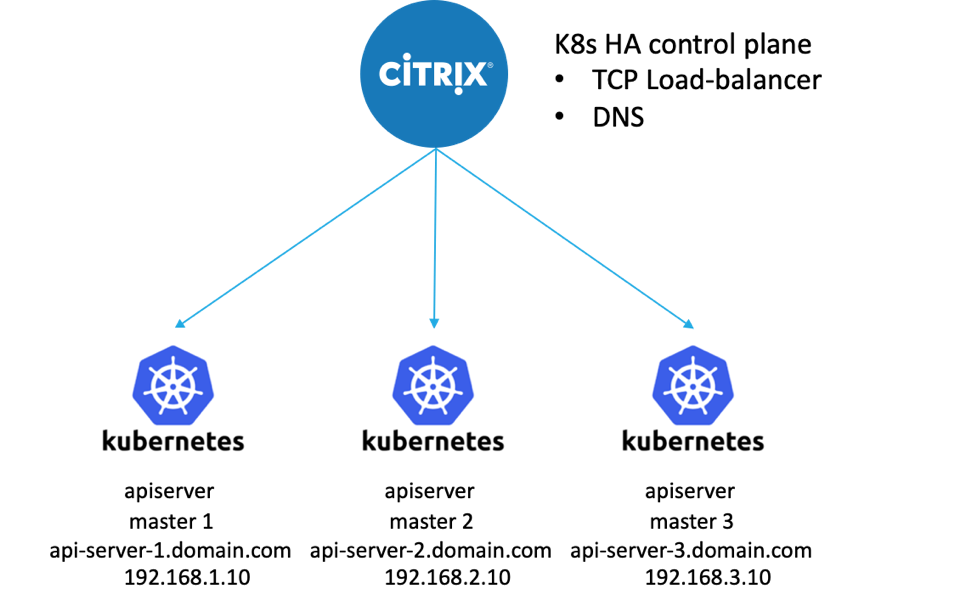
Major platforms, like Red Hat OpenShift, have many control plane components and requirements. Below we will explore how automation can be used to configure the Citrix ADC to load balance the OpenShift control plane.
Before beginning, review these requirements for OpenShift installation.
To configure the Citrix ADC to load balance the OpenShift control plane, follow the steps below:
1: Prerequisites
Install Terraform
If you are using macOS and have Homebrew installed, then use the following command to install Terraform on your Mac:
brew install terraform
For installing Terraform on other operating systems, see the official Terraform installation guide.
Install Citrix ADC Terraform Provider Plug-in
Download and install Citrix ADC Terraform provider plug-in from the Citrix ADC Terraform Provider Official Repo.
You can download a release from the releases page and untar the binary into “~/.terraform.d/plugins/”
2: Clone Our GitHub Repository
git clone https://github.com/citrix/citrix-k8s-ingress-controller.git
cd citrix-k8s-ingsress-controller/deployment/openshift/citrix-adc-for-control-plane/
3: Initialize the Terraform
terraform init
4: Create a Terraform Execution Plan
terraform plan \
  -var citrix_adc_ip="<citrix-adc-ip>" \
  -var citrix_adc_username="<citrix-adc-username>" \
  -var citrix_adc_password='<citrix-adc-password>' \
  -var lb_ip_address="<vip-of-citrix-adc>" \
  -var 'api_backend_addresses=["1.1.1.1","1.1.1.2","1.1.1.3"]' \
  -var 'ingress_backend_addresses=["2.2.2.1","2.2.2.2","2.2.2.3"]'
Note: The values used in this step are only for the demonstration purpose. You must replace them according to your environment.
The description for the variables used in this example is provided as follows.
|
Variables |
Description |
|
citrix_adc_ip |
Management IP address of the Citrix ADC |
|
citrix_adc_username |
Username of the Citrix ADC |
|
citrix_adc_password |
Password of the Citrix ADC |
|
lb_ip_address |
VIP for the Citrix ADC and provided in the installer configuration file |
|
api_backend_addresses |
OpenShift control plane node IP addresses |
|
ingress_backend_addresses |
OpenShift compute node IP addresses. All nodes that could potentially host an OpenShift Router instance should be included here. |
5: Apply the Configs on Citrix ADC Using “terraform apply”
terraform apply \
  -var citrix_adc_ip="<citrix-adc-ip>" \
  -var citrix_adc_username="<citrix-adc-username>" \
  -var citrix_adc_password='<citrix-adc-password>' \
  -var lb_ip_address="<vip-of-citrix-adc>" \
  -var 'api_backend_addresses=["1.1.1.1","1.1.1.2","1.1.1.3"]' \
  -var 'ingress_backend_addresses=["2.2.2.1","2.2.2.2","2.2.2.3"]' \
  -auto-approve
6: Verify Configs on Citrix ADC
The “terraform apply” command will create the necessary load balancing virtual servers on the Citrix ADC. If the OpenShift control plane and worker nodes are UP and running, then the status of the load balancing virtual servers would also be UP. Please see the snapshot of the Citrix ADC virtual servers configured to load balance the OpenShift control plane components below:
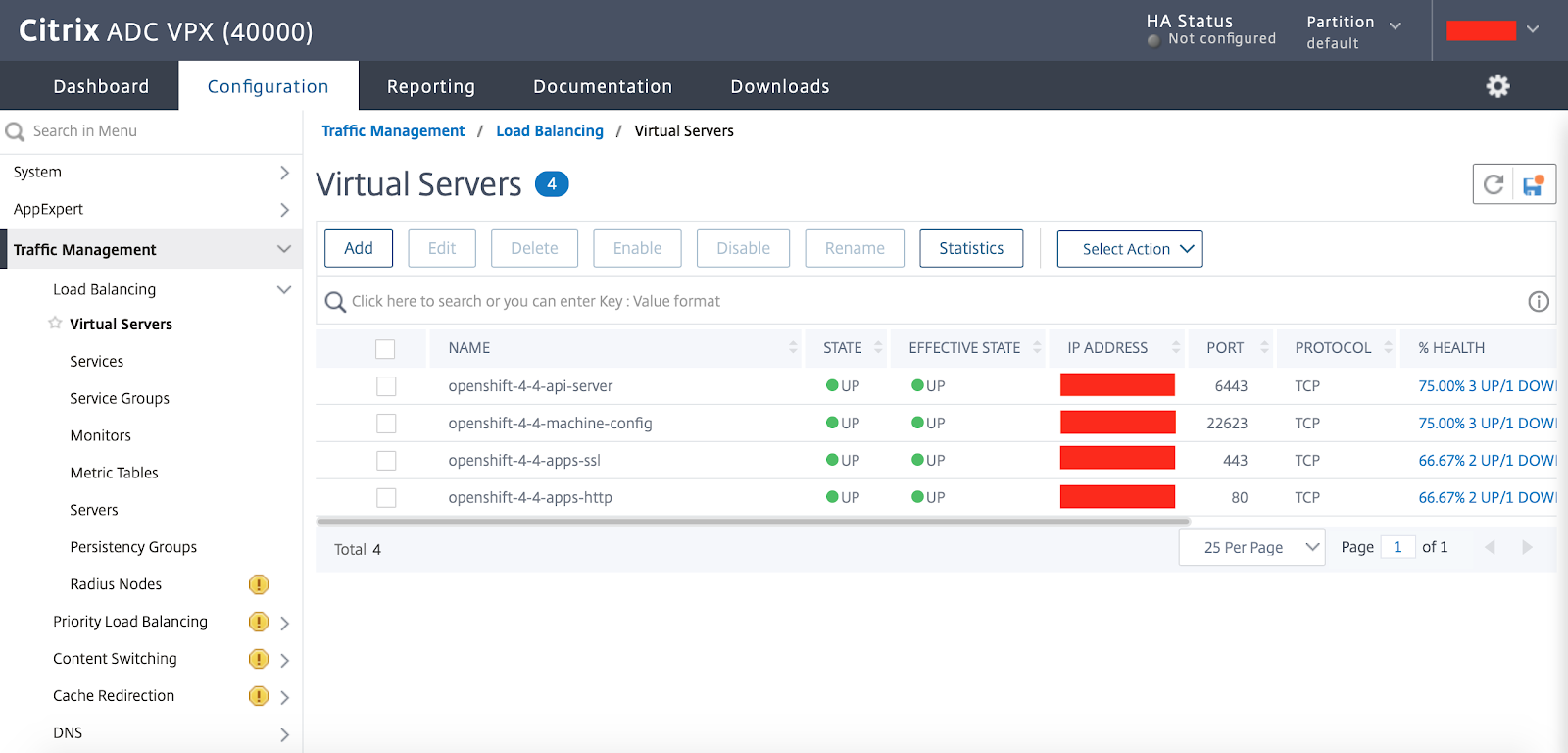
When the load balancing virtual servers are UP, you can connect to the OpenShift API server or the OpenShift console using the Citrix ADC VIP (variable named “lb_ip_address”) specified during “terraform apply”.
What Does the Automation Do?
This Terraform automation creates the load balancing virtual servers needed by the OpenShift control plane components.
More specifically, below is the list of OpenShift control plane components that are load balanced by the Citrix ADC virtual servers. For more details on the OpenShift control plane components, please read the OpenShift Control Plane Architecture.
- API Server
- Machine Config Server
Along with the Control plane component, we can use the same terraform automation to provide Ingress services in OpenShift. - HTTP Ingress
- HTTPS Ingress
Clean Up
When you destroy the OpenShift cluster, you also need to remove the Citrix ADC configuration. To unconfigure, in case of misconfiguration or no longer being needed, you can use the “terraform destroy” command.
terraform destroy \
  -var citrix_adc_ip="<citrix-adc-ip>" \
  -var citrix_adc_username="<citrix-adc-username>" \
  -var citrix_adc_password='<citrix-adc-password>' \
  -var lb_ip_address="<vip-of-citrix-adc>" \
  -var 'api_backend_addresses=["1.1.1.1","1.1.1.2","1.1.1.3"]' \
  -var 'ingress_backend_addresses=["2.2.2.1","2.2.2.2","2.2.2.3"]' \
  -auto-approve
Note: If this command is executed on a working OpenShift setup, it would leave the setup unusable as the control plane VIP would be unconfigured.
Further Reading:
OpenShift supports multiple control planes for high availability in a production environment. As we have shown in this blog post, you can configure Citrix ADC in a few easy steps to be used as a load balancer for an OpenShift control plane. Just remember, you must have a load balancer in front of these for managing the OpenShift cluster control plane traffic.
Blogs:
Microservice based application delivery with Citrix and Red Hat OpenShift
저자 소개
Red Hatter since 2018, technology historian and founder of The Museum of Art and Digital Entertainment. Two decades of journalism mixed with technology expertise, storytelling and oodles of computing experience from inception to ewaste recycling. I have taught or had my work used in classes at USF, SFSU, AAU, UC Law Hastings and Harvard Law.
I have worked with the EFF, Stanford, MIT, and Archive.org to brief the US Copyright Office and change US copyright law. We won multiple exemptions to the DMCA, accepted and implemented by the Librarian of Congress. My writings have appeared in Wired, Bloomberg, Make Magazine, SD Times, The Austin American Statesman, The Atlanta Journal Constitution and many other outlets.
I have been written about by the Wall Street Journal, The Washington Post, Wired and The Atlantic. I have been called "The Gertrude Stein of Video Games," an honor I accept, as I live less than a mile from her childhood home in Oakland, CA. I was project lead on the first successful institutional preservation and rebooting of the first massively multiplayer game, Habitat, for the C64, from 1986: https://neohabitat.org . I've consulted and collaborated with the NY MOMA, the Oakland Museum of California, Cisco, Semtech, Twilio, Game Developers Conference, NGNX, the Anti-Defamation League, the Library of Congress and the Oakland Public Library System on projects, contracts, and exhibitions.
유사한 검색 결과
Red Hat 파트너가 최고의 통신 비즈니스 자산인 이유
에이전틱 패러독스와 하이브리드 AI의 필요성
Composable infrastructure & the CPU’s new groove | Technically Speaking
Machine learning model drift & MLOps pipelines | Technically Speaking
채널별 검색

오토메이션
기술, 팀, 인프라를 위한 IT 자동화 최신 동향

인공지능
고객이 어디서나 AI 워크로드를 실행할 수 있도록 지원하는 플랫폼 업데이트

오픈 하이브리드 클라우드
하이브리드 클라우드로 더욱 유연한 미래를 구축하는 방법을 알아보세요

보안
환경과 기술 전반에 걸쳐 리스크를 감소하는 방법에 대한 최신 정보

엣지 컴퓨팅
엣지에서의 운영을 단순화하는 플랫폼 업데이트

인프라
세계적으로 인정받은 기업용 Linux 플랫폼에 대한 최신 정보

애플리케이션
복잡한 애플리케이션에 대한 솔루션 더 보기

가상화
온프레미스와 클라우드 환경에서 워크로드를 유연하게 운영하기 위한 엔터프라이즈 가상화의 미래
