
This post was written by Christian Hernandez, Solution Architect of the OpenShift Tiger Team.
OpenShift can integrate with underlying infrastructure, enabling OpenShift to dynamically interact with the infrastructure and extend its functionality.
Specifically, this can allow us to set up OpenShift to process a PersistentVolumeClaim and then allocate that storage dynamically.
I am going to cover what is needed to get started with dynamically provisioning storage:
- Cloud Providers (in this example; AWS)
- StorageClasses
- Default StorageClass
Cloud Providers
Using a configured cloud provider such as AWS, you can setup/install OpenShift with the ability to access AWS services. This can be done at install or after the fact.
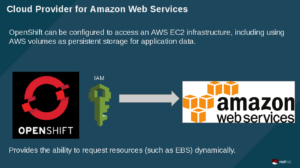
In short, OpenShift uses the defined IAM account to interact with AWS and make requests for resources. In the example that follows, OpenShift will be using this account to request a new EBS volume.
I setup the cloud provider on install. If done correctly, you'll see this on your masters/nodes
[root@master ~]# cat /etc/origin/cloudprovider/aws.conf

[Global]

Zone = us-west-1b
StorageClasses
In OpenShift, you are able to define a StorageClass. This lets administrators define different classes of storage that map to backend EBS volumes. Also, this mechanism helps in managing tiered storage.
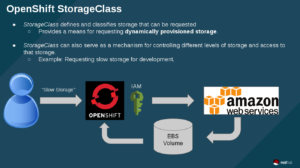
In the above image, the user requests "slow storage" (which is a storage category set up by an OpenShift admin), then OpenShift uses the IAM account to request EBS storage to be created. Finally AWS creates the storage and OpenShift binds the claim to the backend volume.
Default StorageClass
Administrators can also set up a "default" StorageClass. This is useful when a user doesn't request a particular kind of storage or when using a template that needs a persistent storage volume.
 The workflow here is the same as before - except here OpenShift says "since no StorageClass was defined; I'm just going to use the default class". The rest of the workflow is the same.
NOTE: Keep in mind that by default, requesting storage is unrestricted, so you may want to set up quotas for your projects.
Example
I have an OpenShift cluster setup with the AWS cloud-provider plugin.
This means that anytime a user requests storage; I will have to manually create a persistentVolume. I can create a storageClass that will automatically create the requested storage (if the request comes in with the same name)
Here I am creating a storage system called "aws-ebs-slow":
Now, the user can request storage by name "aws-ebs-slow:
Now when I check my PersistentVolumeClaim I should see a "Bound" status. This means I can go ahead and use it and attach it to my application:
Adding the volume to my application will trigger a new deployment (thus giving me a new pod with the mounted filesystem). Here you can see that uploader-2-5tmkh is the name of my new pod and that a new EBS volume was attached as /dev/xvdbe:
So what about those times when someone uses a template, 'just wants storage', or just doesn't specify the class of storage? Easy! We just set up a default storageClass by annotating it:
storageclass.beta.kubernetes.io/is-default-class: "true"
Now we can fire off an application that requires storage (e.g. rocketchat's MongoDB instance) and OpenShift will take the storage claim and provision an EBS volume based on the defined parameters of the default StorageClass. Cool!
As you can see storage was dynamically requested and provisioned without the need of a pv or a pvc.
NOTE: For those who are wondering; RocketChat templates can be found here.
Conclusion
In this blog, we explored how to dynamically allocate storage and how you can provide tiered storage. Also, we went through how to set up default tiers and went through an example on how to automatically attach storage.
저자 소개
Christian is a well-rounded technologist with experience in infrastructure engineering, system administration, enterprise architecture, tech support, advocacy, and product management. He is passionate about open source and containerizing the world one application at a time. He is currently a maintainer of the OpenGitOps project, a maintainer of the Argo project, and works as a Technical Marketing Engineer and Tech Lead at Cisco. He focuses on GitOps practices, DevOps, Kubernetes, network security, and containers.
유사한 검색 결과
Red Hat 파트너가 최고의 통신 비즈니스 자산인 이유
에이전틱 패러독스와 하이브리드 AI의 필요성
Crack the Cloud_Open | Command Line Heroes
Edge computing covered and diced | Technically Speaking
채널별 검색

오토메이션
기술, 팀, 인프라를 위한 IT 자동화 최신 동향

인공지능
고객이 어디서나 AI 워크로드를 실행할 수 있도록 지원하는 플랫폼 업데이트

오픈 하이브리드 클라우드
하이브리드 클라우드로 더욱 유연한 미래를 구축하는 방법을 알아보세요

보안
환경과 기술 전반에 걸쳐 리스크를 감소하는 방법에 대한 최신 정보

엣지 컴퓨팅
엣지에서의 운영을 단순화하는 플랫폼 업데이트

인프라
세계적으로 인정받은 기업용 Linux 플랫폼에 대한 최신 정보

애플리케이션
복잡한 애플리케이션에 대한 솔루션 더 보기

가상화
온프레미스와 클라우드 환경에서 워크로드를 유연하게 운영하기 위한 엔터프라이즈 가상화의 미래
