
This post was written by guest blogger Craig Peters, JFrog’s Director of Product
For most enterprise developers, using a language framework like Spring, or Express.js, can provide you with the resources you need.
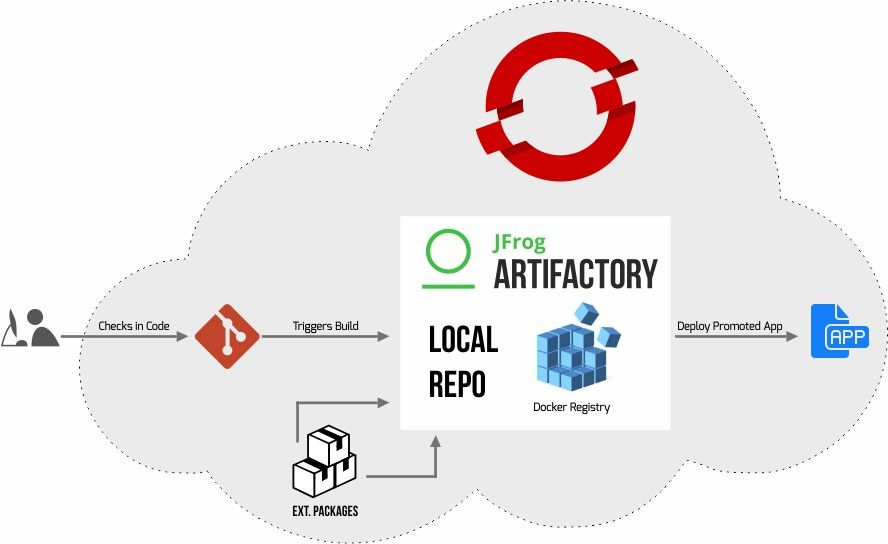
Within container native infrastructure, JFrog Artifactory can provide a chain of trust for the packages those frameworks use. The Red Hat OpenShift Container Platform can draw upon Artifactory when building, packaging and deploying your applications.
To help get your framework applications to build through Red Hat OpenShift, and ready for packaging and deployment with JFrog Artifactory, there are a few setup tricks you’ll likely need to perform.
In this posting, we will demonstrate how those setup procedures are applied for Spring Boot and Express.js. You’ll see how the core steps are the same, and thus should apply to other frameworks as well.
The OpenShift-Artifactory Environment
Pairing OpenShift Container Platform or OpenShift Online with an Artifactory registry can ease cloud-native development and provide a path for continuous integration from code to cluster.
This tutorial applies to environments that are running OpenShift 3.6 or newer. These versions support the source-to-image (S2I) tool, a utility designed for simplifying container image builds.
S2I generates a new Docker image using source code and a builder image that contains the libraries and tools needed to build and run an application.
JFrog Artifactory is the universal binary repository manager. Artifactory maintains a local repository for the packages that compose your applications and acts as your Docker registry for the images you build and run in Red Hat OpenShift. It brings end-to-end binary repository management to your CI/CD pipeline, helps accelerate and optimize its performance, and provides visibility into what is in your container images.
Review JFrog’s white papers to better understand how Artifactory benefits Java and Node.js development.
About the Example Frameworks
- Spring Boot is a framework for creating enterprise applications that run on the Java Virtual Machine (JVM), and supports the Groovy programming language. Part of the open source Spring framework ecosystem, Spring Boot helps make it easier for new adopters of Spring to be productive more quickly.
- Express.js is a minimal and flexible Node.js web application framework that is designed to provide a robust set of features for web and mobile applications.
- Node.js is based on the V8 JavaScript engine and allows you to write server-side JavaScript applications.
Configuring OpenShift for Artifactory
We’ll perform this configuration through the Red Hat OpenShift Container Platform command line interface (known as the OC CLI).
Follow these steps for Red Hat OpenShift S2I Builder to utilize Artifactory’s repositories for package managers and for Docker when running automated build procedures:
- Redirect Red Hat OpenShift S2I Builder to draw on the language’s package repository (for example, Maven or npm) that is cached in Artifactory, rather than the external default.
- Store your credentials for access to Artifactory’s Docker registry as “secrets”, then link them to the service accounts for default, builder, and deployer functions.
- Create the build, deployment, service, and route services for the framework.
Once you set it up, it’s done, at least until your credentials change.
Step 1: Redirect Red Hat OpenShift to Local Package Repositories
A benefit of Artifactory to your Red Hat OpenShift project is its ability to cache your external dependencies to a local repository. This can speed your builds by providing more reliable, consistent access to remote resources, helping to remove any dependency on the network or external repositories. Artifactory provides integrated support for package formats such as Maven, npm, Python, NuGet, Gradle, Go, and more.
Your language framework may rely on at least one of these package managers. For example, Java-based Spring Boot requires Maven, and Express.js requires npm.
Red Hat OpenShift needs to be directed to use the local repository, and given the credentials required to access them. These credentials are stored as secrets created in your Red Hat OpenShift project.
Step 1a: Create Access Secrets
To store the credentials in Red Hat OpenShift, create a secret using the OC CLI. Typically, this credential information is stored in the package manager’s configuration file, and we can draw our secret information directly from that.
For Spring Boot
Create a secret (secret-maven) that contains the credentials for accessing your Maven repository in Artifactory. These can be drawn directly from Maven’s settings.xml file that is configured to use Artifactory (in the current directory in the example shown). Note: all commands in this blog are for working with Red Hat OpenShift Online. There may be subtle differences when working with other Red Hat OpenShift deployments.
<span>$ oc create secret generic secret-maven --from-file=settings.xml=./settings.xml</span>
For Express.js
Create a secret (secret-npm) that contains the credentials for accessing your npm repository in Artifactory. These can be drawn directly from the .npmrc file that is configured to use Artifactory.
<span>$ oc create secret generic secret-npmr .npmrc=.npmrc</span>
Step 1b: Link Access Secret to Service Accounts
For Spring Boot
Link the secret-maven to the three service accounts - one each for builder, deployer, and default operations used by S2I Builder.
$ oc secrets link serviceaccount/default secrets/secret-maven --for=pull


$ oc secrets link serviceaccount/builder secrets/secret-maven


$ oc secrets link serviceaccount/deployer secrets/secret-maven
For Express.js
Perform the same actions, but using secret-npm.
Step 2: Provide Red Hat OpenShift with access to Artifactory Docker Registry
Red Hat OpenShift drives execution of the build from source, and pushes the resulting container images to Artifactory. Once in Artifactory’s Docker registry, the containers are available to be deployed to clusters by Kubernetes.
But Artifactory won’t let just anyone push images into its registry. You’ll need to configure Red Hat OpenShift to provide your credentials (username and password) to Artifactory when it pushes.
Step 2a: Create the Artifactory Credentials Secret
First, you’ll need to create a secret called rt-docker-registry that contains your credentials to access the repository in Artifactory. Replace RT_DOCKER_REPO with the name of the Artifactory repository you are using for your Docker registry.
To create the secret through the Red Hat OpenShift Container Platform command line interface (CLI):
<span>$ oc create secret docker-registry rt-docker-registry --docker-server=<RT_DOCKER_REPO> --docker-username=<YOUR_USER> --docker-password=<YOUR_PASSWORD> --docker-email=<YOUR_EMAIL></span>
Step 2b: Link Access Secret to Service Accounts
Next, use the CLI to link the rt-docker-registry secret to at least the three service accounts - one each for builder, deployer, and default operations used by the S2I builder.
$ oc secrets link serviceaccount/default secrets/rt-docker-registry --for=pull$ oc secrets link serviceaccount/builder secrets/rt-docker-registry
$ oc secrets link serviceaccount/deployer secrets/rt-docker-registry
Step 3: Create the Services
Finally, we must create the build, deployment, service, and route services for the framework.
This is done using a YAML file for each service. In each, link the rt-docker-registry secret to the push and pull actions for the service. For example, as in this snippet for configuring the build service:
output:

    pushSecret:

     name: rt-docker-registry

    to:

      kind: DockerImage

      name: /jfrog-springboot-sample-app:latest
Artifactory has provided some useful templates in a Github repository, for Spring Boot and Node.js. See these for more complete versions of the YAML files for build (bc), deploy (dc), service (svc) and route (route).
$ oc create -f springboot-rt-bc.yaml$ oc create -f springboot-rt-dc.yaml
$ oc create -f springboot-rt-svc.yaml
$ oc create -f springboot-rt-route.yaml
Give it a Try
If you’re new to Artifactory, get a free trial, or try Artifactory Cloud if you’re using OpenShift Online. You can Install Artifactory on Red Hat OpenShift by following the documentation provided in artifactory-docker-examples.
You should use the GitHub project repositories provided by Artifactory for Spring Boot and Node.js to perform the steps in this tutorial.
저자 소개
유사한 검색 결과
기업 속도의 새로운 가치 기준
오픈소스 방어 계층 강화: Red Hat, NVIDIA와 함께 Open Secure AI Alliance 합류
Can Compliance Be A Piece Of Cake? | Compiler
Scaling with Orchestrators | Compiler
채널별 검색

오토메이션
기술, 팀, 인프라를 위한 IT 자동화 최신 동향

인공지능
고객이 어디서나 AI 워크로드를 실행할 수 있도록 지원하는 플랫폼 업데이트

오픈 하이브리드 클라우드
하이브리드 클라우드로 더욱 유연한 미래를 구축하는 방법을 알아보세요

보안
환경과 기술 전반에 걸쳐 리스크를 감소하는 방법에 대한 최신 정보

엣지 컴퓨팅
엣지에서의 운영을 단순화하는 플랫폼 업데이트

인프라
세계적으로 인정받은 기업용 Linux 플랫폼에 대한 최신 정보

애플리케이션
복잡한 애플리케이션에 대한 솔루션 더 보기

가상화
온프레미스와 클라우드 환경에서 워크로드를 유연하게 운영하기 위한 엔터프라이즈 가상화의 미래
