
According to the Sysdig 2021 Container Security and Usage Report, container security is a growing concern for many organizations. However, there are still some gaps. Container image scanning and privileged containers are two of the most crucial aspects.
Podman rootless containers (see Running rootless Podman as a non-root user and Rootless containers with Podman: The basics) and OpenShift Container Platform both implement the principle of least privilege by default, which helps administrators to enforce security best practices. Red Hat quay.io and Red Hat quay container registry offerings help administrators and developers incorporate image vulnerability scanning into their CI/CD pipelines.
[ You might also enjoy reading: Improved systemd integration with Podman 2.0 ]
Red Hat manages quay.io, a hosted public container registry. Individuals or enterprises can use the registry for storing and sharing container images (within an organization or to the general public). Red Hat Universal Base Images (UBI) are based on RHEL and offer a way to build and share your application images freely.
The registry has a built-in security scanner that checks the images for vulnerabilities, provides details about the packages in the image, and identifies the vulnerabilities with their associated fixes. It organizes the vulnerabilities into Low, Medium, and High severity categories. It also provides metadata like the CVE number and a link to the errata related to the vulnerabilities. As container images age, new CVEs are discovered, so for this article, we'll take a look at an older version of UBI. For example, at the time of writing this article, one of the specific builds of ubi8 (8.2-299) has the following output highlighting 178 packages (10 packages with High impact) and 38 vulnerabilities (10 High).

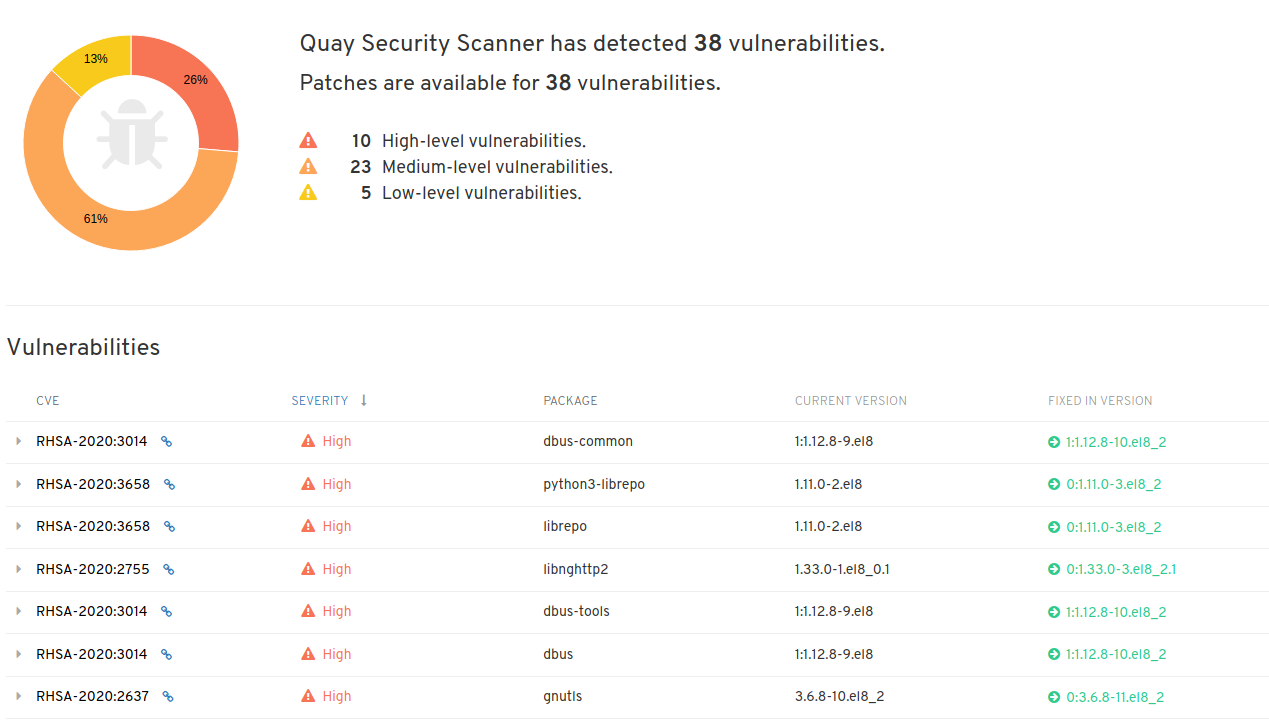
The quay.io UI provides the information related to the vulnerabilities in a user-friendly format. One can browse the list of packages, check the packages impacted, and view the vulnerability details. However, with organizations focused on DevSecOps, it is beneficial to get this information on the fly and utilize it before each deployment to ensure that only secure images make it to the production environment.
This article assumes some basic familiarity with quay.io concepts like repositories, robot accounts, and general tasks like image builds (using DockerFiles) and image tagging. In case you are interested in learning more about these concepts, you can refer to the quay.io User Guides.
In order to get the scanning information via the command line, use the skopeo and jq commands. Skopeo allows users to not only inspect images without downloading them onto a local machine first, but it also supports copying images from one repository (local or remote) to another.
The following command will fetch the image metadata similar to the docker inspect command executed against a local image:
# IMAGE_NAME='app-sre/ubi8-ubi'
# IMAGE_TAG='8.2-299'
# skopeo inspect docker://quay.io/$IMAGE_NAME:$IMAGE_TAG
To get the image's unique digest, we can parse the received json output using the jq command.
# IMAGE_DIGEST=`skopeo inspect docker://quay.io/$IMAGE_NAME:$IMAGE_TAG | jq -r .Digest`
With the digest, you can get the security report for the image by querying the quay.io APIs. We can store the output (json file) in a local file and utilize jq to filter for the desired content.
# curl -o `basename $IMAGE_NAME`.json https://quay.io/api/v1/repository/$IMAGE_NAME/manifest/$IMAGE_DIGEST/security?vulnerabilities=true
For example, to get the information pertaining to High severity vulnerabilities with the associated Advisory ID, Advisory URL, Package Name, its Affected version, and the version that contains the fixes, the following command can be utilized:
jq '.data.Layer.Features[]' `basename $IMAGE_NAME`.json | jq -c '{"Name":.Name,"Version":.Version,"Advisory":.Vulnerabilities[]} | select(.Advisory.Severity=="High") | {"Advisory":.Advisory.Name,"Link":.Advisory.Link,"PACKAGE":.Name,"CURRENT VERSION":.Version,"FIXED IN VERSION":.Advisory.FixedBy }'
The command produces an output like the following indicating that this UBI image (app-sre/ubi8-ubi) has 10 advisory notifications:
{"Advisory":"RHSA-2020:3014","Link":"https://access.redhat.com/errata/RHSA-2020:3014","PACKAGE":"dbus-tools","CURRENT VERSION":"1:1.12.8-9.el8","FIXED IN VERSION":"1:1.12.8-10.el8_2"}
{"Advisory":"RHSA-2020:3658","Link":"https://access.redhat.com/errata/RHSA-2020:3658","PACKAGE":"librepo","CURRENT VERSION":"1.11.0-2.el8","FIXED IN VERSION":"0:1.11.0-3.el8_2"}
{"Advisory":"RHSA-2020:3014","Link":"https://access.redhat.com/errata/RHSA-2020:3014","PACKAGE":"dbus-libs","CURRENT VERSION":"1:1.12.8-9.el8","FIXED IN VERSION":"1:1.12.8-10.el8_2"}
{"Advisory":"RHSA-2020:3014","Link":"https://access.redhat.com/errata/RHSA-2020:3014","PACKAGE":"dbus-common","CURRENT VERSION":"1:1.12.8-9.el8","FIXED IN VERSION":"1:1.12.8-10.el8_2"}
{"Advisory":"RHSA-2020:3014","Link":"https://access.redhat.com/errata/RHSA-2020:3014","PACKAGE":"dbus-daemon","CURRENT VERSION":"1:1.12.8-9.el8","FIXED IN VERSION":"1:1.12.8-10.el8_2"}
{"Advisory":"RHSA-2020:2755","Link":"https://access.redhat.com/errata/RHSA-2020:2755","PACKAGE":"libnghttp2","CURRENT VERSION":"1.33.0-1.el8_0.1","FIXED IN VERSION":"0:1.33.0-3.el8_2.1"}
{"Advisory":"RHSA-2020:5476","Link":"https://access.redhat.com/errata/RHSA-2020:5476","PACKAGE":"openssl-libs","CURRENT VERSION":"1:1.1.1c-15.el8","FIXED IN VERSION":"1:1.1.1g-12.el8_3"}
{"Advisory":"RHSA-2020:3658","Link":"https://access.redhat.com/errata/RHSA-2020:3658","PACKAGE":"python3-librepo","CURRENT VERSION":"1.11.0-2.el8","FIXED IN VERSION":"0:1.11.0-3.el8_2"}
{"Advisory":"RHSA-2020:2637","Link":"https://access.redhat.com/errata/RHSA-2020:2637","PACKAGE":"gnutls","CURRENT VERSION":"3.6.8-10.el8_2","FIXED IN VERSION":"0:3.6.8-11.el8_2"}
{"Advisory":"RHSA-2020:3014","Link":"https://access.redhat.com/errata/RHSA-2020:3014","PACKAGE":"dbus","CURRENT VERSION":"1:1.12.8-9.el8","FIXED IN VERSION":"1:1.12.8-10.el8_2"}
[ Free course: Red Hat Satellite Technical Overview. ]
Wrap up
In the next part of this article series, I incorporate the information from this article into a sample pipeline to make informed decisions about whether to proceed forward with this image and deploy applications into production.
저자 소개
Vishal Bhatia is part of Red Hat’s Cloud Architects team for the MENA region. He is based in Dubai and is responsible for helping organizations with their digital transformation journey and adoption of open source technologies. Vishal has extensive experience in Linux Administration and Automation, Cloud Computing, OpenShift, and Scalable Web Architectures
유사한 검색 결과
Red Hat Enterprise Linux Long-Life Add-On: 지원 종료 걱정 없는 RHEL 소개
인프라를 Red Hat Lightspeed에 어떻게 연결해야 할까요?
Scaling with Orchestrators | Compiler
Container Roundup | Compiler
채널별 검색

오토메이션
기술, 팀, 인프라를 위한 IT 자동화 최신 동향

인공지능
고객이 어디서나 AI 워크로드를 실행할 수 있도록 지원하는 플랫폼 업데이트

오픈 하이브리드 클라우드
하이브리드 클라우드로 더욱 유연한 미래를 구축하는 방법을 알아보세요

보안
환경과 기술 전반에 걸쳐 리스크를 감소하는 방법에 대한 최신 정보

엣지 컴퓨팅
엣지에서의 운영을 단순화하는 플랫폼 업데이트

인프라
세계적으로 인정받은 기업용 Linux 플랫폼에 대한 최신 정보

애플리케이션
복잡한 애플리케이션에 대한 솔루션 더 보기

가상화
온프레미스와 클라우드 환경에서 워크로드를 유연하게 운영하기 위한 엔터프라이즈 가상화의 미래
