On July 14, 2020, a Critical Remote Code Execution (RCE) vulnerability in Windows DNS Server was released that is classified as a ‘wormable’ vulnerability, and has a CVSS base score of 10.0. This issue results from a flaw in Microsoft’s DNS server role implementation and affects all Windows Server versions. Non-Microsoft DNS Servers are not affected.
Updates to this vulnerability are available. However, in some use cases, applying the update quickly might not be practical: in many enterprises, even hotfixes need to run through a series of tests that require time. For such cases, a registry-based workaround is available that also requires restarting the DNS service. However, doing so manually is time consuming and prone to error, especially if many servers are involved. For customers with the Red Hat Ansible Automation Platform, a playbook has been written to automate the workaround.
Background of the vulnerability
The vulnerability is described in CVE-2020-1350
The mitigation can be performed by editing the Windows registry and restarting the DNS service. Guidance for this workaround can be found at KB4569509: Guidance for DNS Server Vulnerability CVE-2020-1350.
Also check out the related blog post of the Microsoft Security Response Center.
Mitigation using Ansible
Ansible can help in automating a temporary workaround across multiple Windows DNS servers. As an example, a playbook is included below which, when executed from within Ansible Tower, has been shown to successfully mitigate this security vulnerability. The following factors need to be considered:
- The provided Ansible Playbook requires making changes to the Windows registry.
- This playbook will first make a backup of the HKLM registry and will save this backup to the root of the
C:drive. It is suggested that this location be changed to an offbox share. - The provided playbook was written specifically for Ansible Tower and serves as an example of how the mitigation can be carried out. The playbook is provided as-is and is only provided for guidance. Customers are advised to write their own playbooks to mitigate the issue. Red Hat makes no claim of official support for this playbook.
Playbook Details
In order to successfully run the referenced playbook, you'll need to run this against a Windows server that has the DNS server running. The credentials should have administrative permissions and if using WinRM as the connection method, the authentication should be “credssp” or “kerberos”. Documentation for configuring Windows servers for WinRM authentication can be found at Windows Remote Management in the Ansible documentation.
The referenced playbook contains three tasks which each provide the following:
- The first task “Backing up the registry settings for HKLM” makes a backup of the HKLM registry key.
- The second task “Changing registry settings for DNS parameters” makes a change to the registry to restrict the size of the largest inbound TCP-based DNS response packet that's allowed.
- The third play “restarting DNS service” restarts the service to make the configuration active.
Also of note is that this playbook is idempotent in that you can run it multiple times and it results in the same outcome. As such, it can be run to validate that servers have the workaround in place.
---
- name: Mitigating Microsoft CVE-2020-1350.
  hosts: all
  gather_facts: False

  tasks:
    - name: Backing up Registry settings for HKLM
      win_command: REG EXPORT HKLM C:\HKLM.Reg /y
      register: reg_save

    - name: Changing registry settings for DNS parameters
      win_regedit:
        path: HKLM:\SYSTEM\CurrentControlSet\Services\DNS\Parameters
        name: TcpReceivePacketSize
        data: 0xFF00
        type: dword

    - name: restarting DNS service
      win_service:
        name: DNS
        state: Restarted
        start_mode: auto
The most recent version of this playbook is available via Github repository.
Validating that the Playbook Succeeded
A mitigation that has not been verified should be treated as no mitigation. Thus let’s check that we have been successful:
- From the GUI interface of the Windows server, open the registry with the command
regedit - Navigate to
HKLM:\\SYSTEM\CurrentControlSet\Services\DNS\Parametersand validate that theTcpReceivePacketSizehas a value of0xff00
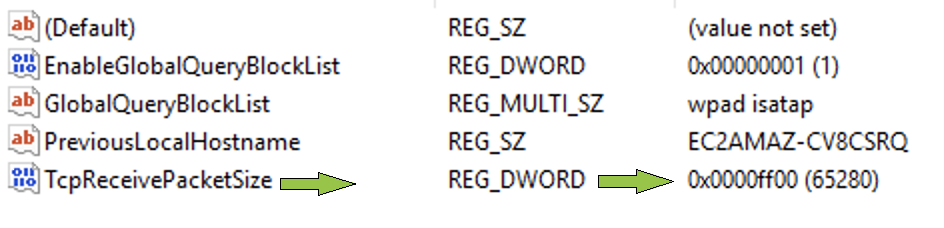
This can also be validated with the following Ansible Playbook. This will check the that the TcpReceivePacketSize value exists and is set to 0xff00.
---
- name: Validating mitigation of Microsoft CVE-2020-1350.
  hosts: all
  gather_facts: False

  tasks:

    - name: Checking status...
      win_reg_stat:
        path: HKLM:\SYSTEM\CurrentControlSet\Services\DNS\Parameters
        name: TcpReceivePacketSize
      register: current_value

    - name: Current value is
      debug:
        msg: "{{ current_value }}"
A successful mitigation will show the following:
TASK [Current value is] *****
ok: [13.57.x.x] => {
    "msg": {
        "changed": false,
        "exists": true,
        "failed": false,
        "raw_value": 65280,
        "type": "REG_DWORD",
        "value": 65280
    }
}
Takeaways and where to go next
Remediating vulnerabilities in network devices and servers is crucial, and in this blog we showed how Ansible can help with that given the current example of the “CVE-2020-1350 | Windows DNS Server Remote Code Execution Vulnerability”.
If you want to know more about the Ansible Automation Platform:
- Check out the Ansible Windows Documentation
- Check out our E-Books
- Sign up for updates to AnsibleFest 2020
*Red Hat provides no expressed support claims to the correctness of this code. All content is deemed unsupported unless otherwise specified
Sobre o autor

Mais como este
Agent-ready AI means token-ready strategy
Stop managing the past and start building IT’s future
Collaboration In Product Security | Compiler
Keeping Track Of Vulnerabilities With CVEs | Compiler
Navegue por canal

Automação
Últimas novidades em automação de TI para empresas de tecnologia, equipes e ambientes

Inteligência artificial
Descubra as atualizações nas plataformas que proporcionam aos clientes executar suas cargas de trabalho de IA em qualquer ambiente

Nuvem híbrida aberta
Veja como construímos um futuro mais flexível com a nuvem híbrida

Segurança
Veja as últimas novidades sobre como reduzimos riscos em ambientes e tecnologias

Edge computing
Saiba quais são as atualizações nas plataformas que simplificam as operações na borda

Infraestrutura
Saiba o que há de mais recente na plataforma Linux empresarial líder mundial

Aplicações
Conheça nossas soluções desenvolvidas para ajudar você a superar os desafios mais complexos de aplicações

Virtualização
O futuro da virtualização empresarial para suas cargas de trabalho on-premise ou na nuvem
