
When a server gets more traffic than it can handle, delays happen. If it's a web server, then the websites it hosts are slow to respond to user interactions. Services provided are inconsistent, and users could lose data or experience inconvenient interruptions. To prevent this, you can run a load balancer, which distributes traffic loads across several servers running duplicate services to prevent bottlenecks.
Load balancing is important for bare-metal servers and containers running on a Kubernetes cluster. The principle is the same, even though the implementation differs. On my hardware, I use the open source HAProxy.
Configuring HAProxy on a Linux server is quick and pays dividends in scalability, flexibility, efficiency, and reliability.
What is HAProxy?
HAProxy (short for High Availability Proxy) is a software-based TCP/HTTP load balancer. It sends client requests to multiple servers to evenly distribute incoming traffic.
By default, HAProxy uses port number 80. Incoming traffic communicates first with HAProxy, which serves as a reverse proxy and forwards requests to an available endpoint, as defined by the load balancing algorithm you've chosen.
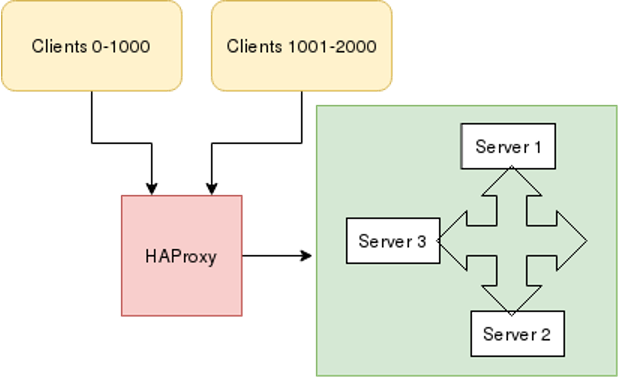
This article configures HAProxy for Fedora, CentOS, and RHEL machines. Similar implementations exist for other distributions.
[ Get an overview of Kubernetes storage and how it’s implemented in the eBook Storage Patterns for Kubernetes for Dummies. ]
Configure HAProxy
Suppose you host an Apache httpd server on three machines using the default port number 80 and HAProxy on another server. For testing, use different content in each web server's index.html so that you can tell them apart.
To configure HAProxy on the load balancing machine, first install the HAProxy package:
$ sudo dnf install haproxyWhen you configure HAProxy on any machine, that machine works as a load balancer that routes incoming traffic to one of your three web servers.
Once you've installed the HAProxy package on your machine, open /etc/haproxy/haproxy.conf in your favorite text editor:
frontend sample_httpd
   bind *:80
   mode tcp
   default_backend sample_httpd
   option tcplog
backend sample_httpd
   balance roundrobin
   mode tcp
   server master 192.168.122.104:80 check
   server node 192.168.122.64:80 check
   server server1 192.168.122.108:80 check
In this example, the frontend sample_httpd listens on port number 80, directing traffic to the default backend sample_httpd with mode tcp. In the backend section, the load balancing algorithm is set to roundrobin. There are several algorithms to choose from, including roundrobin, static-rr, leastconn, first, random, and many more. HAProxy documentation covers these algorithms, so for real-world uses, check to see what works best for your setup.
Finally, add the IP addresses of all three backend machines with a port number. The backend manages all requests.
Restart the HAProxy service after this configuration:
$ sudo systemctl restart haproxyBefore starting HAProxy, check the configuration for mistakes. For in-depth error checking, use these options:
$ sudo haproxy -c -f /etc/haproxy/haproxy.cfgFinally, use the curl command to contact the IP address of the HAProxy load balancing server:
$ curl 192.168.122.224
Hello from webserver2
$ curl 192.168.122.224
Hello from webserver3
$ curl 192.168.122.224
Hello from webserver1
As you can see, when the HAProxy server is contacted, it routes traffic to the three backend machines hosting httpd.
Load balancing is critical
Managing traffic on your servers is an important skill, and HAProxy is the ideal tool for the job. Load balancing increases reliability and performance while lowering user frustration. HAProxy is a simple, scalable, and effective way of load balancing among busy web servers.
Editor's note: Modified 1/3/2023 to clarify that HAProxy is not an Apache-sponsored project and to link to the open source community version.
Sobre o autor
Shiwani Biradar is an Associate Technical support Engineer in Red Hat. She loves contributing to open source projects and communities. Shiwani never stops exploring new technologies. If you don't find her exploring technologies then you will find her exploring food. She is familiar with Linux, Cloud, and DevOps tools and enjoys technical writing, watching TV series, and spending time with family.
Mais como este
Red Hat Enterprise Linux Long-Life Add-On
Como sua infraestrutura deve se conectar ao Red Hat Lightspeed?
Container Roundup | Compiler
Untangling Networks | Compiler
Navegue por canal

Automação
Últimas novidades em automação de TI para empresas de tecnologia, equipes e ambientes

Inteligência artificial
Descubra as atualizações nas plataformas que proporcionam aos clientes executar suas cargas de trabalho de IA em qualquer ambiente

Nuvem híbrida aberta
Veja como construímos um futuro mais flexível com a nuvem híbrida

Segurança
Veja as últimas novidades sobre como reduzimos riscos em ambientes e tecnologias

Edge computing
Saiba quais são as atualizações nas plataformas que simplificam as operações na borda

Infraestrutura
Saiba o que há de mais recente na plataforma Linux empresarial líder mundial

Aplicações
Conheça nossas soluções desenvolvidas para ajudar você a superar os desafios mais complexos de aplicações

Virtualização
O futuro da virtualização empresarial para suas cargas de trabalho on-premise ou na nuvem
