
Istio.io is an open platform that provides a uniform way to connect, manage, and secure microservices. This article describes installing and running on OpenShift (>=1.5 as of now) only. If you would like to know more theory I encourage you to read this post by @christianposta
Note that some of the permissions mentioned in this article may be more than what is needed. I plan to do further research and publish another article or comments on this post with accurate permissions in the future. For updates follow me on twitter @debianmaster
Run as Cluster Administrator on Master
oc login -u system:admin
Istio installation requires that you are the cluster-admin; you can use any cluster admin user for this purpose.
Choose a Namespace and Provide Permissions
oc project default

oc adm policy add-scc-to-user anyuid -z default

oc adm policy add-scc-to-user privileged -z default

oc patch scc/privileged --patch {\"allowedCapabilities\":[\"NET_ADMIN\"]}
NET_ADMIN privilege is needed for iptable NAT redirect chains updated by Istio.
Install Istio Service Mesh
git clone https://github.com/istio/istio

git checkout 0.1.5
Apply Necessary Permissions
oc adm policy add-cluster-role-to-user cluster-admin -z istio-manager-service-account

oc adm policy add-cluster-role-to-user cluster-admin -z istio-ingress-service-account

oc adm policy add-cluster-role-to-user cluster-admin -z default
oc adm policy add-scc-to-user anyuid -z istio-ingress-service-account
 oc adm policy add-scc-to-user privileged -z istio-ingress-service-account
oc adm policy add-scc-to-user anyuid -z istio-manager-service-account oc adm policy add-scc-to-user privileged -z istio-manager-service-account
Many permissions are needed currently, but this may change. Istio installation creates custom service accounts and they need privileges to be able to create ThirdPartyResources.
Deploying Istio
oc apply -f istio/install/kubernetes/istio.yaml
Install Addons
oc apply -f istio/install/kubernetes/addons/prometheus.yaml

oc apply -f istio/install/kubernetes/addons/grafana.yaml

oc apply -f istio/install/kubernetes/addons/servicegraph.yaml
Deploy Sample App
Install istioctl first
curl -L https://git.io/getIstio | sh -

export PATH="$PATH:/Users/YOUR_USERNAME/istio/istio-0.1.5/bin"
Note: Don't forget to replace with the appropriate value.
Deploy bookInfo App
oc apply -f <(istioctl kube-inject -f istio/samples/apps/bookinfo/bookinfo.yaml)
oc expose svc servicegrap
Test Service Mesh / Using Grafana Pod (or Another Pod)
$ export GRAFANA=$(oc get pods -l app=grafana -o jsonpath={.items[0].metadata.name})

$ oc exec $GRAFANA -- curl -o /dev/null -s -w "%{http_code}\n" http://istio-ingress/productpage

$ open http://$(oc get routes servicegraph -o jsonpath={.spec.host})/dotviz
Conclusion
You should see something like this at the end showing the service graph.
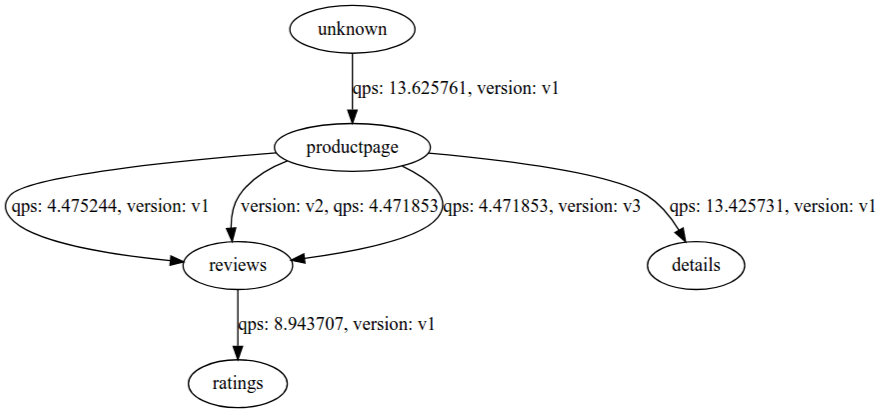
See it in action
Sobre o autor
Mais como este
Conheça o Red Hat Technical Supportability Review with AI
Modernize VMs no Google Cloud com o Red Hat OpenShift Virtualization
Scaling with Orchestrators | Compiler
SREs on a plane | Technically Speaking
Navegue por canal

Automação
Últimas novidades em automação de TI para empresas de tecnologia, equipes e ambientes

Inteligência artificial
Descubra as atualizações nas plataformas que proporcionam aos clientes executar suas cargas de trabalho de IA em qualquer ambiente

Nuvem híbrida aberta
Veja como construímos um futuro mais flexível com a nuvem híbrida

Segurança
Veja as últimas novidades sobre como reduzimos riscos em ambientes e tecnologias

Edge computing
Saiba quais são as atualizações nas plataformas que simplificam as operações na borda

Infraestrutura
Saiba o que há de mais recente na plataforma Linux empresarial líder mundial

Aplicações
Conheça nossas soluções desenvolvidas para ajudar você a superar os desafios mais complexos de aplicações

Virtualização
O futuro da virtualização empresarial para suas cargas de trabalho on-premise ou na nuvem
