Background
Today, Kubernetes has become one of the standards for container orchestration, and more organizations are deploying many more Kubernetes clusters. The organizations treat these clusters as disposable, which facilitates features like geo-redundancy, scale, and isolation for their applications. As one of the most popular service mesh solutions, Istio also provides multiple Deployment Models for how to deploy a single service mesh across multiple clusters, depending on the isolation, performance, and high availability requirements. If you take another look at these different deployment models, you will find that either Istio control plane (istiod) or kube-apiserver needs to be accessed from remote clusters. Besides, the microservices in the data plane that will need to be accessed across clusters also need to be exposed to remote clusters. Although an east-west gateway can be used to enable remote access, it can also increase the configuration difficulties as the deployment of microservices grows in size and complexity.
Submariner to the rescue
Submariner enables direct networking access between pods and services sitting in different Kubernetes clusters, either on-premises, in the cloud, or both. Submariner implements this direct access by facilitating a cross-cluster L3 connectivity using encrypted VPN tunnels. The Gateway Engines are used to manage the secure tunnels to other clusters. The Broker is used to manage the exchange of metadata between the Gateway Engines, enabling them to discover each other. Submariner also provides service discovery across clusters and support for interconnecting clusters with overlapping CIDRs by the Globalnet Controller.
The Submariner documentation site has a diagram of the Submariner architecture.
In the context of service-mesh and multicluster, using Submariner removes the need to manage the east-west gateways. Without the east-west gateways, the selected pod and services can be accessed directly. This direct access removes the burden on developers and mesh operators, which helps to scale beyond a few clusters.
In this blog, we will explain how you can use Submariner to set up an Istio Multi-Primary model across many Red Hat OpenShift clusters without east-west gateways and verify that the Istio multicluster installation is working correctly. The alternative approach would be to configure Istio in either a Primary-Remote, Multi-Primary-on-different-networks, or Primary-Remote-on-different-networks configuration, which would require the configuration and management of multiple east-west gateways.
Prerequisites
Before we begin an Istio multicluster installation, we need to prepare two Red Hat OpenShift clusters and deploy Submariner to connect the two clusters by following the procedure in the Submariner documentation. To make it simpler, we will create two clusters cluster1 and cluster2 with different IP CIDR ranges:
| Cluster | Pod CIDR | Service CIDR |
|---|---|---|
| cluster1 | 10.128.0.0/14 | 172.30.0.0/16 |
| cluster2 | 10.132.0.0/14 | 172.31.0.0/16 |
For the Submariner installation, we will use cluster1 as the broker and then join cluster1 and cluster2 to the broker. Remember to verify that Submariner is working correctly by using the subctl command:
export KUBECONFIG=cluster1/auth/kubeconfig:cluster2/auth/kubeconfig
subctl verify --kubecontexts cluster1,cluster2 --only service-discovery,connectivity --verbose
We also need to follow these instructions for configuring Istio on OpenShift to update security configurations for the two Red Hat OpenShift clusters before deploying Istio.
Configure trust for Istio
A multicluster service mesh deployment requires us to establish trust between all clusters in the mesh, which means we need to use a common root certificate to generate intermediate certificates for each cluster. Follow these instructions for configuring an Istio certificate authority to generate and push a CA certificate secret to both cluster1 and cluster2.
Install Istio Multi-Primary Multicluster Model
We are now ready to install an Istio mesh across multiple clusters.
We will start with the Istio Multi-Primary model, in which the Istio control plane is installed on both cluster1 and cluster2, making each of them a primary cluster.
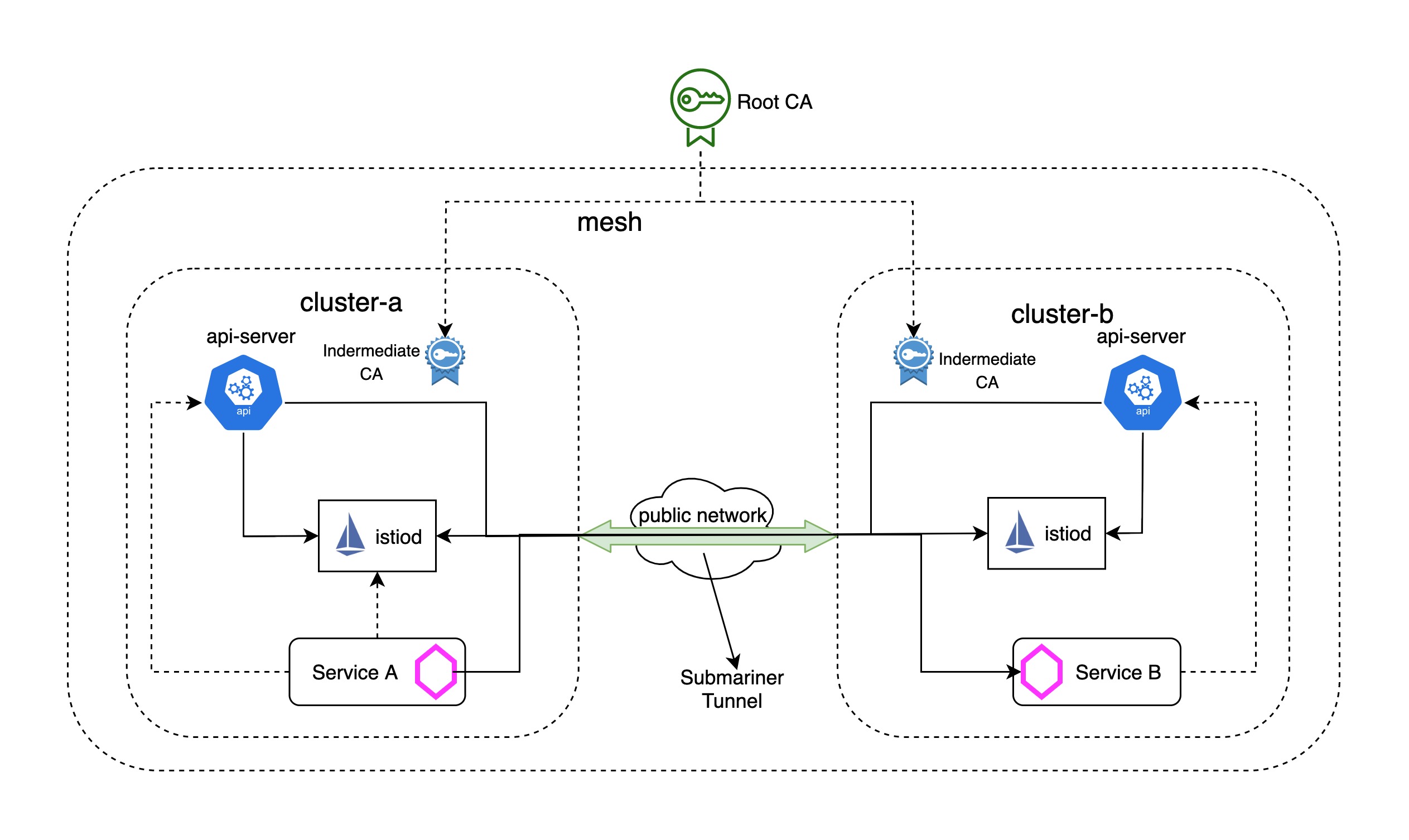
Both clusters reside on the network1 network, meaning there is direct connectivity between the pods in both clusters. The direct connectivity is achieved with Submariner. In this configuration, each control plane observes the API servers in both clusters for endpoints. Service workloads communicate directly (pod-to-pod) across cluster boundaries.
Configure
cluster1as a primary cluster:Create the following Istio configuration for
cluster1:cat <<EOF > cluster1.yaml apiVersion: install.istio.io/v1alpha1 kind: IstioOperator spec: components: cni: enabled: true namespace: kube-system values: global: meshID: mesh1 multiCluster: clusterName: cluster1 network: network1 cni: cniBinDir: /var/lib/cni/bin cniConfDir: /etc/cni/multus/net.d chained: false cniConfFileName: "istio-cni.conf" excludeNamespaces: - istio-system - kube-system logLevel: info sidecarInjectorWebhook: injectedAnnotations: k8s.v1.cni.cncf.io/networks: istio-cni EOFNote: Istio
cniis enabled in the configuration to remove theNET_ADMINandNET_RAWcapabilities for users deploying pods into the Istio mesh on Red Hat OpenShift clusters, see the documentation about Red Hat OpenShift in the Istio documentation for more details.Apply the configuration to
cluster1:istioctl install --kubeconfig=cluster1/auth/kubeconfig -f cluster1.yaml --skip-confirmationConfigure
cluster2as another primary cluster:Create the following Istio configuration for
cluster2:cat <<EOF > cluster2.yaml apiVersion: install.istio.io/v1alpha1 kind: IstioOperator spec: components: cni: enabled: true namespace: kube-system values: global: meshID: mesh1 multiCluster: clusterName: cluster2 network: network1 cni: cniBinDir: /var/lib/cni/bin cniConfDir: /etc/cni/multus/net.d chained: false cniConfFileName: "istio-cni.conf" excludeNamespaces: - istio-system - kube-system logLevel: info sidecarInjectorWebhook: injectedAnnotations: k8s.v1.cni.cncf.io/networks: istio-cni EOFThen apply the configuration to
cluster2:istioctl install --kubeconfig=cluster2/auth/kubeconfig -f cluster2.yaml --skip-confirmationEnable endpoint discovery from each cluster for Istio:
We need to make sure each API server can be accessed by the Istio control plane on the other cluster, so all of the endpoints can be discovered across clusters. Without API server access, the control plane will reject the requests to the endpoints on other clusters.
To provide API server access to
cluster1, we will generate a remote secret incluster2and apply it tocluster1by running the following command:istioctl x create-remote-secret --kubeconfig=cluster2/auth/kubeconfig --name=cluster2 | kubectl apply -f - --kubeconfig=cluster1/auth/kubeconfigNote: We should get an error because multiple secrets are found in the
serviceaccountistio-system/istio-reader-service-accountin the Red Hat OpenShift cluster. To workaround this, we simply need to get the correct secret name manually from thatserviceaccountand specify the secret name by running the--secret-nameforcreate-remote-secretcommand:ISTIO_READER_SRT_NAME=$(kubectl --kubeconfig=cluster2/auth/kubeconfig -n istio-system get serviceaccount/istio-reader-service-account -o jsonpath='{.secrets}' | jq -r '.[] | select(.name | test ("istio-reader-service-account-token-")).name') istioctl x create-remote-secret --kubeconfig=cluster2/auth/kubeconfig --name=cluster2 --secret-name $ISTIO_READER_SRT_NAME | kubectl apply -f - --kubeconfig=cluster1/auth/kubeconfigSimilarly, we will generate a remote secret in
cluster1and apply it tocluster2by running the following command:istioctl x create-remote-secret --kubeconfig=cluster1/auth/kubeconfig --name=cluster1 | kubectl apply -f - --kubeconfig=cluster2/auth/kubeconfig || true ISTIO_READER_SRT_NAME=$(kubectl --kubeconfig=cluster1/auth/kubeconfig -n istio-system get serviceaccount/istio-reader-service-account -o jsonpath='{.secrets}' | jq -r '.[] | select(.name | test ("istio-reader-service-account-token-")).name') istioctl x create-remote-secret --kubeconfig=cluster1/auth/kubeconfig --name=cluster1 --secret-name $ISTIO_READER_SRT_NAME | kubectl apply -f - --kubeconfig=cluster2/auth/kubeconfigVerify the
istio-ingressgatewaypods in each cluster are connected to theistiodof its own cluster:$ kubectl --kubeconfig=cluster1/auth/kubeconfig -n istio-system get pod -l app=istio-ingressgateway NAME READY STATUS RESTARTS AGE istio-ingressgateway-5698ff4d77-wwz8c 1/1 Running 0 1m42s $ kubectl --kubeconfig=cluster2/auth/kubeconfig -n istio-system get pod -l app=istio-ingressgateway NAME READY STATUS RESTARTS AGE istio-ingressgateway-565bd54476-jb84z 1/1 Running 0 1m39s $ istioctl --kubeconfig=cluster1/auth/kubeconfig proxy-status NAME CDS LDS EDS RDS ISTIOD VERSION istio-ingressgateway-5698ff4d77-wwz8c.istio-system SYNCED SYNCED SYNCED NOT SENT istiod-c6965799f-cjct2 1.10.0 $ istioctl --kubeconfig=cluster2/auth/kubeconfig proxy-status NAME CDS LDS EDS RDS ISTIOD VERSION istio-ingressgateway-565bd54476-jb84z.istio-system SYNCED SYNCED SYNCED NOT SENT istiod-6765d8c666-mlcrc 1.10.0Verify the installation:
Follow the instructions to Verify the installation to verify that the Istio multicluster installation is working properly.
Make sure the application pods are connected to the
istiodin their own primary cluster:$ istioctl --kubeconfig=cluster1/auth/kubeconfig proxy-status NAME CDS LDS EDS RDS ISTIOD VERSION helloworld-v1-776f57d5f6-mwq9j.sample SYNCED SYNCED SYNCED SYNCED istiod-c6965799f-cjct2 1.10.0 istio-ingressgateway-5698ff4d77-wwz8c.istio-system SYNCED SYNCED SYNCED NOT SENT istiod-c6965799f-cjct2 1.10.0 sleep-557747455f-jh2p2.sample SYNCED SYNCED SYNCED SYNCED istiod-c6965799f-cjct2 1.10.0 $ istioctl --kubeconfig=cluster2/auth/kubeconfig proxy-status NAME CDS LDS EDS RDS ISTIOD VERSION helloworld-v2-54df5f84b-7prhg.sample SYNCED SYNCED SYNCED SYNCED istiod-6765d8c666-mlcrc 1.10.0 istio-ingressgateway-565bd54476-jb84z.istio-system SYNCED SYNCED SYNCED NOT SENT istiod-6765d8c666-mlcrc 1.10.0 sleep-557747455f-q5n8g.sample SYNCED SYNCED SYNCED SYNCED istiod-6765d8c666-mlcrc 1.10.0Verify that cross-cluster load balancing works as expected by calling the
HelloWorldservice several times from theSleeppod:$ kubectl exec --kubeconfig=cluster1/auth/kubeconfig -n sample -c sleep "$(kubectl get pod --kubeconfig=cluster1/auth/kubeconfig -n sample -l app=sleep -o jsonpath='{.items[0].metadata.name}')" -- curl -sS helloworld.sample:5000/hello Hello version: v1, instance: helloworld-v1-776f57d5f6-mwq9j $ kubectl exec --kubeconfig=cluster1/auth/kubeconfig -n sample -c sleep "$(kubectl get pod --kubeconfig=cluster1/auth/kubeconfig -n sample -l app=sleep -o jsonpath='{.items[0].metadata.name}')" -- curl -sS helloworld.sample:5000/hello Hello version: v2, instance: helloworld-v2-54df5f84b-7prhgVerify the request routing is working as expected by creating the follow
destinationrulesandvirtualservices:cat << EOF | kubectl --kubeconfig=cluster1/auth/kubeconfig -n sample apply -f - apiVersion: networking.istio.io/v1alpha3 kind: DestinationRule metadata: name: helloworld spec: host: helloworld subsets: - name: v1 labels: version: v1 - name: v2 labels: version: v2 --- apiVersion: networking.istio.io/v1alpha3 kind: VirtualService metadata: name: helloworld spec: hosts: - helloworld http: - route: - destination: host: helloworld subset: v2 EOFCall the
HelloWorldservice several times using theSleeppod:$ kubectl exec --kubeconfig=cluster1/auth/kubeconfig -n sample -c sleep "$(kubectl get pod --kubeconfig=cluster1/auth/kubeconfig -n sample -l app=sleep -o jsonpath='{.items[0].metadata.name}')" -- curl -sS helloworld.sample:5000/hello Hello version: v2, instance: helloworld-v2-54df5f84b-7prhg $ kubectl exec --kubeconfig=cluster1/auth/kubeconfig -n sample -c sleep "$(kubectl get pod --kubeconfig=cluster1/auth/kubeconfig -n sample -l app=sleep -o jsonpath='{.items[0].metadata.name}')" -- curl -sS helloworld.sample:5000/hello Hello version: v2, instance: helloworld-v2-54df5f84b-7prhg $ kubectl exec --kubeconfig=cluster1/auth/kubeconfig -n sample -c sleep "$(kubectl get pod --kubeconfig=cluster1/auth/kubeconfig -n sample -l app=sleep -o jsonpath='{.items[0].metadata.name}')" -- curl -sS helloworld.sample:5000/hello Hello version: v2, instance: helloworld-v2-54df5f84b-7prhg
Summary
Submariner simplifies the setup of Istio service mesh across multiple clusters by bringing everything under a simple single model.
Sobre los autores


Simon Delord is a Solution Architect at Red Hat. He works with enterprises on their container/Kubernetes practices and driving business value from open source technology. The majority of his time is spent on introducing OpenShift Container Platform (OCP) to teams and helping break down silos to create cultures of collaboration.Prior to Red Hat, Simon worked with many Telco carriers and vendors in Europe and APAC specializing in networking, data-centres and hybrid cloud architectures.Simon is also a regular speaker at public conferences and has co-authored multiple RFCs in the IETF and other standard bodies.
Más como éste
La paradoja agéntica y los argumentos a favor de la IA híbrida
Deja de administrar el pasado y comienza a forjar el futuro de TI
Command Line Heroes en español. Temporada 1: El Derby de los Containers
Command Line Heroes en español. Temporada 1: Descifrando el código de la nube abierta
Navegar por canal

Automatización
Las últimas novedades en la automatización de la TI para los equipos, la tecnología y los entornos

Inteligencia artificial
Descubra las actualizaciones en las plataformas que permiten a los clientes ejecutar cargas de trabajo de inteligecia artificial en cualquier lugar

Nube híbrida abierta
Vea como construimos un futuro flexible con la nube híbrida

Seguridad
Vea las últimas novedades sobre cómo reducimos los riesgos en entornos y tecnologías

Edge computing
Conozca las actualizaciones en las plataformas que simplifican las operaciones en el edge

Infraestructura
Vea las últimas novedades sobre la plataforma Linux empresarial líder en el mundo

Aplicaciones
Conozca nuestras soluciones para abordar los desafíos más complejos de las aplicaciones

Virtualización
El futuro de la virtualización empresarial para tus cargas de trabajo locales o en la nube
