
This post was written by Christian Hernandez, Solution Architect of the OpenShift Tiger Team.
OpenShift can integrate with underlying infrastructure, enabling OpenShift to dynamically interact with the infrastructure and extend its functionality.
Specifically, this can allow us to set up OpenShift to process a PersistentVolumeClaim and then allocate that storage dynamically.
I am going to cover what is needed to get started with dynamically provisioning storage:
- Cloud Providers (in this example; AWS)
- StorageClasses
- Default StorageClass
Cloud Providers
Using a configured cloud provider such as AWS, you can setup/install OpenShift with the ability to access AWS services. This can be done at install or after the fact.
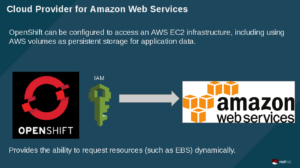
In short, OpenShift uses the defined IAM account to interact with AWS and make requests for resources. In the example that follows, OpenShift will be using this account to request a new EBS volume.
I setup the cloud provider on install. If done correctly, you'll see this on your masters/nodes
[root@master ~]# cat /etc/origin/cloudprovider/aws.conf

[Global]

Zone = us-west-1b
StorageClasses
In OpenShift, you are able to define a StorageClass. This lets administrators define different classes of storage that map to backend EBS volumes. Also, this mechanism helps in managing tiered storage.
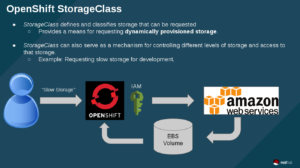
In the above image, the user requests "slow storage" (which is a storage category set up by an OpenShift admin), then OpenShift uses the IAM account to request EBS storage to be created. Finally AWS creates the storage and OpenShift binds the claim to the backend volume.
Default StorageClass
Administrators can also set up a "default" StorageClass. This is useful when a user doesn't request a particular kind of storage or when using a template that needs a persistent storage volume.
 The workflow here is the same as before - except here OpenShift says "since no StorageClass was defined; I'm just going to use the default class". The rest of the workflow is the same.
NOTE: Keep in mind that by default, requesting storage is unrestricted, so you may want to set up quotas for your projects.
Example
I have an OpenShift cluster setup with the AWS cloud-provider plugin.
This means that anytime a user requests storage; I will have to manually create a persistentVolume. I can create a storageClass that will automatically create the requested storage (if the request comes in with the same name)
Here I am creating a storage system called "aws-ebs-slow":
Now, the user can request storage by name "aws-ebs-slow:
Now when I check my PersistentVolumeClaim I should see a "Bound" status. This means I can go ahead and use it and attach it to my application:
Adding the volume to my application will trigger a new deployment (thus giving me a new pod with the mounted filesystem). Here you can see that uploader-2-5tmkh is the name of my new pod and that a new EBS volume was attached as /dev/xvdbe:
So what about those times when someone uses a template, 'just wants storage', or just doesn't specify the class of storage? Easy! We just set up a default storageClass by annotating it:
storageclass.beta.kubernetes.io/is-default-class: "true"
Now we can fire off an application that requires storage (e.g. rocketchat's MongoDB instance) and OpenShift will take the storage claim and provision an EBS volume based on the defined parameters of the default StorageClass. Cool!
As you can see storage was dynamically requested and provisioned without the need of a pv or a pvc.
NOTE: For those who are wondering; RocketChat templates can be found here.
Conclusion
In this blog, we explored how to dynamically allocate storage and how you can provide tiered storage. Also, we went through how to set up default tiers and went through an example on how to automatically attach storage.
Sobre el autor
Christian is a well-rounded technologist with experience in infrastructure engineering, system administration, enterprise architecture, tech support, advocacy, and product management. He is passionate about open source and containerizing the world one application at a time. He is currently a maintainer of the OpenGitOps project, a maintainer of the Argo project, and works as a Technical Marketing Engineer and Tech Lead at Cisco. He focuses on GitOps practices, DevOps, Kubernetes, network security, and containers.
Más como éste
La paradoja agéntica y los argumentos a favor de la IA híbrida
Deja de administrar el pasado y comienza a forjar el futuro de TI
Command Line Heroes en español. Temporada 1: Descifrando el código de la nube abierta
Edge computing covered and diced | Technically Speaking
Navegar por canal

Automatización
Las últimas novedades en la automatización de la TI para los equipos, la tecnología y los entornos

Inteligencia artificial
Descubra las actualizaciones en las plataformas que permiten a los clientes ejecutar cargas de trabajo de inteligecia artificial en cualquier lugar

Nube híbrida abierta
Vea como construimos un futuro flexible con la nube híbrida

Seguridad
Vea las últimas novedades sobre cómo reducimos los riesgos en entornos y tecnologías

Edge computing
Conozca las actualizaciones en las plataformas que simplifican las operaciones en el edge

Infraestructura
Vea las últimas novedades sobre la plataforma Linux empresarial líder en el mundo

Aplicaciones
Conozca nuestras soluciones para abordar los desafíos más complejos de las aplicaciones

Virtualización
El futuro de la virtualización empresarial para tus cargas de trabajo locales o en la nube
