Management of secrets via ArgoCD requires extra configuration, unlike FluxCD, which features seamless integration. However, ArgoCD allows for the ability to integrate using many popular tools of the GitOps community. For more information on the variety of tools available and the mechanics behind them, I highly recommend reading this blog post by Jann Fischer and Raffaele Spazzoli.
This article will explore how to integrate Mozilla SOPS with Openshift Gitops Operator using the Kustomize plugin known as KSOPS. For the encryption of the file, we will use the Age tool, which the SOPS documentation recommends over PGP.
What is KSOPS?
KSOPS, or kustomize-SOPS, is a kustomize plugin for managing SOPS-encrypted resources. KSOPS can be used to decrypt any Kubernetes resource, but it is most commonly used to decrypt Kubernetes Secrets and ConfigMaps. The primary goal of KSOPS is to manage encrypted resources the same way we manage the Kubernetes manifests.
Requirements for getting started:
1. OpenShift 4 cluster
4. SOPS CLI
Install GitOps Operator
Follow the OpenShift Gitops Operator Installation guide for instructions. Verify that all the pods in the openshift-gitops namespace are running:
$ oc get pods -n openshift-gitops

Example output

NAME                                                              READY   STATUS        RESTARTS   AGE
cluster-b5798d6f9-zr576                                           1/1         Running   0              65m
kam-69866d7c48-8nsjv                                              1/1         Running   0              65m
openshift-gitops-application-controller-0                         1/1         Running   0              53m
openshift-gitops-applicationset-controller-6447b8dfdd-5ckgh 1/1         Running   0              65m
openshift-gitops-redis-74bd8d7d96-49bjf                           1/1         Running   0              65m
openshift-gitops-repo-server-c999f75d5-l4rsg                      1/1         Running   0              65m
openshift-gitops-server-5785f7668b-wj57t                          1/1         Running   0              53m
Generate Age Key
Install the Age tool and run the below command to generate a new key:
$ age-keygen -o age.agekey
Public key: age1helqcqsh9464r8chnwc2fzj8uv7vr5ntnsft0tn45v2xtz0hpfwq98cmsg
OpenShift Secret
The next step is to create a secret in the “openshift-gitops” project:
cat age.agekey | oc create secret generic sops-age --namespace=openshift-gitops \
--from-file=key.txt=/dev/stdin
Now, we are ready to update the ArgoCD custom resource to enable custom tooling.
ArgoCD with Custom Tooling
Navigate to the ArgoCD link under the Red Hat OpenShift GitOps operator and Edit the object.

Update the repo server options for ArgoCD as shown below. With the configuration below, we are:
- Creating a new initContainer and installing KSOPS under custom-tools
- Mounting the age private key to decrypt secrets
repo:
  env:
   - name: XDG_CONFIG_HOME
     value: /.config
   - name: SOPS_AGE_KEY_FILE
     value: /.config/sops/age/keys.txt
  volumes:
   - name: custom-tools
     emptyDir: {}
   - name: sops-age
     secret:
       secretName: sops-age
  initContainers:
   - name: install-ksops
     image: viaductoss/ksops:v3.0.2
     command: ["/bin/sh", "-c"]
     args:
     - 'echo "Installing KSOPS..."; cp ksops /custom-tools/; cp $GOPATH/bin/kustomize /custom-tools/; echo "Done.";'
     volumeMounts:
       - mountPath: /custom-tools
         name: custom-tools
  volumeMounts:
   - mountPath: /usr/local/bin/kustomize
     name: custom-tools
     subPath: kustomize
   - mountPath: /.config/kustomize/plugin/viaduct.ai/v1/ksops/ksops
     name: custom-tools
     subPath: ksops
   - mountPath: /.config/sops/age/keys.txt
     name: sops-age
     subPath: keys.txt
Once saved, you should see openshift-gitops-repo-server pod is recreated.
Now, we are ready to test our changes:
1. Configure SOPS via .sops.yaml
For this example and testing, KSOPS relies on the SOPS creation rules defined in .sops.yaml. To make encrypted secrets more readable, it is suggested to use the following encryption regex to only encrypt data and stringData values. This leaves non-sensitive fields, like the secret's name, unencrypted and human-readable.
cat <<EOF > .sops.yaml
creation_rules:
  - path_regex: apps/.*\.sops\.ya?ml
    encrypted_regex: "^(data|stringData)$"
    age: age1helqcqsh9464r8chnwc2fzj8uv7vr5ntnsft0tn45v2xtz0hpfwq98cmsg
EOF
2. Create a local Kubernetes Secret:
cat <<EOF > secret.sops.yaml
apiVersion: v1
kind: Secret
metadata:
  name: mysecret
type: Opaque
data:
  username: YWRtaW4=
  password: MWYyZDFlMmU2N2Rm
EOF
3. Encrypt with SOPS CLI:
sops --encrypt --in-place secret.sops.yaml
4. Define KSOPS kustomize Generator:
cat <<EOF > secret-generator.yaml
apiVersion: viaduct.ai/v1
kind: ksops
metadata:
  # Specify a name
  name: example-secret-generator
files:
  - ./secret.sops.yaml
EOF
5. Create the kustomization.yaml and Push all the changes to the Git repository. Read about kustomize plugins:
cat <<EOF > kustomization.yaml
generators:
  - ./secret-generator.yaml
EOF
6. Create a new Argo application from the Argo console using your repository.

7. Argo will fetch the latest commit and apply the changes.
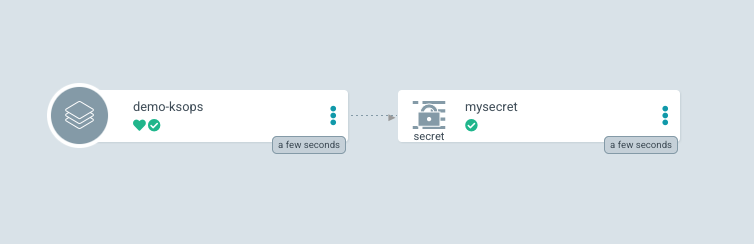
8. Verify the applied changes in the OpenShift console.

Conclusion
In summary, SOPS is an effective tool for securely managing secret information and integrated with ArgoCD it provides a seamless way to manage secrets the same way we manage the rest of the Kubernetes manifests.
저자 소개

유사한 검색 결과
When AI finds the bugs: Why defense in depth was always the answer
CVE-2026-31431: How Red Hat Advanced Cluster Security and Red Hat Advanced Cluster Management can help
Collaboration In Product Security | Compiler
Keeping Track Of Vulnerabilities With CVEs | Compiler
채널별 검색

오토메이션
기술, 팀, 인프라를 위한 IT 자동화 최신 동향

인공지능
고객이 어디서나 AI 워크로드를 실행할 수 있도록 지원하는 플랫폼 업데이트

오픈 하이브리드 클라우드
하이브리드 클라우드로 더욱 유연한 미래를 구축하는 방법을 알아보세요

보안
환경과 기술 전반에 걸쳐 리스크를 감소하는 방법에 대한 최신 정보

엣지 컴퓨팅
엣지에서의 운영을 단순화하는 플랫폼 업데이트

인프라
세계적으로 인정받은 기업용 Linux 플랫폼에 대한 최신 정보

애플리케이션
복잡한 애플리케이션에 대한 솔루션 더 보기

가상화
온프레미스와 클라우드 환경에서 워크로드를 유연하게 운영하기 위한 엔터프라이즈 가상화의 미래
