

GitOps is the declarative approach to application and platform operations expanding on the idea of Infrastructure as Code (IaC) with focus on Git-based workflows. OpenShift GitOps based on Argo CD is widely adopted on OpenShift for application continuous delivery as well as configuring the fleet of clusters based on the configurations that are available in a set of Git repositories. Nevertheless, using Argo CD on OpenShift requires the cluster to be provisioned and ready in order to then install Argo CD and apply the rest of cluster configurations and application deployments on top. Therefore, many cluster admins have been asking how to reduce the steps required for this purpose and go from no cluster to an OpenShift cluster that is installed and brought up to a baseline configuration with apps deployed on top in accordance to the declared configuration in a Git repository. In this blog post, we will be examining this subject and explore two ways that an admin can go from zero to a baseline OpenShift cluster using the GitOps workflow.
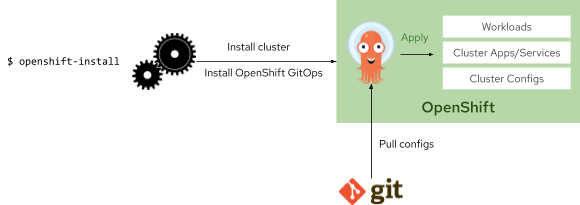 Using OpenShift Installer
The OpenShift Installer is an interactive CLI that automatically provisions cloud infrastructure on a wide number of cloud providers and then installs OpenShift Container Platform on the given cloud provider. The OpenShift Installer allows admins to declaratively define various aspects of the cluster to be installed such as the cloud provider, region, instance/machine types, networking, etc.
In addition to customizing the installation process and the underlying aspects of the OpenShift cluster, the OpenShift Installer also allows applying arbitrary resources to the cluster during the installation. This capability could be used to install the OpenShift GitOps operator and bootstrap Argo CD in order to further configure the cluster based on the declarative configurations that are available in a Git repository.
In order to take advantage of the OpenShift Installer for GitOps bootstrapping, run the following command to generate the declarative manifests that will be used during the cluster installation:
$ openshift-install create manifests –dir mycluster
The OpenShift Installer generates the declarative manifests that govern the cloud provider infrastructure for installing the cluster and the cluster infrastructure configurations.
In order to install OpenShift GitOps operator, a subscription resource is needed to be added to the manifests directory which would instruct Operator Lifecycle Manager (OLM) to install the operator when it is ready.
It’s worth noting that the OpenShift installer would apply any manifest that is in the manifests directory however as this mechanism is designed for customizations of platform operators, the use of this directory of installing non-platform operators (e.g. OpenShift GitOps) is out of the scope of the support for installer. Red Hat is working to make OpenShift composable in the upcoming releases of OpenShift Container Platform in order to give the admins the ability to include or exclude platform and non-platform (OLM) operators as part of the installation process.
cat << EOF > mycluster/manifests/gitops-subscription.yaml
apiVersion: operators.coreos.com/v1alpha1
kind: Subscription
metadata:
  name: openshift-gitops-operator
  namespace: openshift-operators
spec:
  channel: stable
  name: openshift-gitops-operator
  source: redhat-operators
  sourceNamespace: openshift-marketplace
EOF
Once the operator is installed, it deploys a default Argo CD instance which can be used for bootstrapping the cluster by adding an Argo CD application resource to the cluster and referring the Git repository that contains the cluster, services and workload configurations:
cat << EOF > mycluster/manifests/gitops-argocd-app.yaml
apiVersion: argoproj.io/v1alpha1
kind: Application
metadata:
  name: cluster
  namespace: openshift-gitops
spec:
  destination:
    namespace: default
    server: https://kubernetes.default.svc
  project: default
  source:
    path: cluster/console
    repoURL: https://github.com/siamaksade/openshift-gitops-getting-started
    targetRevision: "1.1"
  syncPolicy:
    automated:
      selfHeal: true
It’s worth mentioning that the default Argo CD instance does not have cluster-admin privileges for enhanced security. Therefore if needed, additional rolebindings should be added to the manifests directory in the same manner as above to adjust Argo CD privileges to your requirements.
Once the GitOps bootstrapping resources are added to the manifests directory, the OpenShift installation CLI can execute to provisioning the cloud infrastructure, install OpenShift on the cloud infrastructure and then bootstrap Argo CD in order to bring the cluster up the baseline configuration specified in the referenced Git repository:
$ openshift-install create cluster --dir=sm4
The referenced Git repository could contain additional Argo CD resources and use ApplicationSets in order to bootstrap additional Argo CD instances (e.g. namespace-scoped for dev teams) and deploy cluster services (e.g. Splunk) as well as workloads on the cluster.
The outcome is that once the cluster is installed, OpenShift GitOps operator would get installed on that cluster and would bootstrap Argo CD in order to pull the cluster configurations, cluster services and workloads into the cluster from the provided Git repository.
Using Red Hat Advanced Cluster Management (pull)
Red Hat Advanced Cluster Management for Kubernetes (RHACM), included in Red Hat OpenShift Platform Plus, provides end-to-end visibility and control to manage Kubernetes clusters. In addition to the ability to import or create clusters, RHACM provides a declarative API for defining the OpenShift cluster specification which then would be provisioned on the specified infrastructure (public cloud, on-premises and bare-metal.
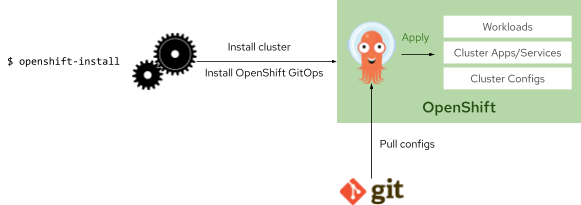 You can follow these steps in the RHACM docs to create a cluster from the RHACM dashboard. Alternatively, create a cluster using the declarative approach through adding a ClusterClaim resource to the RHACM management cluster (via OpenShift GitOps) which would then kick-off cluster provisioning and result in an OpenShift cluster created based on the specifications of the of a cluster pool (template).
apiVersion: hive.openshift.io/v1
kind: ClusterClaim
metadata:
  name: mycluster
  namespace: mypools
  labels:
    usage: production
spec:
  clusterPoolName: aws-east
While you can individually build clusters using ClusterDeployment and InstallConfig secrets, using a ClusterPool of size 0, is an easy to understand approach, that embraces both templating and a straightforward GitOps integration. By setting the ClusterPool size to 0, no resources are used, until the clusterClaim (for a new cluster) is created. The ClusterPool is pre-created by the Cluster Administrator, and can be customized in numerous ways(instructions for creating cluster pools). This allows provisioning of clusters by committing the ClusterClaim to a Git repository being serviced by OpenShift GitOps. This allows for an easy GitOps flow, where understanding and approving the provisioning of clusters using Git merge and review request, becomes an easy to understand task (you are just approving a template).
Once the cluster is up and ready, the policy management capabilities of RHACM could be taken advantage of to install and configure the OpenShift GitOps operator on the provisioned cluster. The following is an example policy that installs OpenShift GitOps operator and bootstraps the default Argo CD instance installed by the operator to pull cluster configurations from a Git repository.
apiVersion: policy.open-cluster-management.io/v1
kind: Policy
metadata:
  annotations:
    policy.open-cluster-management.io/categories: CM Configuration Management
    policy.open-cluster-management.io/controls: CM-2 Baseline Configuration
    policy.open-cluster-management.io/standards: NIST SP 800-53
  name: gitops-operator
  namespace: policies
spec:
  disabled: false
  policy-templates:
  - objectDefinition:
      apiVersion: policy.open-cluster-management.io/v1
      kind: ConfigurationPolicy
      metadata:
        name: gitops-operator
      spec:
        object-templates:
        - complianceType: musthave
          objectDefinition:
            apiVersion: operators.coreos.com/v1alpha1
            kind: Subscription
            metadata:
              name: openshift-gitops-operator
              namespace: openshift-operators
            spec:
              channel: stable
              name: openshift-gitops-operator
              source: redhat-operators
              sourceNamespace: openshift-marketplace
        - complianceType: musthave
          objectDefinition:
            apiVersion: argoproj.io/v1alpha1
            kind: Application
            metadata:
              name: cluster
              namespace: openshift-gitops
            spec:
              destination:
                namespace: default
                server: https://kubernetes.default.svc
              project: default
              source:
                path: cluster/console
                repoURL: https://github.com/siamaksade/openshift-gitops-getting-started
                targetRevision: "1.1"
              syncPolicy:
                automated:
                  selfHeal: true
        remediationAction: enforce
        severity: low
In order to apply the above policy to the provisioned cluster, a placement rule and placement binding needs to be created in RHACM which would describe the intention of applying this policy to the cluster and result in the installation of the OpenShift GitOps operator and bootstrapping the default Argo CD instance on that cluster to pull the cluster configurations, cluster services and workloads into the cluster from the provided Git repository.
RHACM will discover and display your OpenShift GitOps applications, whether they were deployed using Argo CD on the RHACM cluster, or the OpenShift GitOps operator on the managed clusters in your fleet. RHACM also provides an ApplicationSet wizard, in its console, to easily build Argo CD Applications that target different clusters in your fleet using placement.
저자 소개
Siamak Sadeghianfar is a member of the Hybrid Cloud product management team at Red Hat leading the cloud-native application build and delivery on OpenShift.
유사한 검색 결과
Red Hat 파트너가 최고의 통신 비즈니스 자산인 이유
에이전틱 패러독스와 하이브리드 AI의 필요성
Building A Common Language | Compiler: Stack/Unstuck
Edge computing covered and diced | Technically Speaking
채널별 검색

오토메이션
기술, 팀, 인프라를 위한 IT 자동화 최신 동향

인공지능
고객이 어디서나 AI 워크로드를 실행할 수 있도록 지원하는 플랫폼 업데이트

오픈 하이브리드 클라우드
하이브리드 클라우드로 더욱 유연한 미래를 구축하는 방법을 알아보세요

보안
환경과 기술 전반에 걸쳐 리스크를 감소하는 방법에 대한 최신 정보

엣지 컴퓨팅
엣지에서의 운영을 단순화하는 플랫폼 업데이트

인프라
세계적으로 인정받은 기업용 Linux 플랫폼에 대한 최신 정보

애플리케이션
복잡한 애플리케이션에 대한 솔루션 더 보기

가상화
온프레미스와 클라우드 환경에서 워크로드를 유연하게 운영하기 위한 엔터프라이즈 가상화의 미래
