
A simple example - No Shut, No Problem
Since the announcement of Event-Driven Ansible, I cannot stop thinking about potential use cases. Can I get events to automate scaling? Could I use a filesystem event to trigger filesystem integrity checks? Could I get a slackbot to trigger my choice of heavy metal playlist based on a “mood” event? It's all possible! But let’s not go too crazy, not yet.
I started having a look at the fantastic work that one of our engineers, Nilashish Chakraborty has been doing around network telemetry and Ansible. This led me down the path to explore network events and what I could potentially do with something like Event-Driven Ansible. So let’s start with a super simple interface example.
Reaching out to the team at Arista, we started discussing and looking at the mechanisms they are using to get telemetry data. With Arista we are able to use gNMI, gNMI is an open source protocol specification created by the OpenConfig working group that is used to stream data to and from network devices. The OpenConfig working group operates as an open source project with contributions from network operators, equipment vendors in providing vendor-neutral software to manage network devices. I configured gNMI on my Arista switches and queried the interface with the gNMI client on my machine to make sure I was able to get what I needed.
…
! Command: show running-config
! device: arista01 (vEOS-lab, EOS-4.29.0.2F)
…

!
management api gnmi
   transport grpc default
   !
   transport grpc eos
   provider eos-native
!
…
Running configuration on Arista EOS
With my switches configured to allow gNMI, I used my gNMIc client on my machine to test a subscription for events.
Term> gnmic -a 192.168.11.5:6030 -u admin -p ansibleIScool --insecure subscribe --path \
  "/interfaces/interface[name=Ethernet1]/state/admin-status"
This allows us to connect and view the telemetry data that's being streamed. I subscribed just to the admin-status of the ethernet port; however, you could subscribe to whatever data is relevant to you.
{
  "source": "192.168.11.5:6030",
  "subscription-name": "default-1670407121",
  "timestamp": 1670402814238747205,
  "time": "2022-12-07T10:46:54.238747205+02:00",
  "updates": [
    {
      "Path": "interfaces/interface[name=Ethernet1]/state/admin-status",
      "values": {
        "interfaces/interface/state/admin-status": "UP"
      }
    }
  ]
}
Output from gnmic command
Note: If you are not aware of what capabilities are available for you on your chosen platform, you can also use the gNMIc client to check this:
Term> gnmic -a 192.168.11.5:6030 -u admin -p ansibleIScool --insecure capabilities
gNMI version: 0.7.0
supported models:
  - openconfig-keychain-types, OpenConfig working group, 0.2.0
  - arista-sampling-notsupported-deviations, Arista Networks, Inc.,
  - openconfig-openflow-types, OpenConfig working group, 0.2.0
…
Now that we have this streaming, we need to get this data to some kind of event source that we can use with Event-Driven Ansible. I decided I would like to use Kafka for this and I would use Telegraf to consume the telemetry data and send it to Kafka as an output.

I configured Telegraf to connect to the gNMI and forward the telemetry to my Kafka topic:
…
  [[inputs.gnmi.subscription]]
    name = "Ethernet1"
    origin = "openconfig"
    subscription_mode = "sample"
    path = "/interfaces/interface[name=Ethernet1]/state/admin-status"
    sample_interval = "2s"
…
[outputs.kafka]
    brokers = ["192.168.11.49:9092"]
    topic = "network"
…
If we have a look at my Kafka topic, and see what messages are coming in we can see that we are receiving the desired information:
… <on my Kafka System>

[kafka ~]# /opt/kafka/bin/kafka-console-consumer.sh --topic network --from-beginning --bootstrap-server localhost:9092
…

{"fields":{"admin_status":"UP"},"name":"Ethernet1","tags":{"host":"influx.prometheus.io","name":"Ethernet1","path":"","source":"192.168.11.5"},"timestamp":1670440660}

{"fields":{"admin_status":"UP"},"name":"Ethernet1","tags":{"host":"influx.prometheus.io","name":"Ethernet1","path":"","source":"192.168.11.5"},"timestamp":1670440660}

{"fields":{"admin_status":"UP"},"name":"Ethernet1","tags":{"host":"influx.prometheus.io","name":"Ethernet1","path":"","source":"192.168.11.5"},"timestamp":1670440660}

…
With these events in Kafka, I can now create my Ansible Rulebook and trigger remediation for the desired steps to respond to this. I can run ansible-rulebook and we can see how it triggers based on the admin_status of the port.
---

- name: Port State Event from Arista

  hosts: all

  sources:
   - ansible.eda.kafka:
       host: 192.168.11.49
       port: 9092
       topic: network

  rules:
   - name: Test
     condition: event.fields.admin_status == "DOWN"
     action:
       run_playbook:
        name: bring-her-up.yml
Port-Status Rulebook
[localhost]$ ansible-rulebook --rulebook port_status.yml -i inventory.yaml --verbose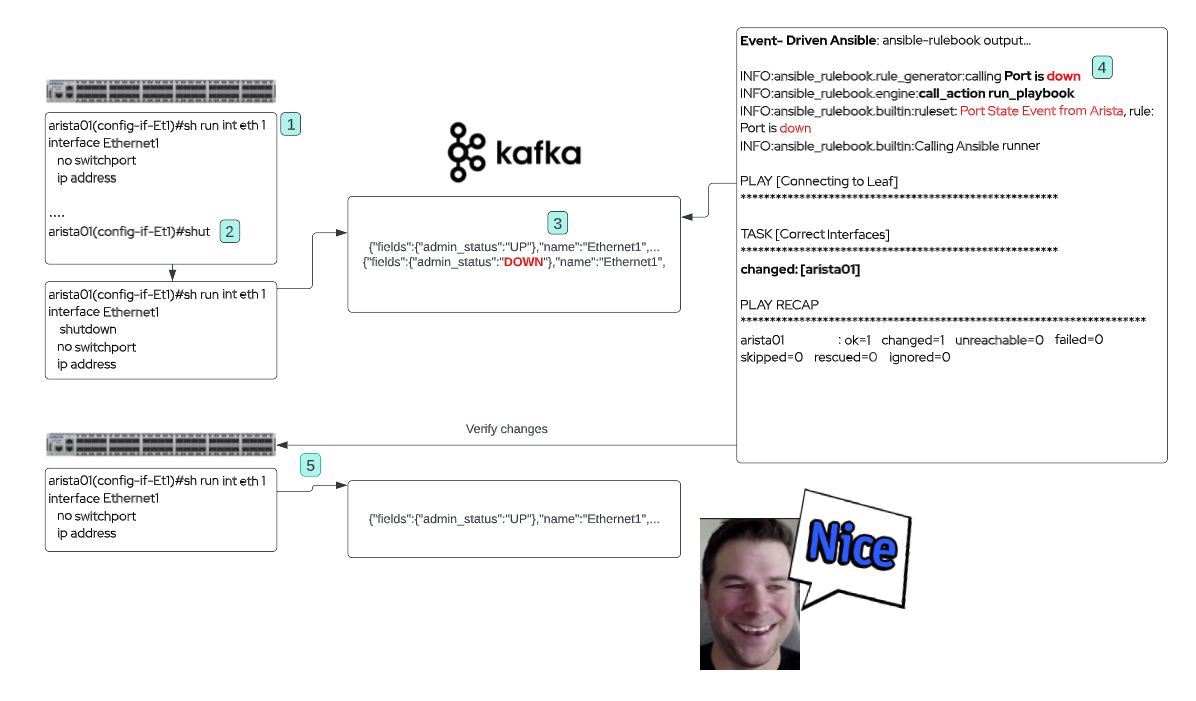
So, with Event-Driven Ansible we are able to respond to events we gather from things like network telemetry. Not only could we use this for simple remediation tasks but we could expand this further with adding ITSM integration or perhaps automated troubleshooting and awareness to events on the network. I think that is pretty slick!
Arista has created an awesome source plugin that we can use instead of Telegraf and Kafka. Daniel Hertzberg and Julio Perez really grasped Event-Driven Ansible concepts and created this magical source plugin in a week. This plugin utilizes NATS, and if you are like me and haven't heard of NATS, It is similar to Kafka in the sense that it is a messaging queue, but there are some differences and you can read up a bit more about them here. This plugin simplifies and reduces the toolset needed to get all-important telemetry data to ansible-rulebook.
Watch for another blog that is coming soon around using the Arista source plugin and a juicy network automation use case.
Call to Action
- Check out the Getting Started with Event-Driven Ansible training
- Visit the Event Driven Ansible web page
- Check out the Event-Driven Ansible playlist on YouTube
- Check out the Best of AnsibleFest 2022
- Try Ansible Automation Platform free for 60 days
저자 소개
유사한 검색 결과
Istio 앰비언트 모드를 통해 제공되는 OpenShift Service Mesh 3.2
OpenShift Service Mesh 3.1 소개
Untangling Networks | Compiler
채널별 검색

오토메이션
기술, 팀, 인프라를 위한 IT 자동화 최신 동향

인공지능
고객이 어디서나 AI 워크로드를 실행할 수 있도록 지원하는 플랫폼 업데이트

오픈 하이브리드 클라우드
하이브리드 클라우드로 더욱 유연한 미래를 구축하는 방법을 알아보세요

보안
환경과 기술 전반에 걸쳐 리스크를 감소하는 방법에 대한 최신 정보

엣지 컴퓨팅
엣지에서의 운영을 단순화하는 플랫폼 업데이트

인프라
세계적으로 인정받은 기업용 Linux 플랫폼에 대한 최신 정보

애플리케이션
복잡한 애플리케이션에 대한 솔루션 더 보기

가상화
온프레미스와 클라우드 환경에서 워크로드를 유연하게 운영하기 위한 엔터프라이즈 가상화의 미래
