TL;DR What is this?
It has been a long term ask and our desire to make Smart Inventory, well, smarter. We’ve listened to feedback, and are now addressing not only direct customer asks but also presenting solutions to make it better overall.
The current Red Hat Ansible Automation Platform Smart Inventory
The current Smart Inventory has a number of shortcomings:
- The smart inventory
host_filtercannot express that a variable EQUALS a value, or do basic logic like NOT. - Host/group/inventory variables cannot be filtered as a combined unit, as these are separate fields.
- Resultant smart inventories do not contain groups.
- The smart inventory
host_filterhas its own custom syntax, which isn’t the most friendly.
All of these issues stem from the original design of Smart Inventory, and the fact that Inventory Django models (Inventory, Group, and Host) save their variables in text form as YAML/JSON, as they appear in the UI. We then have to parse these into a dictionary form so they are in some way usable. This introduces new challenges and constraints.
A better solution: “constructed inventory”
So rather than continuing down a sub-optimal route, we’ve taken stock of the options (there were many and they got quite complex!) and in a future Ansible Automation Platform release, we intend to introduce a new “constructed inventory” feature, designed to provide new capabilities, primarily the ability to use and consume host and group vars.
This will initially coexist alongside the current Smart Inventory facility, but we hope to ultimately to supersede it. If you’re looking for enhancements for Smart Inventory, then read on, as this will no doubt be of interest to you.
Ansible Core already has a constructed plugin. Our ultimate solution will use this approach, compliment it, and make it applicable for a controller function. We’ll then make it more user searchable to make this as simple as possible to use.
To demonstrate how a constructed inventory works, let’s go through a quick example. This should give you a feel for where we’re heading inside Ansible Automation Platform.
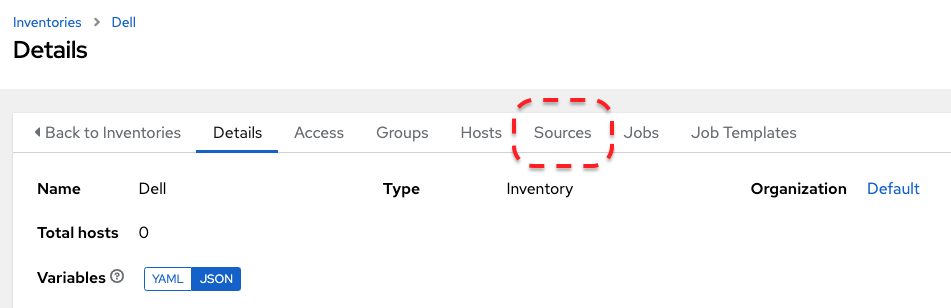
First, we need to create an Inventory. As I’m doing some work with Dell at the moment, I’ll use that as an example here. Inside my “Dell” inventory, we create an Inventory Source:
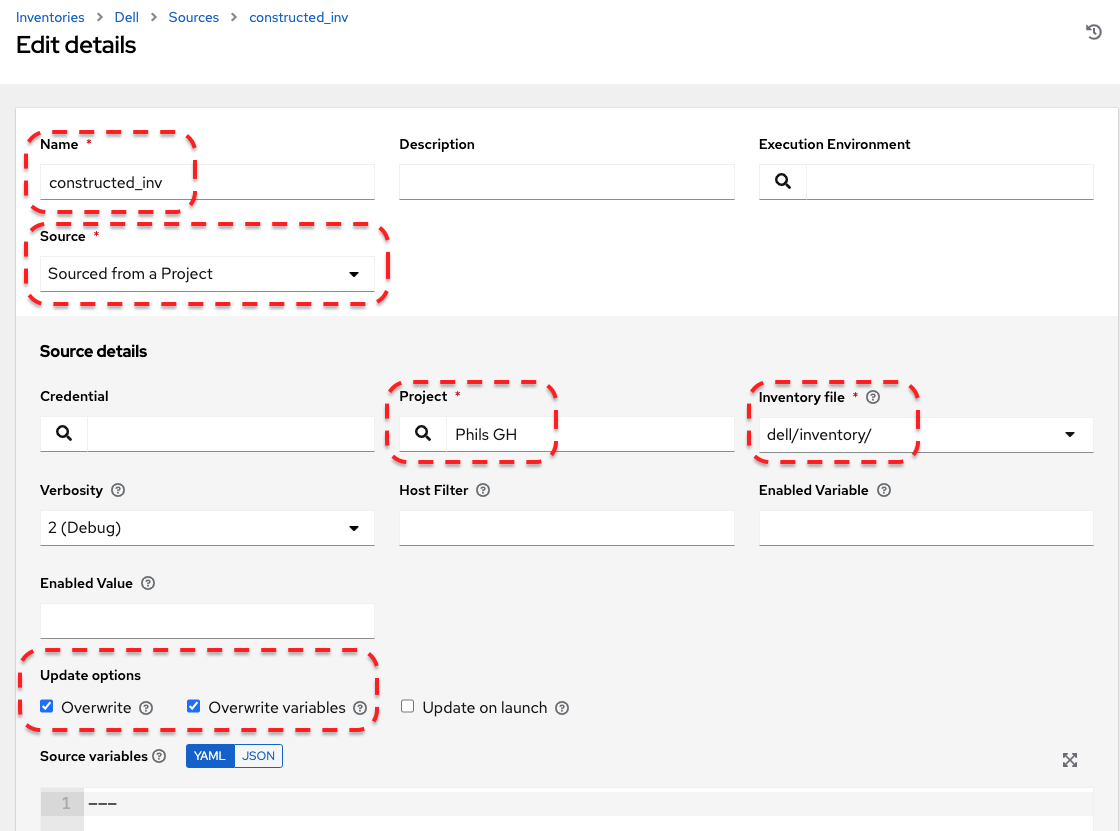
I’m going to pull from my GitHub repo as a source of truth, and I’m asking Ansible Automation Platform to look inside the /dell/inventory directory for details. I’m going to set overwrite options as well, but this is entirely optional:
So now let’s look at the files in that directory:

First, let’s look at the idrac_hosts inventory file. If you’ve worked with Ansible before, then this will be familiar to you:
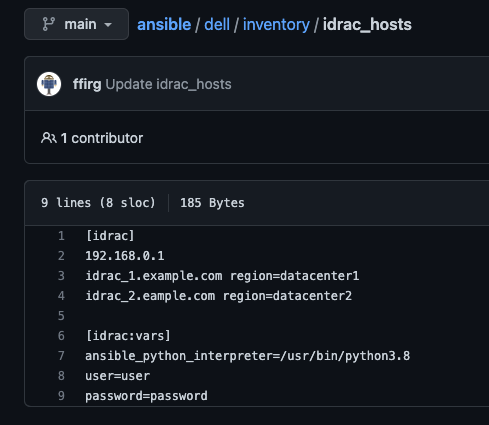
Here I have one idrac group of hosts, with 3 hosts. I’m deliberately mixing hostnames and IPs here for a reason, more in a bit. You’ll see I have some variables set at the individual host level (region) and then some group level ones, as these are common across all hosts. User and password here aren’t required for this example and certainly aren’t good practice! Either use another connectivity method or an Ansible Automation Platform Custom Credential type for this.
Now let’s take a look at the other file, idrac_hosts_constructed_inv.yml:
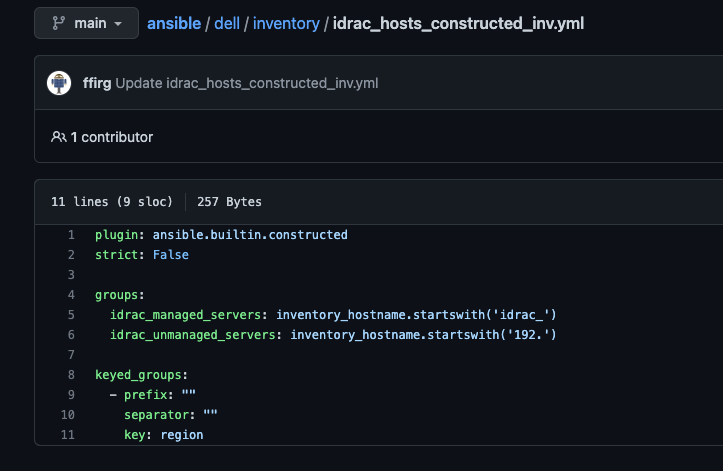
This is where things get neat!
The plugin line simply picks up the constructed inventory plugin. I’m passing in strict: False here to ignore errors, which is the default anyway.
Now we tell the plugin what we want to do with the inventory, and Ansible Automation Platform will do the rest for you!
groups: Using Jinja2 conditionals, we can add what we find to different groups. Anything hostname (starting with idrac_) will go into the idrac_managed_servers group, and any IP address (starting 192) will go into the idrac_unmanaged_server group. This gives me a nice easily identifiable way to assess what I’ve already set up or perhaps still need to do (for example, when the interface is fully set up, it’ll have a pukka hostname to show ‘completion’).
keyed_groups: let me add hosts to groups based on values of a variable. We need to give it a key to use, which in my case is the region [datacenter] that the server resides in.
If we save and sync this Inventory Source, as I have debug on, we can see the magic happening inside Ansible Automation Platform:
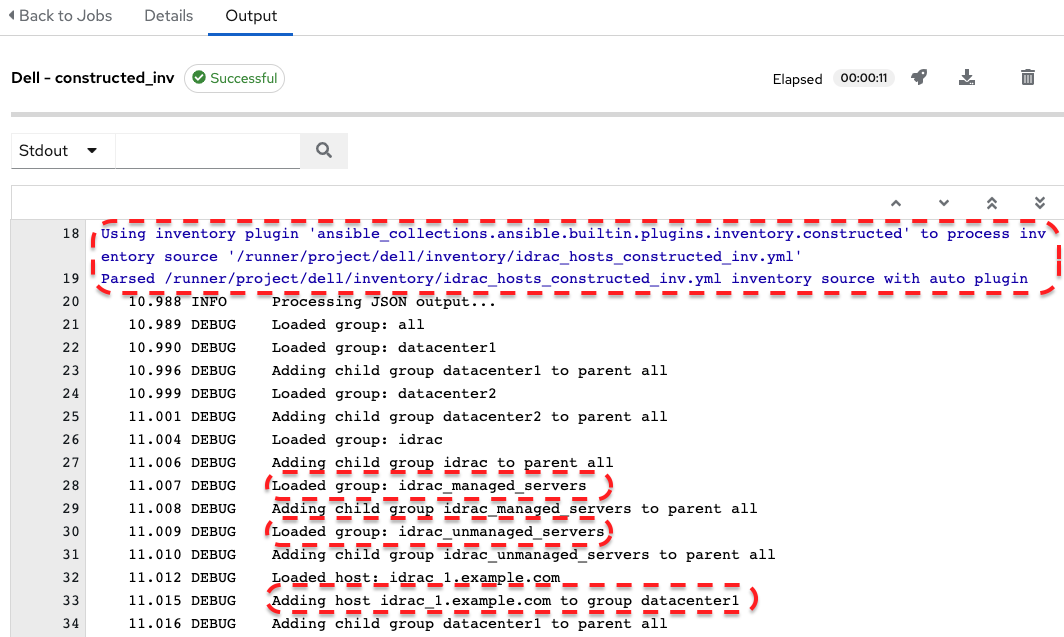
We can see that the constructed inventory plugin has been picked up and parses the inventory file also in our GitHub directory. I’ve highlighted some of the matches, but we can also go into the UI and check things.
I now have 3 hosts under the Dell inventory:
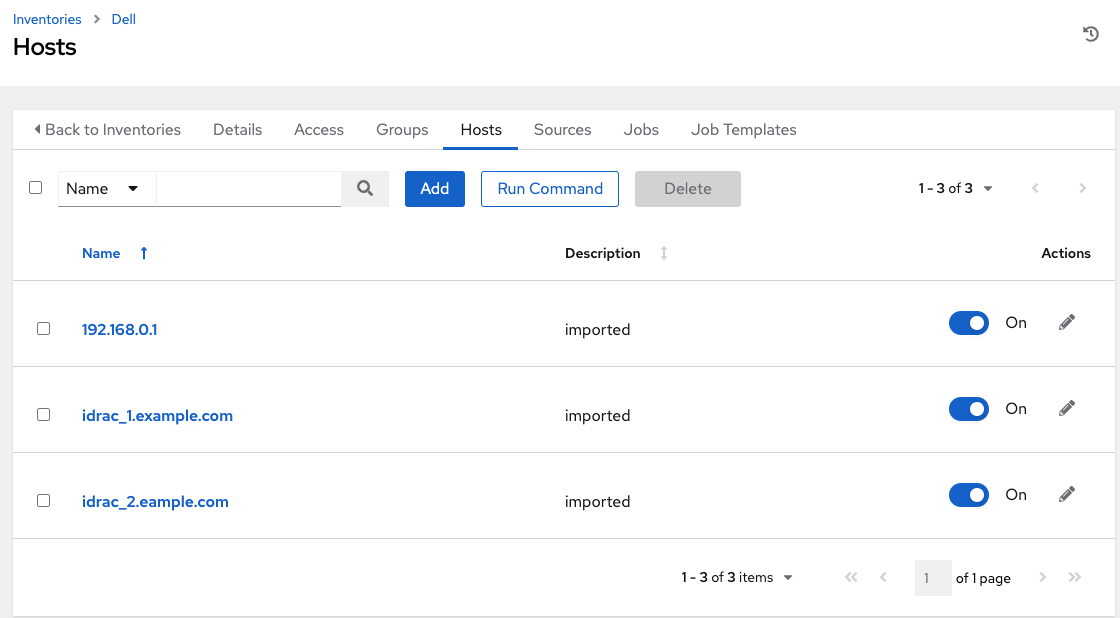
Checking Groups, we have some new groups:
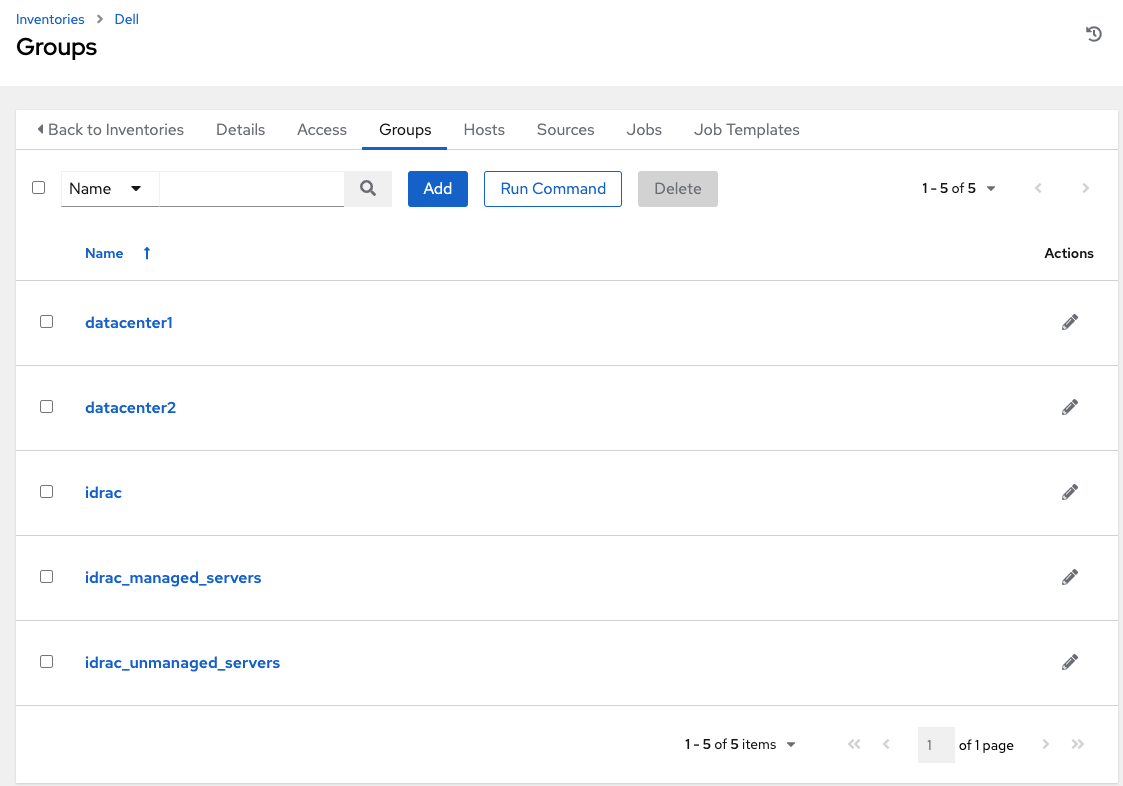
If we go into our managed and unmanaged groups we should see the hosts correctly mapped:
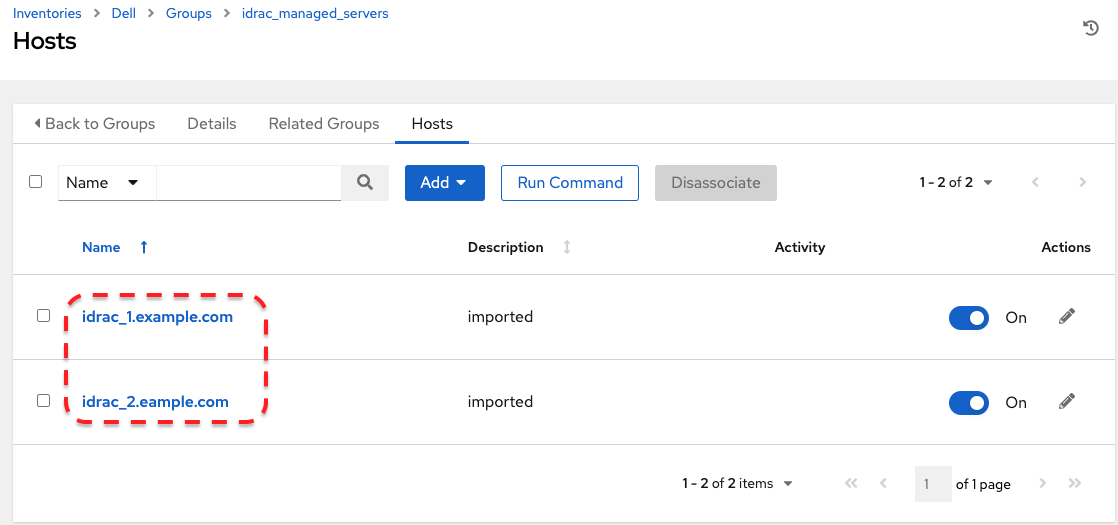
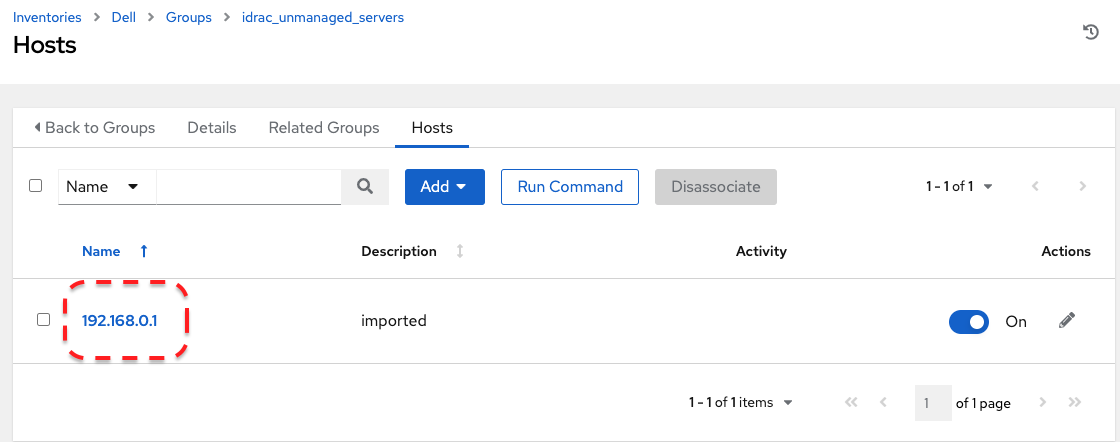
Likewise for the datacenter groups.
Summary:
Hopefully you found that a useful example for constructed inventory. As we’re using what Ansible Core provides us, this is a sweet integration point. We intend to make this nice and easy to use inside Ansible Automation Platform.
Customers with large user bases and needs find monolithic static or even dynamic inventories difficult to manage. Often responsibility is federated out between different teams, who control their own host estates. But we need a centralized platform that can ingest all these sources and do automation across them all. That is, of course, one of Ansible Automation Platform’s sweet spots!
As the tech world becomes more automated and implements GitOps and configuration as code style approaches, constructed inventory is designed to complement these strategies. You supply the information (in the form of variables) at source, and we’ll provide the ability to consume that across your entire estate, in a simple yet effective way.
Once we have the ability to expose such metadata, we introduce the ability to consume it, which gives us the potential to explore further innovative ideas around more intelligence based automation and decisioning.
This has been a taste of what you can expect in the future for Ansible Automation Platform. When this feature is released, look out for a further blog around how to use it!
Special thanks to Shane McDonald and Alan Rominger for help with this blog and their and the rest of the controller engineering coding genius helping shape this feature!
Where to go next
- Come visit us at Red Hat Summit 2023.
- Missed out on AnsibleFest 2022? Check out the Best of AnsibleFest 2022.
- Self-paced lab exercises - We have interactive, in-browser exercises to help you get started with Ansible Automation Platform.
- Try Ansible Automation Platform free for 60 days.
저자 소개

Phil Griffiths is a Product Manager for Ansible Automation Platform with nearly seven years of experience at Red Hat. Phil has held roles as a solution architect and technical consultant both at Red Hat and for other organizations.
유사한 검색 결과
When AI finds the bugs: Why defense in depth was always the answer
AIOps and Ansible Automation Platform: Where AI intelligence meets trusted execution
Collaboration In Product Security | Compiler
Keeping Track Of Vulnerabilities With CVEs | Compiler
채널별 검색

오토메이션
기술, 팀, 인프라를 위한 IT 자동화 최신 동향

인공지능
고객이 어디서나 AI 워크로드를 실행할 수 있도록 지원하는 플랫폼 업데이트

오픈 하이브리드 클라우드
하이브리드 클라우드로 더욱 유연한 미래를 구축하는 방법을 알아보세요

보안
환경과 기술 전반에 걸쳐 리스크를 감소하는 방법에 대한 최신 정보

엣지 컴퓨팅
엣지에서의 운영을 단순화하는 플랫폼 업데이트

인프라
세계적으로 인정받은 기업용 Linux 플랫폼에 대한 최신 정보

애플리케이션
복잡한 애플리케이션에 대한 솔루션 더 보기

가상화
온프레미스와 클라우드 환경에서 워크로드를 유연하게 운영하기 위한 엔터프라이즈 가상화의 미래
