We are excited to announce that multi-version support and OpenShift 4.11 for Azure Red Hat OpenShift (ARO) are now available.
One of the benefits of Azure Red Hat OpenShift is the flexibility and ease of deployment that customers have when it comes to installation. With multi-version support you can now select the version of Azure Red Hat OpenShift that you receive at install time. There are multiple benefits to this: availability for testing your platform running the same version you are currently running, being able to have the same version of Azure Red Hat OpenShift supported by your independent software vendor and the ability to have the version you need in the event that you need to rebuild the cluster.
Below we will walk through how to select the version of Azure Red Hat OpenShift that you want to run.
First your can list the versions that can get installed using the “get versions” parameter from the Azure Command Line Interface (CLI)

Second, you can specify the version in the CLI through the –-version parameter:

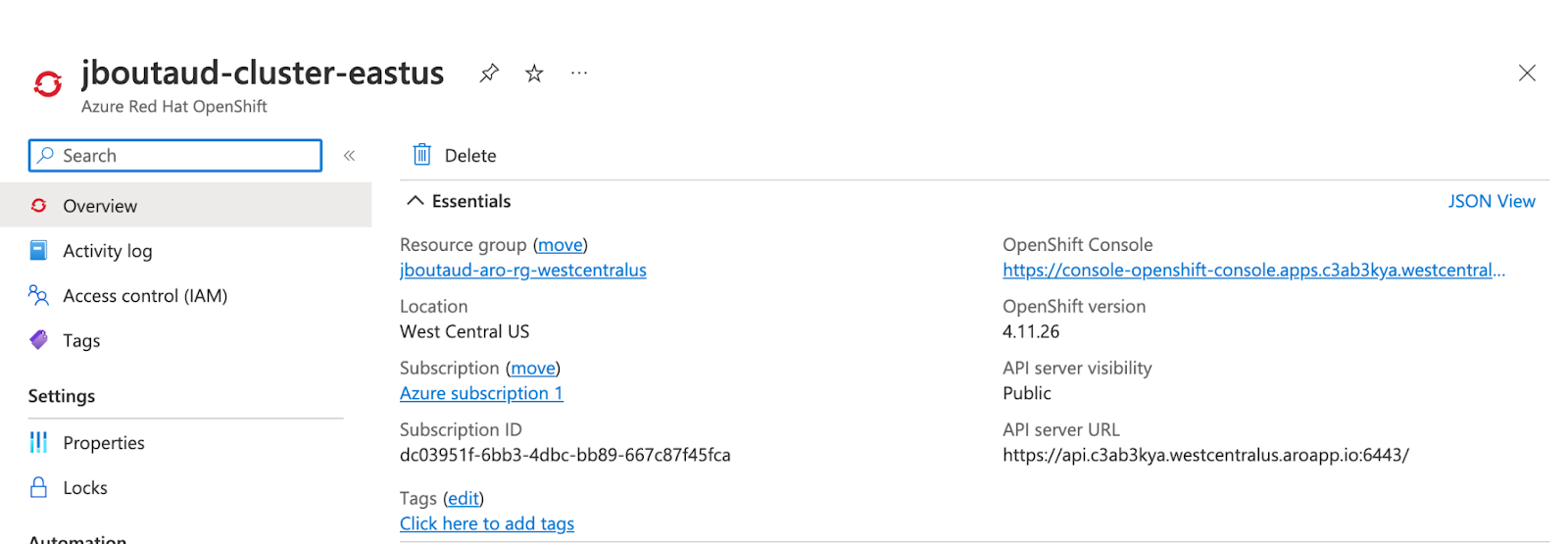
The end result of the deployment being a cluster running version 4.11.26 at install time.
When deploying a hybrid cloud model, it’s important to remember that your application needs can change and you need a platform that is able to evolve accordingly. OpenShift 4.11 for Azure Red Hat OpenShift meets evolving performance requirements for different workloads you may want to run. Check out the updates below.
OpenShift 4.11 for Azure Red Hat OpenShift release updates:
UltraSSD Support:
- You now take advantage of UltraSSD disks in Azure. Microsoft Azure Ultra Disk Storage allows you to have extreme flexibility when choosing the right performance characteristic for your workloads. More information can be found here.
Accelerated Networking Virtual Machines (VMs)
- If an instance type used for the control plane of worker nodes supports accelerated networking, accelerated networking will be turned on for the instance type, thus resulting in better network performance.
OVN as the CNI
- The OVN-Kubernetes Container Network Interface (CNI) plugin is now the CNI of choice for Azure Red Hat OpenShift. OVN-Kubernetes is based on OpenShift Virtual Network (OVN) and provides an overlay-based networking implementation. A few benefits to this include: implementing Kubernetes network policy support, including ingress and egress rules, and using the Geneve (Generic Network Virtualization Encapsulation) protocol rather than VXLAN to create an overlay network between nodes.
Azure Files through CSI driver
- Azure files CSI allows you to leverage the Azure files CSI driver rather than the in-tree CSI driver. As Kubernetes is moving towards CSI this will allow better performance when using Azure files. You can find more information here.
Azure Red Hat OpenShift is continuously expanding our global footprint. We are also pleased to announce that Azure Red Hat OpenShift is now available in Qatar and Brazil southeast regions. More information about region availability can be found here.
For upcoming Azure Red Hat OpenShift updates read more.
Learn more about Azure Red Hat OpenShift today.
저자 소개


Courtney started at Red Hat in 2021 on the OpenShift team. With degrees in Marketing and Economics and certificates through AWS and Microsoft she is passionate about cloud computing and product marketing.
채널별 검색

오토메이션
기술, 팀, 인프라를 위한 IT 자동화 최신 동향

인공지능
고객이 어디서나 AI 워크로드를 실행할 수 있도록 지원하는 플랫폼 업데이트

오픈 하이브리드 클라우드
하이브리드 클라우드로 더욱 유연한 미래를 구축하는 방법을 알아보세요

보안
환경과 기술 전반에 걸쳐 리스크를 감소하는 방법에 대한 최신 정보

엣지 컴퓨팅
엣지에서의 운영을 단순화하는 플랫폼 업데이트

인프라
세계적으로 인정받은 기업용 Linux 플랫폼에 대한 최신 정보

애플리케이션
복잡한 애플리케이션에 대한 솔루션 더 보기

가상화
온프레미스와 클라우드 환경에서 워크로드를 유연하게 운영하기 위한 엔터프라이즈 가상화의 미래
