Do you want to automatically subscribe your Red Hat Enterprise Linux (RHEL) VMs on OpenShift Virtualization to receive the latest updates? In this article you can learn how to do that with OpenShift Pipelines.
OpenShift Pipelines is a cloud-native CI/CD solution, which allows users to easily build customized pipelines with predefined building blocks. These building blocks are also referred to as tasks. For more information on OpenShift Pipelines see Understanding OpenShift Pipelines.
In OpenShift 4.11 new tasks for OpenShift Pipelines are shipped as part of OpenShift Virtualization in a TechPreview. These tasks are designed to aid in creating and customizing VMs and VM templates
With OpenShift Virtualization 4.10 installed, the boot sources of multiple operating systems, including RHEL 8 and RHEL 9, are populated automatically. The previous article Subscribing RHEL VMs in OpenShift Virtualization already showed how VMs templates can be prepared by hand to create VMs which automatically subscribe for regular updates. Note however that this needs to be done every time Red Hat releases an update to the predefined templates. This article will show how to automate the subscribing of RHEL VMs with a simple pipeline built with the new tasks.
The prerequisites for this article are that OpenShift Pipelines and OpenShiftVirtualization 4.11 need to be installed on your cluster and that the ‘deployTektonTaskResources’ feature gate is enabled in the created ‘HyperConverged’ custom resource. After applying the pipeline definition attached to this article to your cluster, a new pipeline called rhel-inject-subscription will appear in the pipelines view of the OpenShift UI.

Click on the menu button on the right of the pipeline, then click “Start” to start the pipeline. In the following view enter your activation key and organization and finally click “Start” again. As explained in the previous article, the subscription credentials can be obtained in the Red Hat Customer Portal. If you do not have the required permissions ask your Organization Administrator to create them for you.
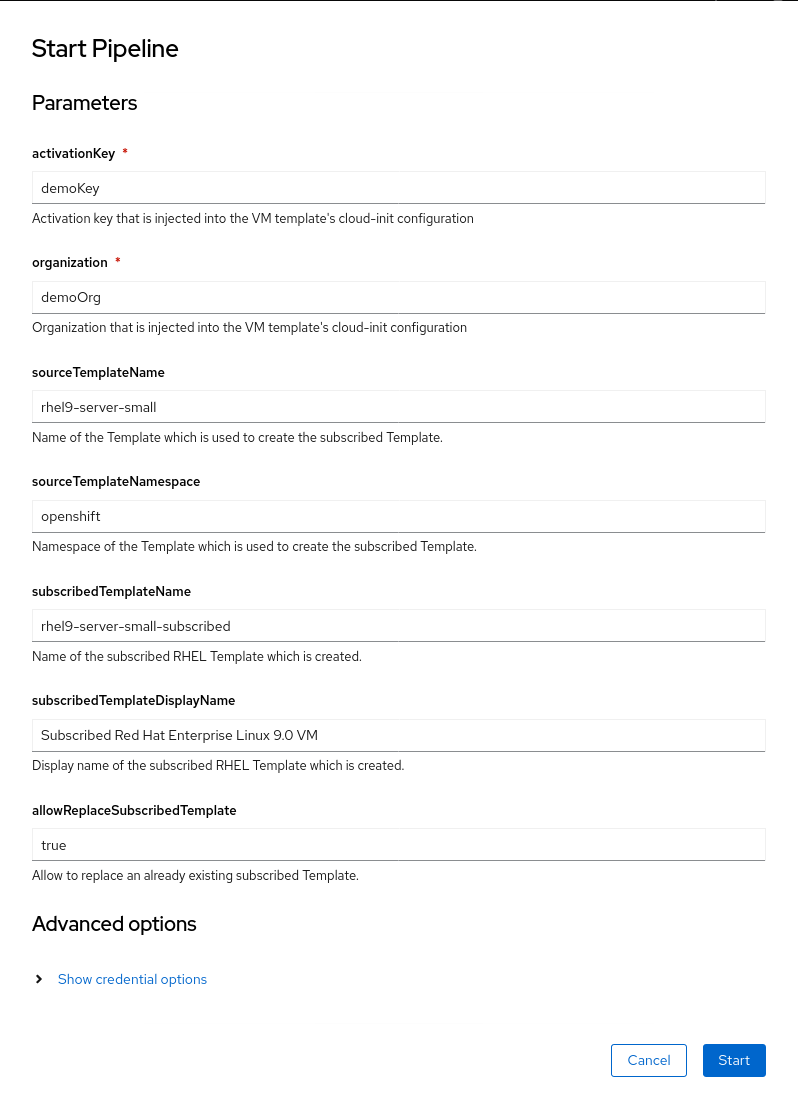
After starting the pipeline the PipelineRun view will open and you can follow the execution status of the pipeline.
The pipeline will create a new VM template named according to the parameters entered previously and will inject the activation key and organization automatically into the template. In the PipelineRun results the name and namespace of the newly created template will be shown. Already existing templates with the same name will be overwritten by default so the pipeline can be run multiple times to update the credentials-injected template.
To create the new template the tasks copy-template and modify-vm-template are used. As its name says the former allows copying existing templates while the latter allows modifying template parameters. Among other things it is possible to modify the disks and volumes attached to VMs created from a template. This feature is used to inject the subscription credentials into the cloud-init configuration of the VM.
Here is the definition of the pipeline we just discussed:
apiVersion: tekton.dev/v1beta1
kind: Pipeline
metadata:
  name: rhel-inject-subscription
spec:
  params:
        - name: activationKey
          description: Activation key that is injected into the VM template's cloud-init configuration
          type: string
        - name: organization
          description: Organization that is injected into the VM template's cloud-init configuration
          type: string
        - name: sourceTemplateName
          description: Name of the Template which is used to create the subscribed Template.
          type: string
          default: rhel9-server-small
        - name: sourceTemplateNamespace
          description: Namespace of the Template which is used to create the subscribed Template.
          type: string
          default: openshift
        - name: subscribedTemplateName
          description: Name of the subscribed RHEL Template which is created.
          type: string
          default: rhel9-server-small-subscribed
        - name: subscribedTemplateDisplayName
          description: Display name of the subscribed RHEL Template which is created.
          type: string
          default: Subscribed Red Hat Enterprise Linux 9.0 VM
        - name: allowReplaceSubscribedTemplate
          description: Allow to replace an already existing subscribed Template.
          type: string
          default: "true"
  tasks:
        - name: copy-template
          params:
            - name: sourceTemplateName
              value: $(params.sourceTemplateName)
            - name: sourceTemplateNamespace
              value: $(params.sourceTemplateNamespace)
            - name: targetTemplateName
              value: $(params.subscribedTemplateName)
            - name: allowReplace
              value: $(params.allowReplaceSubscribedTemplate)
          timeout: 10m
          taskRef:
            kind: ClusterTask
            name: copy-template
        - name: modify-vm-template
          params:
            - name: templateName
              value: $(tasks.copy-template.results.name)
            - name: templateAnnotations
              value:
                - "openshift.io/display-name: $(params.subscribedTemplateDisplayName)"
                - "template.kubevirt.io/provider: my friendly cluster-admin"
                - "template.kubevirt.io/provider-support-level: Full"
                - "template.kubevirt.io/provider-url: https://www.my.corp"
            - name: volumes
              value:
                - |
                  {
                      "cloudInitNoCloud": {
                          "userData": "#cloud-config\nuser: cloud-user\npassword: ${CLOUD_USER_PASSWORD}\nchpasswd: { expire: False }\nrh_subscription:\n  activation-key: $(params.activationKey)\n  org: $(params.organization)"
                      },
                      "name": "cloudinitdisk"
                  }
          runAfter:
            - copy-template
          timeout: 10m
          taskRef:
            kind: ClusterTask
            name: modify-vm-template
  results:
        - name: subscribedTemplateName
          description: Name of the created subscribed Template
          value: $(tasks.copy-template.results.name)
        - name: subscribedTemplateNamespace
          description: Namespace of the created subscribed Template
          value: $(tasks.copy-template.results.namespace)

Now it is time to create a new and subscribed VM from our template. Just switch to the VirtualMachines view, click “Create new VirtualMachine” and here we have our newly created template with the subscription credentials already included.
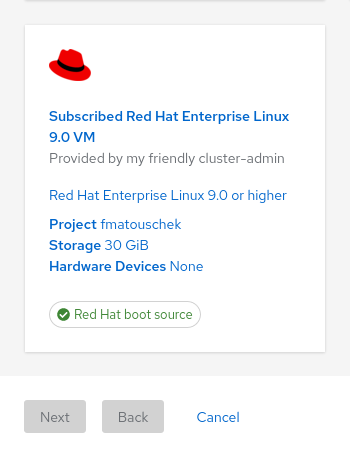
As in the previous post, this makes it very easy to create a new and already subscribed VM but beware that the subscription credentials are visible to any user on the cluster who can read the template.
For the sake of simplicity in this post this pipeline still must be started manually whenever an update in the predefined templates should be propagated to the credentials-injected template(s). The proposed pipeline however modifies only the template, but not the default boot sources. This way automatic updates of the boot sources, e.g. for Red Hat Enterprise Linux minor updates, are applied automatically without the need of running the pipeline again.
This pipeline only modifies one template per run, but with the flexibility of OpenShift Pipelines it is possible to automate this even further and to create a pipeline which automatically creates subscribed templates for every RHEL version and flavor available. For an example of how that can be done see here.
저자 소개

채널별 검색

오토메이션
기술, 팀, 인프라를 위한 IT 자동화 최신 동향

인공지능
고객이 어디서나 AI 워크로드를 실행할 수 있도록 지원하는 플랫폼 업데이트

오픈 하이브리드 클라우드
하이브리드 클라우드로 더욱 유연한 미래를 구축하는 방법을 알아보세요

보안
환경과 기술 전반에 걸쳐 리스크를 감소하는 방법에 대한 최신 정보

엣지 컴퓨팅
엣지에서의 운영을 단순화하는 플랫폼 업데이트

인프라
세계적으로 인정받은 기업용 Linux 플랫폼에 대한 최신 정보

애플리케이션
복잡한 애플리케이션에 대한 솔루션 더 보기

가상화
온프레미스와 클라우드 환경에서 워크로드를 유연하게 운영하기 위한 엔터프라이즈 가상화의 미래
