
This post was a collaboration with Amazon Web Services' Ryan Niksch; Partner Solutions Architect focusing on application platforms, hybrid application solutions, and modernization.
Overview
Security is a critical area of focus for every organization, but for Red Hat and AWS, security is job zero. When deploying Red Hat OpenShift on AWS (ROSA) organizations often struggle with security best practices around credential rotation, use of IAM roles, cross account access, and the use of federation.
Recently Red Hat added AWS Security Token Service support to both OpenShift Container Platform (OCP) and Red Hat managed ROSA. The AWS Security Token Service (AWS STS) enables organizations to request temporary, limited-privilege credentials for AWS Identity and Access Management (IAM) users or users authenticated by the organization (federated users).
With the tight integration of the OpenShift installer and operators controlling AWS Services, utilizing temporary credentials to segment fine-grained permissions is a vital part of any organization’s enterprise security posture.
In this Blog post we will explore deploying Red Hat OpenShift Service (ROSA) on AWS with STS step by step.
Prerequisites
- AWS Account with required AWS Limits for ROSA cluster creation
- Verify required AWS service quotas for ROSA
- ROSA service is enabled in the AWS Account
- A Red Hat account created
- The latest AWS, ROSA, and OC CLIs installed on your host
- You have completed $rosa init and $rosa login
For more detail on these steps, run through the following workshop: https://www.rosaworkshop.io/rosa/1-account_setup/
ROSA with STS advocates for the use of both temporary credentials and the principle of least privilege. Each OpenShift component which interacts with AWS will have a dedicated IAM role instead of providing all permissions to the OpenShift Cluster itself. As such, operators within OpenShift will only get the specific permissions needed to perform their respective actions.
Though it is possible to create AWS IAM roles for each action, the ROSA CLI provides a means of generating these. This is a simple, fast way to get up and running. It is recommended that these roles are inspected by security and cloud teams to be sure they meet with all the considerations of the organization they are being deployed into.
The process of creating the necessary account roles for ROSA can be done in an interactive or automatic way via the ROSA CLI.
- Create the required IAM roles and policies for creating a ROSA cluster using the following command (automatic):
rosa create account-roles --mode auto --version 4.9 -y
When creating the account roles, options exist to specify the OpenShift cluster version (--version), a prefix for the account role names (--prefix), and the mode of installation (--mode <auto|manual>)
Note: The default prefix for account roles is ManagedOpenShift. If you specify a custom prefix you must reference this value during cluster creation.
ROSA account roles only need to be created once per AWS account. As new features and functions are added to OpenShift new operators and future integrations with AWS may result in additional permission requirements. The --version x.x parameter will generate roles and permissions to cater for the permissions needed within the version defined.

The above shows the policies generated for a ROSA cluster using a custom prefix in auto mode. These policies will be used for various operators and the OIDC endpoint.
In manual mode policies will not be created within the AWS account, instead they are generated as JSON files on the local system running the rosa cli. These can later be created in the AWS account, allowing for the assessment of the polices before use.
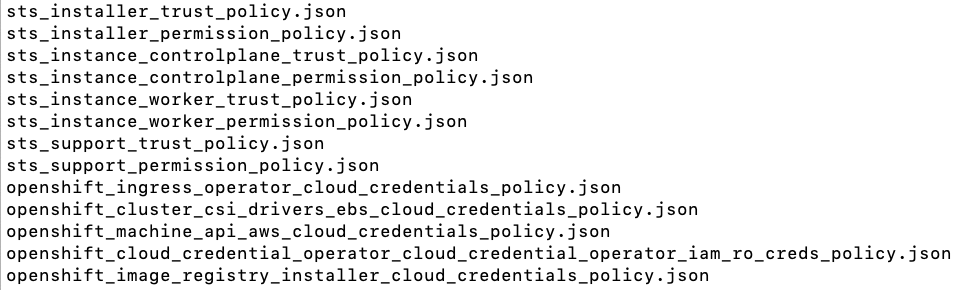
Next we will provision a ROSA cluster providing parameters for STS.
- Create a ROSA cluster by using the following command
rosa create cluster --sts
This will begin the interactive provisioning process of a ROSA cluster using STS.

To install a ROSA cluster the following values will be needed:
- Cluster name
- OpenShift version
- Installer role ARN (if using a custom prefix)
- AWS region
- Optional parameters for sizing, availability, accessibility, etc.
For a deeper exploration of the ROSA create cluster options see the following command reference: Interactive ROSA cluster creation
The cluster will go into a pending state (Waiting for OIDC configuration) instead of installing until roles can be linked to OpenShift operators and the OIDC provider is linked to the previously created endpoint
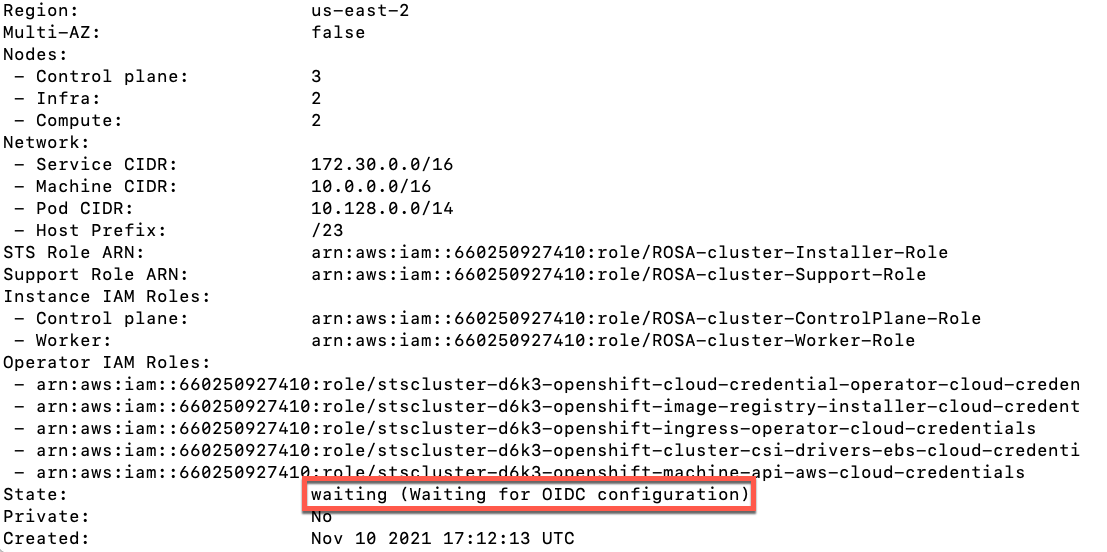
To link the AWS IAM roles created in the first step to operators within OpenShift we must execute the following command:
rosa create operator-roles --cluster <rosa_cluster_name>
This provides a separate AWS IAM role and permissions for each of the Kubernetes operators within OpenShift which interact with AWS APIs and resources. Specifically, the installer operator used during the cluster provisioning process, the machine operator which controls infrastructure scaling, machine sets, machine pools and machine auto scalers, the storage operator which interacts with the AWS EBS CSI driver, the cloud credencial operator, and the ingress operator.

Next we will create the OIDC provider linking the cluster to the OIDC endpoint generated earlier with the following command:
rosa create oidc-provider --cluster <rosa_cluster_name>

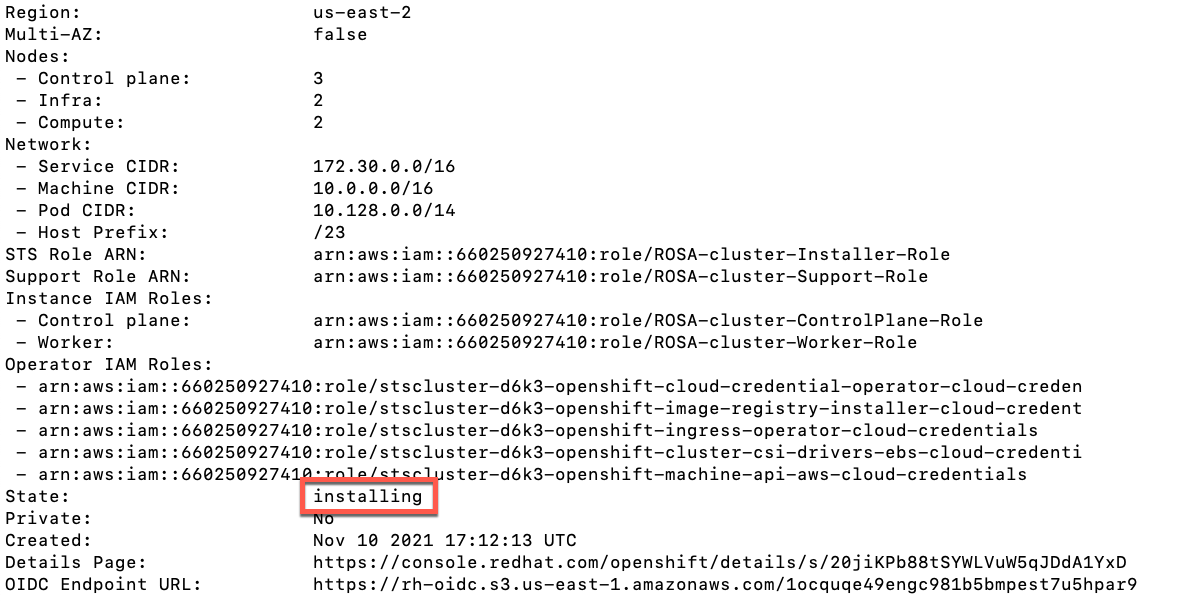
Once this step is completed the cluster state will change from “pending” to “installing” after a few moments. The remaining cluster creation process will take approximately 30 to 40 minutes to complete.
Conclusion
AWS STS integration with Red Hat OpenShift Service on AWS (ROSA) will address many organizational use cases which have stringent requirements for managing access to ROSA clusters either by providing access to users through federated identity or by providing temporary access using STS tokens. AWS and Red Hat have made security a little bit simpler by implementing the use of temporary credentials in just a few simple steps.
저자 소개
유사한 검색 결과
기업 속도의 새로운 가치 기준
오픈소스 방어 계층 강화: Red Hat, NVIDIA와 함께 Open Secure AI Alliance 합류
Can Compliance Be A Piece Of Cake? | Compiler
Collaboration In Product Security | Compiler
채널별 검색

오토메이션
기술, 팀, 인프라를 위한 IT 자동화 최신 동향

인공지능
고객이 어디서나 AI 워크로드를 실행할 수 있도록 지원하는 플랫폼 업데이트

오픈 하이브리드 클라우드
하이브리드 클라우드로 더욱 유연한 미래를 구축하는 방법을 알아보세요

보안
환경과 기술 전반에 걸쳐 리스크를 감소하는 방법에 대한 최신 정보

엣지 컴퓨팅
엣지에서의 운영을 단순화하는 플랫폼 업데이트

인프라
세계적으로 인정받은 기업용 Linux 플랫폼에 대한 최신 정보

애플리케이션
복잡한 애플리케이션에 대한 솔루션 더 보기

가상화
온프레미스와 클라우드 환경에서 워크로드를 유연하게 운영하기 위한 엔터프라이즈 가상화의 미래
