Ansible Content Collections have become the new standard for distributing Ansible content (playbooks, roles, modules, and plugins). Collections have been fully supported since Ansible 2.9 and for the last 2 years, the Ansible community has been on a journey to move to this new way of packaging and consuming Ansible content. With Ansible 2.9, Collections were optional, but as of 2.10 they are a requirement. The ability to be able to install and use Collections as needed is increasingly important.
To help customers manage Collections, private automation hub was released with Red Hat Ansible Automation Platform 1.2. Private automation hub can be deployed in a datacenter or cloud provider and allows users to synchronise and curate content from various sources:
- Certified and supported content from automation hub hosted on console.redhat.com
- Self-supported community content from Ansible Galaxy
- Private content
With private automation hub in place, customers can control the Ansible content that they publish and make available within their organisation. Users can either consume these Collections from the command line or directly from within automation controller.
With this increased reliance on Collections and therefore private automation hub, Ansible Automation Platform 2.1 introduced the ability to deploy a highly-available instance of private automation. This is great for customers who need high-availability, but it does add some additional requirements in terms of supporting infrastructure - load-balancing, shared storage and high-availability PostgreSQL.
An alternative approach that I want to explore is to deploy multiple discrete instances of private automation hub. A recent enhancement in ansible-core 2.11.6 means that when trying to install a Collection, it will now handle exceptions from Galaxy servers and continue to the next server until the Collection is found and installed. So what does this look like?

What are the pros and cons of this approach versus deploying a single highly available instance of private automation hub?
Pros
- Simplified infrastructure. No requirements for load-balancing or shared storage or highly available PostgreSQL.
- Private automation hub can be distributed across different datacenters without worrying about the constraints associated with clustering or multi-site storage like latency.
- Data can be easily restored. Either re-sync Collections from source or restore from a backup.
Cons
- The onus is on the user to ensure consistency across different instances of private automation hub.
- Additional disk space is required, as data is stored across multiple discrete instances of private automation hub.
Configuration for the CLI
So how do you configure Ansible Automation Platform to use multiple instances of private automation hub? First let’s look at configuring this for the CLI. This will be important for anyone developing automation content or building automation execution environments. Thankfully the configuration is nice and straightforward. In an ansible.cfg file, simply specify multiple private automation hub instances in the server_list that you are keeping in sync. Private automation hub will even help you get started with your ansible.cfg file. In the UI for private automation hub, select “Repo Management” and you’ll be able to copy CLI configuration snippets:
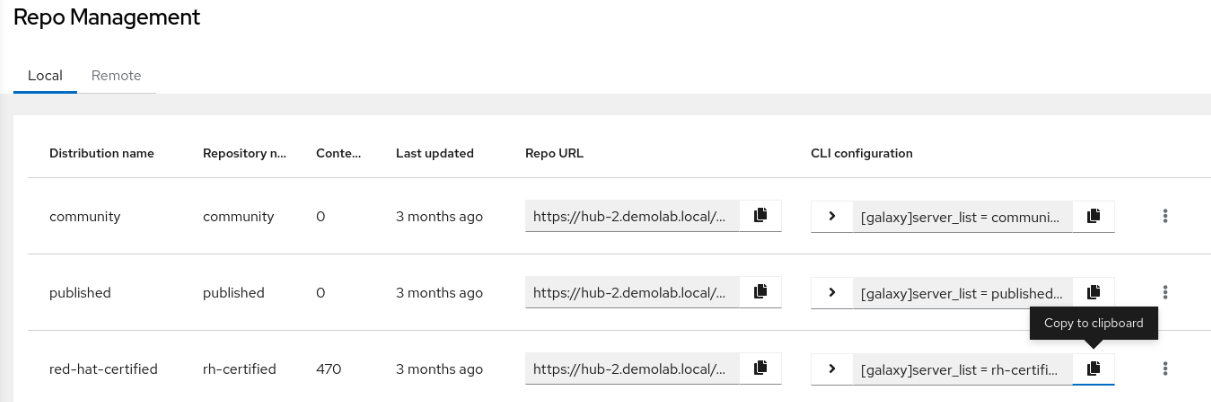
In the following example, the hub instances being added are hub1.demolab.local and hub2.demolab.local. Both instances are in sync and contain the same Ansible Content Collections.
cat ansible.cfg[galaxy]
server_list = hub-1_rh-certified_repo,hub-2_rh-certified_repo
[galaxy_server.hub-1_rh-certified_repo]
url=https://hub-1.demolab.local/api/galaxy/content/rh-certified/
token=<token>
[galaxy_server.hub-2_rh-certified_repo]
url=https://hub-2.demolab.local/api/galaxy/content/rh-certified/
token=<token>When installing a Collection, ansible-galaxy will try to install in the order in which they appear in the server_list. If hub-1.demolab.local is down, then ansible-galaxy will warn that the first galaxy server is down, but will continue to the next server in the list in order to find the requested Collection. Remember, you need ansible-core 2.11.6 for this feature. Here is an example of this:
$ ansible-galaxy collection install sensu.sensu_go
Starting galaxy collection install process
Process install dependency map
[WARNING]: Skipping Galaxy server https://hub-1.demolab.local/api/galaxy/content/rh-certified/. Got an unexpected error when getting available versions of collection sensu.sensu_go: Unknown
error when attempting to call Galaxy at 'https://hub-1.demolab.local/api/galaxy/content/rh-certified/v3/collections/sensu/sensu_go/': <urlopen error [Errno 111] Connection refused>
Starting collection install process
Downloading https://hub-2.demolab.local/api/galaxy/v3/artifacts/collections/rh-certified/sensu-sensu_go-1.11.0.tar.gz to /home/pharriso/.ansible/tmp/ansible-local-3334766ibo52u8/tmpm5vvy4ci/sensu-sensu_go-1.11.0-ttigc4yo
Installing 'sensu.sensu_go:1.11.0' to '/home/pharriso/.ansible/collections/ansible_collections/sensu/sensu_go'
sensu.sensu_go:1.11.0 was installed successfully
Configuration in automation controller
To configure multiple private automation hub instances in automation controller, first make sure you are at least using Ansible Automation Platform 2.0.1 which includes the automation execution environment containing the necessary ansible-core 2.11.6.
Within automation controller, you must define multiple credentials of type “Ansible Galaxy/Automation Hub API Token”. Here is the configuration for hub1.demolab.local.
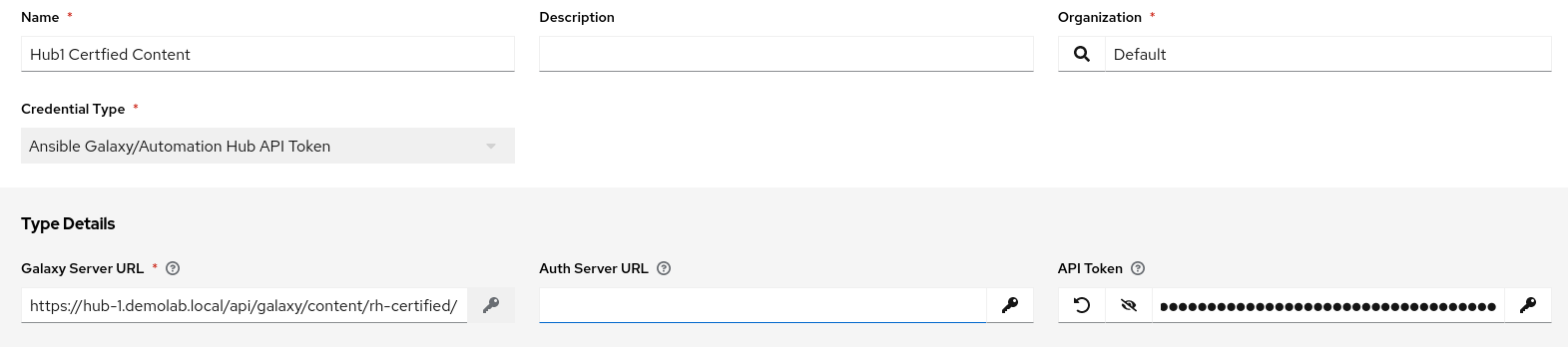
The configuration must be repeated for hub2.demolab.local so that both Private Automation Hub instances are defined:

Next, associate the credentials to an organisation by setting the Galaxy Credentials. The order can also be adjusted to set the primary private automation hub for a specific automation controller:

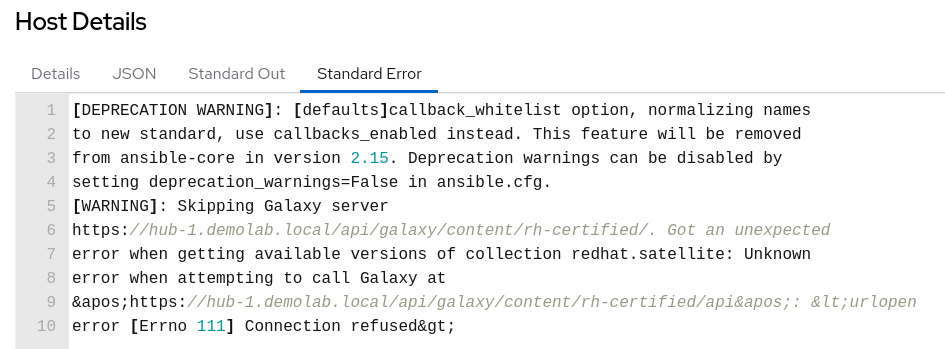
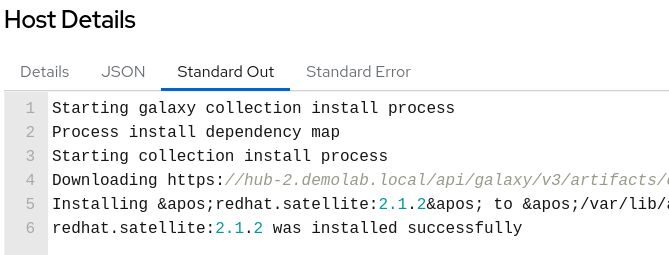
Finally, test the configuration by attempting to sync a project which has a collections/requirements.yml file defined. The project sync should be successful despite hub1.demolab.local being unavailable. Clicking on the task in the project sync output should show that it failed to contact hub-1.demolab.localin the Standard Error:
While the Standard Out will show the Collection is installed from hub-2.demolab.local:
Next Steps
Private automation hub is a key component of the Ansible Automation Platform for customers who wish to synchronise and curate Ansible content within their organisation. Deploying multiple discrete instances of private automation hub gives customers the ability to create a simple but highly available deployment.
Private automation hub is a continually evolving component of Ansible Automation Platform. The following guides cover recent enhancements:
저자 소개

채널별 검색

오토메이션
기술, 팀, 인프라를 위한 IT 자동화 최신 동향

인공지능
고객이 어디서나 AI 워크로드를 실행할 수 있도록 지원하는 플랫폼 업데이트

오픈 하이브리드 클라우드
하이브리드 클라우드로 더욱 유연한 미래를 구축하는 방법을 알아보세요

보안
환경과 기술 전반에 걸쳐 리스크를 감소하는 방법에 대한 최신 정보

엣지 컴퓨팅
엣지에서의 운영을 단순화하는 플랫폼 업데이트

인프라
세계적으로 인정받은 기업용 Linux 플랫폼에 대한 최신 정보

애플리케이션
복잡한 애플리케이션에 대한 솔루션 더 보기

가상화
온프레미스와 클라우드 환경에서 워크로드를 유연하게 운영하기 위한 엔터프라이즈 가상화의 미래
