Thank you to Hicham Mourad and Scott Harwell for co-authoring this blog.
Introduction
In this blog series we will discuss the deployment of Red Hat Ansible Automation Platform on Microsoft Azure, specifically focusing on the deployment access types and what that means for accessing Red Hat Ansible Automation Platform on Azure after deployment completion.
Deployment Access Types
First let’s start by discussing the different deployment access types.
During deployment, Red Hat Ansible Automation Platform on Azure will present an option called “Access” that determines how you will access the user interfaces.
Access Selection at Deploy Time
|
Deployment Type |
Details |
|
Public |
Public deployments allow ingress to the user interfaces over the public internet. Upon deployment, a domain name is issued to the Red Hat Ansible Automation Platform on Azure instance, and users will be able to navigate to the domain to login. This is the easiest approach to deploy because there is no configuration required to access Red Hat Ansible Automation Platform on Azure. Public Access Architecture Diagram below |
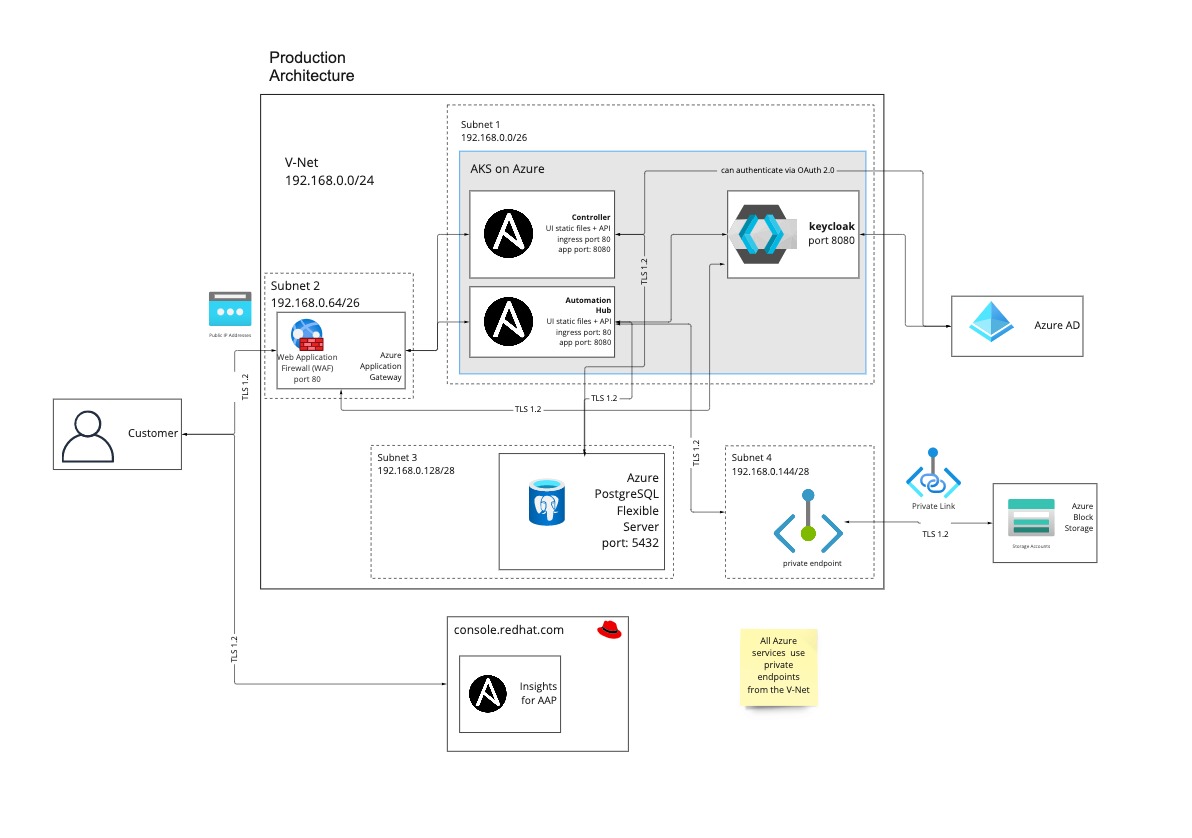
Public Access Architecture Diagram
|
Deployment Type |
Details |
|
Private |
Private deployments omit access from the public internet. When deployed, Red Hat Ansible Automation Platform on Azure will reside in an isolated Azure VNET with no access from external sources or even other Azure devices. Organizations that select this option will have to configure network peering in order to access Red Hat Ansible Automation Platform on Azure via the URLs that are created as part of the deployment process. Once peering and routing are configured, then users can access Red Hat Ansible Automation Platform on Azure through a VM on a connected Azure subnet, or directly if your organization has transit routing setup between Azure and your local network. Note: No two Azure networking configurations are the same. Your organization will need to work with your Azure administrators in order to properly connect the private access deployment to allow user access. Private Access Architecture Diagram below |
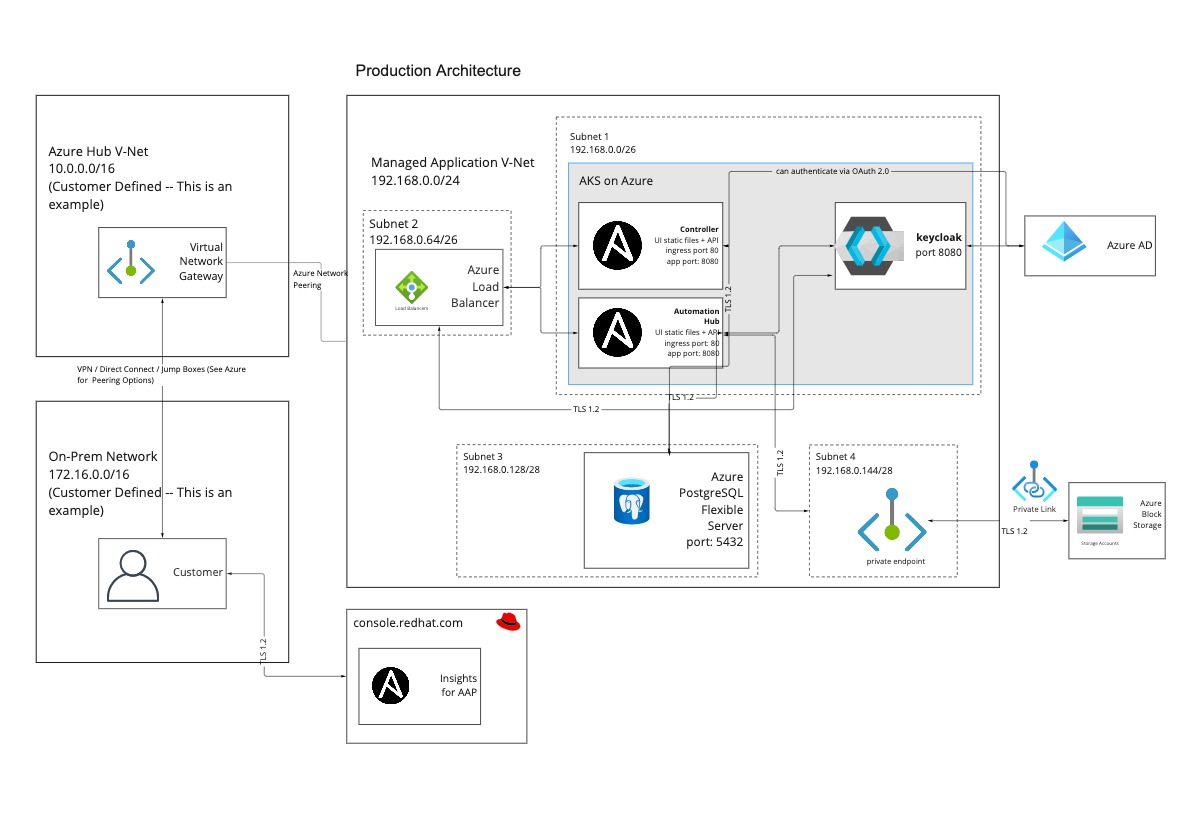
Private Access Architecture Diagram
Note: Regardless of the deployment model for UI access, network peering is required for Red Hat Ansible Automation Platform on Azure to access resources that reside on private networks on Azure networks, or where transit routing between Azure and your on-premises network(s) exists. Red Hat Ansible Automation Platform on Azure requires peering for outbound communication to perform automations against devices on your Azure network(s) and connected on-prem or multi-cloud networks.
With the knowledge of the deployment access types, let’s dive into how to deploy Red Ansible Automation Platform on Azure.
Deploying Red Hat Ansible Automation Platform on Azure
We’ll start by walking through the deployment steps of Red Hat Ansible Automation Platform on Microsoft on Azure.
Start by navigating to the Azure Marketplace, and selecting the “Private Products” menu option. Select the catalog item titled “Red Hat Ansible Automation Platform on Azure”
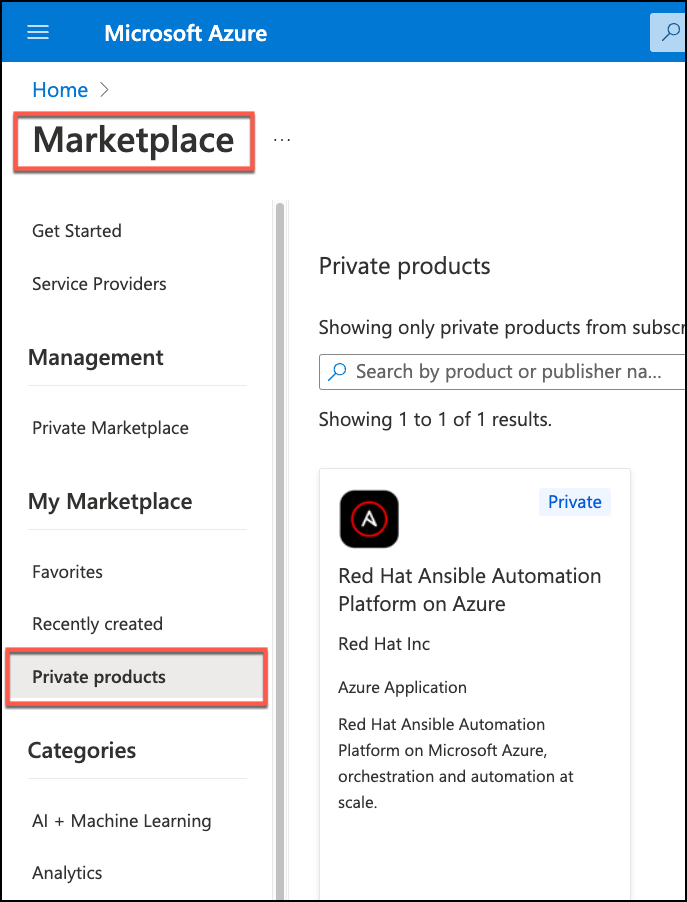
Once you select the catalog tile, you have two screens to complete, and then the deployment will begin. The first screen is a form for input about how Red Hat Ansible Automation Platform on Azure will install into your Azure subscription.
You need to either create a resource group, or provide one that’s already available. This is the resource group where the managed application object of your deployment will reside.
The region field is required and indicates what region the deployment will install to.
The administrator password is also provided here, and will be the password for the “admin” user of both the automation controller and the private automation hub user interfaces.
The deployment will create a “Managed Resource Group” that the publisher of Red Hat Ansible Automation Platform on Azure - in this case Red Hat - has access to in order to perform any management and support tasks against the deployment. The name of the managed resource group is autogenerated, but you do have the ability to change this if needed.

The “Access” field indicates how the UI interfaces and APIs for automation controller and private automation hub will be accessible after deployment. The “Access” field has two options, “Public” and “Private”.
Public indicates that the UI interfaces and APIs for automation controller and private automation hub are accessible via the public internet. These endpoints are protected with Azure Application Gateway and Web Application Firewall. This option is useful for organizations that do not want to configure network peering or want a more turn-key deployment model.
Private indicates that the UI interfaces and APIs for automation controller and private automation hub are only accessible via Azure private networks through network peering. This isolates Red Hat Ansible Automation Platform on Azure from public internet access.
Different organizations choose the access type that works best for them based on their organizational networking policies and Azure networking acumen.
Once the deployment is complete, access information will be available in the managed application record that has been created for the deployment. Navigate to the “Outputs and Parameters” option in the “Settings” section to see the URLs for both automation controller and the private automation hub.

If you’ve selected “Public” for your access method, simply visit the URL to access the corresponding UI.
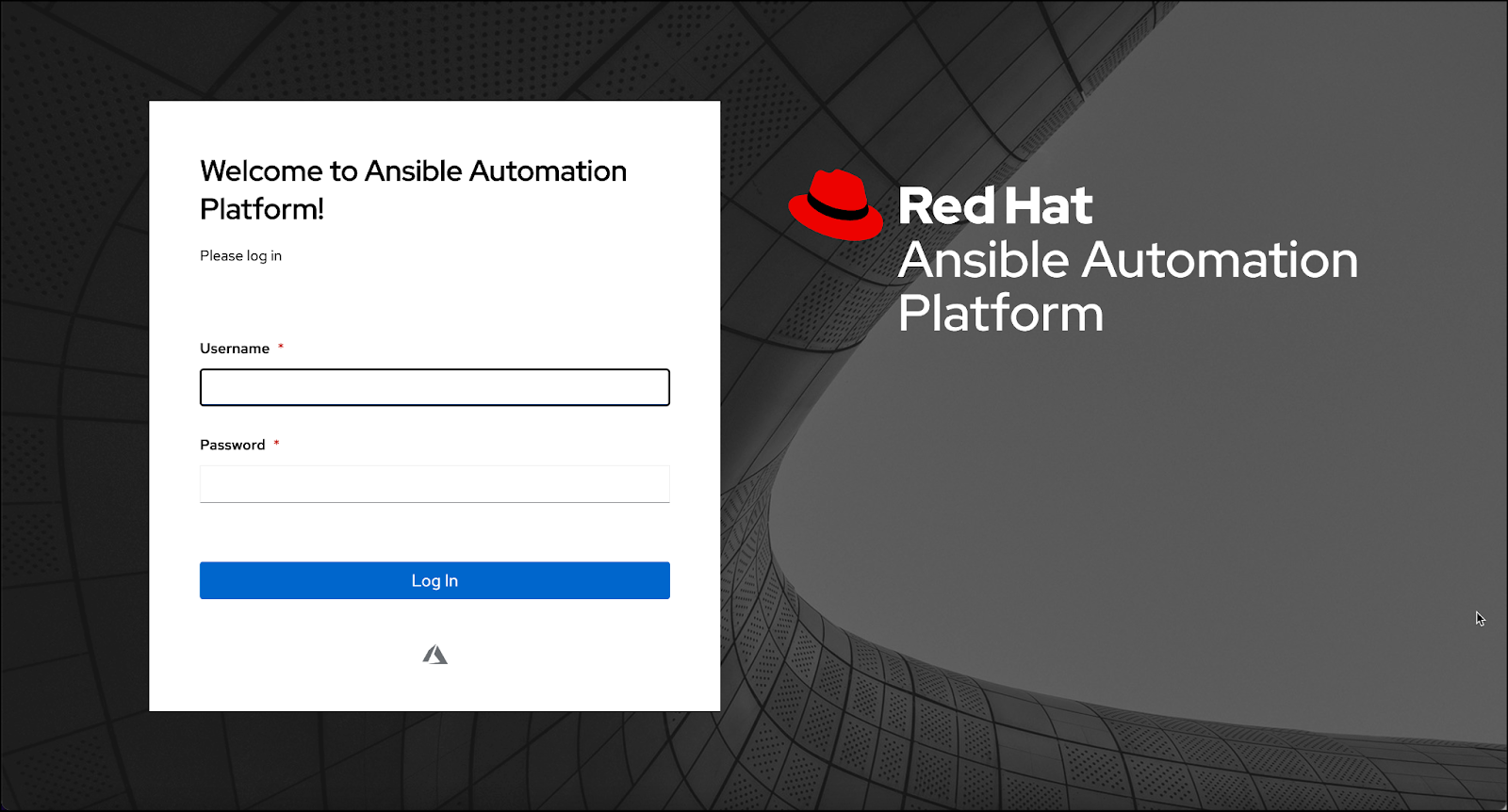
Log in using “admin” and the administrator password you provided earlier and you're good to go. You may then configure users from within the platform or configure SSO with Azure AD or other identity providers (IDP) .
So.. that was easy! But what if you chose “Private” access? If so, then there are further steps to complete to access the UIs for automation controller and private automation hub.
In a subsequent blog post we will review how to access the UIs for Red Hat Ansible Automation Platform on Azure if you select “Private” access. If you do, you have a few options to leverage to access the UIs.
- An Azure hosted virtual machine (VM)
- Azure VPN or Direct Connect
- SSH Tunnel
What can I do next?
Here are a few resources to get started:
- To learn more about Red Hat Ansible Automation Platform on Azure, visit the following site.
- Try a hands-on self-paced lab of Red Hat Ansible Automation Platform on Azure.
- Visit other hands-on self-paced lab(s) on Red Hat Ansible Automation Platform.
- Check out the Red Hat Ansible Automation Platform on Azure documentation.
- Would you like to receive updates on Red Hat Ansible Automation Platform on Azure? Sign up here.
Acknowledgements
저자 소개

Scott Harwell is a Principal Product Manager at Red Hat for Ansible on Clouds. His focus is the delivery of Ansible Automation Platform offerings on hyperscaler cloud vendors such as Microsoft Azure and AWS. Prior to joining Red Hat, Scott held product management, development, and consulting roles for Oracle, AST Corporation, Tech Machine, and Volvo. Scott is a cloud enthusiast with experience and certifications across many cloud providers. He is passionate about automation and likes to find creative ways to improve IT, technical, and business processes.
채널별 검색

오토메이션
기술, 팀, 인프라를 위한 IT 자동화 최신 동향

인공지능
고객이 어디서나 AI 워크로드를 실행할 수 있도록 지원하는 플랫폼 업데이트

오픈 하이브리드 클라우드
하이브리드 클라우드로 더욱 유연한 미래를 구축하는 방법을 알아보세요

보안
환경과 기술 전반에 걸쳐 리스크를 감소하는 방법에 대한 최신 정보

엣지 컴퓨팅
엣지에서의 운영을 단순화하는 플랫폼 업데이트

인프라
세계적으로 인정받은 기업용 Linux 플랫폼에 대한 최신 정보

애플리케이션
복잡한 애플리케이션에 대한 솔루션 더 보기

가상화
온프레미스와 클라우드 환경에서 워크로드를 유연하게 운영하기 위한 엔터프라이즈 가상화의 미래
