
GUIs are nice pieces of software. They often help with a lot of daily tasks. For example, they let you visualize what you're doing on the system, surf the internet, and much more, but they don't belong on servers. The reason for this strong claim comes from the fact that sysadmins shouldn’t be using a server as a desktop, and generally speaking, a server can be administered completely via the command line interface (CLI).
A full-fledged desktop environment is also resource-heavy. It can easily require 2 GB of RAM and three gigabytes or more disk space just to exist. Yes, you can install lightweight GUIs, but again, resources are unnecessarily wasted.
[ You might also enjoy: Balancing Linux security with usability ]
There are other practical issues with a GUI on a server too. To use a GUI, you will probably use SSH X-Server forwarding, which is very slow as SSH encrypts the traffic. There are other ways to manage the server. You can either physically connect to the server (in case of bare metal) or have access to the hypervisor console, which you might or might not be able to, depending on security policies, access, geographic location, and so on.
Who uses a GUI on a server?
Every so often, though, you find that people, especially those coming from different backgrounds, prefer to have a desktop environment installed on their servers as they are not familiar with any shell. However, don't forget that skills can be learned and, after a certain amount of time, those who are administering Linux will find themselves more at home with the GNU/Linux shell.
Of course, visualizing server configurations still helps even the most experienced of us, but RHEL provides Cockpit for that. It is a lightweight browser-based administration tool for Linux.
How do I get rid of the desktop environment?
I have tried many times to eliminate the desktop environment on servers, recommending that administrators use Cockpit. However, it took some time to find a way to cleanly remove GNOME (the default desktop environment on RHEL) without reinstalling the OS.
It turns out that this is possible, but it requires a couple of extra steps.
When you want to learn what is installed on your systems, as usual, DNF comes in handy. Try this command:
$ dnf grouplist
You can see the Installed Environment Groups category. Those groups are there to help manage software collections. Notice the Installed Environment Groups listed below:
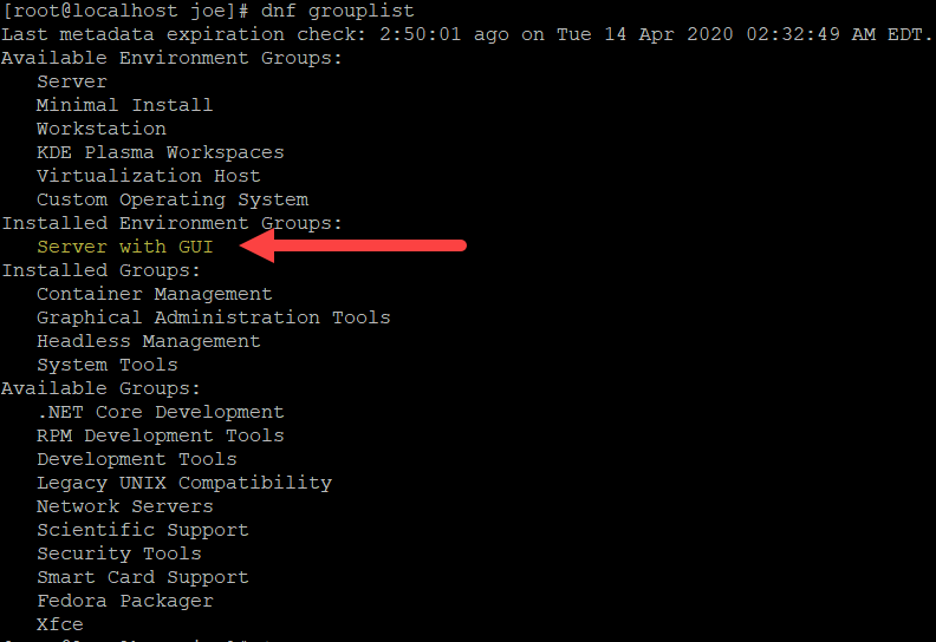
As you can see, the Installed Environment Group is Server with GUI. This is the default during a standard installation via the RHEL ISO.
Remove the GUI
You want to install everything you need to replace your GUI-based tooling and then remove the GUI altogether.
As a first step, you need to install the group Minimal install. This will update the dependencies and make sure that the removal of the Server with GUI group won’t break anything.
Afterward, you also need the Server group. This will help enable Cockpit, the admin tool I mentioned earlier.
Use the following steps:
$ dnf groupinstall -y “Minimal Install”
$ dnf groupremove -y “Server with GUI”
$ dnf groupinstall -y “Server”
Finally, you can enable Cockpit with two additional simple steps:
systemctl enable --now cockpit.socket
sudo firewall-cmd --add-service=cockpit --permanent
To learn more about Cockpit and how to use it, take a look at, An introduction to Cockpit, a browser-based administration tool for Linux.
[ Free online course: Red Hat Enterprise Linux technical overview. ]
Wrapping up
In this article, you learned how to cleanly remove a default desktop environment from a RHEL 8 server in favor of Cockpit. This allows you to save resources and still comfortably manage the system with a browser-based software component.
저자 소개
Italian-born and Swiss-based Cloud and infrastructure Enthusiast, Linux Users since 1998. Avid traveler, foodie, and die-hard cyclist, if he is not tinkering with a complex computing environment, you can find him in the woods or in the kitchen.
Currently, he is working as a senior consultant helping customers to reach their success.
유사한 검색 결과
지금 바로 시작해야 하는 이유: 금융 서비스를 위한 포스트 양자 보안을 지금 시작해야 하는 이유
Red Hat Enterprise Linux Long-Life Add-On: 지원 종료 걱정 없는 RHEL 소개
Infrastructure At The Edge | Compiler
Operating System Management | Compiler
채널별 검색

오토메이션
기술, 팀, 인프라를 위한 IT 자동화 최신 동향

인공지능
고객이 어디서나 AI 워크로드를 실행할 수 있도록 지원하는 플랫폼 업데이트

오픈 하이브리드 클라우드
하이브리드 클라우드로 더욱 유연한 미래를 구축하는 방법을 알아보세요

보안
환경과 기술 전반에 걸쳐 리스크를 감소하는 방법에 대한 최신 정보

엣지 컴퓨팅
엣지에서의 운영을 단순화하는 플랫폼 업데이트

인프라
세계적으로 인정받은 기업용 Linux 플랫폼에 대한 최신 정보

애플리케이션
복잡한 애플리케이션에 대한 솔루션 더 보기

가상화
온프레미스와 클라우드 환경에서 워크로드를 유연하게 운영하기 위한 엔터프라이즈 가상화의 미래
