
There are many options for creating lab environments at home, but doesn't it seem like all this cloud innovation we've heard about should benefit IT learners? Instead of building and maintaining a home lab environment from physical computers, virtual machines, or even containers, what about a concept like labs as a service?
Red Hat has this area covered, especially for folks new to Linux or who need to experiment with some specific software in an easy-to-access environment. The service is called Red Hat Enterprise Linux Skills Workshops.
What advantages do online hosted labs have over local systems? First, the investment is far lower for the participant. There's no need to provide a powerful computer and virtualization software to create a playground. In addition, there's no time consumed with setup, configuration, reverting virtual machines, and such. The vast amount of lab time gets spent doing labs rather than building labs. Finally, you don't always know what you don't know. It's nice to have a series of planned activities that logically expand on each other.
Explore the available activities
RHEL Skills Workshops cover a variety of topics, but I suggest starting with the Admin 101 series. These hands-on opportunities cover basic administrative tasks, such as user and group management, permissions, security, and such. The labs are often based on specific Enable Sysadmin articles, which are linked in the instructions. These articles provide additional context as you get started with RHEL 8.
Consider beginning with these Admin 101 labs:
- Helpful Linux commands [Admin 101]
- User accounts basics [Admin 101]
- File permissions basics [Admin 101]
The workshops don't just cover basic administration. There are activities built around containers and automation tools, too.
[ Fill skills gaps by signing up for a free trial Red Hat Learning Subscription and get unlimited access to our comprehensive curriculum. ]
The following workshops are a great place to begin with these more advanced technologies:
- Deploying containers with container tools [Podman]
- Creating images with the container tools [Buildah]
It can be tough to provide yourself with a workspace to experiment with some of this software, so it's handy to have access to the preconfigured environments Red Hat provides.
There's even an open lab that contains no instructions or scenarios. It provides an RHEL 8 environment for whatever you want to work on and lasts 30 minutes.
Understand the user interface
The user interface for the Skills Workshops is straightforward. It uses a split-screen to provide instructions and access to one or more Bash terminals. They're logically organized, beginning with an overview, goals, and concepts section. The step-by-step instructions are clear and allow you to manually enter commands into the terminal or use the auto-type feature (thus avoiding typos that might interrupt your learning process). There are also good explanations for each step and command, and as mentioned earlier, the labs link back to specific Enable Sysadmin articles that provide even more detail. The workshops label the activities for a particular difficulty level and provide a time estimate.


I want to highlight that the Red Hat environment is not a simulation. It's an actual terminal that accepts the commands expected from the instructions. However, it also takes unexpected commands, meaning that participants can deviate from the specified activities to further experiment with a particular topic. Katacoda provides the interface.
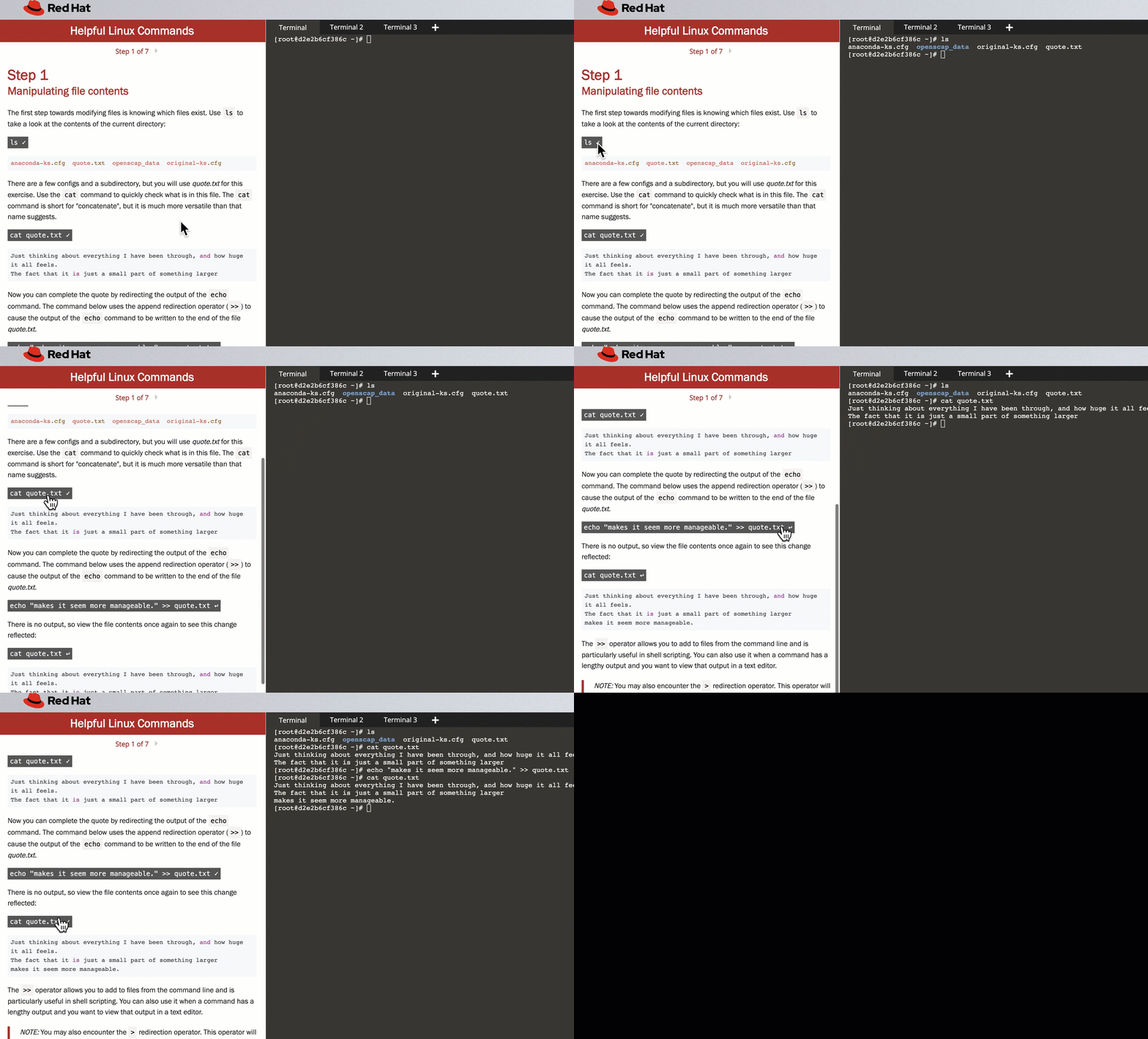
Walking through the Helpful Linux commands workshop (Damon Garn, CC BY-SA 4.0)
Finally, the activities encourage participants to comment and score the lab with one to five stars, helping to steer future learners toward the exercise.
Wrap up
Red Hat Skills Workshops effectively cover several entry-level Linux administrative tasks in bite-sized chunks. The workshops allow you to work with several container and deployment technologies easily.
Cloud computing is generally characterized by broad access, scalable services, platform independence, and a pay-as-you-go structure. One of the benefits of cloud computing is to avoid investing in and maintaining your own lab environment. The Red Hat Skills Workshops activities bring cloud computing concepts to users through an on-demand free service. These hands-on opportunities are a great example of labs as a service.
저자 소개
Damon Garn owns Cogspinner Coaction, LLC, a technical writing, editing, and IT project company based in Colorado Springs, CO. Damon authored many CompTIA Official Instructor and Student Guides (Linux+, Cloud+, Cloud Essentials+, Server+) and developed a broad library of interactive, scored labs. He regularly contributes to Enable Sysadmin, SearchNetworking, and CompTIA article repositories. Damon has 20 years of experience as a technical trainer covering Linux, Windows Server, and security content. He is a former sysadmin for US Figure Skating. He lives in Colorado Springs with his family and is a writer, musician, and amateur genealogist.
유사한 검색 결과
귀사의 Lightwell 전략에 단순한 패치 그 이상이 필요한 5가지 이유
Red Hat Enterprise Linux Long-Life Add-On: 지원 종료 걱정 없는 RHEL 소개
Container Roundup | Compiler
Untangling Networks | Compiler
채널별 검색

오토메이션
기술, 팀, 인프라를 위한 IT 자동화 최신 동향

인공지능
고객이 어디서나 AI 워크로드를 실행할 수 있도록 지원하는 플랫폼 업데이트

오픈 하이브리드 클라우드
하이브리드 클라우드로 더욱 유연한 미래를 구축하는 방법을 알아보세요

보안
환경과 기술 전반에 걸쳐 리스크를 감소하는 방법에 대한 최신 정보

엣지 컴퓨팅
엣지에서의 운영을 단순화하는 플랫폼 업데이트

인프라
세계적으로 인정받은 기업용 Linux 플랫폼에 대한 최신 정보

애플리케이션
복잡한 애플리케이션에 대한 솔루션 더 보기

가상화
온프레미스와 클라우드 환경에서 워크로드를 유연하게 운영하기 위한 엔터프라이즈 가상화의 미래
