


OpenShift helps bring the power of cloud-native and containerization to your applications, no matter what underlying operating systems they rely on. For use cases that require both Linux and Windows workloads, Red Hat OpenShift Container Platform (OCP) allows you to deploy Windows workloads running on Windows server while also supporting traditional Linux workloads hosted on Red Hat Enterprise Linux CoreOS (RHCOS) or Red Hat Enterprise Linux (RHEL).
Getting started
This post chronicles our experiences configuring a Windows workload on an OCP cluster on Azure using both Linux and Windows worker nodes. The OCP cluster uses a virtualized network for pod and service networks. The OVN-Kubernetes Container Network Interface (CNI) plug-in is a network provider for the default cluster network. OVN-Kubernetes is based on an Open Virtual Network (OVN) and provides an overlay-based networking implementation. Communication between windows nodes and Windows/Linux combination occurs over a VXLAN tunnel, but communication between Linux nodes happens purely on the Geneve tunnel. In this post, we'll explain the process of building, publishing, and deploying a Windows workload on the OCP cluster hosted on Azure.
For the workload, a network-intensive tool was purposefully chosen to benchmark the network performance of the systems. The Unified Performance (uperf) http://uperf.org/manual.html, predominantly exists for *NIX systems, however, it was not readily available for Windows. A corresponding compatible codebase purpose-built for Windows can be found here.
Uperf’s typical client-server architecture allows us to start the uperf service in “server” mode. Once the server is in listening mode, the client can be started with a workload definition supplied via XML file.
Exploring the environment
To begin with, our OpenShift environment was composed of 3 control plane nodes, 3 infrastructure nodes, and 6 compute nodes ( 3 Windows and 3 Linux nodes ) hosted on the Azure cloud, deployed through the IPI-based. To manage Windows workloads on OCP, we need the Red Hat Windows Machine Config Operator (WMCO), which allows Windows worker node installation and management. Here is a sample machineset that allowed us to bring Windows Worker Nodes of instance size Standard_D8s_v3 into the cluster:
|
Node Name |
VM Sizes |
Number of instances |
|
Master Nodes |
3 |
|
|
Infrastructure Nodes |
3 |
|
|
Linux Worker Nodes |
3 |
|
|
Windows Worker Nodes |
3 |
Docker Image build and deploy
Every deployment of an uperf container on OCP/ Kubernetes would spin up a process of uperf. This process can be assumed either as a client or server based on the parameter(s) passed. Here is a sneak peek of the leveraged Dockerfile, that resulted in an uperf container image:
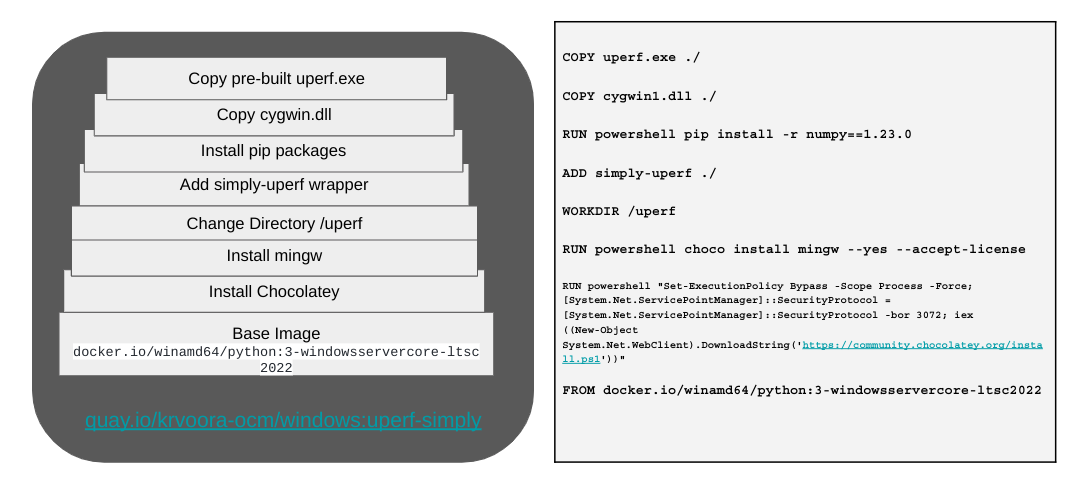
To build a Windows-compatible container image, install a corresponding runtime on the Windows VM:
cd 'C:\Users\vkommadi\Desktop`
git clone https://github.com/krishvoor/uperf-windows/
cd uperf-windows
git submodule --init --recursive update
cd .\uperf-windows
docker build -t windows:uperf-simply .
It is no different to deploy those images in Windows. We will first start uperf in server mode accessible on port 30000:
PS C:\Users\vkommadi\Desktop> docker run -d -p 30000:30000
quay.io/krvoora_ocm/windows:uperf-simply uperf -s -v -P 30000
023963ce1cd81c0629c18d5590b4da51275e325f76e644ad56d087713c0a77e9
PS C:\Users\vkommadi\Desktop>
To validate whether the container is actively running:
PS C:\Users\vkommadi\Desktop> docker ps -a
CONTAINER ID   IMAGE                               COMMAND                  CREATED
STATUS         PORTS                      NAMES
023963ce1cd8   quay.io/krvoora_ocm/windows:uperf-simply   "uperf -s -v -P 30000"   6
minutes ago   Up 6 minutes   0.0.0.0:30000->30000/tcp   nifty_satoshi
PS C:\Users\vkommadi\Desktop>
To run uperf in client mode, let’s supply a customizable parameter file that allows us to tweak threads, duration, and packet size, which allows to stress the uperf-server for a while:
PS C:\Users\vkommadi\Desktop>docker run -v
"c:\Users\vkommadi\Desktop\uperf":"c:\uperf" quay.io/krvoora_ocm/windows:uperf-simply
python c:\uperf\uperf.py
Uperf.exe on execution provides a lot of data to screen. We use simply-uperf, a python script, to parse the standard output of uperf into something easily consumable, like this:
$ docker logs -f fc96d55055dd

{
    "norm_byte_avg": "1.19 GB",
    "norm_ltcy_avg": 6.830062853840754,
    "norm_ltcy_p95": 9.448229074093321,
    "norm_ltcy_p99": 12.689357141501684
}
$ pwd
vkommadi@ovnhybrid MINGW64 ~/Desktop/uperf (master)
$
Deploying Windows workloads on OCP
To deploy this custom Uperf Image to Windows worker nodes, we leveraged Kubernetes Deployment service, as well as ConfigMaps objects, which allowed us to supply declarative updates to Pods and exposed the application running on a set of pods and supplied a non-confidential data to pods.
$
$ git clone https://github.com/krishvoor/uperf-windows/
$ cd uperf-windows
$ oc login <API_SERVER>
$ oc new-project perf-scale-org
$ oc create -f openshift/windows_uperf_server.yml
$ IP_ADDRESS=`oc get po <uperf-server-POD_NAME> -o json | jq -r [.status.podIP][]`
$ sed -i "s/UPDATEME/${IP_ADDRESS}/g" openshift/windows_uperf_client.yml
$ oc create -f openshift/windows_uperf_client.yml
$
Bringing it all together
This exercise demonstrates how conveniently we can implement a cloud-native application on OCP, no matter what underlying operating system that application relies on.
References
OVN-Hybrid config files on Azure
Uperf stdout parser
More about the OVN-K
저자 소개
Krishna Harsha Voora grew up in different regions and experienced different cultures of India, he fell in love with computers after reading about First Generation Computer and it's evolution! This carried into degree in Computer Science & Engineering. After Engineering, he is currently working as Senior Software Engineer in Red Hat India Pvt. Ltd.
Sai is a Senior Engineering Manager at Red Hat, leading global teams focused on the performance and scalability of Kubernetes and OpenShift. With over a decade of deep expertise in infrastructure benchmarking, cluster tuning, and real-world workload optimization, Sai has driven critical initiatives to ensure OpenShift scales seamlessly across diverse deployment footprints- including bare metal, cloud, and edge environments.
Sai and his team are committed to making Kubernetes the premier platform for running mission-critical workloads across industries. A strong advocate for open source, he has played a pivotal role in bringing performance and scale testing tools like kube-burner into the CNCF ecosystem. He holds 8 U.S. patents in systems and performance engineering and has published at leading conferences focused on systems performance and cloud infrastructure.
Sai is passionate about mentoring engineers, fostering open collaboration, and advancing the state of performance engineering within the cloud-native community.
유사한 검색 결과
Red Hat 파트너가 최고의 통신 비즈니스 자산인 이유
에이전틱 패러독스와 하이브리드 AI의 필요성
Crack the Cloud_Open | Command Line Heroes
Edge computing covered and diced | Technically Speaking
채널별 검색

오토메이션
기술, 팀, 인프라를 위한 IT 자동화 최신 동향

인공지능
고객이 어디서나 AI 워크로드를 실행할 수 있도록 지원하는 플랫폼 업데이트

오픈 하이브리드 클라우드
하이브리드 클라우드로 더욱 유연한 미래를 구축하는 방법을 알아보세요

보안
환경과 기술 전반에 걸쳐 리스크를 감소하는 방법에 대한 최신 정보

엣지 컴퓨팅
엣지에서의 운영을 단순화하는 플랫폼 업데이트

인프라
세계적으로 인정받은 기업용 Linux 플랫폼에 대한 최신 정보

애플리케이션
복잡한 애플리케이션에 대한 솔루션 더 보기

가상화
온프레미스와 클라우드 환경에서 워크로드를 유연하게 운영하기 위한 엔터프라이즈 가상화의 미래
