

Improving scaling capabilities of Red Hat OpenStack Platform is an important part of product development. One of the features that helps to simplify the management of resources is called Cells. Simply put: Cells makes this easier by taking a distributed approach to management to support large scale deployments. In this post we'll look at how to use OpenStack Platform 16 with Cells.
Previously our team of performance and scale engineers described the process to scale OSP to more than 500 nodes. With Red Hat OpenStack Platform 16 we introduced full support for multiple Nova’s Cells v2 feature that helps operators manage more compute resources within the same region than was possible before.
Previously, deployments were single-cell deployments which meant managing large environments required tuning Director parameters and therefore required more resources. In Red Hat OpenStack Platform 16, multi-cell deployment allows each cell to be managed independently. In this article we will describe our process of testing multi-cell deployment at scale with Red Hat OpenStack Platform 16.
Cells v2
Cells v2 is an OpenStack Nova feature that improves scaling capability for Nova in Red Hat OpenStack Platform. Each cell has a separate database and message queue which increases performance at scale. Operators can deploy additional cells to handle large deployments and, compared to regions, this enables access to a large number of compute nodes using a single API.
Each cell has its own cell controllers which run the database server and RabbitMQ along with the Nova Conductor services.
Main control nodes are still running Nova Conductor services which we call “super-conductor”.
Services in cell controllers can still call placement APIs but cannot access any other API-layer services via RPC nor do they have access to global API databases on control nodes.
Multiple cells
Cells provide a strategy for scaling Nova: each cell will have a message queue and database for Nova – separate failure domains for groups of compute nodes

Figure: cellsv2 services
Cells V2 simple cell has been available since Red Hat OpenStack Platform 13 (default deployment). Cells V2 multi-cell deployment was not managed by Director.
What are the benefits of Cells V2 multi-cell over the flat deployment?
-
Fault Domains database and queue failures affect a smaller piece of the deployment
-
It leverages a small, read-heavy API database that is easier to replicate
-
High-availability is now possible
-
Simplified/organized replication databases and queues
-
Cache performance is improved
-
Fewer compute nodes per queue and per database
-
Provide one unique set of endpoints for large regions.
Lab architecture
Details of our lab inventory is shown below.
+----------------------------------+------+
| Total baremetal physical servers | 128  |
| Director                         | 1    |
| minion                           | 1    |
| Rally                            | 1    |
| Controllers                      | 24   |
| Remaining                        | 100  |
| virtualcompute                   | 1000 |
+----------------------------------+------+
Each of the bare metal nodes had following specifications: 2x Intel Xeon E3-1280 v6 (4 total cores, 8 threads) 64 GB RAM 500 GB SSD storage
We have created a virtualcompute role that represents normal compute nodes but allowed us to differentiate bare metal nodes from VM based compute nodes.
Deployment - virtualcompute role
We have used VMs and the Virtual Bare Metal Controller (VBMC) to efficiently use lab hardware to simulate 1,000 compute nodes. The VBMC service allows you to import VMs to Director and manage as if it was baremetal node through IPMI (PXE boot, power on, power off) during deployment. Registered nodes were used as compute nodes using the virtualcompute role.
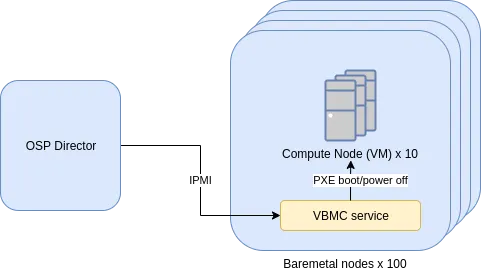
Figure: compute nodes setup
Scaling Director - Minion
Because we had to manage a large environment and had limited resources for Director (only 4 cores and 64GB RAM) we decided to use scale Director using the Minion feature.
Note: Scaling Director with Minions are currently in Tech Preview support level for Red Hat OpenStack Platform 16.0.
Minions are nodes that can be deployed to offload the main Director. Minions usually run heat-engine service and ironic-conductor but in our case we have only used heat-engine on minions.

The following graph shows the CPU utilization of processes that are running on Director during deployment. As illustrated, if we will move the load generated by heat-engine and ironic-conductor to minion hosts we can free CPU time for other services that are running during Heat’s stack creation.

Deployment model
In Red Hat OpenStack Platform 16 we deploy a separate stack (usually one, but we can deploy more using split cell controller feature). This improves deployment time and day two operations – such as adding or removing compute nodes since we don’t need to update the stack with a large number of compute nodes.
(undercloud) [stack@f04-h17-b01-5039ms ~]$ openstack stack list
+--------------------------------------+------------+----------------------------------+--------------------+----------------------+----------------------+
| ID                                   | Stack Name | Project                          | Stack Status       | Creation Time        | Updated Time         |
+--------------------------------------+------------+----------------------------------+--------------------+----------------------+----------------------+
| 47094df3-f8d1-4084-a824-09009ca9f26e | cell2      | ab71a1c94b374bfaa256c6b25e844e04 | UPDATE_COMPLETE    | 2019-12-17T21:39:44Z | 2019-12-18T03:52:42Z |
| c71d375d-0cc3-42af-b37c-a4ad2a998c59 | cell3      | ab71a1c94b374bfaa256c6b25e844e04 | CREATE_COMPLETE    | 2019-12-17T13:50:02Z | None                 |
| dc13de3e-a2d0-4e0b-a4f1-6c010b072c0d | cell1      | ab71a1c94b374bfaa256c6b25e844e04 | UPDATE_COMPLETE    | 2019-12-16T18:39:33Z | 2019-12-18T09:28:31Z |
| 052178aa-506d-4c33-963c-a0021064f139 | cell7-cmp  | ab71a1c94b374bfaa256c6b25e844e04 | CREATE_COMPLETE    | 2019-12-11T22:08:11Z | None                 |
| ab4a5258-8887-4631-b983-ac6912110d73 | cell7      | ab71a1c94b374bfaa256c6b25e844e04 | UPDATE_COMPLETE    | 2019-11-25T14:12:56Z | 2019-12-10T13:21:48Z |
| 8e1c2f9c-565b-47b9-8aea-b8145e9aa7c7 | cell6      | ab71a1c94b374bfaa256c6b25e844e04 | UPDATE_COMPLETE    | 2019-11-25T11:26:09Z | 2019-12-14T09:48:49Z |
| d738f84b-9a38-48e8-8943-1bcc05f725ec | cell5      | ab71a1c94b374bfaa256c6b25e844e04 | UPDATE_COMPLETE    | 2019-11-25T08:41:48Z | 2019-12-13T16:18:59Z |
| 1e0aa601-2d79-4bc3-a849-91f87930ec4c | cell4      | ab71a1c94b374bfaa256c6b25e844e04 | UPDATE_COMPLETE    | 2019-11-25T05:57:44Z | 2019-12-09T13:33:11Z |
| 250d967b-ad60-40ce-a050-9946c91e9810 | overcloud  | ab71a1c94b374bfaa256c6b25e844e04 | UPDATE_COMPLETE    | 2019-11-13T10:13:48Z | 2019-11-19T10:57:05Z |
+--------------------------------------+------------+----------------------------------+--------------------+----------------------+----------------------+
Deployment time
We have managed to deploy 1000 nodes within a single region. The deployment model used in the Red Hat OpenStack Platform 16 for multi-cell deployments scaled without issues and time to deploy was consistent regardless of total number of nodes:
-
~360 minutes to deploy cell with bare metal 3 CellControllers and 100 virtualcompute nodes from scratch.
-
~190 minutes to scale out the cell from 100 - 150 virtualcompute nodes.
Details of the deployed 1,000 node environment are shown below.
Deployment check: CLI
(overcloud) [stack@f04-h17-b01-5039ms ~]$ openstack hypervisor stats show
+----------------------+---------+
| Field                | Value   |
+----------------------+---------+
| count                | 1000    |
| current_workload     | 0       |
| disk_available_least | 21989   |
| free_disk_gb         | 29000   |
| free_ram_mb          | 1700017 |
| local_gb             | 29000   |
| local_gb_used        | 0       |
| memory_mb            | 5796017 |
| memory_mb_used       | 4096000 |
| running_vms          | 0       |
| vcpus                | 2000    |
| vcpus_used           | 0       |
+----------------------+---------+

(overcloud) [stack@f04-h17-b01-5039ms ~]$ openstack compute service list | grep nova-compute | grep up | wc -l
1000
Full command output:
(undercloud) [stack@f04-h17-b01-5039ms ~]$ openstack compute service list | grep nova-compute | grep up

(undercloud) [stack@f04-h17-b01-5039ms ~]$ openstack server list --name compute -f value | wc -l
1000

(overcloud) [stack@f04-h17-b01-5039ms ~]$ openstack availability zone list
+-----------+-------------+
| Zone Name | Zone Status |
+-----------+-------------+
| internal  | available   |
| cell7     | available   |
| cell5     | available   |
| cell1     | available   |
| cell4     | available   |
| cell6     | available   |
| cell3     | available   |
| nova      | available   |
| cell2     | available   |
| nova      | available   |
+-----------+-------------+

(overcloud) [stack@f04-h17-b01-5039ms ~]$ openstack aggregate list
+----+-------+-------------------+
| ID | Name  | Availability Zone |
+----+-------+-------------------+
|  2 | cell1 | cell1             |
|  5 | cell2 | cell2             |
|  8 | cell3 | cell3             |
| 10 | cell4 | cell4             |
| 13 | cell5 | cell5             |
| 16 | cell6 | cell6             |
| 19 | cell7 | cell7             |
+----+-------+-------------------+
Deployment check: Dashboard

Figure: Dashboard view of the aggregates and availability zones
Multi-cell deployment testing
We have tested functionality of multi-cell overcloud at 500, 800 and 1,000 node counts.
With 500 nodes running on 6 cells, we have not encountered any problems with the Overcloud. We have run the following Rally tests to generate intensive load on Overcloud.
test scenario NovaServers.boot_and_delete_server
args position 0
args values:
{
  "args": {
    "flavor": {
      "name": "m1.tiny"
    },
    "image": {
      "name": "^cirros-rally$"
    },
    "force_delete": false
  },
  "runner": {
    "times": 10000,
    "concurrency": 20
  },
  "contexts": {
    "users": {
      "tenants": 3,
      "users_per_tenant": 10
    }
  },
  "sla": {
    "failure_rate": {
      "max": 0
    }
  },
  "hooks": []
}

Results of Rally tests - Response Times (sec):

Action | Min (sec) | Median (sec) | 90%ile (sec) | 95%ile (sec) | Max (sec) | Avg (sec) | Success | Count |
nova.boot_server | 8.156 | 8.995 | 10.984 | 11.377 | 28.16 | 9.687 | 100.0% | 10000 |
nova.delete_server | 0.717 | 2.32 | 2.411 | 2.462 | 4.955 | 2.34 | 100.0% | 9999 |
total | 8.959 | 11.335 | 13.331 | 13.754 | 30.431 | 12.027 | 100.0% | 10000 |
 -> duration | 7.959 | 10.335 | 12.331 | 12.754 | 29.431 | 11.027 | 100.0% | 10000 |
 -> idle_duration | 1.0 | 1.0 | 1.0 | 1.0 | 1.0 | 1.0 | 100.0% | 10000 |
During Rally tests loads generated on the control plane were handled without errors and we did not observe any anomalies of performance metrics.

Above 800 nodes, we have noticed flapping OVN agents which caused problems with scheduling. This is most likely due to overloading ovsdb-server which we had offloaded by tuning OVN related parameters.
We are still working on parameters tuning to prepare best practices and a complete set of parameters to tune for large multi-cell deployments. However, operators might want to consider using one of the SDN solutions when deploying a multi-cell environment with more than 500 nodes.
저자 소개
Erwan Gallen is Senior Principal Product Manager, Generative AI, at Red Hat, where he follows Red Hat AI Inference Server product and manages hardware-accelerator enablement across OpenShift, RHEL AI, and OpenShift AI. His remit covers strategy, roadmap, and lifecycle management for GPUs, NPUs, and emerging silicon, ensuring customers can run state-of-the-art generative workloads seamlessly in hybrid clouds.
Before joining Red Hat, Erwan was CTO and Director of Engineering at a media firm, guiding distributed teams that built and operated 100 % open-source platforms serving more than 60 million monthly visitors. The experience sharpened his skills in hyperscale infrastructure, real-time content delivery, and data-driven decision-making.
Since moving to Red Hat he has launched foundational accelerator plugins, expanded the company’s AI partner ecosystem, and advised Fortune 500 global enterprises on production AI adoption. An active voice in the community, he speaks regularly at NVIDIA GTC, Red Hat Summit, OpenShift Commons, CERN, and the Open Infra Summit.
유사한 검색 결과
Red Hat OpenShift 4.22가 엔터프라이즈 AI의 수익성에 미치는 영향
Red Hat 파트너가 최고의 통신 비즈니스 자산인 이유
Crack the Cloud_Open | Command Line Heroes
Edge computing covered and diced | Technically Speaking
채널별 검색

오토메이션
기술, 팀, 인프라를 위한 IT 자동화 최신 동향

인공지능
고객이 어디서나 AI 워크로드를 실행할 수 있도록 지원하는 플랫폼 업데이트

오픈 하이브리드 클라우드
하이브리드 클라우드로 더욱 유연한 미래를 구축하는 방법을 알아보세요

보안
환경과 기술 전반에 걸쳐 리스크를 감소하는 방법에 대한 최신 정보

엣지 컴퓨팅
엣지에서의 운영을 단순화하는 플랫폼 업데이트

인프라
세계적으로 인정받은 기업용 Linux 플랫폼에 대한 최신 정보

애플리케이션
복잡한 애플리케이션에 대한 솔루션 더 보기

가상화
온프레미스와 클라우드 환경에서 워크로드를 유연하게 운영하기 위한 엔터프라이즈 가상화의 미래
