
Ansible runs on Python, and with Ansible Tower, Python is also the engine under the hood. When working with my customers, I have seen some practical questions that appear to be relatively common. This article provides some tips for setting up and troubleshooting virtualenvs in an Ansible Tower scenario.
1. What is a virtualenv?
A Python virtualenv is basically a directory created with the virtualenv command (which, as you can guess, is a Python script).
Once this virtualenv is "activated," you can add specific Python modules there and have an isolated environment for experimenting and developing without affecting your main Python/Ansible scripts and playbooks.
Ansible Tower has two virtualenvs under the default directory: awx and ansible.
The first is: /var/lib/awx/venv/awx. awx virtualenv is for the exclusive use of Ansible Tower itself and should not be modified.
The other virtualenv is: /var/lib/awx/venv/ansible. This virtualenv is what Tower uses to run the templates (playbooks).
Someone could ask: If I need to add Python modules required by my Ansible Tower playbooks, should I add them under the default ansible virtualenv?
Well, you could.
But it is probably a better idea to create another virtualenv if:
- You want to keep the default virtualenv as a stable development environment and want to experiment with new modules in another virtualenv.
- You have different groups of developers working with various projects that require specific Python/Ansible modules.
2. Tips for setting up a virtualenv
There are excellent explanations and examples in the Ansible Tower and Python documentation about how to set up a virtualenv.
I normally follow the Ansible Tower documentation when I am creating a new virtualenv, but there are some topics that I tend to overlook (which later ends with me scratching my head asking, "Hmm... why is this not acting like I was expecting?").
Permissions on the Python modules
Make sure to observe the recommendation to set umask 0022, not only when you create your virtualenv, but also when you add Python modules to it.
The reason for this is that Ansible Tower runs as the user awx, so this user needs to be able to read the Python modules in the virtualenv.
If the permissions are not set correctly, your templates/playbooks may give you errors like module XYZ is not installed or module XYZ has no attribute ABC when the problem is actually a simple permission issue.
[ Readers also enjoyed: How to create an Ansible Playbook ]
Install Ansible in your virtualenv
The playbooks you want to run using the virtualenv will need your specific Python modules installed in your virtualenv. It makes sense to have the Ansible engine also running from that virtualenv.
You can use the following command to install a specific version of Ansible:
sudo /opt/my-envs/xyz/bin/pip install ansible==2.9.15
Note: If you do not specify the version, pip installs the latest version. There are behavioral changes between Ansible 2.9 and Ansible 2.10, so it is advisable to check this doc before allowing the installation of 2.10 or a newer version.
Use Pip to list the Python modules
Let's say you want to create a replica of your virtualenv in another environment, or you have multiple Ansible Tower nodes and need to replicate the virtualenv across all nodes. To capture the list of modules for comparison or documentation, you can use:
pip list > pip_list.txt

head -5 /tmp/pip_list.txt
Package       Version
------------- ---------
ansible       2.9.15
certifi       2020.12.5
cffi          1.14.4
You can also generate a list in a format that allows the installation of the same module versions somewhere else:
pip freeze > /tmp/pip_freeze.txt

head -3 /tmp/pip_freeze.txt
ansible==2.9.15
certifi==2020.12.5
cffi==1.14.4
You can then use this freeze file to install the same modules with exactly the same versions using:
sudo /opt/my-envs/xyz/bin/pip install -r pip_freeze.txt
3. Make virtualenvs available in Tower projects/templates
By default, Ansible Tower only knows about its own virtualenvs.
In order to make Tower aware of the additional virtualenvs, you have two options:
- Use REST API calls as described in Ansible Tower documentation
- Use the web interface and navigate to SETTINGS -> SYSTEM:

After doing one of these two steps, you will be able to select the new virtualenvs when you work with Organizations, Projects, and Templates in Tower:
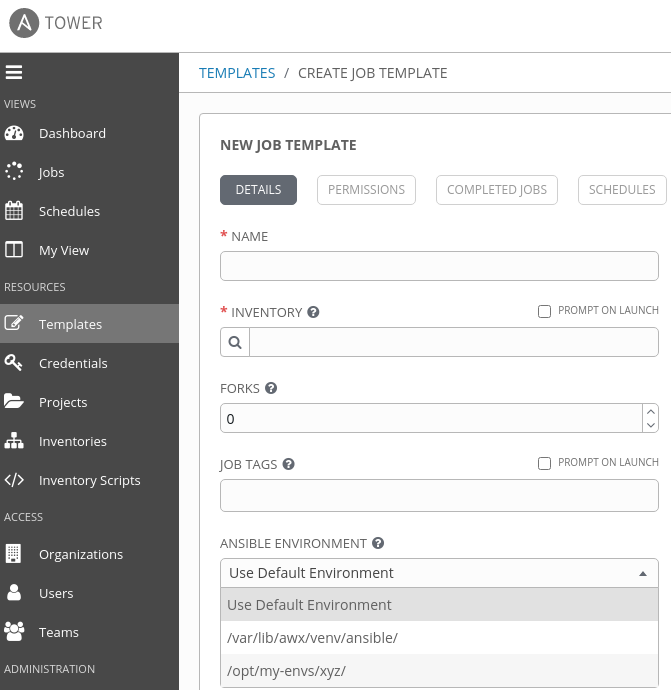
Note: Make sure that the virtualenv directory is readable by the user awx. If it is not, Tower will not list the virtualenv.
"The most important thing to pay attention to is which virtualenv is active and which binaries your playbooks are using."
4. Backing up and restoring a virtualenv
If you take a full Tower backup (using the setup.sh -b script), the virtualenvs will be automatically backed up there, and you will be able to restore them with setup.sh -r). Of course, restoring this way means that everything else will also be restored.
If you need to backup/restore the virtualenv, you can always use tools like tar to do that.
Also, if you saved the output of your pip freeze command, you can recreate the directory structure and use the pip install command with the -r argument as shown above.
Ensure that the restored directory structure is readable by the awx user so that Tower can recognize the virtualenv and list it under the ANSIBLE ENVIRONMENT field in Organizations, Projects, and Templates.
Note: In a scenario with Ansible Tower running on OpenShift, things are different when dealing with virtualenvs. That is a topic for another article.
5. Troubleshooting versions
Which Python version are you using?
One source of potential problems is related to the exact version of Python and Pip used, or the version that the tools are seeing.
Sometimes you need to use the command line to install/verify Python modules, so it is always good to check which Python version you are using.
For example, after activating the virtualenv, check the version:
source /opt/my-envs/xyz/bin/activate

(xyz) [admin@control my-envs]$ which python
/opt/my-envs/xyz/bin/python

(xyz) [admin@control my-envs]$ which python3
/opt/my-envs/xyz/bin/python3

(xyz) [admin@control my-envs]$ python -V
Python 3.6.8

(xyz) [admin@control my-envs]$ which pip
/opt/my-envs/xyz/bin/pip

(xyz) [admin@control my-envs]$ pip3 -V
pip 20.2.4 from /opt/my-envs/xyz/lib/python3.6/site-packages/pip (python 3.6)
As you can see in the example above, after activation, all the commands point to paths in my virtualenv, which is what you should expect to see, unless you have other versions in your path, and that could create some problems.
This is particularly important if you do have other Python versions on your server. Sometimes you may want to run the pip command as the root user, and what root sees as the default Python may not be what your non-root account sees. This would cause the module to be installed under the wrong Python environment, and the templates that you run from Tower would not find the module.
Instead of running sudo pip install module-name, use the full path for pip to avoid this problem. Using my previous scenario as an example, that would be:
sudo /opt/my-envs/xyz/bin/pip install module-name
Which Ansible version are you using?
If you still see errors like No module named XYZ, check which Ansible version you are running from the template output:

Does it match the version/location that you have in your virtualenv?
You don't need to install Ansible in your virtualenv, but keep in mind that if Ansible playbooks are executed by a different instance of Ansible, it may not see the Python modules installed in your virtualenv.
[ A free guide from Red Hat: 5 steps to automate your business. ]
Wrap up
Virtualenvs are a great way to create isolated scenarios where you can experiment with different Python/Ansible modules without interfering with other installed modules. Virtualenvs are easy to recreate from scratch. The most important thing to pay attention to is which virtualenv is active and which binaries your playbooks are using.
저자 소개
Roberto Nozaki (RHCSA/RHCE/RHCA) is an Automation Principal Consultant at Red Hat Canada where he specializes in IT automation with Ansible. He has experience in the financial, retail, and telecommunications sectors, having performed different roles in his career, from programming in mainframe environments to delivering IBM/Tivoli and Netcool products as a pre-sales and post-sales consultant.
Roberto has been a computer and software programming enthusiast for over 35 years. He is currently interested in hacking what he considers to be the ultimate hardware and software: our bodies and our minds.
Roberto lives in Toronto, and when he is not studying and working with Linux and Ansible, he likes to meditate, play the electric guitar, and research neuroscience, altered states of consciousness, biohacking, and spirituality.
유사한 검색 결과
Red Hat Ansible 올스타: 네트워크 및 인프라 자동화의 미래를 주도합니다
Ansible Automation Platform을 위한 새로운 오토메이션 오케스트레이터로 IT 워크플로우를 규모에 맞게 통합
Random Acts Of Automation | Compiler
Untangling Networks | Compiler
채널별 검색

오토메이션
기술, 팀, 인프라를 위한 IT 자동화 최신 동향

인공지능
고객이 어디서나 AI 워크로드를 실행할 수 있도록 지원하는 플랫폼 업데이트

오픈 하이브리드 클라우드
하이브리드 클라우드로 더욱 유연한 미래를 구축하는 방법을 알아보세요

보안
환경과 기술 전반에 걸쳐 리스크를 감소하는 방법에 대한 최신 정보

엣지 컴퓨팅
엣지에서의 운영을 단순화하는 플랫폼 업데이트

인프라
세계적으로 인정받은 기업용 Linux 플랫폼에 대한 최신 정보

애플리케이션
복잡한 애플리케이션에 대한 솔루션 더 보기

가상화
온프레미스와 클라우드 환경에서 워크로드를 유연하게 운영하기 위한 엔터프라이즈 가상화의 미래
