Red Hat Advanced Cluster Management for Kubernetes allows you to deploy, upgrade, and configure different spoke clusters from a hub cluster. It is an OpenShift cluster that manages other clusters. The infrastructure, and its configuration, can be defined using Red Hat Advanced Cluster Management governance, allowing you to define configurations through policies. These policies define sets of mustHave or mustNotHave objects:
apiVersion: policy.open-cluster-management.io/v1
kind: Policy
metadata:
    <REDACTED>
    name: du-mb-op-conf-config-operator
    namespace: ztp-group
spec:
    <REDACTED>
    policy-templates:
        - objectDefinition:
            <REDACTED>
            spec:
                <REDACTED>
                object-templates:
                    - complianceType: musthave
                      objectDefinition:
                        apiVersion: local.storage.openshift.io/v1
                        kind: LocalVolume
                        <REDACTED>
                        spec:
                            logLevel: Normal
                            managementState: Managed
                            <REDACTED>
Bindings and placement rules link the policies to different spoke clusters of your infrastructure. The binding and placement rules select which cluster get the new policies applied:
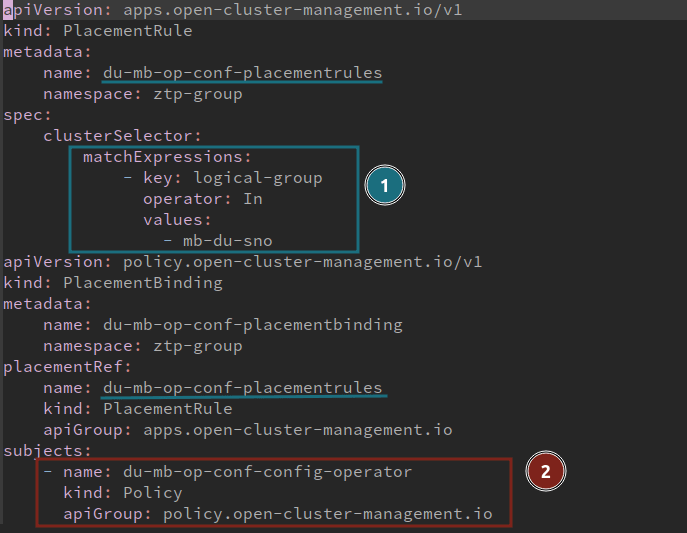
- The PlacementRule selects a set of clusters
- The PlacementBinding binds the PlacementRule with existing policies
All clusters with the logical-group mb-du-sno label are affected by the policy du-mb-op-conf-config-operator. As a result, different sets of mustHave and mustNotHave define its desired status, which can be considered validated.
But what would be a proper procedure to take a set, or subgroup, of these clusters to test some new policies? How would we take some clusters out of their logical group to test some new configurations?
This tutorial shows how to use Red Hat Advanced Cluster Management governance and subgroups to safely test new configurations. The tutorial is divided into the following steps:
- An existing scenario with a set of clusters belonging to a specific logical group. We need to test and validate a new configuration.
- The configurations are managed by Red Hat Advanced Cluster Management governance policies.
- To create a subgroup, extracting one cluster out of this initial logical group.
- This new cluster (or subgroup) will use the same configuration from its original group. Plus, some new configurations need to be validated.
- With the new configuration validated on the subgroup, we can safely migrate all the clusters.
- All the clusters running in the logical group with the new configuration.
A Git repository is connected to the hub cluster to inject the Red Hat Advanced Cluster Management policies into the governance process.
The scenario
For this tutorial, we focus on a scenario with three different Single Node OpenShift (SNO) instances. All are intended to be used in a telecommunications environment to deploy a midband distributed unit. This example can apply to any other scenario.
SNO5, SNO6, and SNO7 are already deployed and working, using a ZTP siteconfig custom resource. All are based on Red Hat OpenShift 4.12 and belong to the logical-group "mb-du-sno".
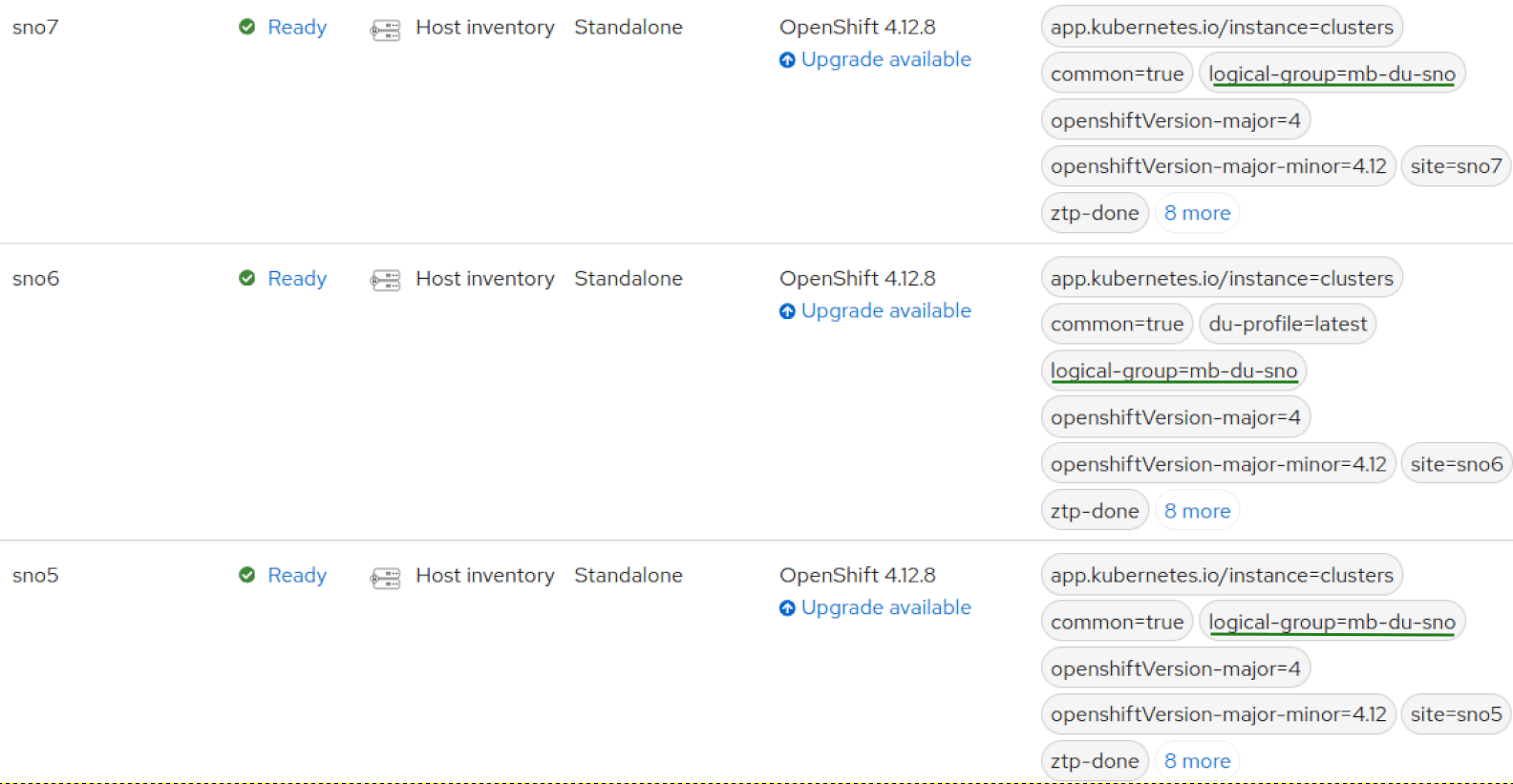
Each cluster has been configured using policies from the Red Hat Advanced Cluster Management governance. All the policies are marked compliant on all clusters. Therefore, the clusters are deployed, working, and properly configured.
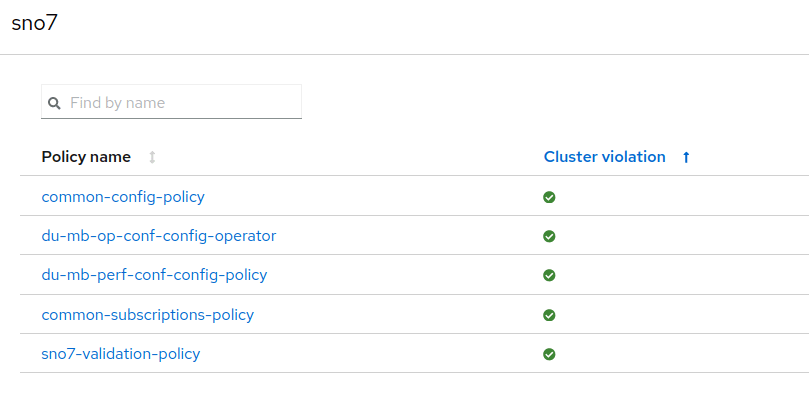
These policies are created with a GitOps methodology that connects a Git repository to the hub cluster. Here is a view of the policies from the Git repository:
.
├── common
│   ├── common-config-policy.yaml
│   ├── common-placementbinding.yaml
│   ├── common-placementrules.yaml
│   └── common-subscriptions-policy.yaml
└── du-mb-op-conf
├── du-mb-op-conf-config-operator.yaml
├── du-mb-op-conf-placementbinding.yaml
├── du-mb-op-conf-placementrules.yaml
├── du-mb-perf-conf-config-policy.yaml
├── du-mb-perf-conf-placementbinding.yaml
└── du-mb-perf-conf-placementrules.yaml
Create the subgroup
Create a new subgroup called mb-du-sno-4.12.26. First, copy previous policies to a new folder for the subgroup:
$ cp -r mb-du-sno/ mb-du-sno-4.12.26
$ tree
├── common
│   ├── common-config-policy.yaml
│   ├── common-placementbinding.yaml
│   ├── common-placementrules.yaml
│   └── common-subscriptions-policy.yaml
├── mb-du-sno
│   ├── du-mb-op-conf-config-operator.yaml
│   ├── du-mb-op-conf-placementbinding.yaml
│   ├── du-mb-op-conf-placementrules.yaml
│   ├── du-mb-perf-conf-config-policy.yaml
│   ├── du-mb-perf-conf-placementbinding.yaml
│   └── du-mb-perf-conf-placementrules.yaml
└── mb-du-sno-4.12.26
    ├── du-mb-op-conf-config-operator.yaml
    ├── du-mb-op-conf-placementbinding.yaml
    ├── du-mb-op-conf-placementrules.yaml
    ├── du-mb-perf-conf-config-policy.yaml
    ├── du-mb-perf-conf-placementbinding.yaml
    └── du-mb-perf-conf-placementrules.yaml
You cannot have several policies with the same name, so change the metadata.name on all new policies:
$ cd mb-du-sno-4.12.26
View the previous names:
$ yq '.metadata.name' *
du-mb-op-conf-config-operator
---
du-mb-op-conf-placementbinding
---
du-mb-op-conf-placementrules
---
du-mb-perf-conf-config-policy
---
du-mb-perf-conf-placementbinding
---
Du-mb-perf-conf-placementrules
Append -4.12.26 to all the metadata.name in the new YAMLs:
$ for i in `ls *.yaml`; do  yq e -i  '.metadata.name = .metadata.name + "-4.12.26"' $i; done
$ yq '.metadata.name' *
du-mb-op-conf-config-operator-4.12.26
---
du-mb-op-conf-placementbinding-4.12.26
---
du-mb-op-conf-placementrules-4.12.26
---
du-mb-perf-conf-config-policy-4.12.26
---
du-mb-perf-conf-placementbinding-4.12.26
---
du-mb-perf-conf-placementrules-4.12.26
Now, change PlacementBindings to point PlacementRule (1) and the Policy (2) with the new names of these resources. The change needs to be done in all the files named “*-placementbinding.yamls”, from the newly created folder above:
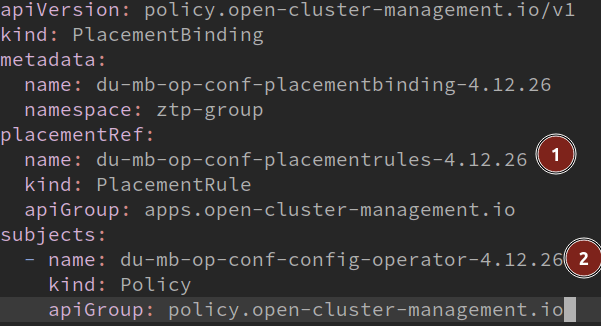
Finally, change PlacementRules to bind the policies to the new subgroup, modifying the clusterSelector to match the name of the new subgroup. The change needs to be done in all the files named “*-placementrules.yaml”, from the new created folder above:
apiVersion: apps.open-cluster-management.io/v1
kind: PlacementRule
metadata:
  name: du-mb-op-conf-placementrules-4.12.26
  namespace: ztp-group
spec:
  clusterSelector:
    matchExpressions:
      - key: logical-group
        operator: In
        values:
          - mb-du-sno-4.12.26
---
apiVersion: apps.open-cluster-management.io/v1
kind: PlacementRule
metadata:
  name: du-mb-perf-conf-placementrules-4.12.26
  namespace: ztp-group
spec:
  clusterSelector:
    matchExpressions:
      - key: logical-group
        operator: In
        values:
          - mb-du-sno-4.12.26
Finally, move SNO5 from its original logical group to the newly created one. Edit your siteconfig file and change the labels of SNO5 to make it part of the new subgroup:

Siteconfig files are not explained in this tutorial, but it is part of the preparation of the scenario. It is expected you have experience about how to deploy your clusters using ZTP siteconfigs.
Push and sync your siteconfig from the Git repository.

After changed the logical-group, SNO5 is still compliant in the governance model:
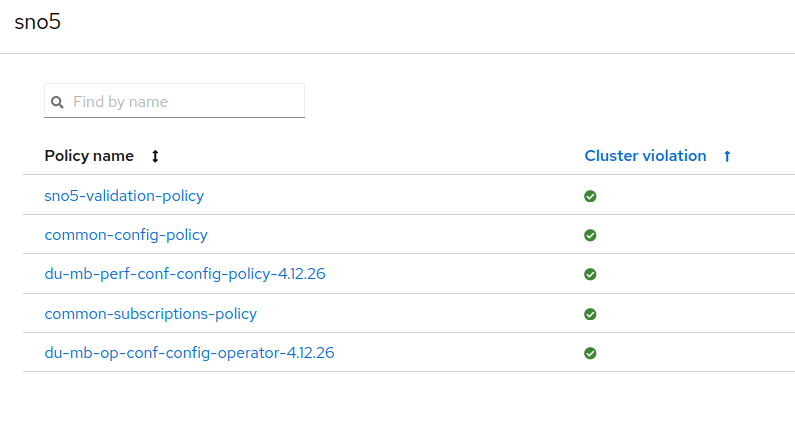
It's still compliant because you copied all the policies from its previous logical group. It's using a new set of policies, but the same configuration.
Now it's time to add a new configuration to the subgroup.
Introduce changes in the subgroup configuration
To produce the desired change and make a cluster upgrade to validate policies in a new environment, create a new policy with the required PlacementRules and PlacementBindings.
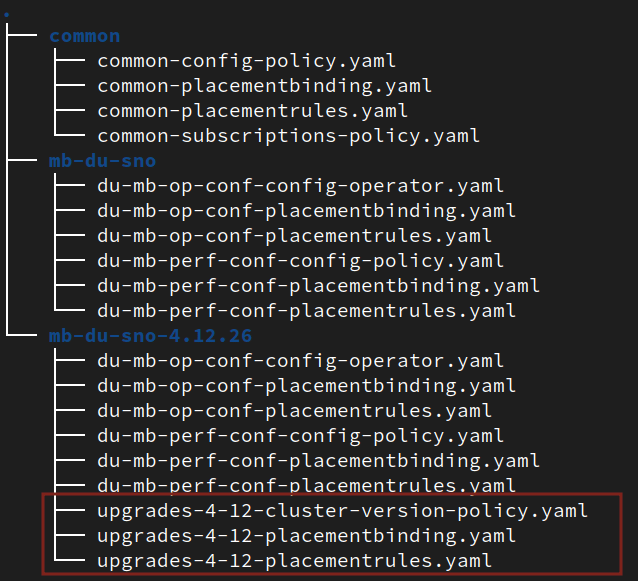
I won't go in detail about the new policy, but it modifies the ClusterVersion. This produces an upgrade to the OpenShift desired version.
PlacementRule makes the cluster SNO5 affected by this policy, selecting the new subgroup:
apiVersion: apps.open-cluster-management.io/v1
kind: PlacementRule
metadata:
    name: upgrades-4-12-placementrules
    namespace: ztp-common
spec:
    clusterSelector:
        matchExpressions:
            - key: logical-group
              operator: In
              values:
                - mb-du-sno-4.12.26
With the new files in the Git repo and everything synced, SNO5 has a new policy, which is not compliant.
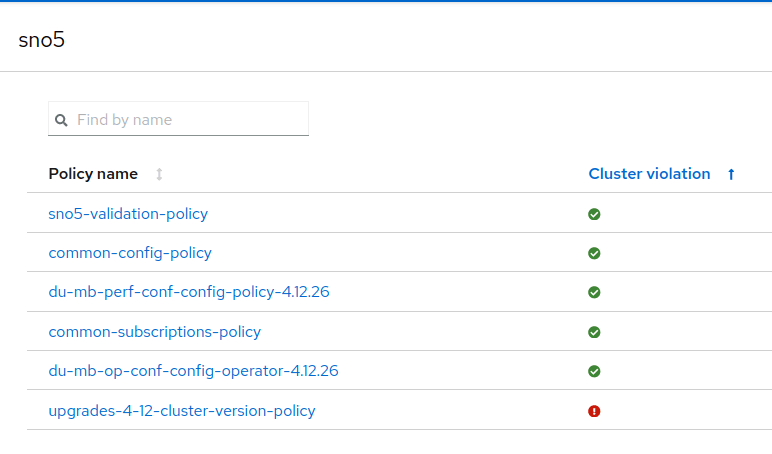
Remediate new policies and wait for the validation
To remediate the new policy, Topology Aware Lifecycle Management (TALM) Operator and ClusterGroupUpgrade (CGU) resources go into play. Basically, a new CR makes the remediation for clusters and policies. More details on how to use TALM Operator can be found in the OpenShift documentation.
TALM Operator helps you manage when and how to trigger a policy remediation. A policy remediation makes the proper changes to reach a compliant status. For example, far edge use case updates can only be made during predefined maintenance windows. Or, how many clusters you want to update at the same time.
Create a CGU to remediate the non-compliant policy of SNO5.
$ cat <<EOF | oc apply -f -
apiVersion: ran.openshift.io/v1alpha1
kind: ClusterGroupUpgrade
metadata:
  name: sno5-subgroup-change
  namespace: ztp-install
spec:
  backup: false
  clusters:
  - sno5
  enable: true
  managedPolicies:
  - upgrades-4-12-cluster-version-policy
  preCaching: false
  remediationStrategy:
    maxConcurrency: 1
    timeout: 240
EOF
Once TALM starts the remediation, the new policy (upgrades-4-12-cluster-version-policy) is applied. In this case, this triggers a cluster upgrade.
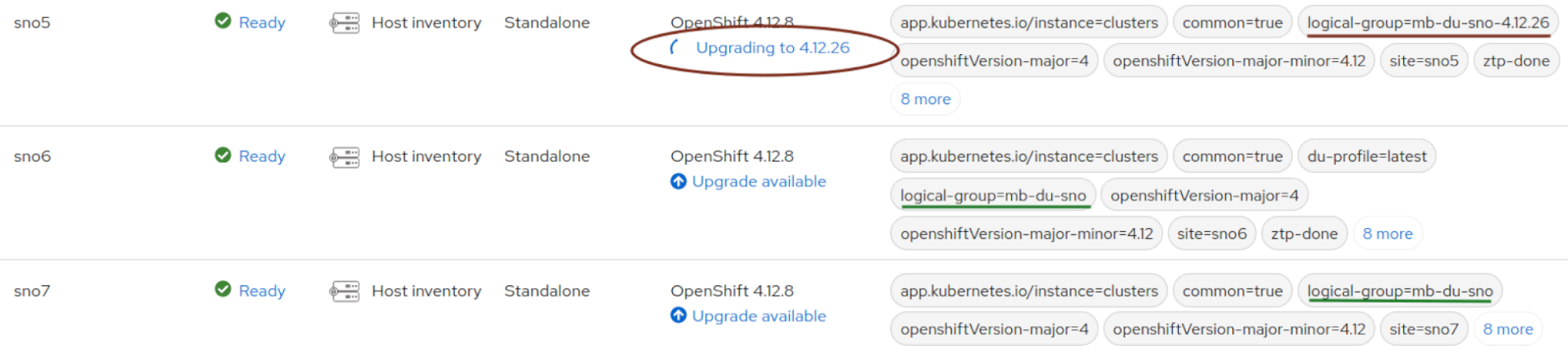
After a while, the upgrade is done. All the policies are again compliant.
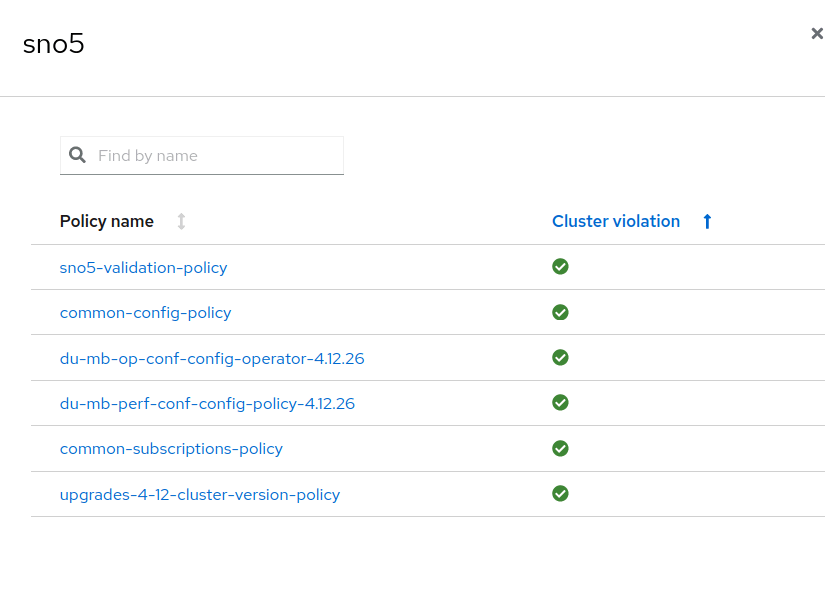
Now that you have finished the validation of the new configuration, we can conclude that all the policies are still valid in the new subgroup and include the new tested policies to the original logical group. And of course, we can return SNO5 cluster to its logical group.
Apply the new configuration to all the clusters
At this point, you could apply different strategies, such as getting SNO5 back to its original logical group. For this example, we will do a kind of canary rollout. Now that we have demonstrated that the new configuration worked on one SNO, we can move all the clusters to the new logical group.
In the Siteconfig, change the logical group to the other clusters:
$ cat <<EOF | oc apply -f -
apiVersion: ran.openshift.io/v1alpha1
kind: ClusterGroupUpgrade
$ cat site-multi-sno-ipv4-4-12.yaml | grep logical-group -B 3
  - clusterName: "sno5"
    networkType: "OVNKubernetes"
    clusterLabels:
      logical-group: "mb-du-sno-4.12.26"
--
  - clusterName: "sno6"
    networkType: "OVNKubernetes"
    clusterLabels:
      logical-group: "mb-du-sno-4.12.26"
--
  - clusterName: "sno7"
    networkType: "OVNKubernetes"
    clusterLabels:
      logical-group: "mb-du-sno-4.12.26"
Once the configuration is sync, SNO5 and SNO6 belong to the new logical group. They are therefore affected by the policy created above and are not compliant.
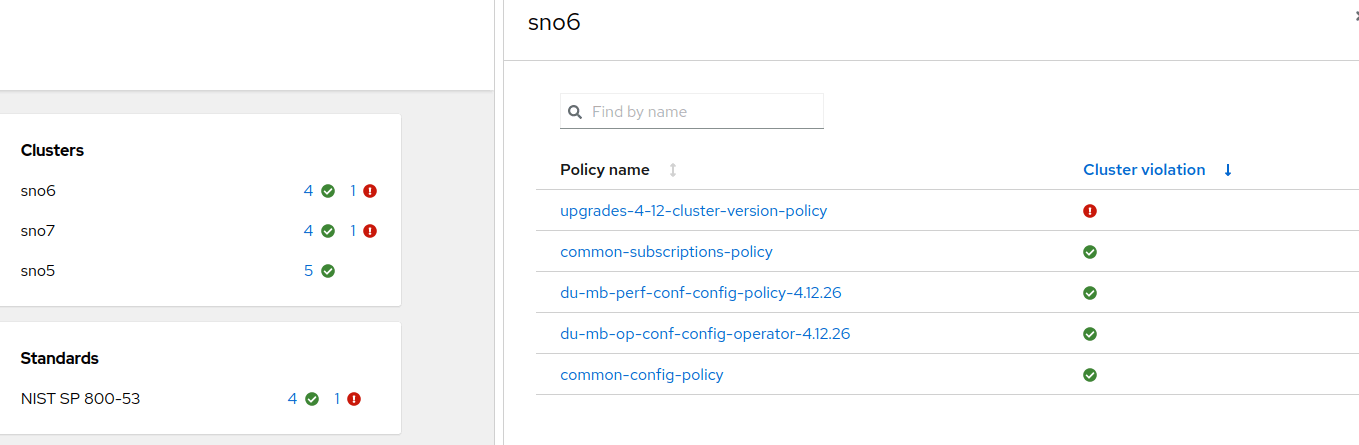
Create a new CGU to start a remediation:
$ cat <<EOF | oc apply -f -
apiVersion: ran.openshift.io/v1alpha1
kind: ClusterGroupUpgrade
metadata:
  name: mb-du-upgrade
  namespace: ztp-install
spec:
  backup: false
  clusters:
  - sno6
  - sno7
  enable: true
  managedPolicies:
  - upgrades-4-12-cluster-version-policy
  preCaching: false
  remediationStrategy:
    maxConcurrency: 1
    timeout: 240
EOF
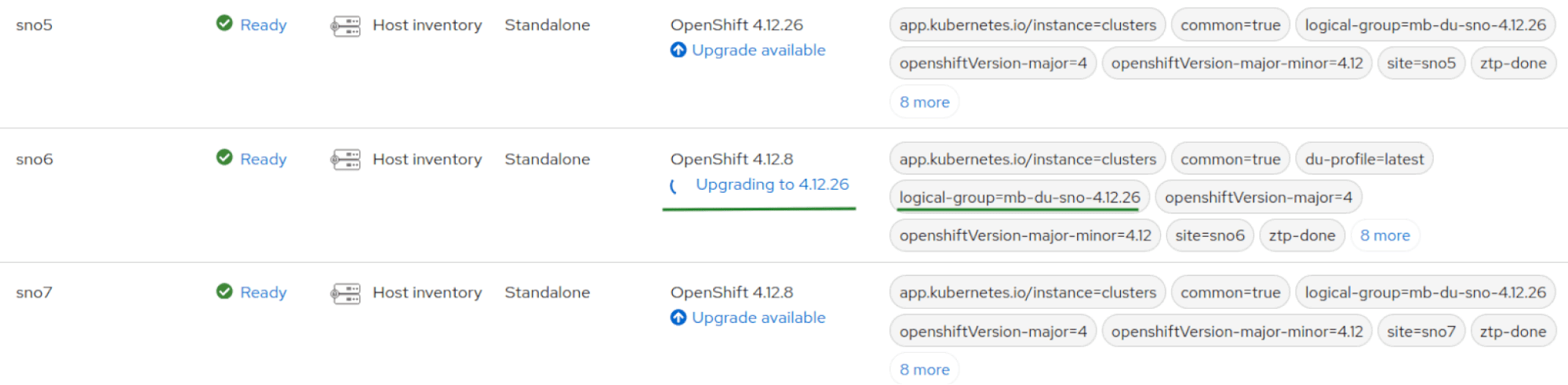
By default, (maxConcurrency: 1) remediate the policies one by one. For that reason, SNO7 cluster is upgraded after SNO6 success:
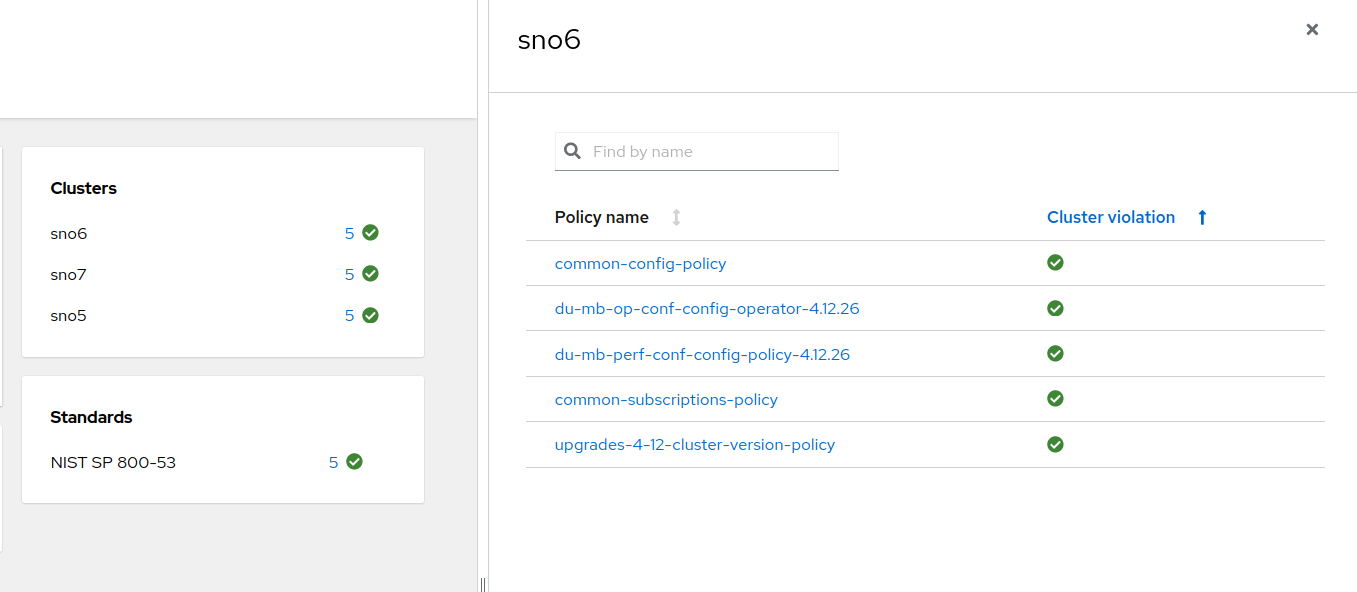
After a while, both clusters are compliant. Upgrades without the risk!
Conclusion
The concept of subgroups is a way of using the Red Hat Advanced Cluster Management governance to apply different sets of policies to different clusters. This helps us test and validate policies and configurations, lowering possible risks without affecting a significant number of clusters. The process is flexible about which policies and clusters are involved.
저자 소개

Computer Engineer from the Universidad Rey Juan Carlos. Currently working as Software Engineer at Red Hat, helping different clients in the process of certifying CNF with Red Hat Openshift. Expert and enthusiastic about Free/Libre/Open Source Software with wide experience working with Open Source technologies, systems and tools.

유사한 검색 결과
Red Hat and Netris bring multi-tenant networking to sovereign AI clouds and neoclouds
Increasing hardware costs? Get more from your VM estate with Red Hat OpenShift Virtualization
Collaboration In Product Security | Compiler
Keeping Track Of Vulnerabilities With CVEs | Compiler
채널별 검색

오토메이션
기술, 팀, 인프라를 위한 IT 자동화 최신 동향

인공지능
고객이 어디서나 AI 워크로드를 실행할 수 있도록 지원하는 플랫폼 업데이트

오픈 하이브리드 클라우드
하이브리드 클라우드로 더욱 유연한 미래를 구축하는 방법을 알아보세요

보안
환경과 기술 전반에 걸쳐 리스크를 감소하는 방법에 대한 최신 정보

엣지 컴퓨팅
엣지에서의 운영을 단순화하는 플랫폼 업데이트

인프라
세계적으로 인정받은 기업용 Linux 플랫폼에 대한 최신 정보

애플리케이션
복잡한 애플리케이션에 대한 솔루션 더 보기

가상화
온프레미스와 클라우드 환경에서 워크로드를 유연하게 운영하기 위한 엔터프라이즈 가상화의 미래
