We recently announced the general availability (GA) of managed identity and workload identity for Microsoft Azure Red Hat OpenShift clusters. With this, users benefit from short-lived, limited permission credentials that enhance security and reduce operational overhead that may otherwise come with longer lived credentials such as service principals.
Now, we’d like to call attention to a significant enhancement to the cluster creation process. A fully integrated portal experience for deploying managed identity-based Azure Red Hat OpenShift clusters is now available.
Simplicity and speed: Deploy in a few clicks
Creating a managed identity-based Azure Red Hat OpenShift cluster involves several steps:
- Creating user-assigned managed identities
- Performing role assignments with correct scopes
- Passing those identities into the cluster creation command
This process is necessary to realize the benefits of managed identities, but adds steps that could make cluster creation more complex.
With the new Azure portal experience, we have added the option to automate the entire process. You can now deploy a new, fully configured managed identity-based Azure Red Hat OpenShift cluster in just a few clicks.
The portal handles the heavy lifting, automatically creating all the necessary user-assigned managed identities and applying the appropriate role assignments on your behalf, simplifying the deployment process.
Demo of the portal experience
In the demo below, you will create a cluster using the defaults to see how easy the process is. You will start by clicking the Azure Red Hat OpenShift resource in the portal to enter the create flow. Next, select your resource group and enter a name for your cluster. You will then review your selections on the validation page and begin cluster creation.
Using your own identities
While the above process is perfect for quickly creating a cluster, many organizations already have existing, well-defined identity management strategies. For these use cases, the portal also provides an option to create a cluster using existing user-assigned managed identities and role assignments.
In the Authentication tab, there is a new section allowing you to select the Authentication type. This defines the authentication mechanism that the cluster uses. Managed identity is the default, but you can still select Service principal if desired.
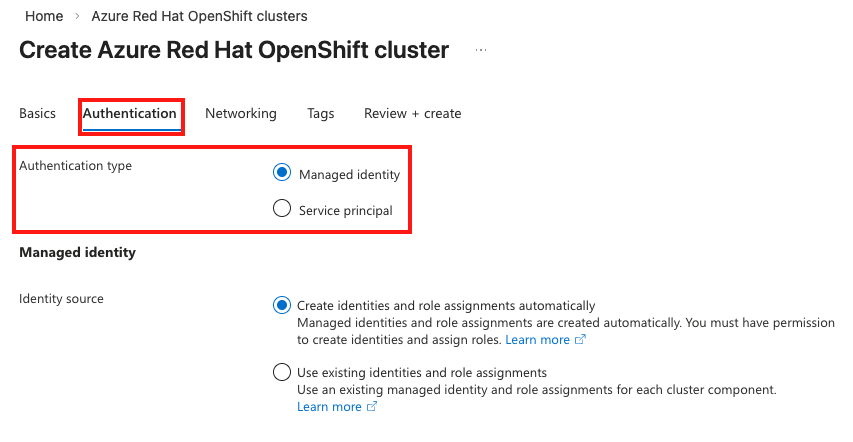
Figure 1. Selecting an authentication type
If you select Managed identity, you can select the source for your identities in the section underneath, with two options. The automated option will create the identities and role assignments for you, but be aware that the user that is logged into the portal must have the appropriate permissions to create identities and role assignments.
There is also an option to Use existing identities and role assignments. When you choose this option, a selection area will appear for each component. Clicking the Select link will open a managed identity selection blade that will allow you to choose the correct identity corresponding to that component.
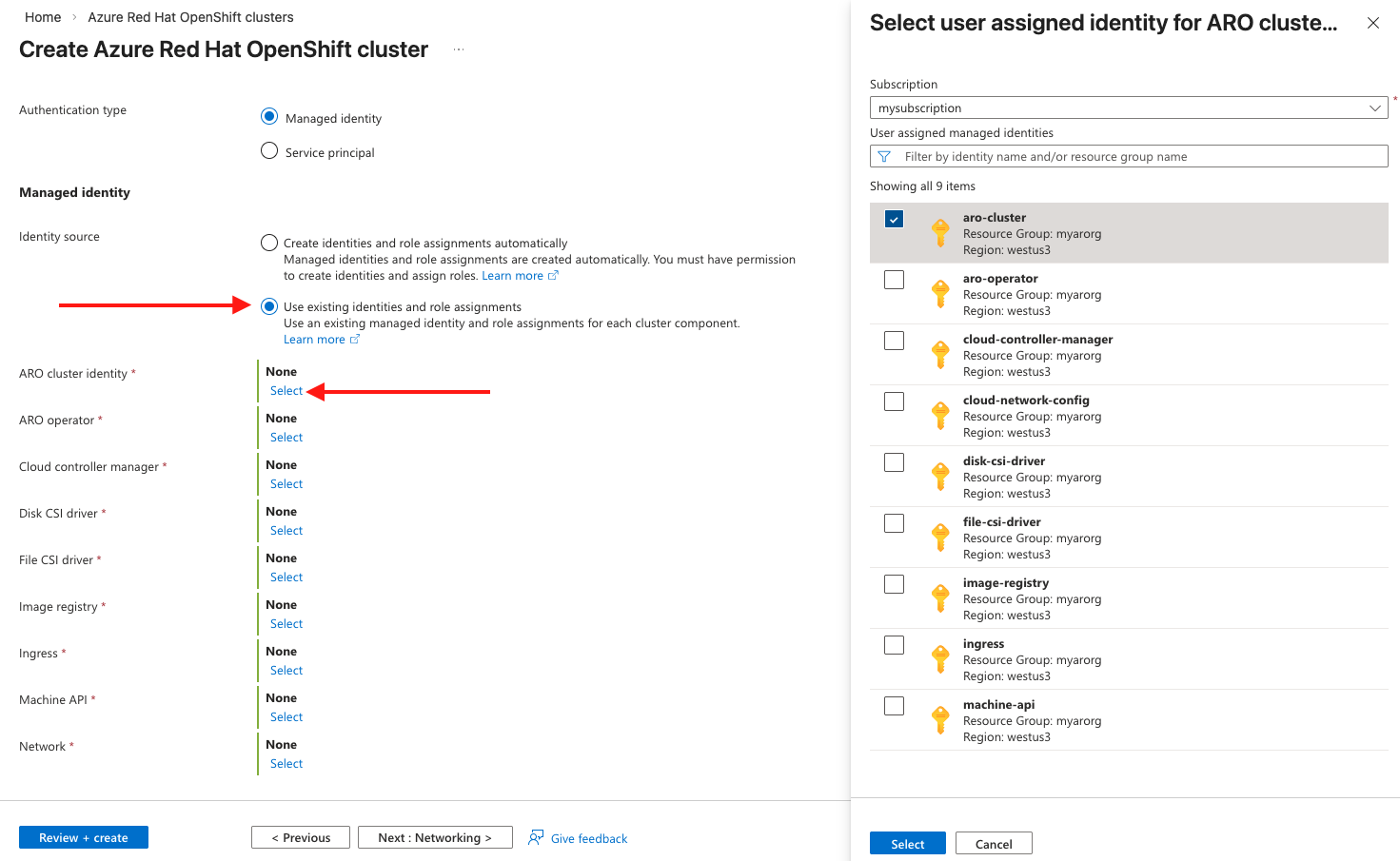
Figure 2. Choosing existing identities and role assignments
This flexibility allows you to follow your own process and requirements for identity creation while still benefiting from the streamlined provisioning experience in the portal.
Get started today
Managed identity based clusters are a cloud-native best practice for Azure Red Hat OpenShift which was covered in our public preview blog post. The new portal experience now combines that enhanced underlying security with a more streamlined, user-friendly workflow. You can access the new creation workflow directly in the Azure portal when provisioning your next Azure Red Hat OpenShift cluster.
For more details on Azure Red Hat OpenShift and managed identities, please refer to the documentation:
Teste de produto
Red Hat OpenShift Container Platform | Teste de solução
Sobre o autor

Mais como este
Unlock enterprise-ready, secure AI with Red Hat Lightspeed Agent for Google Cloud
Confidential guest reset on QEMU hypervisor: Design choices and approach
SREs on a plane | Technically Speaking
Navegue por canal

Automação
Últimas novidades em automação de TI para empresas de tecnologia, equipes e ambientes

Inteligência artificial
Descubra as atualizações nas plataformas que proporcionam aos clientes executar suas cargas de trabalho de IA em qualquer ambiente

Nuvem híbrida aberta
Veja como construímos um futuro mais flexível com a nuvem híbrida

Segurança
Veja as últimas novidades sobre como reduzimos riscos em ambientes e tecnologias

Edge computing
Saiba quais são as atualizações nas plataformas que simplificam as operações na borda

Infraestrutura
Saiba o que há de mais recente na plataforma Linux empresarial líder mundial

Aplicações
Conheça nossas soluções desenvolvidas para ajudar você a superar os desafios mais complexos de aplicações

Virtualização
O futuro da virtualização empresarial para suas cargas de trabalho on-premise ou na nuvem
