
Deploying AI at the edge is both rewarding and challenging. In previous articles, you've seen how to optimize and package your edge AI models and how to execute them to fulfill common use case requirements at the edge, but there's more.
In this article, we'll switch our focus from model and service architecture to the management questions that affect our edge AI use case once a model runs across thousands of devices. We'll answer questions such as: How do you know which version is running where? How do you update it without causing fleet-wide incidents? And how do you manage devices that are unreachable by conventional means?

These questions define AI model management at the edge, and they're harder than they look. In cloud AI, model management is a centralized problem. At the edge, you're managing thousands to hundreds of thousands of geographically distributed devices, each with its own hardware profile, connectivity situation, regional business context, and potentially its own regulatory requirements. A model update that's simple in the cloud can be far more difficult across an entire edge fleet, and a bad update sent to every device at once is a very different kind of incident to manage than one in the cloud.
Edge AI fleet management: Knowing and controlling what runs where
The answer to AI model management starts with the approach you use to manage the device and the operating system (OS) where that AI model runs.
Declarative vs. imperative management
There are 2 fundamental approaches to managing device state: declarative and imperative. An imperative model tells each device what to do at a specific moment. A declarative model defines the desired state and lets each device reconcile its actual state against that definition continuously. For edge AI fleet management, the declarative approach is more appropriate. Devices at the edge go offline, restart unexpectedly, and operate in conditions the central system can't fully anticipate. Beyond better scalability, a declarative system handles this naturally because the device is responsible for converging toward the desired state whenever it can. GitOps extends this further by using a version-controlled repository as the single source of truth. You commit changes to a Git repository, and an agent on each device applies them. This gives you a full audit trail, the ability to roll back to any previous state, and a clear change approval process through standard pull request workflows.
Pull versus push management
The next question is how devices containing the AI models report their actual state back to the control plane and how the system delivers configuration updates. Here, there are 2 patterns: pull and push management. In a push-based model, the central system sends updates and records what it sent, while in a pull-based model, the edge device initiates the request and the central system only needs to respond. Pull-based communication has a practical network advantage that matters greatly at the edge. Devices behind network address translation (NAT), behind corporate firewalls, or on cellular connections are unreachable from the outside by default. Push-based management requires inbound connectivity to each device, which means opening firewall rules or managing virtual private network (VPN) tunnels. Pull-based communication requires only outbound connectivity from the device, which is almost universally available even in restrictive network environments. For edge AI deployments, this is often the deciding factor.
Another problem with the push management method is that the recorded state and actual device state can diverge whenever a push fails, a device is offline, or an update completes partially. In contrast, in a pull-based model, each device periodically reports its actual running state. The control plane stores what it received rather than what it sent, which is another reason pull management is the best fit for edge use cases.
Segmenting the fleet
The next requirement is the ability to target configuration, AI model, and system updates by something more specific than "all devices at once." Real edge deployments have segmentation, for example:
- By hardware class, because different hardware runs different model variants
- By geography, because regulatory requirements may differ by country
- By business unit, because shared platforms serving multiple teams need tenant isolation
- By operational group, because production devices and test devices need different policies
For this reason, you should attach metadata to each device at enrollment and maintain it throughout the device lifecycle. You can then use those labels—such as hardware class, geographic region, business unit, and operational tier—to express deployment policies like "deploy model version v2.1 to all devices labeled hardware-class=jetson-orin-agx in region=europe in operational-tier=production." This is the foundation for targeted rollouts, compliance reporting, and incident response for edge computing use cases.
Integration through a management API
Another factor you need to consider is integrating the management platform with other subsystems to unlock greater value and support more complex use cases. Having an application programming interface (API) is the best way to simplify this integration because management APIs make the infrastructure composable. When the same capabilities available in the management console or command-line interface (CLI) are also accessible through an API, you can easily integrate fleet management into, for example, existing continuous integration and continuous delivery (CI/CD) pipelines, trigger model deployments as part of a broader release process, query device state from observability platforms, and automate responses to operational events.
This is the same approach Red Hat took with its products. For example, Red Hat Advanced Cluster Management provides this API for Red Hat OpenShift and MicroShift deployments, with label-based cluster targeting, policy propagation, GitOps support, and management that integrates with external automation tooling. Red Hat Edge Manager provides similar capabilities for Red Hat Enterprise Linux (RHEL) / Red Hat Device Edge nodes, with device group definitions that reflect any combination of hardware, geography, or business attributes, and pull-based communication that works across NAT and firewall boundaries without requiring inbound access to field devices.
With these tools, you'll get deployment consistency: having the right model on the right device. That's a necessary condition, but model quality is what determines whether the system delivers value. And there's more. In Part 1: Preparing AI models for deployment, we described the model distribution challenge, but storing and moving the model to the device is only part of the problem. You also need a place to keep track of model versions. You usually handle this with a model registry. A model registry is a central place to register, version, and manage models before deploying them. It stores metadata about each model, such as the project, training settings, performance metrics, and deployment events, making it a key part of model governance.
Red Hat OpenShift AI includes a model registry. In an upcoming release of Edge Manager, a new catalog collector will collect selected model metadata and artifact references from that registry and publish them to the Edge Manager software catalog. This helps streamline model lifecycle management at the edge: when you register a new model version, it appears in the catalog, and operators can roll it out to their fleets using the same rollout policies they already use.
We mentioned earlier that having the right model on the right device is essential, but to verify that, you'll need to monitor AI-specific metrics alongside infrastructure metrics across the fleet—which is what the next section covers.
Edge AI observability: Monitoring AI-specific quality metrics
Fleet visibility usually covers infrastructure state, such as what OS version, what container image, and what model tag is running on each device. But for AI workloads, infrastructure state isn't sufficient. A device can report it's running model version v2.1 and be completely healthy from an infrastructure perspective while that model is actually producing degraded inference results because of a distribution shift in the local environment.
Monitoring AI quality at fleet scale requires a different telemetry strategy from standard infrastructure monitoring. You can't stream raw inference inputs and outputs from thousands of devices to a central platform; the bandwidth cost is prohibitive, and storage requirements at the receiving end are enormous. The right architecture collects statistical summaries at the device level and only forwards those summaries, not the raw data (except in rare cases).
How does it work, and what data isn't part of regular infrastructure monitoring?
At the device, the inference service computes and exposes AI-specific metrics such as the distribution of its own confidence scores (how certain the model is about its predictions), per-class detection rates over time (how often each output class is predicted), and inference latency percentiles. These metrics are important. For example, a confidence score distribution that shifts downward over 6 weeks while all infrastructure metrics remain normal tells you the model is struggling with something in its current environment. A per-class detection rate that suddenly drops to zero for a class that historically appeared regularly tells you something in the environment has changed.
That data isn't the raw detections, but a summary with relevant information about them. At this point, you could send those summaries to a local or regional aggregation tier, which aggregates data across devices in its site or region and potentially applies filters before forwarding to the central platform (core datacenter or cloud).
If used, this tiered architecture keeps the bandwidth cost at each tier proportional to the number of devices it aggregates from, rather than linear in the number of raw inference events. At the central platform, the aggregated metrics power fleet-wide dashboards and alerts—such as accuracy degradation heatmaps across sites, drift trend charts per model version, and confidence distribution histograms segmented by device class. These views let operators spot issues that would be invisible at the device level, compare model performance across regions, and prioritize remediation where it matters most.
OpenTelemetry is the standard protocol for this telemetry pipeline. An OpenTelemetry collector on each edge device forwards metrics to a regional aggregation point, which then forwards them to a central Prometheus and Grafana deployment. Once the information is centralized, you can extract actionable insights from it. For example, you can use Red Hat TrustyAI, part of Red Hat OpenShift AI, to add AI-specific analysis at the central platform with statistical drift tests, bias detection, and model explainability. This combination gives an operations team the visibility to detect model degradation at the fleet level before it shows up in downstream business metrics.
Observability tells you when a model needs to change. Getting that AI model upgrade to the device is a different problem entirely. Let's dig into how that works.
Edge AI model updates: Using constrained links
Delivering models to thousands of distributed devices introduces a new set of challenges, especially when bandwidth, latency, and reliability vary across sites.
One effective way to distribute model updates across geographically distributed infrastructure is through a tiered registry architecture. A central registry at the core, regional mirror registries placed closer to clusters of edge sites, and local registries on-site for isolated environments form the hierarchy. When you publish a new model version at the core, it propagates outward to the mirrors. Edge devices pull from the nearest available tier, improving pull reliability for sites with marginal connectivity.
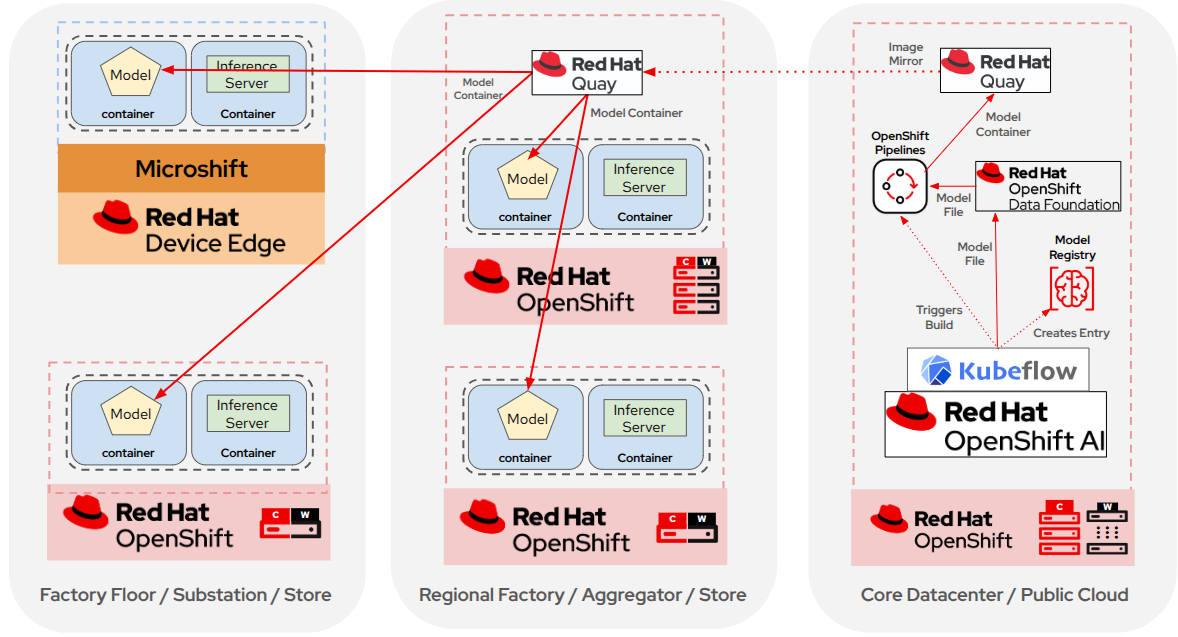
Example of a multilayer AI model distribution topology based on OpenShift and MicroShift
Distribution topology solves where model artifacts come from. The next challenge is reducing how much data devices must transfer in the first place because edge networks aren't data center networks. Many devices connect through 4G or 5G cellular links where data transfer has a cost. Others connect through shared wide area network (WAN) links originally sized for business application traffic. That means a multigigabyte model image distributed to thousands of devices simultaneously becomes a network planning problem.
There's no single answer to this. It depends on the packaging model chosen for the AI model. As covered in Part 1: Preparing AI models for deployment, there are several distribution approaches, but container-based packaging is the best fit for edge AI deployments in most cases. It provides Open Container Initiative (OCI) layer deduplication, registry-based versioning, and a single distribution infrastructure shared with your application containers. For that reason, in this article we'll assume the model is packaged and distributed as an OCI container image, either embedded with its runtime or as a dedicated ModelCar sidecar.
Besides choosing the distribution method, there's another factor to consider: bandwidth is typically limited in edge architectures. The good news is when using OCI images as the AI model distribution method, you have multiple options of varying sophistication to reduce bandwidth usage during upgrades.
Delta upgrades
The baseline is standard OCI layer deduplication. When you push an updated container image, devices download only the changed layers. If you packaged your AI model along with the runtime in a container image as shown in Part 1: Preparing AI models for deployment, and you update your AI model, the inference runtime layer stays the same and devices download only the model weights layer. This requires no special configuration and is inherent to the OCI format.
Note this benefit applies mainly to the single-image approach, where the model and runtime share the same container image. In the ModelCar pattern, the model image contains only the weights file. When the model changes, that entire image effectively changes, so there's no layer to reuse and deduplication gives no practical benefit there. In this case, you need something additional, such as zstd:chunked compression.
Beyond standard layer deduplication, zstd:chunked compression goes further. Clients can selectively download individual chunks (4 MB by default) within a layer based on which chunks differ, using HTTP range requests. The runtime reuses files or chunks that already exist locally without downloading them again. For model images where some weight files remain unchanged between versions, this can reduce transfer size even within a single layer. This means ModelCar images, which contain a single weights file and get no benefit from layer deduplication, can still see real transfer reductions on incremental updates when using zstd:chunked since the device downloads only the byte ranges that changed, reusing the rest from local storage.
If you don’t want to use zstd:chunked, you still have a different approach to bandwidth usage reduction. You can use binary delta techniques that compute the binary difference between 2 versions of a layer and ship only the delta, similar to what OSTree does on its updates. How does it work? The tar-diff library, using bsdiff and zstd, reconstructs updated layers byte-for-byte from pre-generated patch files that are orders of magnitude smaller than the full container layer.
Each approach involves different tradeoffs. Standard layer deduplication requires no configuration and works with any OCI-compatible registry and runtime, but it only helps when part of the image is unchanged. The zstd:chunked method goes further and works even within a single layer, but it requires both the registry and the container runtime on the edge device to support it, and the savings depend on how much of the binary changed between versions.
Additionally, the savings from zstd:chunked require a container image registry; the benefits don't apply to disconnected transport where you must use an update file on a USB drive, for example. Lastly, binary delta with tar-diff can produce the smallest transfers of the 3, since it computes the exact difference between 2 versions regardless of layer structure. There's no OCI standard for delta distribution today, however, so the delivery mechanism requires additional tooling beyond a standard registry and OCI client.
Red Hat already provides the building blocks needed to put this into practice today and is actively closing the gap on what's still missing. For the tiered registry architecture, Red Hat Quay provides 2 complementary distribution mechanisms. Geo-replication allows a single Quay deployment to store image data across multiple connected regions. When you push an image, the data lands on the nearest storage backend and replicates in the background to the others. The nearest available storage always serves pulls, making distribution transparent to the client. This works well for the core-to-regional tier where sites maintain reliable connectivity.
For sites with intermittent or scheduled connectivity, repository mirroring uses separate, independent Quay deployments that pull content from an upstream registry on a configurable schedule. Each mirror operates autonomously and can continue serving pulls even when disconnected from the source. This fits the regional-to-edge tier where connectivity cannot be guaranteed. Red Hat Quay stores and serves zstd:chunked-compressed images, so the partial layer downloads and local chunk reuse described in this article work out of the box. Compatible runtimes (Podman, CRI-O) handle chunk-level deduplication automatically, with no extra registry to build or maintain.
On the binary delta side, Red Hat is building oci-delta, a tool meant to make the tar-diff workflow much simpler to use in practice. It's expected to ship as a technical preview in RHEL 10.3 and 9.9. Edge Manager includes it to provide bootc image delta updates. Today, getting binary delta updates working means putting together tar-diff and your own scripts to generate, store, and apply the patches. oci-delta aims to fold that into a single supported tool, lowering the bar for teams that want the smallest possible transfers but don't want to build and maintain custom tooling around it.
Note this section focused only on deltas of the container image, but there are other kinds of deltas that matter for edge AI. Instead of making the container image the unit of change, you can build a model update as a delta of the previous model. The idea is to ship only the model weights that changed, for example in a .ptd file, and apply them to the model already on the device. This works well when a new version only retrains part of the model, or when you fine-tune a large base model and only a small set of weights changes. The benefits are similar to those outlined earlier: the transfer is much smaller, updates reach devices faster, and devices with slow or intermittent links use less bandwidth. It also pairs well with the options above because the runtime and the base model stay as they are, and only the small weight delta moves to the edge.
This tiered registry architecture with the delta and compression techniques we've seen handles devices with slow or intermittent connectivity, but you need a different approach for devices with no network path to any registry at all.
Edge AI model updates: Disconnected and air-gapped
We've seen how the packaging approach chosen for the model determines the update unit and the delivery mechanism when you have a connected environment; this holds true for disconnected architectures as well.
Let’s start with distributing the model as files. When you distribute the model directly as files, the update unit is the model file itself, together with whatever metadata or configuration travels alongside it. In disconnected environments, the delivery mechanism is usually a manual copy. That means you place the new file on physical media, carry it to the site, and copy it into the directory the inference service reads from. This works for a single device, but it doesn't scale well. There's no built-in versioning, no atomic switch from 1 version to the next, and no standard way to verify the file in place matches what was intended to be deployed. Each of these gaps usually ends up solved by custom scripts, which adds maintenance burden as the fleet grows.
Throughout this article series, we used model distribution based on container images. In that case, whether embedded in the inference container or as a ModelCar sidecar, a model update is a regular container image update, with the exception of bootc OS image, in which case a model update is a complete OS image update. The delivery mechanism is the same in both cases (OCI archives transported on physical media), but the granularity of what you're delivering is different.
For container image-based model updates delivered to completely isolated sites, the process involves exporting the updated model image to a portable OCI archive, transporting that archive on physical media (typically a USB drive or external disk during a scheduled maintenance visit), and importing the archive into the device's local container store. Once in the local store, the model is available to the container runtime exactly as if it had been pulled from a live registry.
For bootc OS image updates that embed the model, the same OCI archive mechanism applies to the full OS image. The device applies the update via bootc upgrade from the local archive and reboots into the new version.
In both cases, all artifacts remain signed with cosign, and the device verifies signatures locally regardless of how the artifact arrived. An update delivered on a USB drive must pass the same signature verification as one pulled from a live registry. This is particularly important for air-gapped deployments where the physical delivery channel is outside the normal monitoring perimeter.
We're talking about upgrading a single device, but what happens in sites with multiple devices that have occasional, infrequent connectivity? In that case, if you have enough devices and the site's space and logistics permit it, deploying a local OCI registry mirror as an intermediate tier is an excellent approach. This mirror can synchronize manually offline or automatically during connectivity windows, benefiting not only AI models, but also any containerized application and bootc image. The mirror pulls from the regional registry when connected and serves all local devices from its local store at any time, even during disconnections.
You can update RHEL, Red Hat Device Edge, and OpenShift using either the file-based method described above or the local registry mirror approach, depending on what the site can support.
When the edge site hosts many devices, it can make sense to add a management layer too, such as Edge Manager, to manage the edge site fleet as a whole, since the Red Hat management tools also support deployment in disconnected environments.
The methods described above establish an efficient, reliable delivery pipeline. But what happens when an operating system or AI model update turns out to be wrong?
When deployments fail: Roll back failed updates
Even with staged rollouts, deployments occasionally fail. At the edge, mean time to recovery (MTTR) without automated rollback can be protracted because the device is remote and the system might not detect the failure immediately. Manually rolling back a large fleet after propagating a bad update represents a major operational incident. Automated rollback must happen at the device level, triggered when the device itself detects something is wrong.
There are 2 distinct rollback mechanisms, and they address different failure modes. The first is AI model rollback.
AI model rollback
For container-based deployments that don't use Kubernetes, Podman has its own version of this. Podman auto-update can roll back automatically when a container fails to come back up cleanly after an update, reverting to the previous image and restarting it. By default, this check confirms the container starts and stays up, but it can be paired with a custom health check command so the check deciding whether the update is good can be an inference sanity check instead of a simple port check. The catch is this works at the container level. For a model embedded directly in the inference image, the health check command runs against that single container. In contrast, for a ModelCar-style deployment, the model itself is a sidecar that copies files onto a shared volume. The health check that matters isn't on the ModelCar container, but on the serving container reading the model, since that's the component that runs inference and can detect a problem.
The same logic applies to devices running Kubernetes (OpenShift and MicroShift). A readiness probe on the serving container must validate the model rather than the ModelCar init container. This distinction matters because you often can't health check the ModelCar itself at all. In the default setup, the ModelCar is a plain init container that copies the model files into a shared volume and then exits, leaving nothing running to probe. One thing worth mentioning is a standard Kubernetes deployment doesn't automatically roll back just because new pods fail their readiness probe. It will mark the rollout as stalled and stop progressing, but reverting to the previous version still needs something to trigger it, whether that's a person, a script watching rollout status, or a GitOps controller reconciling against a previous known-good manifest.
Operating system rollback
The second mechanism is OS-level atomic rollback via bootc rollback, which reverts the entire OS image, including the kernel, drivers, runtime, and any model artifacts embedded in the OS image. This is the right response when an OS or driver update has broken something at a lower level than the model itself. Greenboot triggers this automatically if post-update health checks fail.
For AI workloads, those health checks can also help build automated rollback systems rather than relying on manual post-upgrade metric reviews. In that case, the checks should include AI quality validation alongside infrastructure validation. After a bootc update, Greenboot runs an AI health check by passing a batch of known-good inference samples through the updated model and verifying the outputs match expected results within a defined tolerance. If the updated model fails this check—whether because a driver update altered TensorRT behavior, the new model variant is incompatible with the target hardware, or the model artifact was corrupted in transit—Greenboot can automatically revert the system to the previous known-good state without human intervention.
Automated rollback is essential, but nobody wants to be in a situation where they need it. The next question is how to avoid relying on rollback in the first place. The safest update is one tested under real production conditions before it replaces what is already working everywhere.
Deploying safely: Champion, challenger, and canary
What are AI model champions and challengers? The current production model is the champion; it's already running across the fleet and its behavior is known. The newer model candidate is the challenger: it has passed offline testing, but nobody knows yet how it will behave on real devices in the field.
What we want to prove is the challenger is at least as good as the champion before it takes over. At the edge, this proof can't come from splitting live traffic between 2 model versions the way it might in a cloud service since, for example, there's no load balancer sitting between the sensor and the inference service. The solution instead is to split at the device level.
A small group of devices runs the challenger while the rest of the fleet keeps running the champion. Both groups see the same kind of input under the same conditions, so you can compare their results directly. The challenger only replaces the champion once it matches or beats the champion on the metrics that matter, such as confidence scores, per-class detection rates, and latency and memory on the actual target hardware. Since both groups write to the same downstream systems at the same time, you'll need a model version tag as covered in Part 2: Running AI models at the edge. Without that tag, canary results and production results blend into a single aggregate with no way to separate them.
How you choose that small group of devices matters as much as the comparison itself. Too few devices, and the result isn't meaningful; too narrow a selection—such as all devices from 1 site or 1 hardware type—won't accurately represent the fleet. A good selection is large enough to produce a clear answer within the test window and varied enough to cover the diverse hardware, locations, and conditions found across the fleet.
What happens in cases where even a small group running the challenger is too much risk? There's also a solution for that scenario: blue-green deployments—specifically, blue-green shadow mode. In this pattern, the challenger runs on the same devices as the champion and sees the same inputs, but the system never acts on its output. The champion keeps making every real decision while the challenger's results are logged separately and compared against the champion and against ground truth where available. Because the challenger's output never reaches shared downstream systems in the first place, outputs don't mix as they did in the previous scenario. However, you must keep in mind that running both models simultaneously on the same device requires an inference server capable of loading and running more than 1 model at once, making concurrent model execution a requirement for blue-green shadow deployments.
You can implement these patterns with your own tools, but Red Hat provides products that can be useful here too. For example, Edge Manager supports fleet rollout policies that can target devices by label and roll out in sequential batches, each gated by a success threshold before moving to the next. The same labels used to group devices by site, hardware type, or stage can define which devices run the challenger first, so a new model can be sent to a defined slice of the fleet and only continue to the rest once it clears the bar. For OpenShift and MicroShift deployments, Red Hat Advanced Cluster Management for Kubernetes does the equivalent job through placement rules, selecting clusters by label and deploying the challenger workload only to the matching subset before going fleet-wide.
What comes next
With the delivery, rollback, and safe rollout techniques we've seen, the fleet can be updated reliably and recover when something goes wrong. But a model that is correctly deployed today won't stay accurate forever. Sensor drift, changing environments, and shifts in the data the model sees in the field will degrade performance over time, often quietly enough that nothing in the deployment pipeline itself catches it.
In Part 4: Keeping models accurate over time, we'll explore how to cover the cycle that keeps a model useful after it ships. This includes monitoring a deployed model for signs that accuracy is slipping, capturing and using real-world data from the fleet to retrain it, and routing that retrained version back through validation and rollout to close the loop.
关于作者
Luis Arizmendi is a tech enthusiast at the intersection of Edge Computing, Artificial Intelligence, MLOps, and Physical AI, with a deep background in containerized workloads at scale, and infrastructure optimization for high performance or real-time deterministic operation.
At Red Hat, he helps organizations design scalable architectures and bring AI beyond the data center, all the way to the edge, into systems that must perceive, decide, and act in the real world.
Passionate about open source technology and the convergence of AI, Edge, and Robotics into the next wave of intelligent, autonomous systems.


