
When I started playing with AI models for edge computing use cases, everything went smoothly. But once I reached the "it works" point and started thinking about how to operationalize it, the whole thing became more complicated. I started to question how a trained model becomes something you can ship to the edge. How can I get the most out of edge devices while running AI models? How can I manage hundreds of distributed models? How can I maintain accuracy over time?
If you've ever had these questions, you should continue reading this article series. Here, we'll answer these and other questions related to the lifecycle of edge AI models.
Together, the 4-part series will follow the full journey of an AI model, from the moment training finishes, through deployment to thousands of edge devices, platform and AI model lifecycle management at scale, and into the continuous cycle of monitoring, improvement, and redeployment that keeps the model accurate over time across a large fleet of devices.
But let's start from the beginning.
In this first article, we'll focus on the journey from training pipeline to signed AI models, ready to travel to the edge.

Before jumping into the details, I suggest you read the companion article, Moving AI to the edge: Benefits, challenges and solutions. That's a good starting point for understanding why organizations are moving AI inference to the edge. This series goes deeper, focusing more on the machine learning operations (MLOps) concepts that matter specifically at the edge while leaving general MLOps practices outside its scope.
The architecture: Understanding what lives where
The first question to ask is: Which MLOps components live where?
Edge AI doesn't force us to run the architecture at a remote site, completely replacing what we have running in the cloud. A better approach is to distribute it. Certain parts of the MLOps lifecycle must stay in the cloud. Others must run at the edge.
What should be kept at the core datacenter or cloud? Model training, hyperparameter optimization, and experiment tracking usually belong to those locations, where compute is abundant and there's no pressure on memory or power budgets. The model registry, dataset versioning systems, retraining pipelines, centralized monitoring aggregation, governance records, and fleet management control planes also live centrally. These functions benefit from reliable infrastructure and don't have hard real-time or low-latency requirements.
At the edge, responsibilities are narrower, but constraints are much harder. Inference runs there, as close to the sensor or actuator as possible. Local feature extraction, immediate actuation, local event detection, and short-term data buffering happen at the edge. What doesn't happen at the edge, in most cases, is full model training—though limited local fine-tuning during idle periods or the federated learning pattern is increasingly practical, which we'll cover in Part 4: Keeping models accurate over time.
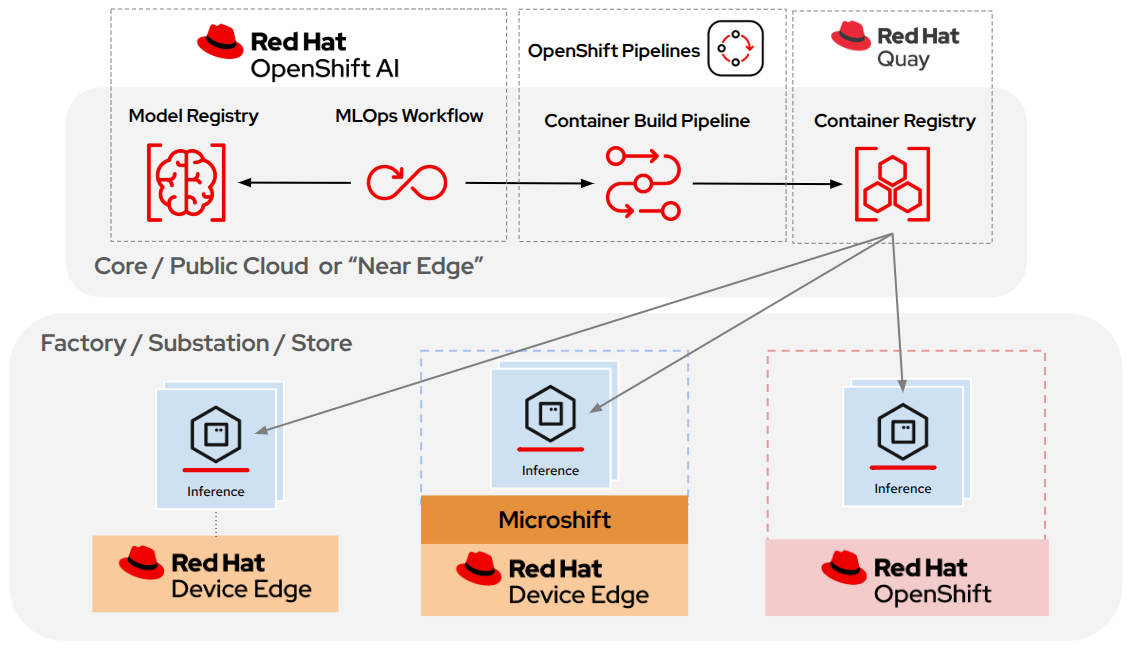
Typical edge AI architecture topology example with Red Hat products
Connectivity between these 2 layers handles model updates flowing from the core to the edge, while telemetry, training data, and monitoring data flow from the edge to the core. Additionally, regarding connectivity, 1 important requirement applies to most edge computing use cases: Internet connectivity must not be required for inference to function.
A system making a remote application programming interface (API) call during an inference request hasn't been designed for the edge; it's a client-server application that breaks whenever the network does.
Once you know what lives where, the next question is: What does the model itself need to look like before it can run on edge hardware?
Preparing the model: Optimization and runtime formats
I need to include a disclaimer here. This section applies to deep learning models, but you need to bear in mind that not every edge AI use case needs one, since classical machine learning approaches—like decision trees, gradient-boosted trees, or statistical anomaly detection—often run efficiently on edge hardware without any of the steps below.
Now, if you're thinking about using a deep learning model, such as computer vision, speech, or large language model-based (LLM-based) applications, the path from training to deployment involves several key factors.
A deep learning model coming out of training is almost never in a form that runs efficiently on an edge device. It's typically a PyTorch checkpoint or a Hugging Face model file in full 32-bit floating-point (FP32) precision, designed to run on a high-memory GPU. Before it can be deployed to the edge, it needs to be optimized and compiled into a format the target hardware can execute efficiently.
Optimization
Why do you need optimization? The full model coming out of the training pipeline might use multiple times the memory of its optimized equivalent and run much slower. On a device with 8 GB of shared CPU and GPU memory running the operating system (OS), application workloads, and the inference service simultaneously, a non-optimized model doesn't fit.
The optimization pipeline can include several stages. Knowledge distillation is the right tool when the model itself is too large to start with. Rather than modifying the original, as happens with the other techniques below, it trains a new, smaller student model to approximate the behavior of a larger teacher, fundamentally reducing capacity before any further optimization.
The next technique is pruning, which removes weights contributing little to the output. Unstructured pruning removes individual weights for higher compression ratios at the cost of requiring sparse computation support from the runtime, while structured pruning removes entire, predefined groups of parameters, producing a smaller model with the same architecture that maps well to hardware acceleration.
Finally, quantization is a technique that converts model weights from high precision (that is, FP32) to lower precision at the cost of reducing the model's inference accuracy. Mixed precision strategies run layers prone to accuracy loss in FP16 or FP32 while keeping the rest in 8-bit integer (INT8) or 4-bit integer (INT4), often giving the best balance between size reduction and accuracy preservation.
Runtime formats
With an optimized model in hand, the next decision while preparing the model is the runtime format to use on our edge device. But there's a big caveat: This choice can be hardware-specific, which can be challenging since edge computing use cases often feature a heterogeneous fleet of devices.
There's one format seen as the de facto standard when you want to be as hardware-agnostic as possible: Open Neural Network Exchange (ONNX). This is the most important format to understand because it serves as the common intermediate step between different formats depending on the target hardware. Common training frameworks such as PyTorch and TensorFlow can export trained models to ONNX, and from ONNX you compile to hardware-specific targets.
Let me add another disclaimer here. When I refer to ONNX, I mean the portable interchange format, but there's also something called ONNX Runtime, which is a runtime, not a format. The runtime executes ONNX-formatted models.
The beautiful thing about the ONNX format and ONNX Runtime is that you can run models directly on x86_64 and aarch64 with CPU or GPU backends, making it the most portable choice for heterogeneous fleets where you want a single format that works anywhere.
But then why do we have "other" runtime formats?
When portability in your edge use case is less important than squeezing every millisecond out of a specific chip, hardware-native runtimes take over. For example, suppose you have an NVIDIA-specific device. In that case, another runtime, such as TensorRT, might be the best option. TensorRT takes an ONNX model and compiles it into an NVIDIA hardware-specific execution engine, typically delivering better throughput and lower latency than ONNX Runtime on NVIDIA hardware.
However, these hardware-specific runtime formats also have drawbacks. By default, a TensorRT engine compiled for one GPU microarchitecture won't run on a different one, so separate engines are required per GPU type in a heterogeneous fleet. TensorRT offers a hardware compatibility mode that allows an engine to run across multiple architectures, but you'll still end up recompiling the model from the base ONNX. Therefore, separate per-architecture builds remain the recommended path for production edge deployments where performance matters.
Everything mentioned here is also valid for other hardware-specific runtimes and runtime formats, such as OpenVINO, which performs optimizations similar to TensorRT, but for Intel hardware (CPUs, integrated GPUs, and vision processing units (VPUs)).
What happens with LLMs at the edge?
It's worth noting that the techniques and formats described here apply primarily to the predictive AI models that dominate edge AI today, such as computer vision models for quality control and surveillance, time-series models for predictive maintenance, and structured data models for anomaly detection. Generative AI (gen AI) at the edge, such as LLMs, is an emerging and growing use case, but it has different optimization characteristics.
For example, standard INT8 post-training quantization was designed for encoder and convolutional architectures. LLMs require specific quantization methods, such as Activation-aware Weight Quantization (AWQ) and Generalized Post-Training Quantization (GPTQ), which handle the wide activation dynamic ranges of transformer decoder layers more accurately. Just as non-LLM edge models rely on ONNX (format) and TensorRT or ONNX Runtime (runtime) for optimized inference, LLMs have their own format and runtime ecosystem.
On the server side, models serialized in SafeTensors or quantized via AWQ or GPTQ run on high-throughput runtimes like vLLM. On CPU and mixed CPU/GPU edge hardware, GPT-Generated Unified Format (GGUF)—a model container format that typically carries its own quantization—has become the dominant format, paired with llama.cpp (also an experimental feature in vLLM).
In summary, returning to non-gen AI, which accounts for the most common edge AI use cases today, the recommended pipeline for a heterogeneous fleet is to train in PyTorch or TensorFlow, export to ONNX as the common intermediate format, and then branch at compilation time to produce hardware-specific variants (TensorRT engines per NVIDIA GPU type, OpenVINO for Intel devices, and ONNX Runtime models for everything else).
What's next in our model preparation for our edge AI use case? In practice, optimization techniques such as quantization, pruning, knowledge distillation, and format conversion are rarely applied in isolation. They're chained together into MLOps pipelines that automate, version, and reproduce the entire journey from trained model to deployed artifact, which is exactly what the next section covers. Let's dig in.
The model CI/CD pipeline: building confidence before distribution
When running AI at the core (cloud or on-premises data centers), it's possible to iterate quickly on model versions and push updates frequently. At the edge, a bad model pushed to 10,000 devices simultaneously creates a large problem with no easy recovery path.
How can you be sure your model is prepared for use? The AI continuous integration / continuous delivery (CI/CD) pipeline is the gate deciding whether a model is ready for distribution.
Standard software CI/CD checks that code compiles and unit tests pass. For AI models, these checks are necessary but insufficient. In your MLOps pipeline for your edge AI use case, you need to add 3 additional gate types.
AI CI/CD gate types
Data validation checks the training dataset before the training run produces the model. For example, it checks that expected class distributions are present, labeling error rates are below the threshold, and there's no data leakage between training and evaluation splits. A model trained on corrupted or imbalanced data can appear accurate in offline evaluation while failing systematically in production.
Model accuracy regression testing compares the candidate against the current production model on a held-out test set actively maintained with recent production-labeled examples. This is a stronger signal than evaluating on the original training test set because the production test set reflects the current real-world input distribution rather than the distribution when the model was originally trained. It also helps catch overfitting. A model can keep improving its score on a static training test set while it's memorizing it, so testing against fresh production data is what shows whether the model still generalizes.
Hardware performance validation. While data and accuracy validations are generic to MLOps, hardware performance validation is more specific to edge computing use cases. It runs the model candidate on representative physical hardware from each device class in the fleet, measuring inference latency, memory footprint, and power draw. A model that passes all accuracy gates but exceeds the memory envelope of the deployment target variant, or whose inference latency exceeds the service level agreement (SLA) for the target application, has failed validation even though its accuracy looks excellent. This gate must run on actual target hardware, not on cloud GPUs or emulated environments. Today, this step is still mostly manual, and teams keep building their own in-house rigs and scripts to wire up devices to CI pipelines. Projects like Jumpstarter aim to standardize this, giving CI/CD pipelines a consistent way to run tests on real or virtual hardware instead of reinventing that plumbing every time.
AI Pipelines in Red Hat OpenShift AI—the Red Hat platform that provides a consistent enterprise-ready hybrid AI and MLOps platform—are built on Kubeflow Pipelines and provide the orchestration infrastructure for these multistage model CI/CD pipelines. As part of OpenShift AI, MLflow tracks training runs, parameter sets, and artifact hashes, making every model traceable back to the data and pipeline configuration that produced it.
Deployment strategies
Let's say your model has passed the MLOps pipeline integration gates. Now what?
You might think you need to start thinking about your continuous deployment pipeline.
By that, I mean the pipeline governing how validated models reach the fleet using strategies such as canary deployment (pushing to a small device subset first and monitoring before full rollout), blue-green deployment (running the candidate alongside production, while production is the only version handling requests), and phased rollout by device group.
You still need to make an important decision before going there: how you package your model and how you distribute it down to edge locations.
Packaging the model for distribution
Model weights are the output of the training pipeline, and at the end of the day, they're a file. That file, together with the inference runtime executing it, needs to reach the edge device somehow. Broadly speaking, you can either distribute that file directly or use a different transport mechanism, like a container image.
Another important point affecting the packaging decision is that edge deployments often operate in environments where connectivity is intermittent or completely absent, such as factory floors with radio frequency (RF) shielding, substations in remote areas, vehicles moving through coverage gaps, or air-gapped sites where no external network is permitted by design.
Each approach has its own trade-offs in terms of artifact size, update frequency, and offline behavior. Let's see some of the main patterns.
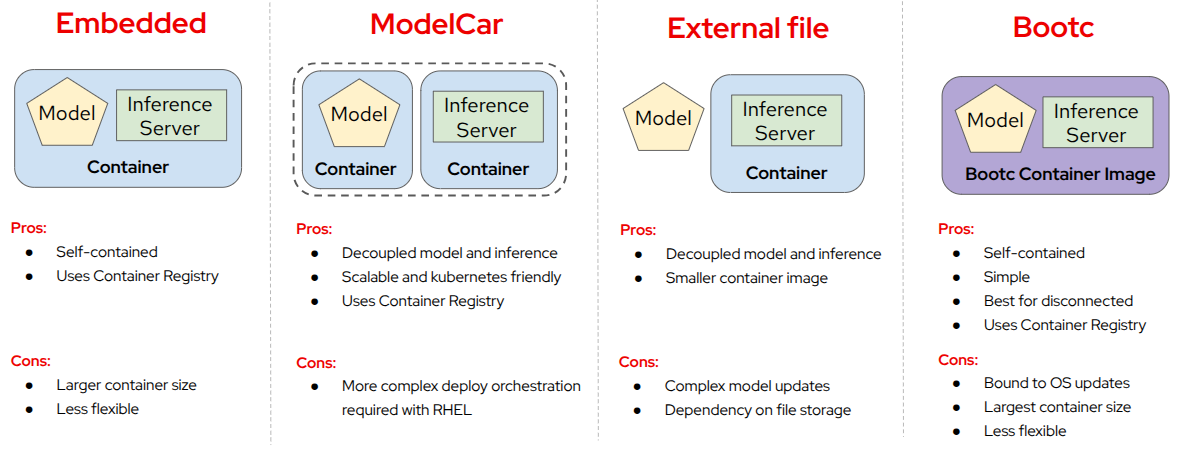
Different ways of packaging a model
Embedding the model and runtime in the same container image
The 1st approach embeds the model weights directly inside the container image together with the inference runtime. The model and the code running it travel and deploy as a single Open Container Initiative (OCI) image. There are no runtime dependencies on external storage, and the model and runtime always share the same tested version. The clear downside is that any model update requires rebuilding and redistributing the full container image. For far-edge devices that are frequently offline or where model updates are infrequent, this trade-off is favorable: The simplicity and reliability outweigh the update overhead.
Dedicated container image for the model (Modelcar)
The 2nd approach, known as the Modelcar pattern, packages the model weights as a dedicated, lightweight OCI container image acting purely as a data carrier. The runtime server has its own container image. The inference server—KServe, for example, which is available in OpenShift AI, OpenShift, and now in MicroShift too—mounts the model from this sidecar at startup using an init container. This decouples the model version from the runtime version. The model and runtime each have their own independent release cycle, their own OCI signing chain, and their own versioning history in the registry. This is the most flexible pattern and the one best aligned with cloud-native practices.
Directly using model files
The 3rd approach distributes the file directly. It stores the model as an external file (such as in a Simple Storage Service (S3) bucket) on a volume or object storage endpoint, mounting it into the inference container at startup. This allows the model to update independently of the runtime container. The problem is the runtime dependency it creates: If the storage endpoint is unavailable when the container starts, inference fails unless the file is downloaded, complicating model updates.
In addition, at the edge, storage systems are often remote, and connectivity is unreliable. This approach also requires a separate distribution infrastructure (Network File System (NFS), S3-compatible object storage, or a proprietary solution) with its own authentication, access control, versioning, and security scanning. You lose the signing, scanning, and versioning capabilities that a container registry provides automatically when the model is containerized, while adding operational burden for a parallel distribution system. For most edge deployments, this operational investment isn't justified.
Embedding the model in an operating system image
The 4th approach embeds the model into an operating system image. For example, when the model is combined with a bootc image mode operating system (that is, Red Hat Device Edge), the model can be embedded—directly as a file or included in a container image—in the OS image itself, making the kernel, drivers, runtime, and model a single atomic unit that deploys together and rolls back together.
The benefit of this model is maximum consistency, but the drawback is that any model update requires rebuilding and redistributing the OS image. For deployments where models change frequently or where different devices need different model versions, the update cycle becomes expensive. This pattern works best when model updates are rare, certification requirements demand a fully immutable stack, or the operational simplicity of a single artifact outweighs the cost of full-image redistribution, such as when the device operates in a disconnected environment.
The right choice depends on the connectivity profile and update frequency. For far-edge devices frequently disconnected, embedding the model in the OS image gives atomic deployment, no external dependencies, and coherent rollbacks. For edge devices with reliable connectivity where models update often, the decoupled patterns provide flexibility without external storage risks.
Throughout the rest of this series, we'll use examples based on models in containers (1st, 2nd, and 4th approaches) primarily distributed by OCI container image registries—the same OCI container registry used for application containers—because it offers multiple benefits for edge computing architectures.
Model warehousing and distribution
You've probably decided that the best way to package your model is in a container image. But how do you distribute that container image to edge devices?
The answer is simple. If the container image is the primary distribution unit for AI models, then the place to host and distribute those images is the same infrastructure already used for every other container workload: the container registry.
One term worth clarifying before going further with container registry usage is the concept of model registry. In the MLOps world, a model registry is a metadata and lifecycle management system. It doesn't store weights or distribute the model; it tracks model versions, experiment lineage, evaluation metrics, approval status, and deployment history. The model registry answers "which version of this model is in this artifact (container image in our case) and what do we know about it?" while the container image registry answers "here is the signed, immutable artifact to pull."
Returning to the container image registry, it's important to bear in mind that it isn't a file server. It provides content storage where every layer is identified by its hash, image signing, vulnerability scanning, access control, deduplication, delta updates, multi-architecture manifest support, and replication across registries. Replication is a great distribution method for edge computing use cases where you can have a small secondary container registry at the edge location to replicate images to.
If you wonder why you should distribute models using container images in a container image registry, consider that when you store a model as an OCI container image, all of these capabilities found in container image registries apply automatically to your model distribution architecture with no extra tooling.
The alternative—distributing models as raw files through object storage or NFS—requires building each of these capabilities separately. You need a signing mechanism, a vulnerability scanner, an access control system, a replication mechanism, and a retention policy for model files, all operating outside the registry and requiring their own operational overhead. The operational investment in a parallel file distribution infrastructure is usually too high.
With OCI as the distribution format for models, you can use the same infrastructure for every other asset the fleet needs, and reducing infrastructure at the edge is always a huge benefit.
Application containers already live in the registry, but OS container images built with bootc can be stored and distributed in the same way as GitOps configuration manifests or Helm charts. The result is a single registry that distributes OS updates, application deployments, model updates, and configuration manifests, all with the same tools, the same signing keys, and the same access policies. When provisioning a new edge site, the registry is the only distribution system that needs to be accessible.
Additionally, projects such as OCI Registry as Storage (ORAS) simplify distributing models inside container images and take it even further by providing a general-purpose specification and tooling for storing any file type as an OCI artifact, not just container images. This means arbitrary files such as configuration bundles, calibration datasets, or firmware packages can be pushed, pulled, signed, and managed through the same registry, using the same access policies and tooling, as long as the content is wrapped in the OCI artifact format—making the container image registry the universal system for hosting and distributing artifacts to the edge.
Red Hat Quay, an enterprise-ready container image registry, is a good choice for building this model distribution architecture because it provides native multi-architecture image indexes, zstd:chunked compression for efficient partial layer downloads (more about this in Part 3: Managing AI models across distributed fleets), image signing integration through cosign, vulnerability scanning, image replication, mirroring, and more.
Again, what happens with LLMs?
As explained before, most edge AI use cases use non-generative models, which is why all the examples above focus on that type of AI. However, there are still emerging use cases for LLMs at the edge, such as on-device workforce assistants or copilots and natural language interfaces. What if you want to run an LLM at the edge? What does LLM model distribution look like?
For LLM deployments specifically, model weights aren't the only artifact requiring this packaging. System prompts—including few-shot examples, chain-of-thought instructions, and tool definitions—directly control model behavior and can change that behavior as substantially as a weight update.
The good news is that you can still use the container image distribution system, but you need to take additional aspects into account. For example, an LLM producing incorrect outputs because of a changed prompt is operationally indistinguishable from one producing incorrect outputs because of a bad model update. Therefore, prompt templates should be version-controlled in Git, packaged as OCI artifacts (they're structured text files), signed with cosign, and deployed through the same pipeline used for model images. Red Hat can help with this alongside GitOps workflows and pipelines. For example, OpenShift AI has prompt management features that let you save and reuse prompts across different experiments.
Supply chain security: protecting the AI artifact
With the model in the registry, the next concern before it leaves for the edge is verifying that no one has tampered with it.
AI models have a threat surface that standard application containers don't. A model backdoor attack or an AI trojan modifies model weights so the model behaves correctly on normal inputs while reliably misclassifying specific trigger patterns or exfiltrating data. The modified model passes functional testing because it genuinely performs its intended function on all inputs except the carefully designed trigger. This is a meaningful attack vector. Even worse, a single tampered model distributed to thousands of devices creates a systematic failure nearly invisible without forensic investigation.
Protecting the model distribution to the edge
Edge deployments are more exposed to this because models travel further through CI/CD pipelines, registries, replication hops, and sometimes physical media to air-gapped sites. Each step is a potential insertion point.
When distributing models in container images, as discussed in the previous section, image signing with cosign (part of the Sigstore project) closes the most direct attack vector. The model container image is signed at the point where it exits the validated CI/CD pipeline. Every device verifies that signature before loading the model, regardless of how it arrived. A tampered model distributed through a compromised registry or delivered via USB to a disconnected site is rejected the same way.
Red Hat OpenShift Pipelines can automate this signing step directly inside the CI/CD pipeline so the signature is applied consistently without manual intervention. Red Hat Trusted Artifact Signer takes this further by running Sigstore components inside your own OpenShift cluster under your own trust material, so you aren't dependent on external infrastructure. OpenShift, MicroShift, and Red Hat Enterprise Linux (RHEL) with Podman can all enforce image signature verification natively through container policy configuration, rejecting unsigned or incorrectly signed images before they run.
Models and CVEs
Additionally, software bill of materials (SBOM) generation addresses a different threat: vulnerabilities in the components the model runs on top of. When the model and runtime are packaged together (the 1st model packaging approach in the previous section), a single SBOM covers the full stack: base OS, inference runtime including dependencies such as Python packages, CUDA toolkit, and others. When using the Modelcar pattern, the SBOM lives on the runtime image, which is where all exploitable components reside.
Container image registries such as Red Hat Quay store SBOM metadata alongside image signatures, but standard SBOMs can't capture model-specific information, such as the training framework, dataset, whether the model was fine-tuned from a base model, or what quantization was applied. An AI bill of materials (AIBOM) covers this gap. Red Hat is actively working on an AIBOM standard as well as tooling to structure and validate AIBOM data, exploring how it can feed into security tools like Red Hat Trusted Profile Analyzer. Trusted Profile Analyzer already cross-references SBOMs against Common Vulnerabilities and Exposures (CVE) databases today, so when a vulnerability is disclosed, you get an immediate answer about which model images in the fleet are affected.
Even with SBOMs, the best mitigation against CVEs in the runtime image is not having them in the first place, and Red Hat has something to offer here as well. Red Hat Project Hummingbird provides minimal, hardened base application images built specifically to reduce the number of components shipped. This helps minimize the number of CVEs to discover, track, and patch across the fleet.
Trusting the operating system
SBOMs and minimal base images address what's inside the image, but they say nothing about whether the software loading and running the model can itself be trusted. A signature check only means something if the device performing it is clean. If the OS running the model has been compromised, it can report anything, including telling you that a malicious model is safe to run. Secure Boot helps address this by verifying the full chain from firmware through bootloader and OS kernel before any user-space code runs, so the environment performing the model signature check is itself verified.
The limitation is that Secure Boot stops at the bootloader and OS kernel, which might not be enough for edge computing use cases.
For an edge device running AI inference unattended on a factory floor, in a substation, or at a remote site, physical access is a realistic threat, meaning someone has options to modify the device OS by, for example, directly modifying content on physical disks with an external device.
If you think using image-based operating systems—like the bootc images presented above—keeps you safe from these attacks because system files sit in read-only partitions, think again.
An attacker with physical access can bypass this since they can boot from external media, mount the disk offline, and modify files directly before the OS ever starts. This means the read-only enforcement bootc provides at runtime doesn't protect against someone who has the device in their hands before boot. The inference runtime or model weights can be replaced this way, and the modification won't be detected because nothing verifies the on-disk state at mount time.
However, bootc sealed images—a new experimental bootc feature—close this gap by using composefs and fs-verity to verify the entire root filesystem at boot time. During the image build, a composefs digest of the root filesystem is computed and embedded in the kernel command line of a Unified Kernel Image (UKI), which is then signed with your Secure Boot keys. At boot time, the UKI signature is verified by Secure Boot firmware, and the composefs digest in the kernel command line is checked against the actual mounted root filesystem using fs-verity. Any offline tampering with the OS, runtime, or model loader is detectable before any code executes, including on devices updated via physical media to air-gapped sites, because the filesystem must match exactly what was signed at build time.
What comes next
We've reached a point where the model is trained, optimized, packaged, and stored in a signed and scanned registry, ready to deploy even in offline environments if needed.
In Part 2: Running AI models at the edge, we'll follow the model from the registry to the devices where it will run as part of a heterogeneous edge hardware fleet, choosing the right execution platform per device class, managing hardware accelerators and their dependency chains, dealing with specific edge AI requirements, and reviewing messaging architectural patterns for AI models.
Resource
Get started with AI for enterprise organizations: A beginner’s guide
About the author
Luis Arizmendi is a tech enthusiast at the intersection of Edge Computing, Artificial Intelligence, MLOps, and Physical AI, with a deep background in containerized workloads at scale, and infrastructure optimization for high performance or real-time deterministic operation.
At Red Hat, he helps organizations design scalable architectures and bring AI beyond the data center, all the way to the edge, into systems that must perceive, decide, and act in the real world.
Passionate about open source technology and the convergence of AI, Edge, and Robotics into the next wave of intelligent, autonomous systems.
More like this
Reimagining the enterprise innovation engine in the agentic era
Building an AI-powered multimodal compliance monitor: From training to tracking to chat
How Red Hat cleared IT debt for scalable AI
Standardizing the AI stack with PyTorch
Browse by channel

Automation
The latest on IT automation for tech, teams, and environments

Artificial intelligence
Updates on the platforms that free customers to run AI workloads anywhere

Open hybrid cloud
Explore how we build a more flexible future with hybrid cloud

Security
The latest on how we reduce risks across environments and technologies

Edge computing
Updates on the platforms that simplify operations at the edge

Infrastructure
The latest on the world’s leading enterprise Linux platform

Applications
Inside our solutions to the toughest application challenges

Virtualization
The future of enterprise virtualization for your workloads on-premise or across clouds
