
Ansible is an open source IT automation engine used to automate application organization, framework computerization, cloud provisioning, and numerous IT administration tasks. Ansible improves the adaptability, consistency, and dependability of the IT climate.
Podman is an open source containerization platform that packages all the dependencies for building, shipping, and running applications as Podman containers. Using container virtualization technology ensures that an application works seamlessly in any environment. Podman CLI can implement almost all the commands from the Docker CLI.
[ Readers also liked: Improved systemd integration with Podman 2.0 ]
In this article, I show you how to automate Podman with Ansible by demonstrating how to automate various operations on the managed node. These are the following operations that you learn how to perform on a managed node:
- Install Podman
- Pull the httpd server image
- Copy the HTML code in the destination directory
- Run the httpd container and expose it to the public
- Start the webserver
For this procedure, I'm using Ansible 2.10.
Playbook for the entire setup
Installing Podman
In the package module, assign the name of the software you need to install. The state tag is used to describe the desired condition of the software, here I use present, which means install.
  - name: installing podman
    package:
      name: "podman"
      state: present
Pull the httpd server image from the Podman image repository
Using the Ansible podman image module, pull the httpd image.
  - name: Pull an image
    containers.podman.podman_image:
      name: httpd
Copy webpage
Using the copy module, copy the webpage from source to destination.
  - name: Copying file into home
    copy:
      src: /root/ws1/index.html
      dest: /home
Run the httpd container
Run the container in detached mode and attach the volume to it after exposing its port.
  - name: Re-create a redis container
    containers.podman.podman_container:
      name: sarthak
      image: httpd
      state: started
      detach: true
      exposed_ports:
        - 80
      ports:
        - 4444:80
      volumes: /home/:/usr/local/apache2/htdocs/
Running playbook to run Podman services
Confirm your managed node has Podman installed
Podman is not installed on this system, so install it by using the podman.yml playbook.
podman --version
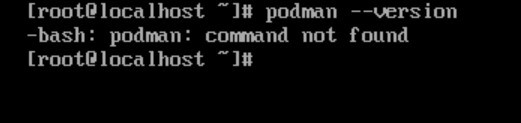
Next, run the playbook:
ansible-playbook podman.yml

Confirm that Podman successfully installed:
podman --version

Verify the httpd server image was successfully pulled:
podman ps

Check the web server:
curl [ip address]:[port no]

After following all these steps, Podman will be configured in your systems, and the website will be hosted on the 4444 port.
The complete playbook file:
---
- hosts: podman
  tasks:
  - name: installing podman
    package:
      name: "podman"
      state: present
  - name: Pull an image
    containers.podman.podman_image:
      name: httpd
  - name: Copying file into home
    copy:
      src: /root/ws1/index.html
      dest: /home
  - name: Re-create a redis container
    containers.podman.podman_container:
      name: sarthak
      image: httpd
      state: started
      detach: true
      exposed_ports:
        - 80
      ports:
        - 4444:80
      volumes: /home/:/usr/local/apache2/htdocs/
[ Need more on Ansible? Take a free technical overview course from Red Hat. Ansible Essentials: Simplicity in Automation Technical Overview. ]
Wrap up
Ansible can be used to install Podman and to deploy Podman containers, simplifying your sysadmin life and adding scalability and flexibility to your environment.
Sobre el autor
Sarthak Jain is a Pre-Final Year Computer Science undergraduate from the University of Petroleum and Energy Studies (UPES). He is a cloud and DevOps enthusiast, knowing various tools and methodologies of DevOps. Sarthak also Mentored more than 2,000 students Regarding the Latest Tech trends through their community Dot Questionmark.
Más como éste
Las amenazas de la inteligencia artificial se mueven rápido. Tus defensas también deberían hacerlo.
Avance de las funciones poscuánticas de SSH en Red Hat Enterprise Linux
Untangling Networks | Compiler
Infrastructure At The Edge | Compiler
Navegar por canal

Automatización
Las últimas novedades en la automatización de la TI para los equipos, la tecnología y los entornos

Inteligencia artificial
Descubra las actualizaciones en las plataformas que permiten a los clientes ejecutar cargas de trabajo de inteligecia artificial en cualquier lugar

Nube híbrida abierta
Vea como construimos un futuro flexible con la nube híbrida

Seguridad
Vea las últimas novedades sobre cómo reducimos los riesgos en entornos y tecnologías

Edge computing
Conozca las actualizaciones en las plataformas que simplifican las operaciones en el edge

Infraestructura
Vea las últimas novedades sobre la plataforma Linux empresarial líder en el mundo

Aplicaciones
Conozca nuestras soluciones para abordar los desafíos más complejos de las aplicaciones

Virtualización
El futuro de la virtualización empresarial para tus cargas de trabajo locales o en la nube
