
A few weeks ago, I joined the OpenShift team as a Developer Advocate. To help me get a better understanding of the platform, I went through the process of building and deploying a React app on Red Hat OpenShift Online. After trying the standard Create React App and the Node.js sample repository, I built an app that has both a React frontend and an Express backend, and then set it up so that it could be deployed on Red Hat OpenShift. In this post, I’m sharing the process I followed and some tips so that other developers can have a more smooth experience the first time around.
Some Details on the App
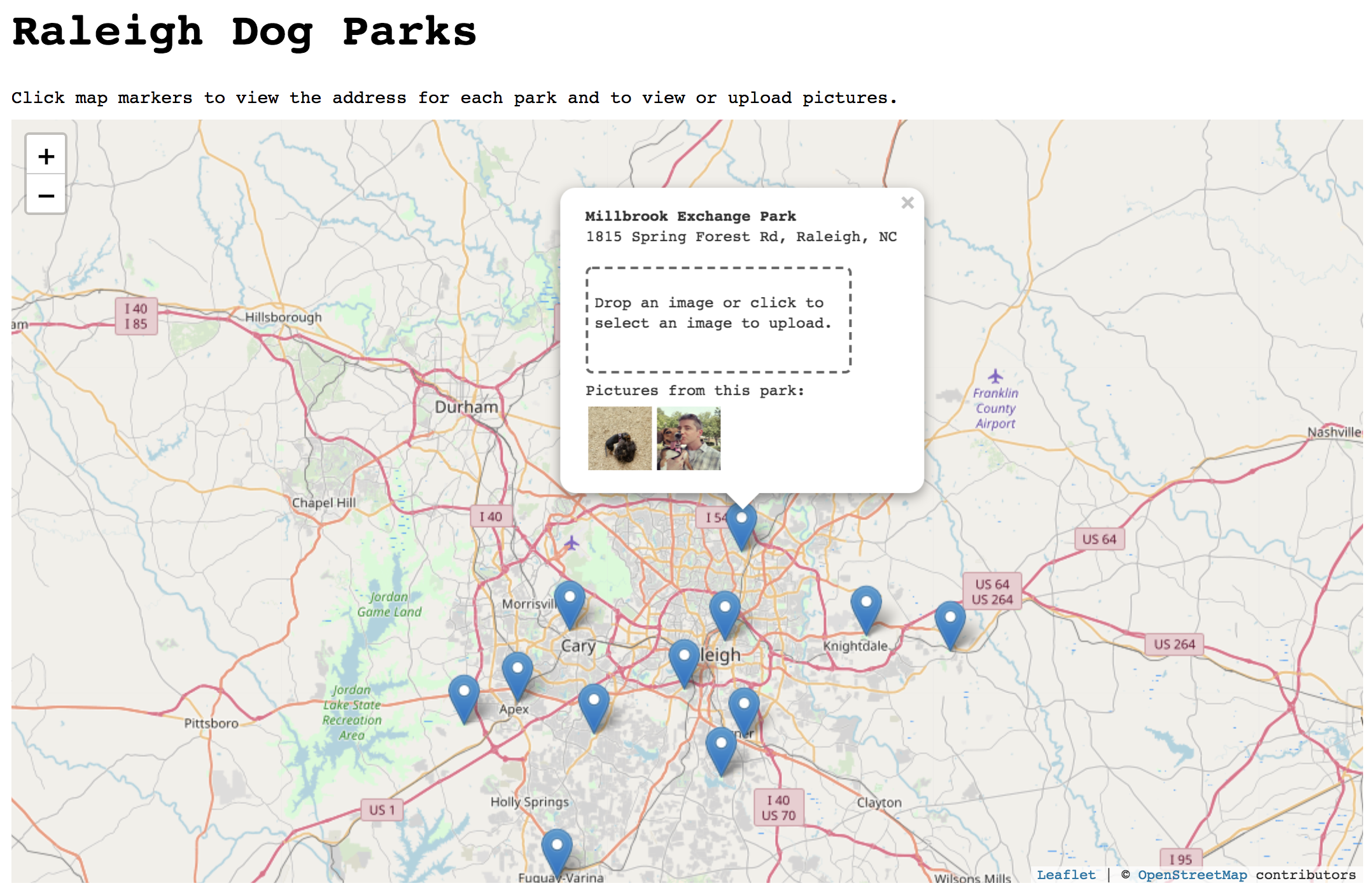
 I take too many pictures of my dog, especially when we’re at the dog park. I built this web app to give me a place to upload and view pictures I’ve taken at different dog parks near my hometown of Raleigh, NC. The user clicks on a map marker for each park, and can view or upload pictures taken at that park. The dog park location data is pulled from one of the Open Data Raleigh APIs. Then, it uses React-Leaflet to handle the map features. Finally, it’s using Cloudinary to host the images that are uploaded for each park. In a future version of the app, I may use MongoDB to store the images instead, but for now, the free tier of Cloudinary works just fine.
Setup and Dependencies
To follow along, you’ll need a Red Hat OpenShift Online account and a Cloudinary account. Of course, you could also walk through this using Minishift and run OpenShift locally. If you don’t already have an OpenShift account, you can create one here.
Deploying to OpenShift
In this post, we’ll be using the web console to deploy our app, but there are alternatives including the oc command line tool and Odo.
Sign in to your Red Hat OpenShift Online account. When you first sign in, you’ll see a catalog of supported languages, databases, and other options. Find Node.js in the list and select it.
This opens a wizard which will guide you through the deployment process. On the initial information screen, click “Next.”
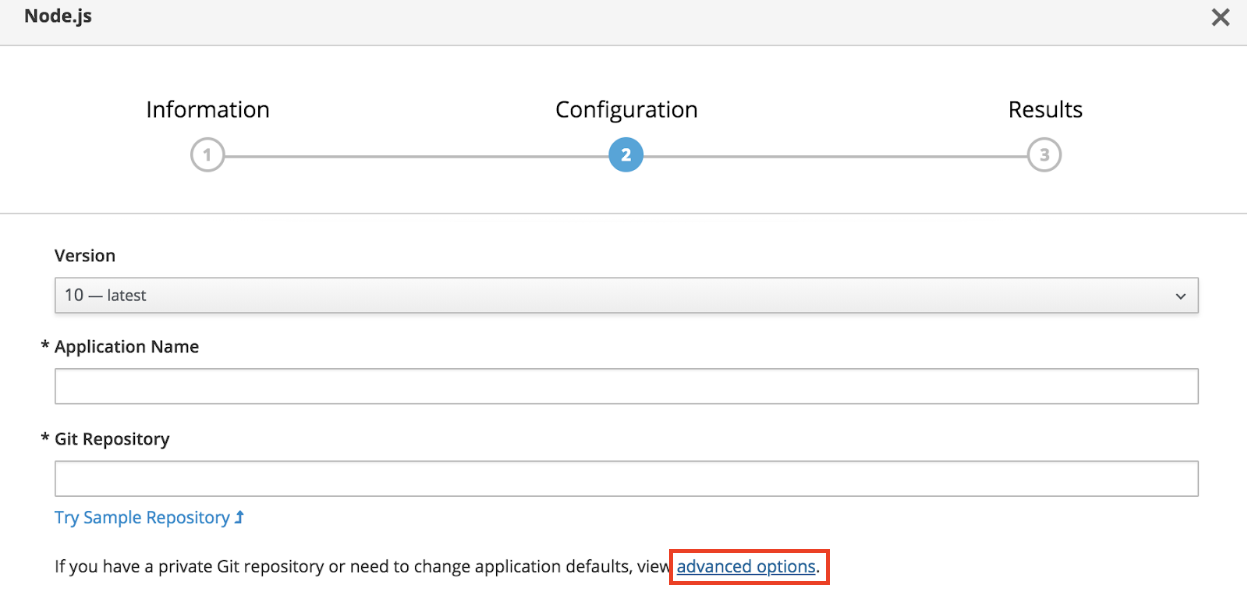
On the Configuration screen that appears next, click the link at the bottom to view advanced options.
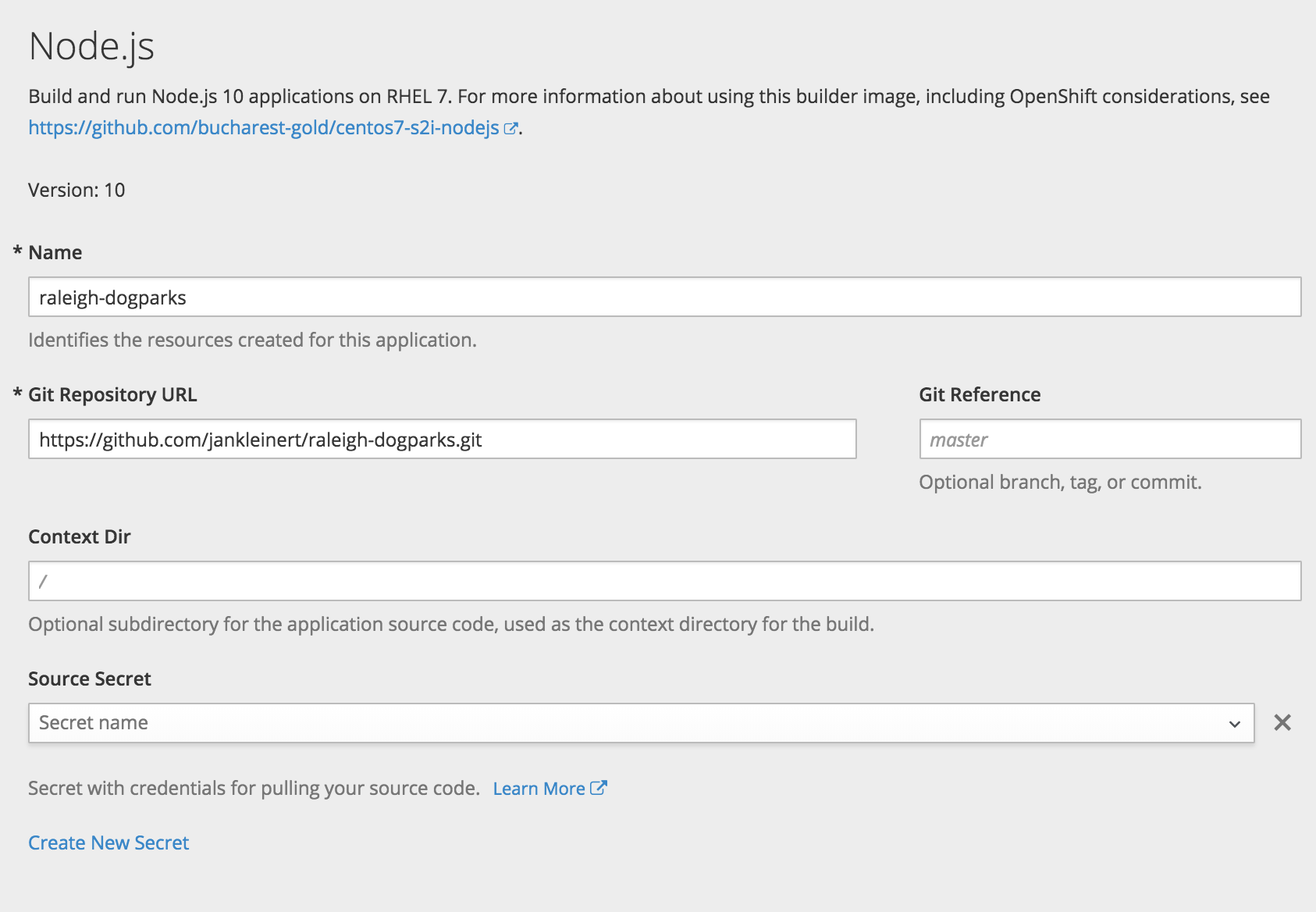
Set the following values:
Name: raleigh-dogparks
Github Repository URL: https://github.com/jankleinert/raleigh-dogparks.git
Then, scroll down to the Build Configuration section. First, deselect the checkbox next to “Launch the first build when the build configuration is created.” I’ll explain the reason for this in a moment.
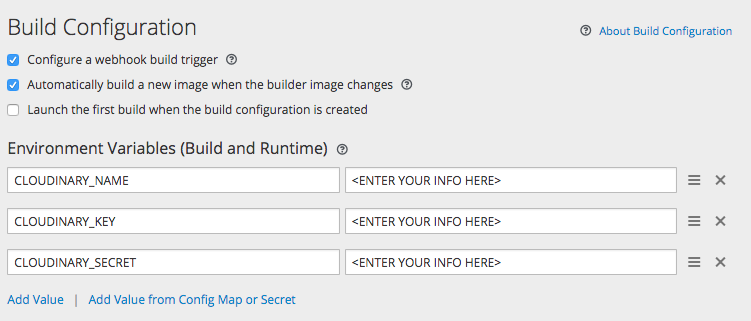
The three environment variables that we will add are for the Cloudinary API. You can find these in the main dashboard of the Cloudinary account you created. Those environment variables are referenced in server/routes/routes.js as part of the Cloudinary config:
cloudinary.config({

  cloud_name: process.env.CLOUDINARY_NAME,

  api_key: process.env.CLOUDINARY_KEY,

  api_secret: process.env.CLOUDINARY_SECRET

});
Leave all the other settings as-is and click “Create” to exit the wizard.
We didn’t launch the build right away because our app needs additional memory allocated to the build process. This is sometimes the case for Node.js apps that use webpack and npm to install packages.
To do that, click Builds > Builds in the left navigation. On the Builds screen, click on “raleigh-dogparks” and then Actions > Edit YAML to edit the Build Config.

In the Build Config editor, update the resources section to specify a memory limit of 1Gi (the default is 512Mi), as shown below.
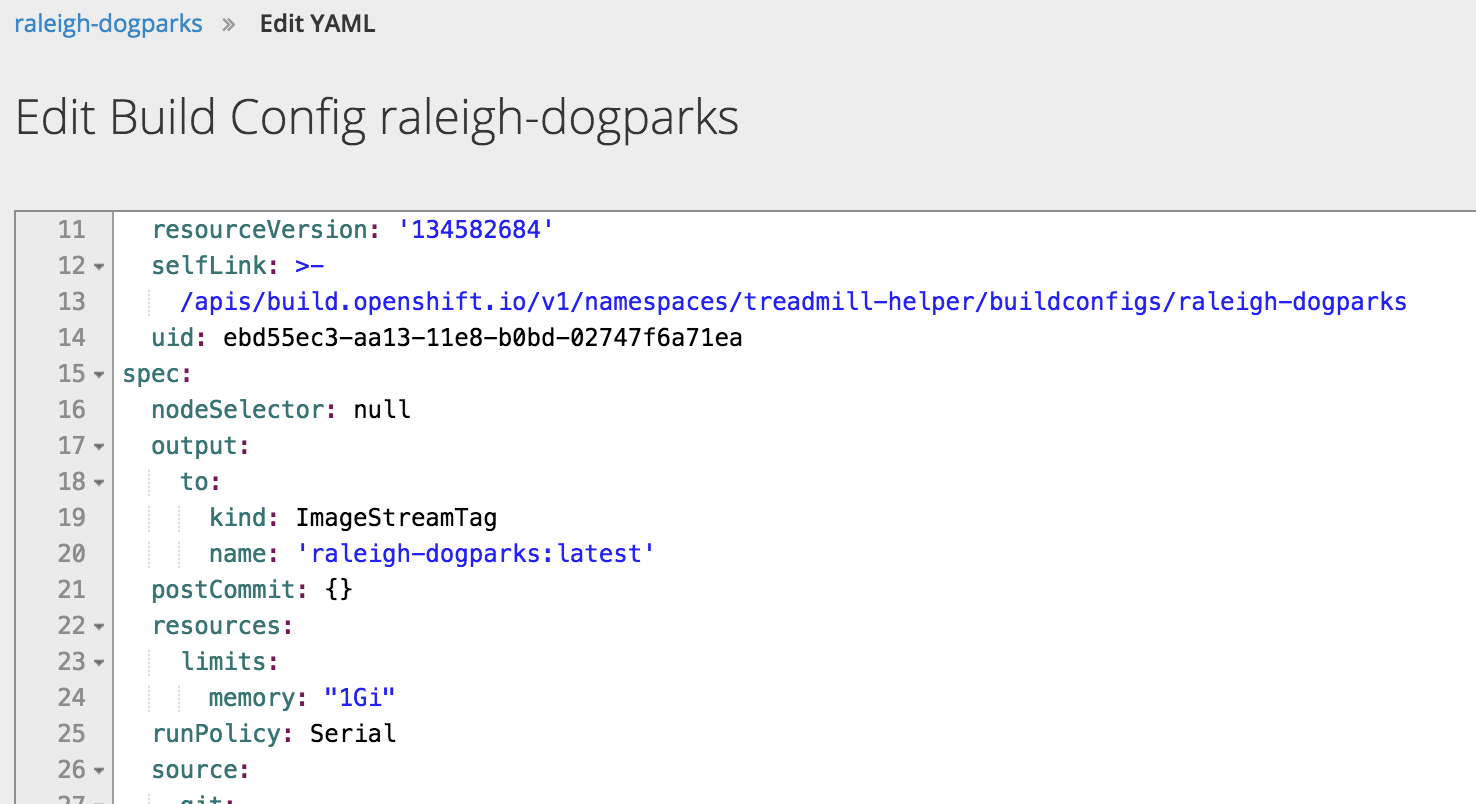
Now click "Start Build".
Once the build completes, go back to the Overview panel, and expand the raleigh-dogparks application to see that it’s deployed.
In the initial setup, you may have noticed that the option to create a route to the application was selected by default.
 Creating a route allows the app to be externally accessible by a URL. If you click that Route URL, you should be able to launch the app. That’s it! You’ve successfully deployed the app on Red Hat OpenShift Online.

Development Notes
In order to make the move from running this app locally to running it on Red Hat OpenShift Online, there were a couple small changes I needed to make.
Default IP and port
Containers in OpenShift should bind to any address, which we designate with 0.0.0.0 and use port 8080 by default. That may not be what your app is set up for, particularly if you use something like Create React App or another kind of generator tool to create an initial framework. For this app, you can see that in bin/www I’ve set the IP address and port to 0.0.0.0 and 8080, respectively, unless some other values are set via environment variables.
var app = require('../server/server');

var ip = process.env.IP || '0.0.0.0';

var port = process.env.PORT || 8080;
app.listen(port, ip, function() {
 console.log('running at ' + ip + ':' + port);
 });
NPM scripts in package.json
If you view the log from your build, you’ll see the following:
During a build, OpenShift runs npm install -s --only=production and then npm start. In the case of this app, I also wanted to run webpack after install. You can do that by adding a postinstall step in your npm scripts, like this:
"scripts": {

  "build": "webpack",

  "postinstall": "npm run build",

  "start": "node bin/www"

}
Summary
Now you should have all the information you need to be able to deploy an app on Red Hat OpenShift Online using React, Node.js, and Express. Don’t stop there, though! Build off these basics adding in a webhook to trigger a build each time a change is pushed to your Github repository or setting up a custom hostname for your route.
Sobre el autor
Más como éste
Ansible Automation Platform 2.7: Guía de Visual Execution Environment Builder y detección de contenido
Cómo Lightwell protege tus resultados y la velocidad de los desarrolladores
Random Acts Of Automation | Compiler
How Red Hat cleared IT debt for scalable AI
Navegar por canal

Automatización
Las últimas novedades en la automatización de la TI para los equipos, la tecnología y los entornos

Inteligencia artificial
Descubra las actualizaciones en las plataformas que permiten a los clientes ejecutar cargas de trabajo de inteligecia artificial en cualquier lugar

Nube híbrida abierta
Vea como construimos un futuro flexible con la nube híbrida

Seguridad
Vea las últimas novedades sobre cómo reducimos los riesgos en entornos y tecnologías

Edge computing
Conozca las actualizaciones en las plataformas que simplifican las operaciones en el edge

Infraestructura
Vea las últimas novedades sobre la plataforma Linux empresarial líder en el mundo

Aplicaciones
Conozca nuestras soluciones para abordar los desafíos más complejos de las aplicaciones

Virtualización
El futuro de la virtualización empresarial para tus cargas de trabajo locales o en la nube
