
La ejecución de Red Hat Enterprise Linux for Microsoft Azure ofrece varios beneficios, entre los que se incluyen una mayor escalabilidad, flexibilidad, rentabilidad y acceso a una amplia variedad de servicios gestionados. Al utilizar la infraestructura global de Microsoft Azure, puedes ajustar las cargas de trabajo de Red Hat Enterprise Linux para satisfacer las demandas cambiantes, reducir los gastos de capital y aprovechar los distintos modelos de compra. Esta oferta incluye asistencia integrada entre Microsoft y Red Hat con soporte técnico las 24 horas, los 7 días de la semana.
En este artículo, ofrezco consejos para configurar Red Hat Enterprise Linux for Microsoft Azure y algunas sugerencias para aprovechar al máximo su valor. El objetivo de este artículo es ayudarte a evitar inconvenientes en el proceso de compra, implementación, configuración y gestión de las instancias de Red Hat Enterprise Linux en Microsoft Azure, ya sea que estés trasladando las cargas de trabajo actuales a un entorno de nube o que recién estés comenzando.
Aprovecha todo el potencial de Enterprise Linux
Red Hat Enterprise Linux ofrece mucho más que solo acceso a un sistema operativo (SO) Linux. Está diseñada específicamente para los entornos de Azure e incluye funciones integradas e integraciones que optimizan el rendimiento, la gestión y las funciones de seguridad:
- Perfiles de rendimiento específicos de Azure preconfigurados para implementaciones más rápidas y uniformes.
- Red Hat Enterprise Linux for Azure ofrece la posibilidad de recopilar, analizar y visualizar los datos de rendimiento y diagnóstico.
- La interfaz de línea de comandos (CLI) de Azure (
azure-cli) permite gestionar las imágenes y los recursos de Red Hat Enterprise Linux for Azure. - El modo de imagen optimiza las operaciones en la nube con herramientas propias de los contenedores, lo cual permite utilizar imágenes de contenedores de arranque de Red Hat Enterprise Linux e imágenes inmutables del sistema para reducir la superficie de ataque.
Lightspeed te ayuda a ejecutar Red Hat Enterprise Linux como una plataforma única
Red Hat Lightspeed se incluye con Red Hat Enterprise Linux sin costo adicional y puede reforzar las funciones del sistema operativo como una plataforma unificada en todas las nubes y en las instalaciones:
- Visibilidad: Lightspeed simplifica la gestión y la supervisión con una visión integral de todo el entorno de Red Hat Enterprise Linux.
- Alertas proactivas: Lightspeed envía alertas de forma proactiva a los administradores y a las partes interesadas antes de que se produzca una interrupción o un evento de seguridad.
- Análisis de desajustes: Lightspeed analiza los datos en todos los entornos y destaca los patrones de rendimiento y los desajustes en la configuración que podrían afectar el rendimiento de las aplicaciones.
- Cumplimiento normativo: Lightspeed supervisa los sistemas según los estándares del sector, lo cual te permite mantener el cumplimiento y te ayuda en tus iniciativas para reforzar la estrategia de seguridad.
Lightspeed optimiza la gestión de Red Hat Enterprise Linux en diversas implementaciones, lo cual permite disfrutar de una experiencia uniforme independientemente del lugar donde lo instales. Esto resulta especialmente útil si algunas de tus cargas de trabajo aún se ejecutan en las instalaciones, además de las que se ejecutan en Microsoft Azure.
Se accede a esta función a través de Red Hat Hybrid Cloud Console. Conecta tu cuenta de Microsoft Azure y las de Red Hat, y regístrate en Red Hat Lightspeed. Si te registraste en Red Hat Enterprise Linux a través de imágenes PAYG en Azure Marketplace, es posible que esta conexión no sea automática.
Opciones de compra de Red Hat Enterprise Linux for Microsoft Azure
Hay varias maneras de adquirir Red Hat Enterprise Linux for Microsoft Azure:
- Adquiérelo directamente en Azure Marketplace con el método de pago por uso (pay-as-you-go, PAYG) o con un plazo de uno o tres años.
- Adquiere una suscripción de Red Hat o de un partner de Red Hat. Si se trata de un escenario de migración, puedes pasarte a Microsoft Azure con Cloud Access de Red Hat, lo que también se conoce como trae tu propia suscripción (BYOS). Además, puedes implementar tu propia imagen o una imagen dorada como una máquina virtual (VM).
Cada uno de estos métodos cuenta con diferentes mecanismos para el aprovisionamiento de la VM subyacente. Por lo general, los clientes de Marketplace realizarán el aprovisionamiento mediante la consola de Azure o el comando az. Los clientes de Cloud Access disponen de varios métodos para realizar el aprovisionamiento mediante una de las opciones de imagen dorada.
Cualquiera de estos métodos es válido y da como resultado una instancia de Red Hat Enterprise Linux que permite el mismo acceso a las actualizaciones de Red Hat. Ten en cuenta que las VM aprovisionadas a través de Azure Marketplace vienen preconfiguradas para usar Azure-hosted Red Hat Update Infrastructure, mientras que las VM aprovisionadas mediante BYOS deben conectarse a Red Hat Subscription Manager.
Preguntas que debes responder antes de comenzar
Antes de comenzar, tómate un tiempo para considerar algunos factores determinantes. Estas son algunas de las preguntas que surgen con frecuencia:
¿Cuál es el caso de uso para la implementación de Red Hat Enterprise Linux for Azure?
El modo en que implementes la instancia de Red Hat Enterprise Linux para Microsoft Azure dependerá de tu caso de uso. Pregúntate:
- ¿Deseo usar mi propia suscripción o adquirirla en Azure Marketplace? ¿Esta instancia será una carga de trabajo de larga duración que requiera una suscripción anual o una carga de trabajo de corta duración que requiera PAYG?
- ¿Quiero usar una imagen estándar en Azure y diseñar a partir de ella, o subir una propia?
- ¿Cómo se actualizará esta máquina? Si tu respuesta es Azure Marketplace, usa Red Hat Update Infrastructure; pero si tu respuesta es BYOS, pregúntate cómo te conectarías a la gestión de suscripciones.
Una carga de trabajo crítica que se espera que se ejecute de forma permanente durante períodos prolongados requiere una infraestructura de nube estable y con alta disponibilidad. Las cargas de trabajo que presentan variaciones estacionales, con una gran demanda durante ciertos períodos y una demanda baja en otros, se beneficiarían de la elasticidad de un entorno de nube. Esta elasticidad permite ampliar rápidamente los recursos durante los períodos de mayor actividad y reducirlos durante los períodos de menor actividad, lo cual optimiza la eficiencia de costos. Estos diferentes casos de uso sugieren diferentes modelos de implementación.
¿Cuál es el modelo de implementación más adecuado?
Al elegir un modelo de implementación, ten en cuenta las preferencias de pago. Tanto la suscripción anual como las opciones de PAYG (según el uso) tienen ventajas y desventajas, y la elección ideal depende en gran medida de tus requisitos específicos, las limitaciones presupuestarias y los patrones de carga de trabajo previstos. Si la previsibilidad del presupuesto y la facturación simplificada son primordiales, una tarifa mensual o anual puede ser la más adecuada. Por el contrario, si la flexibilidad, la eficiencia de costos y la capacidad de ajuste rápido son esenciales, un modelo basado en el uso podría ser una mejor opción.
- Suscripción anual: Una suscripción anual ofrece previsibilidad del presupuesto, facturación simplificada y, en general, un precio más competitivo al comprometerse con planes a largo plazo. Una tarifa fija también elimina la necesidad de supervisar de cerca el uso. Las suscripciones están disponibles a través de tu gestor de cuentas de Red Hat o de un partner certificado de Red Hat, con el cual puedes calificar para el programa Red Hat Hybrid Committed Spend, que abarca tanto entornos locales como de nube. Las suscripciones anuales pueden calificar para el Microsoft Azure Consumption Commitment (MACC) si se adquieren a través de Azure Marketplace.
- Pago por uso (PAYG): Esta opción de pago ofrece una mayor flexibilidad, elimina los compromisos a largo plazo y califica para el MACC. Este enfoque basado en el uso garantiza que solo pagues por los recursos que utilizas, lo que permite una asignación óptima de los costos y una adaptación rápida en respuesta a las fluctuaciones de la demanda. Sin embargo, este modelo puede generar costos impredecibles y requiere la supervisión permanente del uso para evitar excesos si no se controla cuidadosamente.
¿Cómo puedo cambiar de modelo de pago más adelante?
Si te comprometes con un tipo de modelo de pago y las necesidades de tu empresa cambian de modo que el otro modelo resulte más adecuado, existen dos métodos para hacerlo.
- Cambio de planes PAYG a planes de uno o tres años con las Azure Reserved Virtual Machine Instances: Puedes cambiar de los planes de pago por uso a los de plazo fijo mediante las Azure Reserved Virtual Machine Instances. Esto no cambia directamente las máquinas virtuales actuales, sino que aplica un descuento de reserva para que coincida con el uso de las máquinas virtuales en ejecución.
- Cambio de PAYG a Bring Your Own Subscription (BYOS) con Azure Hybrid Benefit: El cambio de una máquina virtual PAYG de Azure Marketplace a un modelo BYOS a plazo fijo con Azure Hybrid Benefit implica convertir tu máquina virtual actual para que use tu propia suscripción a Red Hat Enterprise Linux. Este es un cambio más permanente en tus máquinas virtuales. Azure Hybrid Benefit también se puede usar para pasar de BYOS a PAYG.
¿Qué necesitas para comenzar?
Una vez que hayas elegido las opciones de implementación y pago que mejor se adapten a tu empresa, necesitas dos cosas para comenzar: una cuenta de Microsoft Azure y tu cuenta de Red Hat. Si no tienes una u otra, configúralas antes de comenzar.
Implementación de Red Hat Enterprise Linux for Microsoft Azure
Red Hat Enterprise Linux for Microsoft Azure ofrece flexibilidad a la hora de realizar implementaciones en la nube. Así como hay varias formas de pagar Red Hat Enterprise Linux for Microsoft Azure, también las hay de implementar una instancia.
Configuración de Red Hat Enterprise Linux adquirido a través de Azure Marketplace
Si compraste Red Hat Enterprise Linux en Azure Marketplace, sigue estos pasos para configurarlo.
1. Iniciar sesión
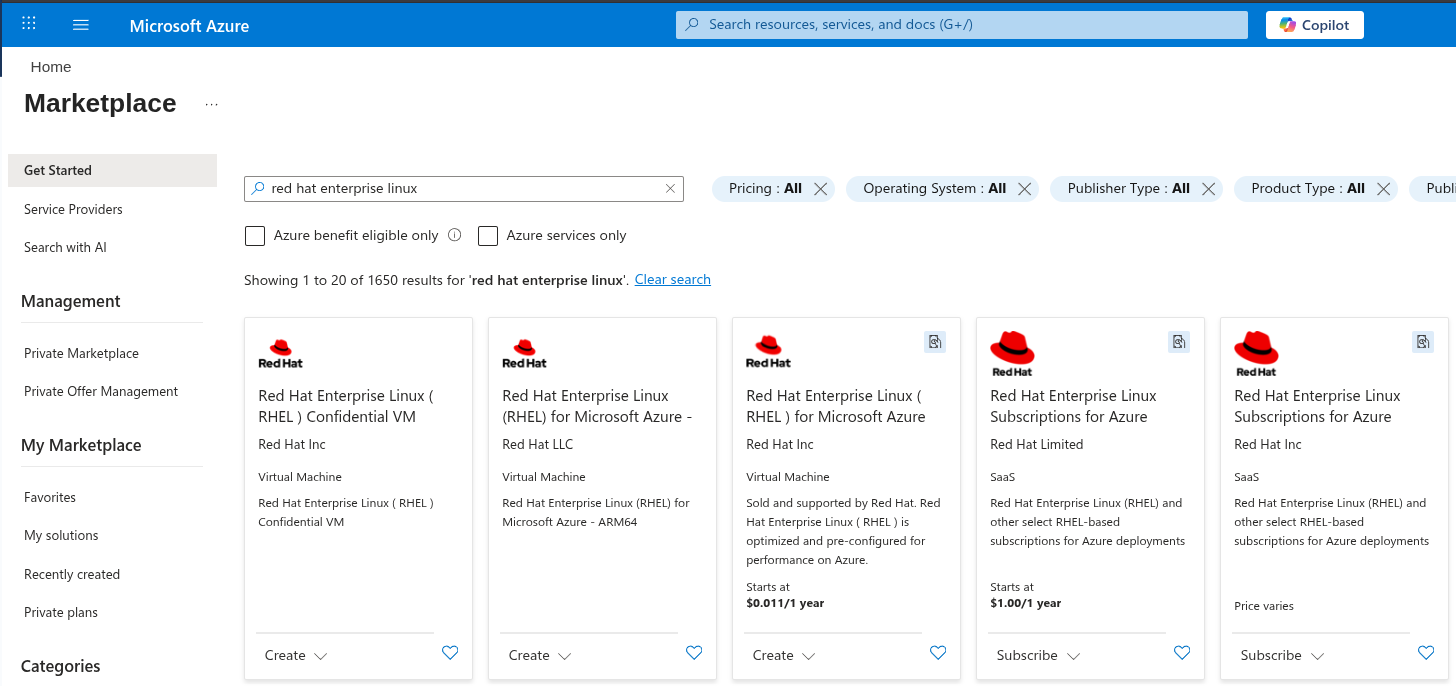
Inicia sesión en el Marketplace de Azure. Busca "Red Hat Enterprise Linux".
2. Elige una oferta
Algunas ofertas están marcadas como Sold by Microsoft. Esto significa que tu acuerdo financiero y el soporte principal son con Microsoft. Otras ofertas están etiquetadas como Sold and supported by Red Hat. Esto significa que tu acuerdo financiero y el soporte principal son con Red Hat. Tu elección puede variar en función de tus relaciones actuales con estos proveedores y tu capacidad para negociar con tu respectivo gerente de cuentas. Ten en cuenta que Red Hat y Microsoft ofrecen soporte integrado para esta oferta, por lo que siempre recibirás la ayuda que necesites, independientemente de la opción de adquisición.
Selecciona una de estas ofertas de Red Hat Enterprise Linux:
- Red Hat Enterprise Linux incluye su administrador de volúmenes lógicos (LVM) configurado.
- La «última versión secundaria» es una versión de actualización continua de la versión más reciente.
- Las versiones secundarias con numeración inferior requieren intervención manual para cambiar de versión.
- Red Hat Enterprise Linux Raw incluye un disco RAW (y no tiene configurado el LVM).
- Red Hat Enterprise Linux ARM64 es para procesadores ARM64, a diferencia de los otros, que son para procesadores x86_64.
- Red Hat Enterprise Linux for SAP tiene usos específicos con SAP.
- Red Hat Enterprise Linux for HPC facilita la implementación mediante la automatización para instalar contenido de informática de alto rendimiento (HPC).
- Red Hat Enterprise Linux for Third Party Linux Migration es una oferta con descuento para los usuarios que migran desde otra distribución de Linux basada en RPM e incluye Extended Lifecycle Support (ELS) para Red Hat Enterprise Linux 7.
- Red Hat Enterprise Linux 7 ELS proporciona acceso a parches de seguridad y actualizaciones más allá de la fecha de finalización del mantenimiento de Red Hat Enterprise Linux 7 (30/06/2024).
3. Crea una máquina virtual
Independientemente de lo que elijas, el siguiente paso es crear una máquina virtual.
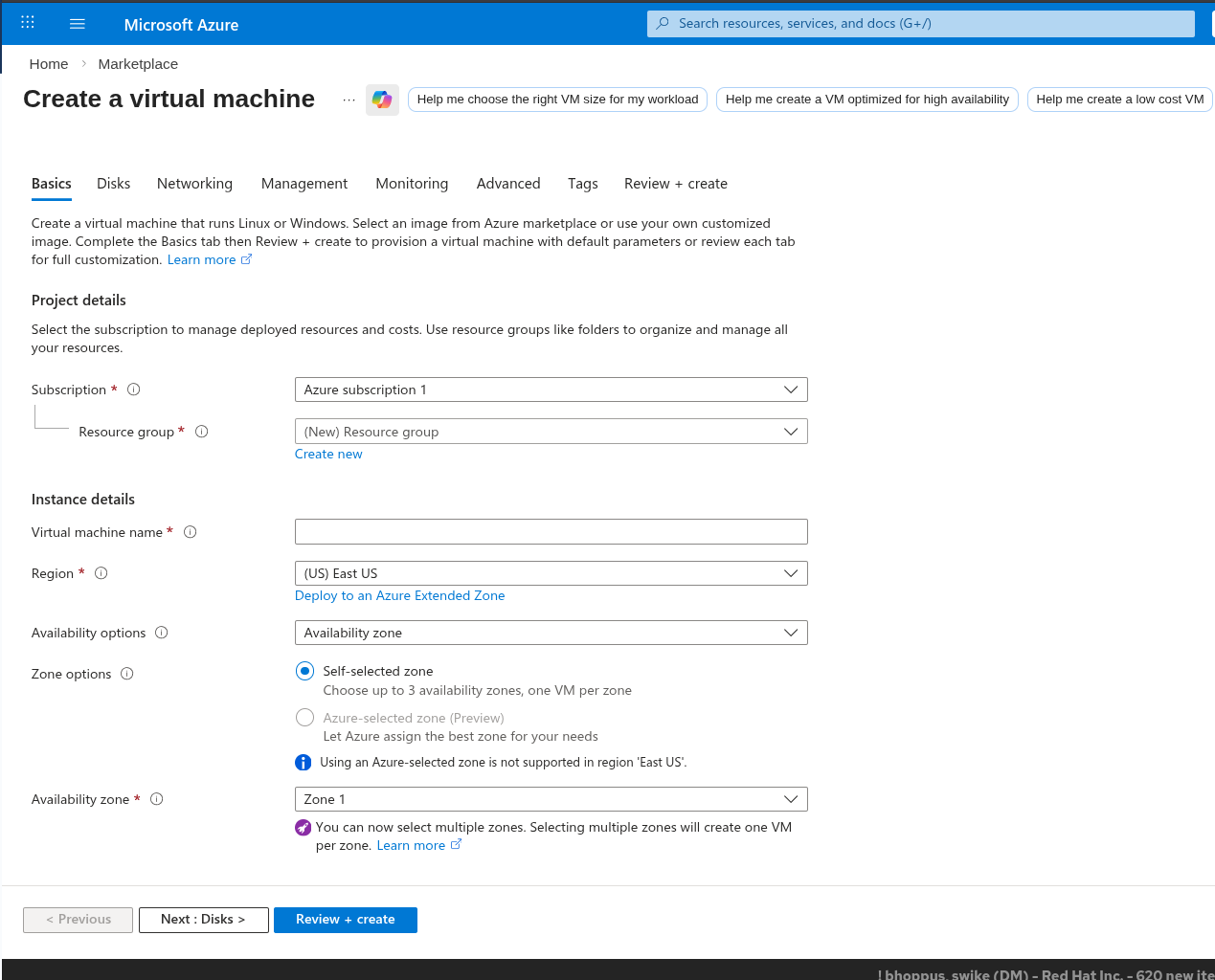
Selecciona Create a resource > Compute > Virtual Machine y completa los campos obligatorios.
En el menú desplegable Image, selecciona la versión de Red Hat Enterprise Linux que estés utilizando.
4. Elige un agente de aprovisionamiento
Selecciona entre utilizar cloud-init o el agente de WALA para personalizar el aprovisionamiento:
- WALA es un agente específico de la plataforma Azure que se utiliza para aprovisionar y configurar máquinas virtuales (VM), además de gestionar las extensiones de Azure. El agente de WALA es más sencillo de usar y está estrechamente integrado con Azure.
- cloud-init es un agente que no es específico de Azure y no interactúa con las extensiones de Azure. El agente cloud-init utiliza un estándar más amplio y ofrece más flexibilidad, capacidad de extensión y desarrollo activo, pero su uso es más complejo y no está integrado directamente en Azure.
5. Elige un tipo de arranque
Elige entre el arranque Gen1 (BIOS) o Gen2 (UEFI).
- BIOS es más antigua y tiene mayor compatibilidad con versiones anteriores
- UEFI es más reciente, se inicia más rápido y es más compatible con las tecnologías más nuevas
6. Conéctate a tu máquina virtual
Accede a la página de descripción general de tu máquina virtual y selecciona Connect para abrir un shell remoto (mediante SSH) en tu instancia.
Instalación de una instancia de Red Hat Enterprise Linux implementada previamente de forma local
La transferencia desde una instancia de Red Hat Enterprise Linux implementada previamente de forma local requiere algunos pasos adicionales antes de realizar la configuración de la sección anterior. Antes de comenzar, también debes evaluar los planes sobre el tiempo de inactividad y los costos de transferencia de datos.
Este proceso parte del supuesto de que te trasladas desde un entorno virtualizado. Si tu instancia local se ejecutaba en un servidor dedicado (bare metal), es posible que este proceso tenga pasos adicionales que no se incluyen aquí.
1. Realiza un backup
Realizar un backup es un paso fundamental de este procedimiento. Realizarás cambios importantes en el sistema, y una buena copia de seguridad puede ser el único método de recuperación si las cosas no salen según lo planeado.
2. Crea una imagen de disco de la instancia local
Si puedes detener el servidor, puedes crear la imagen con el comando dd. Si no puedes detener el servidor, puedes crear la imagen con la gestión de volúmenes lógicos (LVM).
Guarda esta imagen de disco en un archivo.
3. Carga la imagen de disco en Azure Blob Storage
Inicia sesión en Azure Portal y ve a Cuentas de almacenamiento. Crea una nueva cuenta de almacenamiento o usa una que ya tengas.
Dentro de la cuenta de almacenamiento, crea un contenedor de blobs y carga el archivo de imagen de disco en él.
4. Crea un disco administrado a partir de la imagen de disco
En Azure Portal, ve a Disks en Compute.
Selecciona Create y elige la opción para crear un disco a partir de un Blob. Dirígelo al Blob donde cargaste la imagen de disco.
5. Crea una máquina virtual a partir del disco administrado
En Azure Portal, ve a Virtual Machines.
Haz clic en Create y selecciona la opción para crear una máquina virtual (Virtual Machine, VM) desde un disco administrado. Asegúrate de especificar la configuración que coincida con tu implementación local, como el tamaño de la VM, las opciones de red, etcétera.
6. Inicia la máquina virtual
Cuando el disco administrado esté listo, puedes crear una VM nueva a partir de él. A partir de ahí, el proceso es similar al de creación de cualquier otra VM de Azure. Configura los detalles de la VM, añade almacenamiento si es necesario, ajusta las redes, revisa y crea la instancia.
7. Realiza la configuración para que coincida con tu implementación local
Cuando la instancia esté en ejecución, es posible que debas realizar una configuración adicional. Conéctate a la instancia y asegúrate de que todo funcione según lo previsto. Es posible que debas realizar actualizaciones, cambiar la configuración o hacer otros cambios para que coincidan con la instancia local.
Conclusión
El uso de Red Hat Enterprise Linux for Microsoft Azure puede mejorar significativamente la escalabilidad, la flexibilidad y la rentabilidad de tu infraestructura de nube. Al seguir los consejos y las pautas de este artículo, podrás optimizar los procesos de implementación, configuración y gestión, lo que facilitará una transición fluida a la nube. Independientemente de si vas a migrar una carga de trabajo existente o a empezar de cero, conocer las opciones de compra, los modelos de implementación y los mecanismos de soporte te ayudará a tomar decisiones fundamentadas. Gracias al soporte integrado de Red Hat y Microsoft, puedes abordar las complejidades del cloud computing con confianza y aprovechar todo el potencial de Linux empresarial en el entorno de Azure.
Obtén más información sobre los procesos técnicos específicos para configurar Red Hat Enterprise Linux for Microsoft Azure.
Prueba del producto
Prueba del producto Red Hat Enterprise Linux
Sobre el autor
I am focused on creating content for the RHEL community. Over a Decade in IT, cybersecurity advocate, conference organizer, and open-source enthusiast. Hobbies include homelabs, podcasting and 3D Printing.
Más como éste
Presentación de Red Hat OpenShift Service Mesh 3.4
Red Hat Enterprise Linux Long-Life Add-On: RHEL sin una fecha de finalización predeterminada
Scaling with Orchestrators | Compiler
Infrastructure At The Edge | Compiler
Navegar por canal

Automatización
Las últimas novedades en la automatización de la TI para los equipos, la tecnología y los entornos

Inteligencia artificial
Descubra las actualizaciones en las plataformas que permiten a los clientes ejecutar cargas de trabajo de inteligecia artificial en cualquier lugar

Nube híbrida abierta
Vea como construimos un futuro flexible con la nube híbrida

Seguridad
Vea las últimas novedades sobre cómo reducimos los riesgos en entornos y tecnologías

Edge computing
Conozca las actualizaciones en las plataformas que simplifican las operaciones en el edge

Infraestructura
Vea las últimas novedades sobre la plataforma Linux empresarial líder en el mundo

Aplicaciones
Conozca nuestras soluciones para abordar los desafíos más complejos de las aplicaciones

Virtualización
El futuro de la virtualización empresarial para tus cargas de trabajo locales o en la nube
