
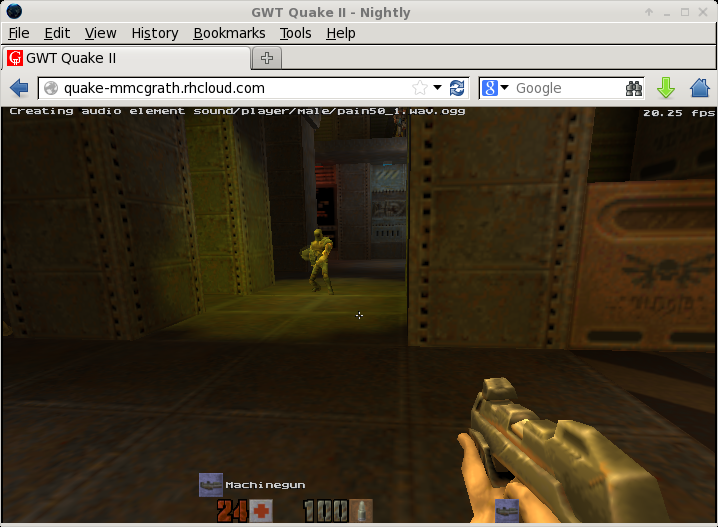
We've been adding a lot of great features to OpenShift lately but we've also been working on some cool demos behind the scenes. The OpenShift operations team loves this cloud stuff and we love pushing it to its limits. We've also got a few gamers on hand, so with that in mind we worked to get quake2-gwt up and running and hosted on OpenShift. This version of Quake 2 runs in your web browser.
This is one of those ah-hah moments for some people who haven't seen much HTML5 content before. Everything in the demo is running either on OpenShift or in your browser.
Let's get started!
To get started the first thing you need is to get an OpenShift account at http://openshift.redhat.com/.
We've been adding a lot of great features to OpenShift lately but we've also been working on some cool demos behind the scenes. The OpenShift operations team loves this cloud stuff and we love pushing it to its limits. We've also got a few gamers on hand, so with that in mind we worked to get quake2-gwt up and running and hosted on OpenShift. This version of Quake 2 runs in your web browser.
This is one of those ah-hah moments for some people who haven't seen much HTML5 content before. Everything in the demo is running either on OpenShift or in your browser.
Let's get started!
To get started the first thing you need is to get an OpenShift account at http://openshift.redhat.com/. Then create a jbossas-7 app either in the web interface or via the command-line tools:
$ rhc app create quake2 jbossas-7
This will have created a simple "hello-world" jbossas-7 application. These next steps will override that repo with the quake2 quickstart repo that has already been prepared.
$ cd quake2

$ git remote add upstream -m master \

git://github.com/wshearn/openshift-quickstart-quake2.git

$ git pull -s recursive -X theirs upstream master
Last to do is a push:
$ git push
After that, all the source code and build requirements are uploaded to OpenShift and built there. One problem we ran into is that ogg and lame are not installed by default and since quake is more fun with sound, we needed to add them. So, in our build script we download the lame source and install it, if you watch the git push closely you'll see those steps happen in realtime.
From there it's a matter of compiling our war and deploying it in the JBoss container. This is a great demo to get you thinking differently about what a web application can be. It's also fun to watch the game start-up as it downloads the different texture packs it needs.
Troubleshooting
If you're having problems getting Quake2 to load in your browser make sure you have webgl enabled and the latest version of Chrome or Firefox, on a desktop that has 3d acceleration enabled we've seen up to 90fps, not bad for a webpage! If your browser is crashing try disabling the sound bits and re-pushing, not all browsers deal with the sound correctly. You can edit the .openshift/action_hooks/build script and comment out the first block. git commit, then git push.
Alternatively, try downloading the latest version of Firefox:
http://ftp.mozilla.org/pub/mozilla.org/firefox/nightly/latest-trunk/
Then browse to about:config, search for webgl and set webgl.force-enabled
to true.
For more info on the Quake II GWT port take a look at
http://code.google.com/p/quake2-gwt-port/
What's Next?
- Sign up for OpenShift Online
- Interested in a private Platform As a Service (PaaS)? Register for
an evaluation of OpenShift Enterprise - Need Help? Post your questions in the forums
- Follow us on Twitter
Sobre el autor
Mike McGrath is vice president, Core Platforms, at Red Hat where he leads the development of Red Hat Enterprise Linux and related platforms.
Más como éste
Ansible Automation Platform 2.7: Guía de Visual Execution Environment Builder y detección de contenido
Cómo Lightwell protege tus resultados y la velocidad de los desarrolladores
Can agentic AI patch the internet?
Random Acts Of Automation | Compiler
Navegar por canal

Automatización
Las últimas novedades en la automatización de la TI para los equipos, la tecnología y los entornos

Inteligencia artificial
Descubra las actualizaciones en las plataformas que permiten a los clientes ejecutar cargas de trabajo de inteligecia artificial en cualquier lugar

Nube híbrida abierta
Vea como construimos un futuro flexible con la nube híbrida

Seguridad
Vea las últimas novedades sobre cómo reducimos los riesgos en entornos y tecnologías

Edge computing
Conozca las actualizaciones en las plataformas que simplifican las operaciones en el edge

Infraestructura
Vea las últimas novedades sobre la plataforma Linux empresarial líder en el mundo

Aplicaciones
Conozca nuestras soluciones para abordar los desafíos más complejos de las aplicaciones

Virtualización
El futuro de la virtualización empresarial para tus cargas de trabajo locales o en la nube
