


The first blog of this series shows how to create and integrate a Quarkus application from scratch into Azure DevOps and Red Hat managed cloud services, such as Azure Red Hat OpenShift), Red Hat OpenShift on AWS, and OpenShift Dedicated on Google Cloud.
This article covers leveraging OpenShift Pipelines, which are already included in all OpenShift offerings.
This blog series also includes:
- CI/CD with Azure DevOps to managed Red Hat OpenShift cloud services
- A guide to integrating Red Hat OpenShift GitOps with Microsoft Azure DevOps
These demonstrations assume:
- Azure Red Hat OpenShift/Red Hat OpenShift Service on AWS/Red Hat OpenShift Dedicated 4.12+ installed
- OpenShift Pipelines 1.12 installed
- OpenShift GitOps 1.10 installed
- A Quarkus application source code
- Azure Container Registry as an image repository
- Azure DevOps Repository as a source repository
I'll introduce a few continuous integration/continuous deployment (CI/CD) concepts before beginning.
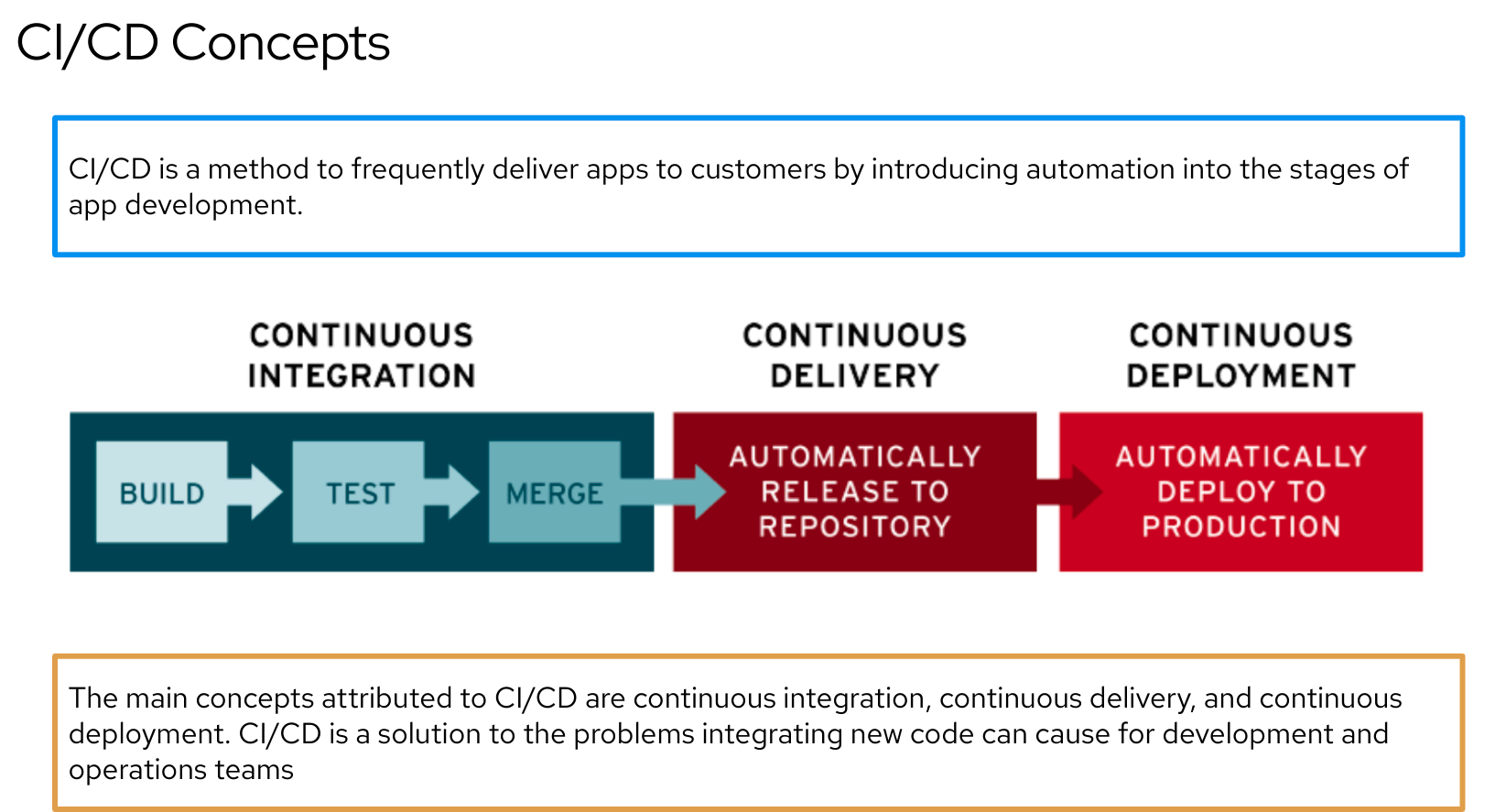

OpenShift Pipelines is a CI/CD serverless Kubernetes-native tool. It defines a set of Kubernetes Custom Resources (CR) that act as building blocks to assemble CI/CD pipelines.
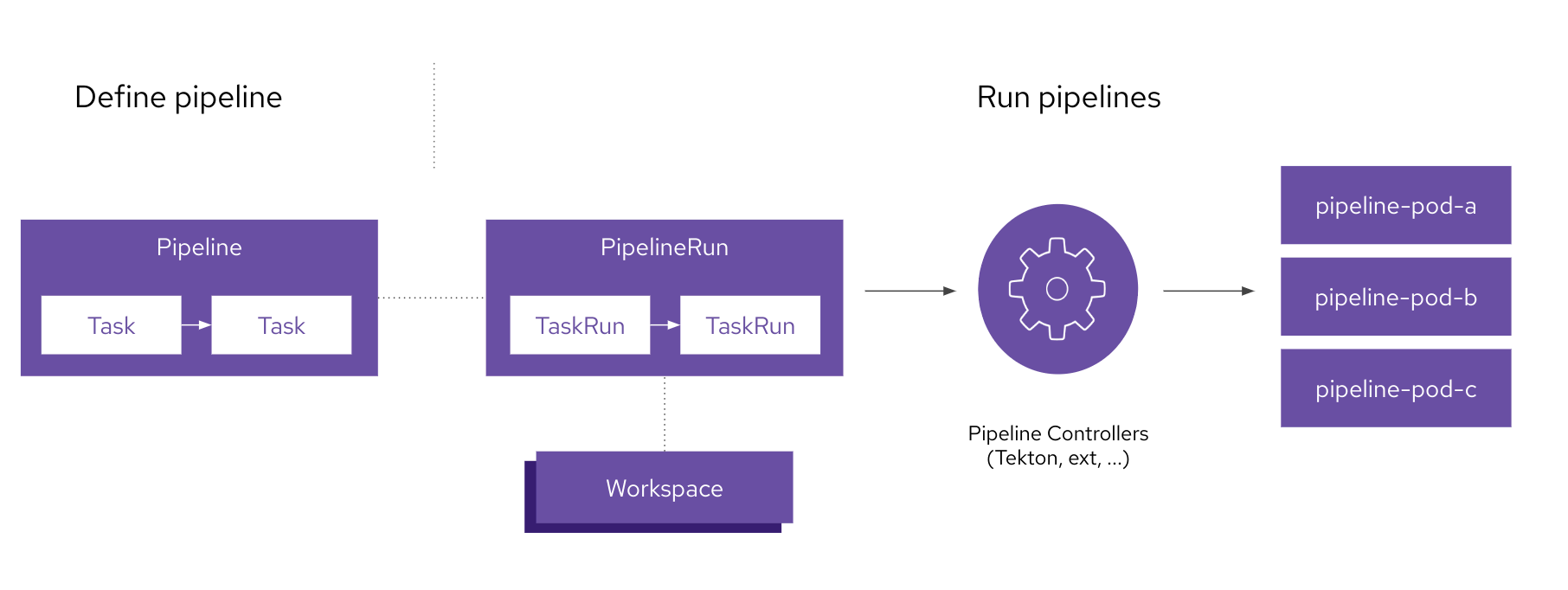
Components include Steps, Tasks, Pipelines, Workspace, Triggers and more.
Think about Pipelines and Tasks as reusable templates and PipelineRun and TaskRun as single instantiated runs of a Pipeline.
OpenShift Pipelines provides out-of-the-box ClusterTasks for immediate use, but customers can create internal Tasks as required. This blog will use both of these.
The Workspace is a storage space for sharing data between TaskRuns.
The following is a basic schema:
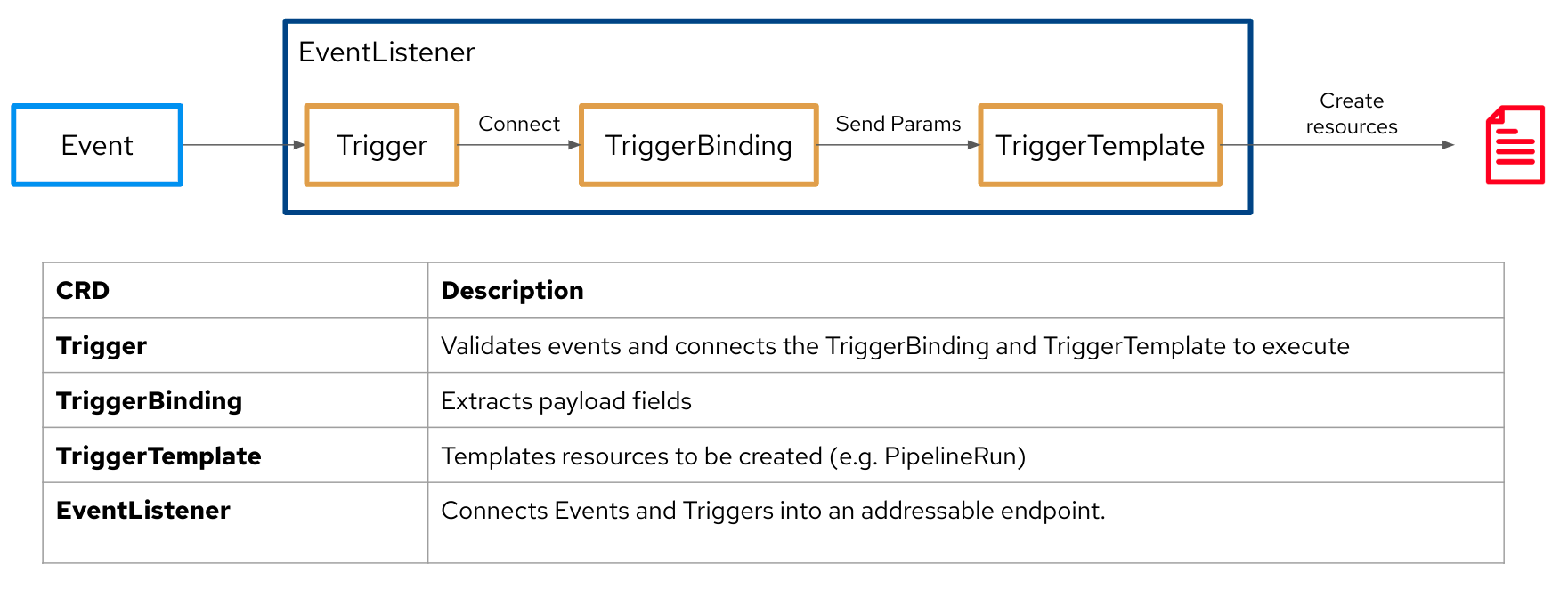
OpenShift Pipelines have other resources available, such as Triggers (Triggers / TriggerBinding / TriggerTemplate / EventListener), with the aim of automatically starting a Pipeline after a specific event in the source code repository.
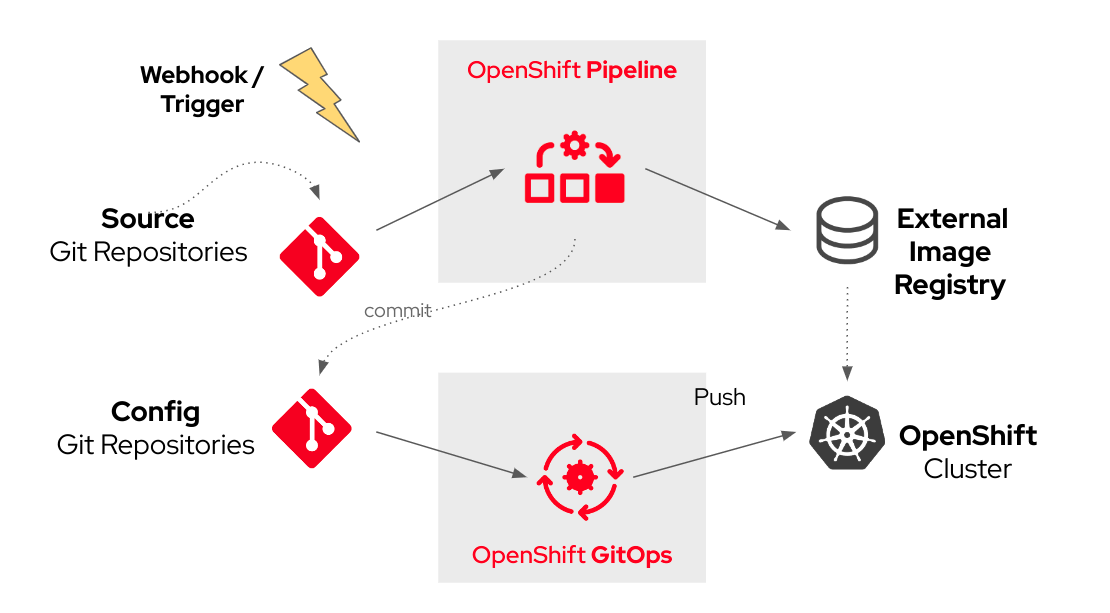
The scenario described in this blog automatically instantiates a PipelineRun based on a Pipeline leveraging Triggers after a commit to source code. The Pipelines are built using ClusterTasks, which are available out-of-the-box with OpenShift Pipelines. There is also a custom Task update-image-url-digest, a script for commiting a new deployment.yaml file with the latest image digest in the Config GitOps repository. The next blog covers setting it up.
The full CI/CD flow will be:
Starting with the same Quarkus source code from the previous blog, I opted for a native Quarkus build that applies a multistage Docker build. The resulting Dockerfile below will be added to the root of the Source Git repository:
FROM registry.access.redhat.com/quarkus/mandrel-23-rhel8:latest AS build
COPY --chown=quarkus:quarkus target/native-sources /code/target/native-sources
USER quarkus
WORKDIR /code/target/native-sources
RUN native-image \$(cat ./native-image.args)
FROM registry.access.redhat.com/ubi9/ubi-minimal:latest
WORKDIR /work/
RUN chown 1001 /work \
&& chmod "g+rwX" /work \
&& chown 1001:root /work
COPY --from=build --chown=1001:root /code/target/native-sources/*-runner /work/application
EXPOSE 8080
USER 1001
ENTRYPOINT ["./application", "-Dquarkus.http.host=0.0.0.0"]
Next, construct the Pipeline:
Create a Project to host the Quarkus application on Azure Red Hat OpenShift/ Openshift Service AWS/OpenShift Dedicated:
$ export PROJECT=quarkus-app
$ oc new-project $PROJECT
Set up the related Pipeline's resources. A PersistentVolumeClaim is used as a shared workspace throughout the PipelineRun:
$ cat  << EOF > workspace.yaml
apiVersion: v1
kind: PersistentVolumeClaim
metadata:
 name: workspace-pvc
spec:
 accessModes:
 - ReadWriteOnce
 resources:
   requests:
     storage: 500Mi
 storageClassName: <your_storage_class>
EOF
$
Create a Trigger, which references a TriggerBinding and a TriggerTemplate:
$ cat << EOF > trigger.yaml
apiVersion: triggers.tekton.dev/v1beta1
kind: Trigger
metadata:
 name: quarkus-app-trigger
spec:
 serviceAccountName: pipeline
 bindings:
   - ref: quarkus-app
 template:
   ref: quarkus-app
EOF
$
Add a TriggerBinding, which extracts values from the body of the source code's webhook. You can customize this based on your needs:
$ cat << EOF > triggerbinding.yaml
apiVersion: triggers.tekton.dev/v1beta1
kind: TriggerBinding
metadata:
 name: quarkus-app
spec:
 params:
 - name: git-repo-url
   value: \$(body.resource.repository.remoteUrl)
 - name: git-repo-name
   value: \$(body.resource.repository.name)
 - name: git-revision
   value: \$(body.after)
 - name: git-commit-author
   value: \$(body.resource.pushedBy.uniqueName)
 - name: git-commit-comment
   value: \$(body.resource.commits[0].comment)
EOF
$
The following is a TriggerTemplate, which embeds the PipelineRun to be started:
$ cat << EOF > triggertemplate.yaml
apiVersion: triggers.tekton.dev/v1beta1
kind: TriggerTemplate
metadata:
 name: quarkus-app
spec:
 params:
 - name: git-repo-url
   description: The source code Git repository URL
 - name: git-revision
   description: The source code Git revision
   default: master
 - name: git-repo-name
   description: The name of the deployment to be created / patched
 - name: git-commit-author
   description: The source code commit's author
 - name: git-commit-comment
   description: The source code commit's comment
 resourcetemplates:
 - apiVersion: tekton.dev/v1beta1
   kind: PipelineRun
   metadata:
     generateName: build-and-delivery-\$(tt.params.git-repo-name)-\$(tt.params.git-revision)-
   spec:
     serviceAccountName: pipeline
     pipelineRef:
       name: build-and-delivery
     params:
     - name: deployment-name
       value: \$(tt.params.git-repo-name)
     - name: git-repo-url
       value: \$(tt.params.git-repo-url)
     - name: git-revision
       value: \$(tt.params.git-revision)
     - name: git-commit-author
       value: \$(tt.params.git-commit-author)
     - name: git-commit-comment
       value: \$(tt.params.git-commit-comment)
     - name: IMAGE
       value: <your_container_registry>/<your_repository>/\$(tt.params.git-repo-name)
     - name: EXTERNAL_IMAGE_REGISTRY
       value: <your_container_registry>
     - name: NAMESPACE
       value: <your_application_namespace>
     - name: git-ops-repo-url
       value: <your_gitops_repo>
     workspaces:
     - name: shared-workspace
       persistentVolumeClaim:
         claimName: workspace-pvc
     - name: maven-settings
       emptyDir: {}
EOF
$
The following EventListener will create a Pod and a Kubernetes Service, which will expose and point from the WebHook:
$ cat << EOF > eventlistener.yaml
apiVersion: triggers.tekton.dev/v1beta1
kind: EventListener
metadata:
 name: quarkus-app
spec:
 serviceAccountName: pipeline
 triggers:
   - triggerRef: quarkus-app-trigger
EOF
$
Below is a schema to understand the correlation between all Triggers-related resources:
Finally, here is the whole Pipeline:
$ cat << EOF > pipeline.yaml
apiVersion: tekton.dev/v1beta1
kind: Pipeline
metadata:
 name: build-and-delivery
spec:
 workspaces:
 - name: shared-workspace
 - name: maven-settings
 params:
 - name: git-repo-url
   type: string
   description: The source code Git repository URL
 - name: git-ops-repo-url
   type: string
   description: The config code Git repository URL
 - name: git-revision
   type: string
   description: The source code Git revision
   default: "master"
 - name: git-commit-author
   type: string
   description: The source dode Git commit's author
   default: "OpenShift Pipelines"
 - name: git-commit-comment
   type: string
   description: The source dode Git commit's author
   default: "Test by OpenShift Pipelines"
 - name: IMAGE
   type: string
   description: image to be built from the code
 - name: NAMESPACE
   type: string
   default: "quarkus-app"
 - name: EXTERNAL_IMAGE_REGISTRY
   type: string
   description: External endpoint for the container registry
   default: <your_registry>
 tasks:
 - name: fetch-repository
   taskRef:
     name: git-clone
     kind: ClusterTask
   workspaces:
   - name: output
     workspace: shared-workspace
   params:
   - name: url
     value: \$(params.git-repo-url)
   - name: subdirectory
     value: ""
   - name: deleteExisting
     value: "true"
   - name: revision
     value: \$(params.git-revision)
 - name: maven-build
   taskRef:
     name: maven
     kind: ClusterTask
   workspaces:
   - name: source
     workspace: shared-workspace
   - name: maven-settings
     workspace: maven-settings
   params:
   - name: GOALS
     value:
     - -DskipTests
     - clean
     - package
     - -Dquarkus.package.type=native-sources
   - name: CONTEXT_DIR
     value: ./
   runAfter:
   - fetch-repository
 - name: build-image
   taskRef:
     name: buildah
     kind: ClusterTask
   params:
   - name: IMAGE
     value: \$(params.IMAGE)
   workspaces:
   - name: source
     workspace: shared-workspace
   runAfter:
   - maven-build
 - name: fetch-gitops-repository
   taskRef:
     name: git-clone
     kind: ClusterTask
   workspaces:
   - name: output
     workspace: shared-workspace
   params:
   - name: url
     value: \$(params.git-ops-repo-url)
   - name: subdirectory
     value: ""
   - name: deleteExisting
     value: "true"
   - name: revision
     value: "master"
   runAfter:
   - build-image
 - name: update-image-url-digest
   taskRef:
     name: gitops-change-image
     kind: Task
   workspaces:
   - name: source
     workspace: shared-workspace
   params:
     - name: image_url
       value: \$(tasks.build-image.results.IMAGE_URL)
     - name: image_digest
       value: \$(tasks.build-image.results.IMAGE_DIGEST)
     - name: git-commit-comment
       value: \$(params.git-commit-comment)
   runAfter:
   - fetch-gitops-repository
 - name: gitops-push
   taskRef:
     name: git-cli
     kind: ClusterTask
   workspaces:
   - name: source
     workspace: shared-workspace
   params:
     - name: GIT_SCRIPT
       value: |
         git config --global --add safe.directory /workspace/source
          git config --global user.email "tekton@tekton.dev"
         git config --global user.name "OpenShift Pipeline"
         git checkout master
         git add .
         git commit --allow-empty -m "[OpenShift Pipeline] \$(params.git-commit-author) with comment \$(params.git-commit-comment) has updated deployment.yaml with latest image"
         git push origin master
     - name: BASE_IMAGE
       value: quay.io/redhat-cop/ubi8-git
     - name: git-commit-author
       value: \$(params.git-commit-author)
   runAfter:
   - update-image-url-digest
EOF
The custom Task looks like this:
$ cat << EOF > task.yaml
apiVersion: tekton.dev/v1
kind: Task
metadata:
 name: gitops-change-image
 annotations:
   tekton.dev/displayName: "GitOps Change Image Task"
spec:
 workspaces:
 - name: source
 params:
 - name: image_url
   description: Image URL
   type: string
 - name: image_digest
   description: Image digest
   type: string
 steps:
 - name: gitops-image-change
   image: quay.io/redhat-cop/ubi8-git
   workingDir: "/workspace/source"
   script: |
     export imageurl=\$(params.image_url)
     export imagedigest=\$(params.image_digest)
     cat << EOF > dev_aro/deployment.yaml
     apiVersion: apps/v1
     kind: Deployment
     metadata:
       labels:
         app: quarkus-ci-cd
       name: quarkus-ci-cd
     spec:
       replicas: 1
       selector:
         matchLabels:
           app: quarkus-ci-cd
       template:
         metadata:
           labels:
             app: quarkus-ci-cd
         spec:
           containers:
             - image: \$imageurl@\$imagedigest
               imagePullPolicy: Always
               name: quarkus-ci-cd
               ports:
                  - containerPort: 8080
                    protocol: TCP
                  - containerPort: 8443
                    protocol: TCP
     EOF
EOF
$
OpenShift Pipelines is a Kubernetes-native solution, therefore credentials for all Git repositories (Source Git repository code and Config GitOps repository) and image registries are stored as Secrets.
Set up credentials for Git repositories (Source and Config) and for pushing the container image to the external image registry. Link them to the pipeline ServiceAccount, which is created by default after installing the OpenShift Pipelines operator.
Read-only permissions are enough for the Source Git repository. You need read/write permissions for the Config GitOps repository.
$ oc create secret generic git-credentials --from-literal=username=<username> --from-literal=password=<password> --type "kubernetes.io/basic-auth" -n $PROJECT

$ oc annotate secret git-credentials "tekton.dev/git-0=https://<your source / gitops  repository>" -n $PROJECT

$ oc secrets link pipeline git-credentials -n $PROJECT

$ oc create secret generic image-registry-credentials --from-literal=username=<username> --from-literal=password=<password> --type "kubernetes.io/basic-auth" -n $PROJECT

$ oc annotate secret image-registry-credentials "tekton.dev/docker-0=https://<your external image registry>" -n $PROJECT

$ oc secrets link pipeline image-registry-credentials -n $PROJECT
Apply the OpenShift Pipelines manifests and expose the EventListener with a Route. It will be the endpoint for the Source Git repository's WebHook:
$ oc apply -f .
$ oc expose svc <event_listener_svc>Important: The EventListener is exposed in clear text for simplicity, but it's possible to expose it in HTTPS.
Create a webhook in your source code Source Git repository pointing to the EventListener Route:

Commit a change to the source code, and you should see the PipelineRun instantiated:
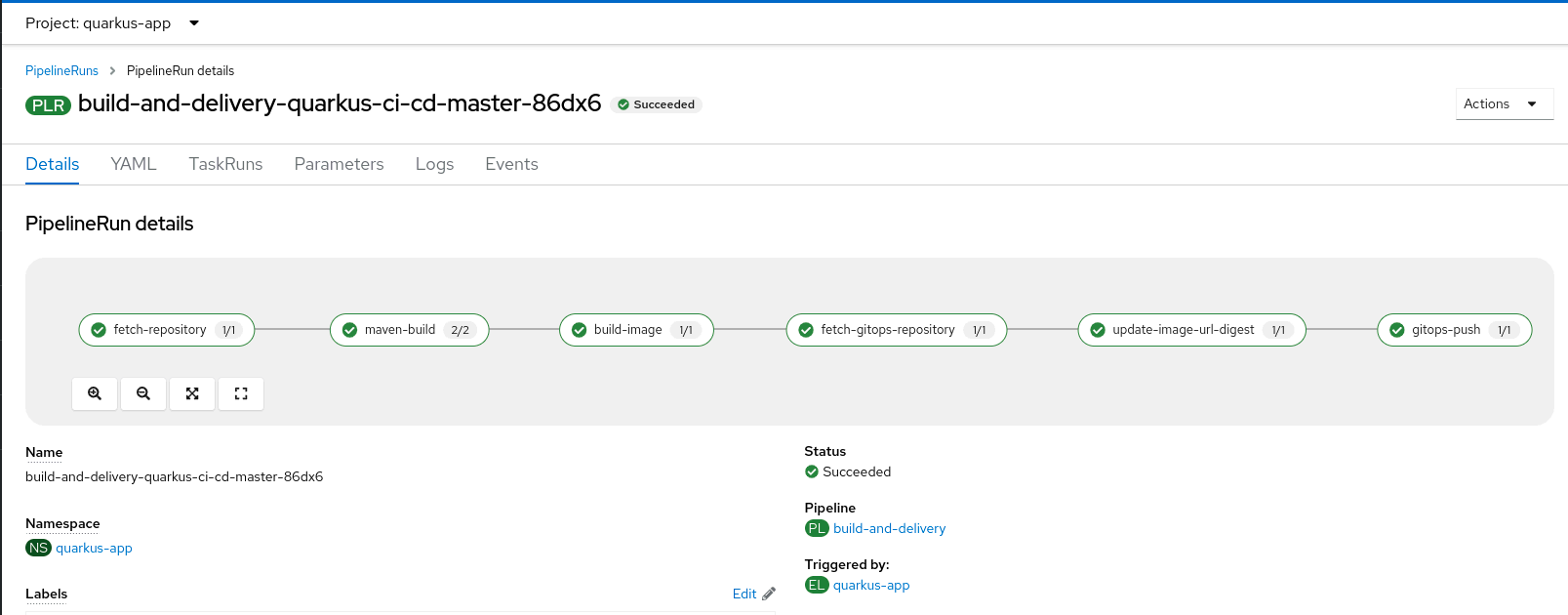
The Config GitOps repository will present the latest image digest with the expected comment:
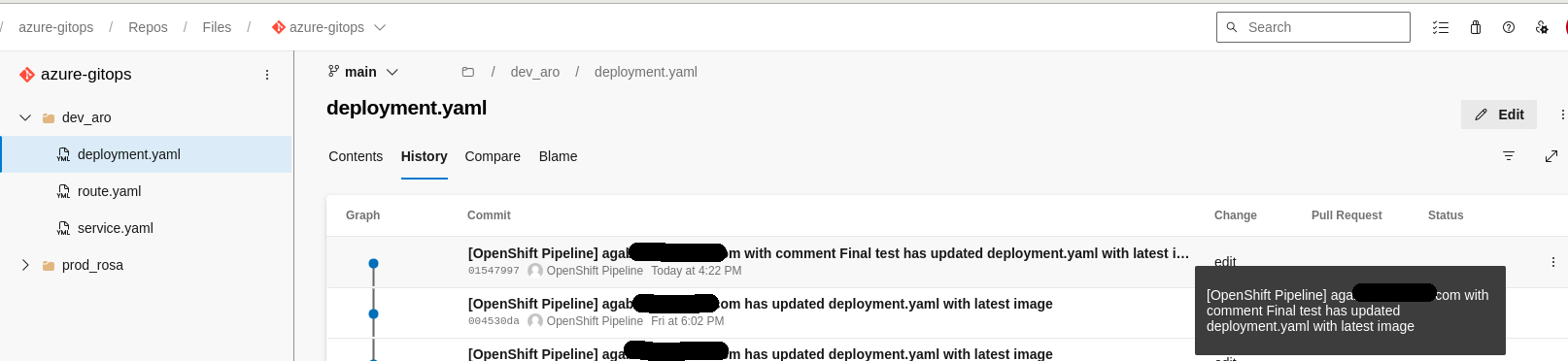
The scenario here is tailored for Azure Container Registry. You may need to change some parameters according to your specific environment.
For example, if you are using GitHub, a few TriggerBinding options must be changed as follows:
 - name: git-repo-url
   value: \$(body.repository.html_url)
 - name: git-repo-name
   value: \$(body.repository.name)
This process works the same across different environments hosted on Microsoft Azure (such as Azure Red Hat OpenShift), AWS (such as Red Hat OpenShift on AWS) or Google (OpenShift Dedicated).
You can store the OpenShift Pipelines manifest resources on a Git repository for re-use with other similar Quarkus applications. Secure them with OpenShift Pipelines Chains or extend them with other required ClusterTasks/Tasks, such as static code analysis, integration test, or image scanning tasks.
Wrap up
The next blog covers the final part of implementing a continuous deployment solution using OpenShift GitOps and releasing the application to the end users: A guide to integrating Red Hat OpenShift GitOps with Microsoft Azure DevOps.
Sobre los autores
Angelo has been working in the IT world since 2008, mostly on the infra side, and has held many roles, including System Administrator, Application Operations Engineer, Support Engineer and Technical Account Manager.
Since joining Red Hat in 2019, Angelo has had several roles, always involving OpenShift. Now, as a Cloud Success Architect, Angelo is providing guidance to adopt and accelerate adoption of Red Hat cloud service offerings such as Microsoft Azure Red Hat OpenShift, Red Hat OpenShift on AWS and Red Hat OpenShift Dedicated.
Gianfranco has over 20 years of experience in the IT industry, covering roles such as system engineer, technical project manager, entrepreneur, and cloud presales engineer. Since joining Red Hat’s EMEA CSA team in 2022, he has been helping customers design and adopt enterprise-grade solutions built on Red Hat OpenShift.
His expertise spans hybrid cloud architectures, container platforms, and AI-enabled infrastructures, with a strong focus on Red Hat OpenShift AI (RHOAI). He supports organizations in operationalizing AI/ML workloads, enabling collaboration between data scientists, developers, and platform teams, and ensuring consistent, scalable deployments across hybrid environments. Passionate about innovation, he works closely with customers to translate business needs into technical strategies that drive measurable outcomes and long-term value.
Gianfranco is motivated by continuous learning and the evolving landscape of cloud and AI technologies. His goal is to empower customers to fully leverage their OpenShift and AI investments while building resilient, future-ready platforms.
Proud husband and father, he enjoys cooking, traveling, and staying active through mountain biking, swimming, and scuba diving whenever possible.
Marco is an EMEA Specialist Adoption Architect at Red Hat, specialized in Red Hat OpenShift and managed cloud services such as ARO and ROSA. Marco is fueled by a love for nerdy culture and a good amount of passion for music and movies.
His journey began in 2010 as a Linux System Engineer and he spent almost a decade supporting Italian Public Administration customers: managing the stability of mid-to-large-scale public infrastructures provided a good technical foundation necessary for his transition into the world of containerization.
Since joining Red Hat in 2022, Marco’s role has evolved alongside the cloud landscape. Having transitioned from Customer Success Architect into his current position within the Launch Team as an SAA - OpenShift, he partners with customers across the EMEA region.
In this role, he provides the technical enablement and architectural guidance necessary to meet business outcomes and expectations by helping them consolidate their use of Red Hat products.
Más como éste
OpenShift: Integración consistente para la empresa híbrida
¿Tu plataforma de aplicaciones está preparada para lo que viene?
Scaling with Orchestrators | Compiler
Command Line Heroes: segunda temporada: Sobre DevSecOps
Navegar por canal

Automatización
Las últimas novedades en la automatización de la TI para los equipos, la tecnología y los entornos

Inteligencia artificial
Descubra las actualizaciones en las plataformas que permiten a los clientes ejecutar cargas de trabajo de inteligecia artificial en cualquier lugar

Nube híbrida abierta
Vea como construimos un futuro flexible con la nube híbrida

Seguridad
Vea las últimas novedades sobre cómo reducimos los riesgos en entornos y tecnologías

Edge computing
Conozca las actualizaciones en las plataformas que simplifican las operaciones en el edge

Infraestructura
Vea las últimas novedades sobre la plataforma Linux empresarial líder en el mundo

Aplicaciones
Conozca nuestras soluciones para abordar los desafíos más complejos de las aplicaciones

Virtualización
El futuro de la virtualización empresarial para tus cargas de trabajo locales o en la nube
