
The open source AI ecosystem has matured quickly, and many developers start by using tools such as Ollama or LM Studio to run large language models (LLMs) on their laptops. This works well for quickly testing out a model and prototyping, but things become complicated when you need to manage dependencies, support different accelerators, or move workloads to Kubernetes.
Thankfully, just as containers solved development problems like portability and environment isolation for applications, the same applies to AI models too! RamaLama is an open source project that makes running AI models in containers simple, or in the project’s own words, “boring and predictable.” Let’s take a look at how it works, and get started with local AI inference, model serving, and retrieval augmented generation (RAG).
Why run AI models locally?
There are several reasons developers and organizations want local or self-hosted AI:
- Control for developers: You can run models directly on your own hardware instead of relying on a remote LLM API. This avoids vendor lock-in and gives you full control over how models are executed and integrated.
- Data privacy for organizations: Enterprises often cannot send sensitive data to external services. Running AI workloads on-premises or in a controlled environment keeps data inside your own infrastructure.
- Cost management at scale: When you are generating thousands or millions of tokens per day, usage-based cloud APIs can become expensive very quickly. Hosting your own models offers more predictable cost profiles.
With RamaLama, you can download, run, and manage your own AI models, just as you would with any other type of workload like a database, backend, etc.
What is RamaLama?
RamaLama is a command-line interface (CLI) for running AI models in containers on your machine. Instead of manually managing model runtimes and dependencies, you plug into an existing container engine such as Podman or Docker.
Conceptually, you move from:
podman run <some-image>
to:
ramalama run <some-model>
Under the hood, RamaLama:
- Uses your existing container engine to bring isolation/security by default
- Pulls images that are pre-built for your hardware accelerator
- Fetches models from sources such as:
- Ollama’s model registry
- Hugging Face
- Any Open Container Initiative (OCI)-compliant registry (Docker Hub, Quay.io, etc.)
- Runs the model using a runtime such as llama.cpp.
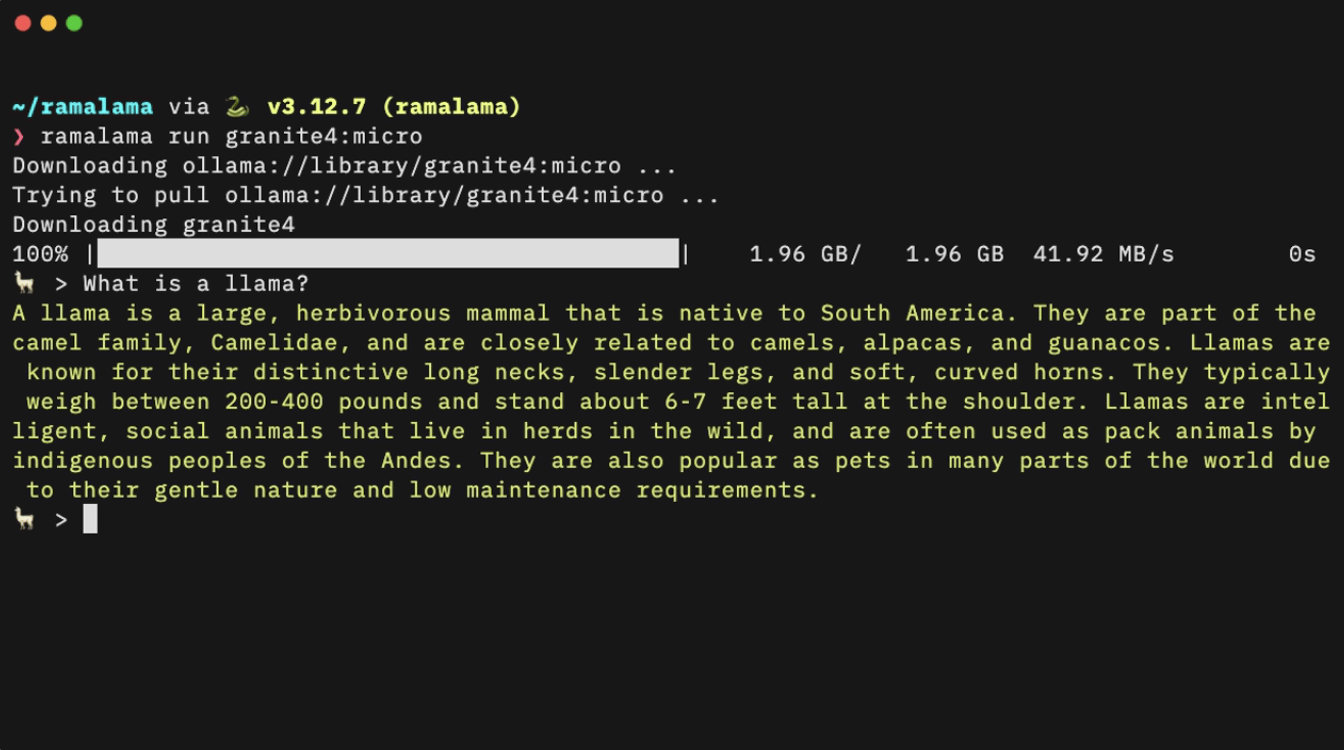
One command, and you’re good to start chatting with a local model or perhaps serve it as a OpenAI-compatible API endpoint for your existing applications to use. Now, let’s check out how to install and use RamaLama.
Installing RamaLama and inspecting your environment
Start by visiting the RamaLama website at ramalama.ai and installing the CLI for your platform. Packages are available for Linux, macOS, and Windows. After installation, verify that RamaLama can see your environment:
ramalama info
This command prints details about your container engine and any detected GPU accelerators, and while you may not see any available models yet with a ramalama list, you’ll see shortly how to fetch your model of choice.
How RamaLama selects the right image
When you run a model for the first time, RamaLama uses the information from ramalama info to pull a pre-built image that matches your hardware:
- CUDA images for NVIDIA GPUs
- ROCm images for supported AMD GPUs
- Vulkan-based images where appropriate
- CPU-only images when no accelerator is available
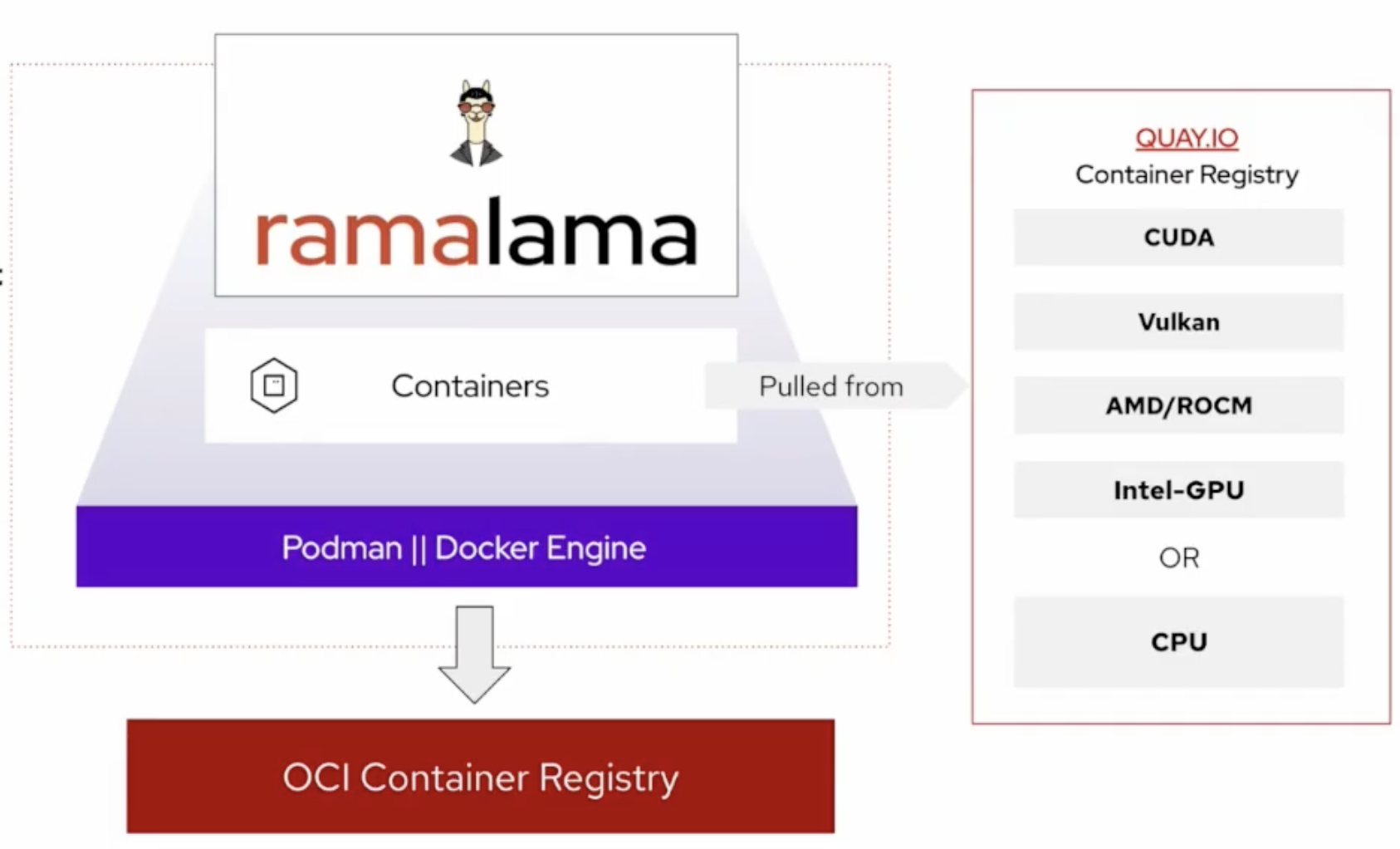
These images are compiled from the upstream llama.cpp project, which also powers Ollama. That means you get a robust and proven inference engine wrapped in a container workflow. Once the image is pulled and the model is downloaded, RamaLama reuses them for subsequent runs.
Running your first model with RamaLama
To run a model locally, you can start with a simple command such as:
ramalama run gpt-oss

Here:
gpt-ossis a short model name that maps to a backing registry, which in this case is HuggingFace- You can also supply a full model URL if you prefer to reference a specific location directly (for example,
hf://unsloth/gpt-oss-20b-GGUF)
After this command completes the initial image pull and model download, you have a local, isolated, GPU-optimized LLM running in a container!
Serving an OpenAI-compatible API with RamaLama
Interactive command-line chat is useful, but many applications require a network-accessible API. Typical use cases include:
- RAG services that answer questions over your own documents (ex. LangChain, Dify, LlamaIndex)
- Agents that call tools or microservices (ex. Model Context Protocol)
- Existing applications that already use the OpenAI API (ex. LangChain, LangGraph, CrewAI and others)
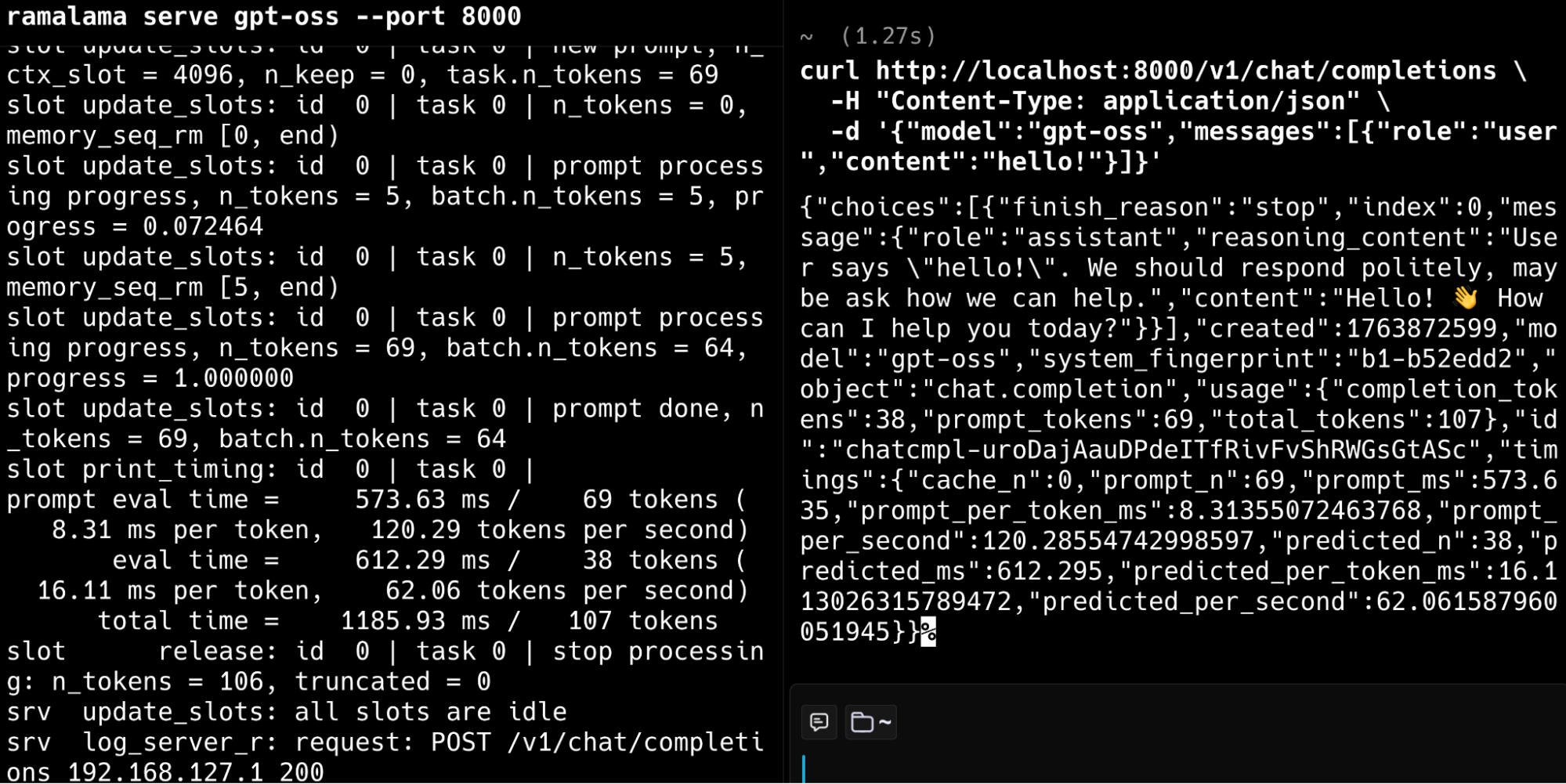
RamaLama makes it straightforward to expose a local model through a REST endpoint:
ramalama serve gpt-oss --port 8000
This command:
- Serves an OpenAI-compatible HTTP API on port 8000
- Allows any tool that can talk to the ChatGPT API to use your local endpoint instead
- Starts a lightweight UI front end you can use to interactively test the model in your browser (navigate to localhost:8000 in your browser)
With this setup, you can point existing OpenAI clients at your RamaLama endpoint without changing how those clients are written.
Adding external data with RAG using RamaLama
Many real applications need LLMs to answer questions about your own documents. This pattern is known as
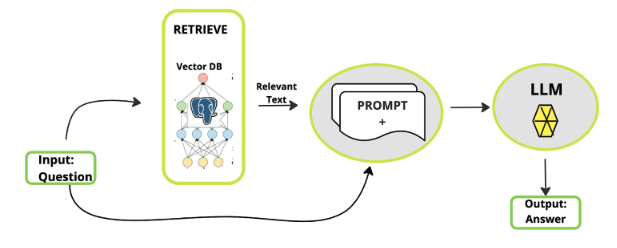
Your data might live in formats such as PDFs, spreadsheets, images and graphs, or office documents such as DOCX, which are traditionally hard for a model to understand. For this, RamaLama uses the Docling project to simplify this data preparation for AI and provides a built-in RAG workflow. This means you can run your language model alongside your private enterprise data. For example:
ramalama rag data.pdf quay.io/cclyburn/my-data
This command:
- Uses Docling to convert data.pdf (or other types of files) into structured JSON
- Builds a vector database from that JSON for similarity search
- Packages the result into an OCI image that RamaLama can run alongside a model (ex. quay.io/cclyburn/my-data)
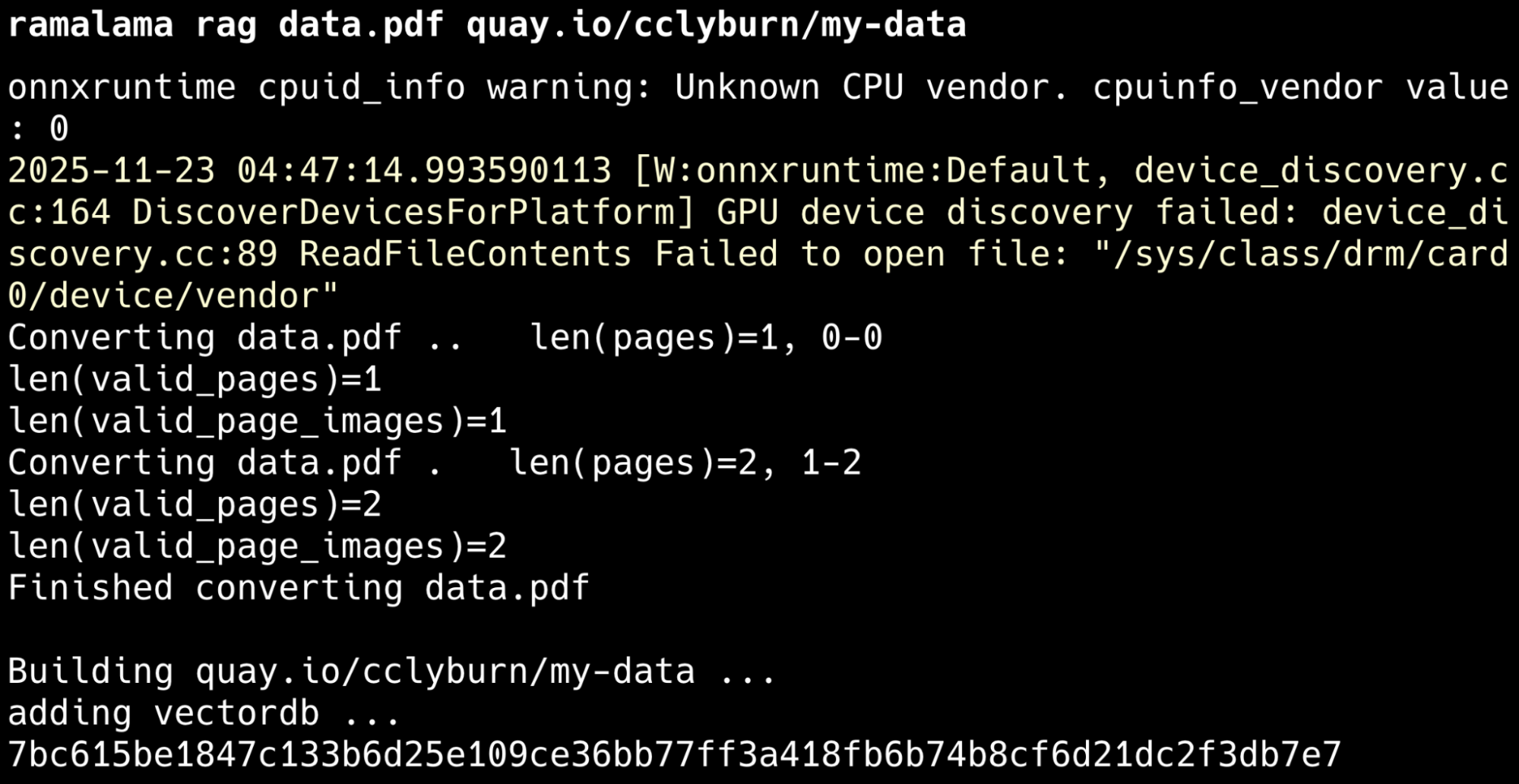
Once that image is built, you can launch a model with RAG enabled:
ramalama run --rag <RAG_IMAGE> gpt-oss
This starts 2 containers that include:
- The RAG image that contains your processed documents via the vector database, which by default uses Qdrant
- Your selected model (ex
gpt-oss) running as an inference server
The result is a chatbot that can answer questions grounded in your own data. You can also expose this combined model and RAG pipeline as an OpenAI-compatible API, just as you did earlier with ramalama serve.
From local workflows to edge and Kubernetes
Because RamaLama packages models (and a RAG pipeline) as container images, you can move them through the same pipelines you already use for other workloads. From a single local setup, you can:
- Generate
Quadlet filesPágina disponible en Inglés (Español no está disponible) for deployment to edge devices - Generate Kubernetes manifests for clusters
More details on how to do this are available in this Red Hat Developer blog. However, that approach lets your models travel as portable container artifacts, simplifying promotion from a developer laptop to staging and production environments.
Wrapping up
RamaLama brings together containers, open source runtimes such as llama.cpp and an OpenAI-compatible API to make local AI workloads easier to run and manage. In addition, it’s designed with a robust security footprint, running AI as an isolated container, mounting the model as read-only, and not providing network access. If you’re looking for a standardized way to run LLMs locally on your own infrastructure, be sure to check out RamaLama on GitHub and start making working with AI “boring and predictable!”
Recurso
IA y disrupción tecnológica para líderes de TI
Sobre el autor
Cedric Clyburn (@cedricclyburn), Senior Developer Advocate at Red Hat, is an enthusiastic software technologist with a background in Kubernetes, DevOps, and container tools. He has experience speaking and organizing conferences including DevNexus, WeAreDevelopers, The Linux Foundation, KCD NYC, and more. Cedric loves all things open-source, and works to make developer's lives easier! Based out of New York.
Más como éste
El marco de los agentes de la IA no es suficiente: 7 funciones de la plataforma que faltan en producción
Asago: Orquestación de la seguridad y la gobernanza de la inteligencia artificial open source
Can agentic AI patch the internet?
How Red Hat cleared IT debt for scalable AI
Navegar por canal

Automatización
Las últimas novedades en la automatización de la TI para los equipos, la tecnología y los entornos

Inteligencia artificial
Descubra las actualizaciones en las plataformas que permiten a los clientes ejecutar cargas de trabajo de inteligecia artificial en cualquier lugar

Nube híbrida abierta
Vea como construimos un futuro flexible con la nube híbrida

Seguridad
Vea las últimas novedades sobre cómo reducimos los riesgos en entornos y tecnologías

Edge computing
Conozca las actualizaciones en las plataformas que simplifican las operaciones en el edge

Infraestructura
Vea las últimas novedades sobre la plataforma Linux empresarial líder en el mundo

Aplicaciones
Conozca nuestras soluciones para abordar los desafíos más complejos de las aplicaciones

Virtualización
El futuro de la virtualización empresarial para tus cargas de trabajo locales o en la nube
