
Updated Tech Preview release of Containerized Ansible Automation Platform
We’ve received tremendous interest around the Technology Preview of the containerized Red Hat Ansible Automation Platform solution. Both existing and potential customers love the simplified, lightweight approach for providing a full featured, enterprise ready automation platform.
From all the feedback we’ve made numerous fixes, enhancements and improvements as we move towards general availability. This blog is designed to outline the major changes.
Further installation simplification
By making better use of some core Ansible Automation Platform features, it’s now possible to remove some and simplify other command line instructions around installation.
By making use of ansible.cfg, we were able to define the necessary collections path the installer needs, automatically set the default inventory file and provide a logging mechanism:
$ cat ansible.cfg
[defaults]
collections_path = ./collections
inventory = ./inventory
log_path = ./aap_install.log
This means you no longer need to explicitly set a collections path as a prerequisite step or pass in the inventory if using the installation defaults. The installation also automatically creates a log for you.
Enhanced security
The use of Transport Layer Security (TLS) across all services is now the default for extended network security. You are able to bring your own certificates (refer to the installation guide for details on how to do this) or just use the internally generated ones provided by the installer.
Port changes
In order to avoid some potential conflicts, we’ve moved the default UI ports:
Component | Was | Now |
automation controller | 443 | 8443 |
Ansible automation hub | 444 | 8444 |
Event-Driven Ansible controller | 445 | 8445 |
These can still be changed via the installer as an option.
Automation mesh
Containerized installations have now been added with automation mesh capabilities! You can now add hop and remote execution nodes at installation time.
In order to add a remote execution node, just add your nodes into your inventory file under this section:
# This section is for your AAP Execution host(s)
# ------------------------------------------------
[execution_nodes]
carm-mesh-node1.lan
Once installed, the Topology view in the UI will look similar to this:
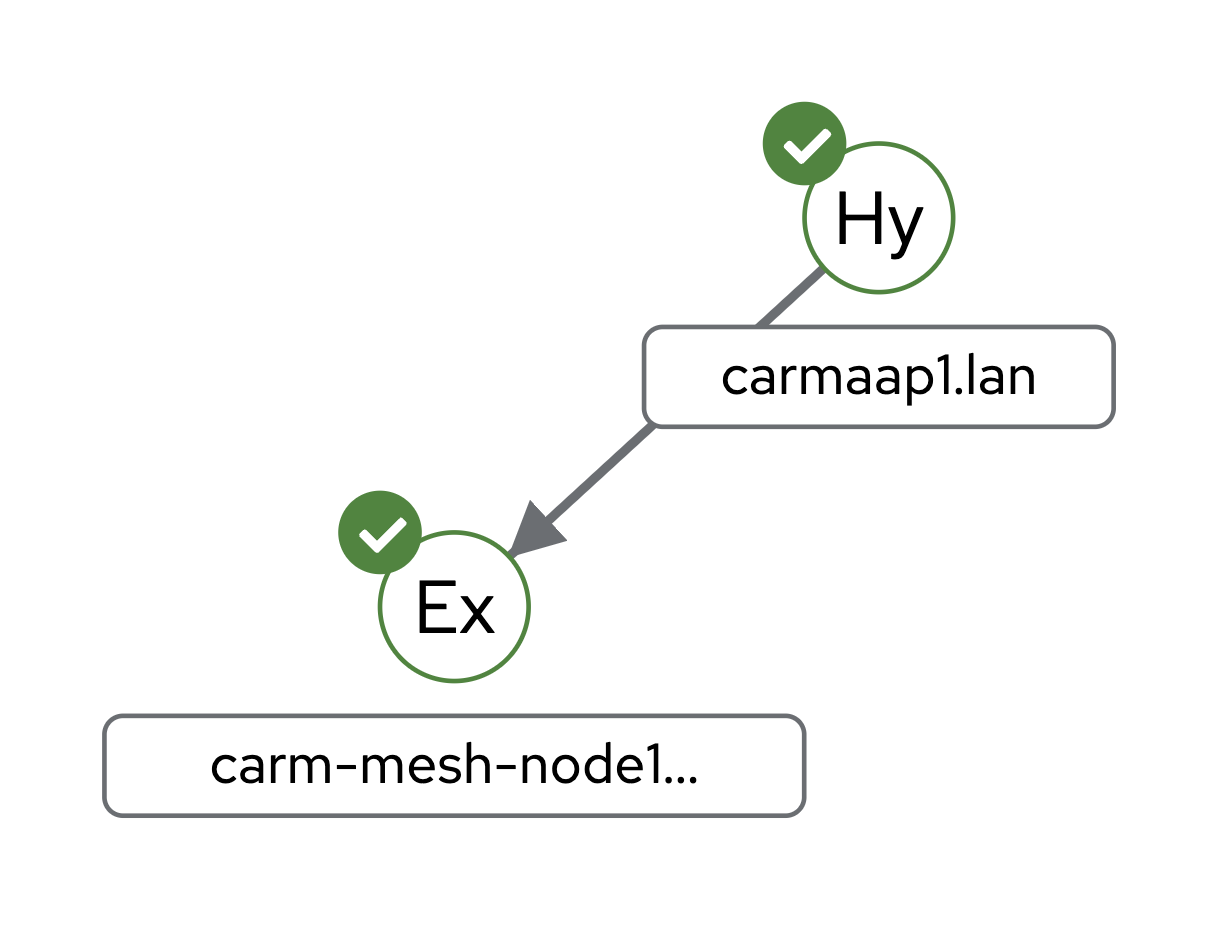
My hybrid automation controller (carmaap1.lan) shown here is peered with the remote execution node (carm-mesh-node1.lan), which is also automatically added to the execution plane Instance Group. So I can target automation to run here by selecting that Instance Group when running automation.
If you need to reach your remote execution node via a hop node (due to secure networking zones etc), then use this:
# This section is for your AAP Execution host(s)
# ------------------------------------------------
[execution_nodes]
carm-mesh-node1.lan
carm-hop-node1.lan receptor_type=hop receptor_peers='["carm-mesh-node1.lan”]'
This will look like this:
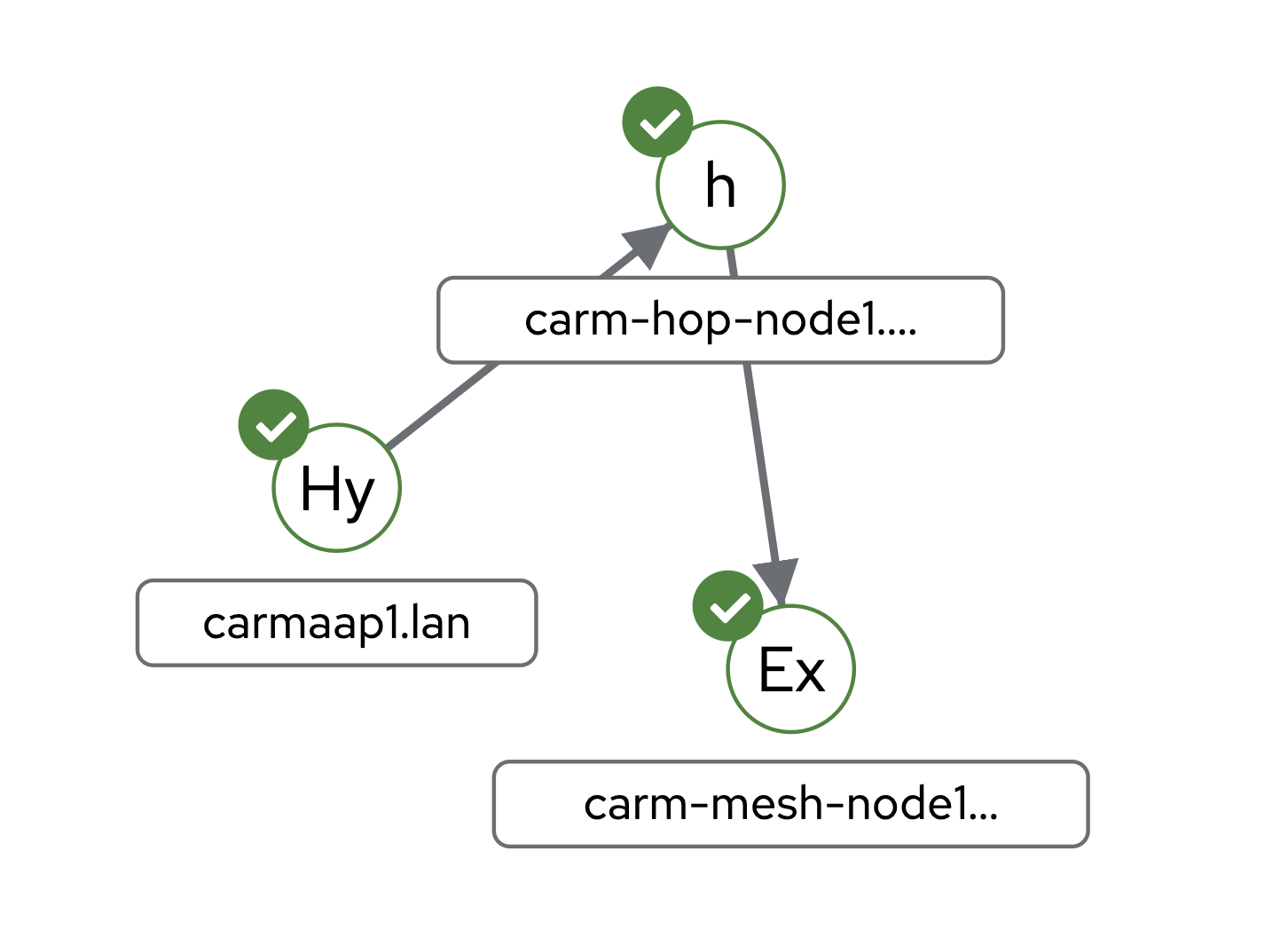
Now in order to target automation to be run on the remote execution node (carm-mesh-node1.lan) it has to go through the hop node (carm-hop-node1.lan).
Event-Driven Ansible
Event-Driven Ansible’s Decision Environments (DEs) are now created during the installation (de-supported and any custom DEs) and the associated Event-Driven Ansible credentials resources (if you’re not using the bundle install)
Networking
We've added IPv6 support for the user interface so customers can reach the web console via IPv4 and/or IPv6. Other internal communication ( i.e. the backend services) are still using IPv4 currently.
Content seeding
We introduced the ability to use a configuration-as-code approach using some of our Ansible validated collections to pre-seed automation content. The first release had the ability to seed just about any automation controller content (such as projects, inventories, credentials, job & workflow templates etc). You can refer to this blog for more details on how to do this.
We have now added the ability to also seed automation hub content like namespaces, collections, execution environment images and others. My sample GitHub repository now contains some simple examples to get you started.
Ansible Automation Hub
We’ve added support for collection and container signing.
Summary
This blog provides a quick overview of the major changes to the tech preview of containerized Ansible Automation Platform.
You can get started by downloading this from the normal Red Hat Portal Downloads section, and you'll find the current documentation here. The latest Installation Guide has more technical information around the changes I’ve outlined in this blog.
If you want to learn more about why we’ve introduced containerized Ansible Automation Platform, please check out this blog.
Happy automating!
À propos de l'auteur
Phil Griffiths is a Product Manager for Ansible Automation Platform with nearly seven years of experience at Red Hat. Phil has held roles as a solution architect and technical consultant both at Red Hat and for other organizations.
Plus de résultats similaires
Ansible Automation Platform 2.7 : guide de Visual Execution Environment Builder et Content Discovery
Red Hat Ansible All-Stars : piloter l'avenir de l'automatisation du réseau et de l'infrastructure
Random Acts Of Automation | Compiler
Untangling Networks | Compiler
Parcourir par canal

Automatisation
Les dernières nouveautés en matière d'automatisation informatique pour les technologies, les équipes et les environnements

Intelligence artificielle
Actualité sur les plateformes qui permettent aux clients d'exécuter des charges de travail d'IA sur tout type d'environnement

Cloud hybride ouvert
Découvrez comment créer un avenir flexible grâce au cloud hybride

Sécurité
Les dernières actualités sur la façon dont nous réduisons les risques dans tous les environnements et technologies

Edge computing
Actualité sur les plateformes qui simplifient les opérations en périphérie

Infrastructure
Les dernières nouveautés sur la plateforme Linux d'entreprise leader au monde

Applications
À l’intérieur de nos solutions aux défis d’application les plus difficiles

Virtualisation
L'avenir de la virtualisation d'entreprise pour vos charges de travail sur site ou sur le cloud
