
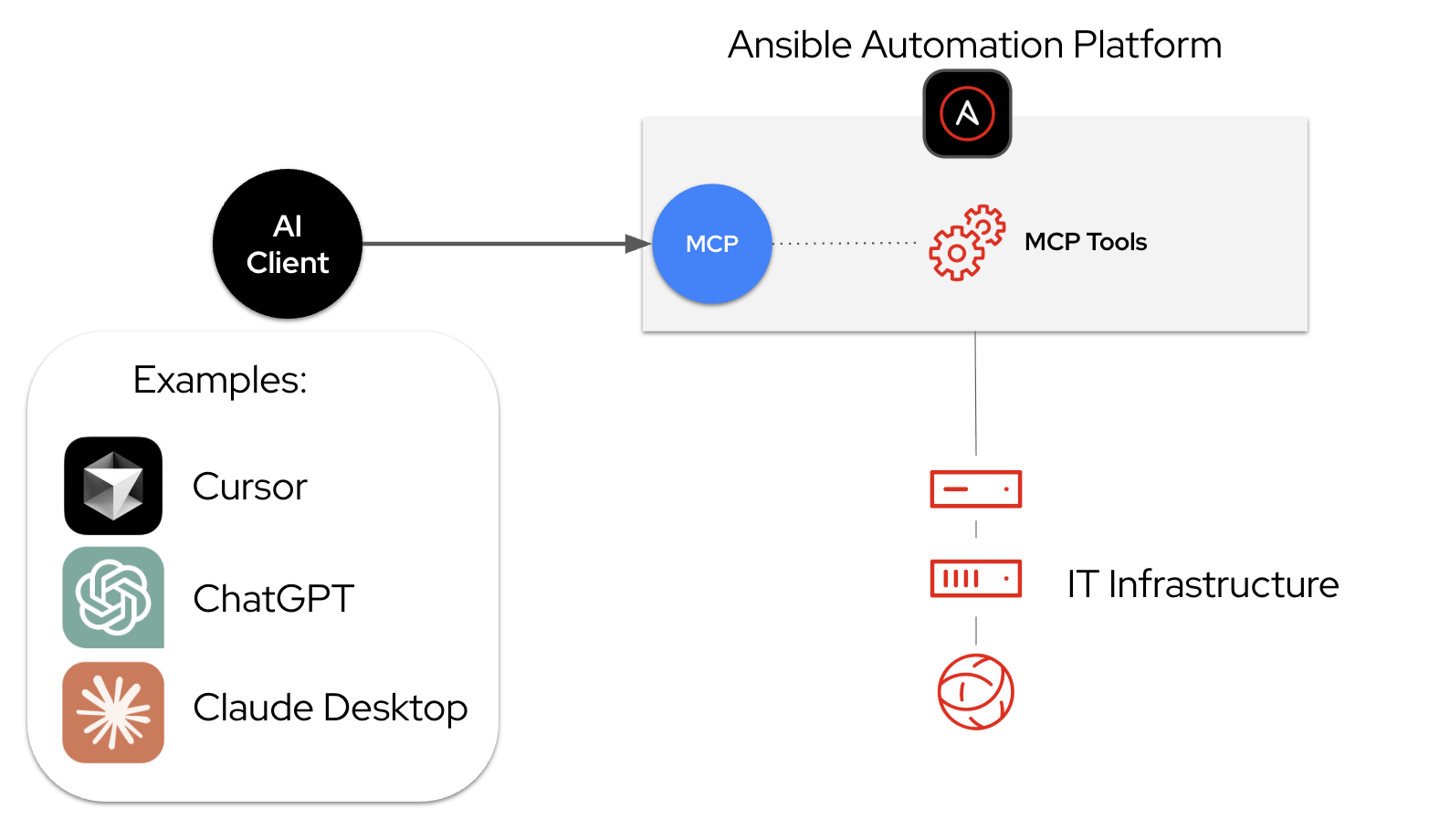
À mesure que nous continuons à développer les capacités d'intelligence de Red Hat Ansible Automation Platform, nous avons ajouté une fonction de serveur MCP disponible en tant que fonction d'aperçu technologique dans Ansible Automation Platform 2.6.4. Le serveur MCP fait le lien entre le client MCP de votre choix et Ansible Automation Platform. Cette intégration vous aide à gérer l'ensemble de votre infrastructure à l'aide de nouveaux outils tels que Cursor et Claude.
Quel est le rôle du serveur MCP pour Ansible Automation Platform ?
Le serveur MCP d’Ansible Automation Platform est une implémentation de serveur MCP (Model Context Protocol) qui permet aux grands modèles de langage (LLM) d’interagir avec Ansible Automation Platform et de la gérer par le biais d’interactions en langage naturel. Les processus d'automatisation sont ainsi moins complexes et les équipes travaillent plus efficacement avec l'automatisation de l'infrastructure, sans compromettre la sécurité et la gouvernance pour les entreprises. En bref, il fournit une interface conversationnelle à votre environnement d'automatisation et vous permet de déclencher et d'interroger vos processus d'automatisation Ansible existants avec un dialogue simple, sans contourner les contrôles établis.
Fonctionnement et importance
Avec l'ajout du serveur MCP, les outils d'IA et les LLM de votre choix peuvent désormais communiquer directement avec Ansible Automation Platform. Les personnes peuvent ainsi naviguer plus facilement dans les environnements d'automatisation, les interroger et les comprendre, et orchestrer les workflows d'automatisation à l'aide du langage naturel.
Le serveur MCP est déployé au sein d'Ansible Automation Platform. Il est installé dans le cadre du processus d'installation standard d'Ansible Automation Platform et offre un ensemble complet d'outils pour des fonctionnalités telles que la gestion des tâches, la gestion des inventaires et la conformité de la sécurité. Une fois le serveur déployé, les administrateurs ont la possibilité de configurer le serveur MCP dans l'un des deux modes suivants : lecture seule, idéal pour l'interrogation et la surveillance en toute sécurité, ou lecture-écriture, pour permettre aux agents d'IA d'exécuter des tâches et de mettre en œuvre des modifications.
Il est important de garantir l'accessibilité de l'IA sans compromettre la sécurité. Dans ce cadre, les équipes fournissent un accès sécurisé, basé sur les rôles, aux tâches, au contenu, à la surveillance et aux fonctions d'administration. Le serveur MCP applique un modèle de sécurité à double couche qui combine des autorisations au niveau du serveur et de l’utilisateur. Parce qu'il se connecte directement aux API d'Ansible Automation Platform, il hérite des autorisations des utilisateurs via le contrôle d'accès basé sur les rôles (RBAC) et les politiques de gouvernance. Cette structure permet de garantir que l'agent d'IA ne peut exécuter que les actions autorisées à la fois par la configuration du serveur et par les autorisations définies par l'utilisateur.
Une interface en langage naturel simplifie l'automatisation informatique en permettant aux personnes d'exécuter des tâches à l'aide de descriptions conversationnelles. Cette approche conversationnelle simplifie la création des processus automatisés, ce qui profite aussi bien aux ingénieurs chevronnés qu'aux nouveaux utilisateurs.
La démonstration suivante présente ces avantages dans cinq cas d'utilisation concrets, des déploiements automatisés aux résolutions de problèmes intelligentes. Elle montre comment le serveur MCP assure des niveaux stricts de sécurité et de gouvernance tout en rendant l'automatisation plus accessible via le langage naturel.
Démarrage
Découvrez l'automatisation basée sur l'IA Le serveur MCP d'Ansible Automation Platform est disponible en tant que fonction d'aperçu technologique dans Ansible Automation Platform 2.6.4.
Options d'installation
Il est possible de déployer le serveur MCP sur deux types d'installations d'Ansible Automation Platform :
- Pour les déploiements sur Red Hat Enterprise Linux (RHEL) 9 ou 10, vous pouvez déployer le serveur MCP à l'aide du programme d'installation conteneurisé. Le serveur s’exécute sous forme de pod aux côtés de vos composants Ansible Automation Platform. Il est exposé sur le port 8448 avec la version compatible HTTPS.
- Pour les déploiements sur Red Hat OpenShift Container Platform (versions 4.12 à 4.17 et versions ultérieures), vous pouvez déployer le serveur MCP via l'opérateur Ansible Automation Platform. L’opérateur gère la gestion du cycle de vie et crée automatiquement les routes OpenShift nécessaires.
Documentation officielle
La documentation comprend des instructions sur l'installation, la configuration des autorisations au niveau du serveur et de l'utilisateur, et la connexion d'agents d'IA externes (Claude, Cursor, ChatGPT, VS Code, etc.). Les personnes peuvent signaler des commentaires et des problèmes par le biais de ce formulaire.
- Pour l'installation sur RHEL : Déploiement d'Ansible MCP Server – Installation en conteneur
- Pour l'installation sur Red Hat OpenShift : Déploiement d'Ansible MCP Server – OpenShift Container Platform
Ensembles d'outils disponibles
Le serveur MCP fournit actuellement six ensembles d'outils spécialisés, chacun étant conçu pour prendre en charge différents rôles et cas d'utilisation :
Gestion des tâches | Des outils pour lister les modèles de tâche disponibles, lancer des tâches d'automatisation et surveiller leur statut en temps réel |
Gestion d’inventaire | Des outils pour interroger votre inventaire sur les détails de l’hôte, vérifier l’appartenance à un groupe et vérifier les faits du système. |
Surveillance du système | Des outils pour récupérer les journaux des tâches, résoudre les problèmes liés aux tâches qui ont échoué et vérifier l'intégrité de votre environnement d'automatisation |
Gestion des utilisateurs | Des outils qui permettent à l'agent d'IA d'administrer l'accès et la structure organisationnelle au sein d'Ansible Automation Platform |
Sécurité et conformité | Des outils qui permettent à l'agent d'IA d'agir comme un opérateur de sécurité, de gérer les informations d'identification sensibles et de vérifier l'intégrité de la plateforme sans révéler de secrets bruts |
Configuration de la plateforme | Des outils qui permettent aux administrateurs et aux développeurs d'inspecter et d'optimiser l'infrastructure d'Ansible Automation Platform elle-même. |
Étapes suivantes
Le serveur MCP pour Red Hat Ansible Automation Platform est un élément clé de notre stratégie continue qui consiste à utiliser l'intégration de l'IA pour rendre l'automatisation d'entreprise plus accessible et plus puissante. En associant les fonctions robustes et axées sur la sécurité d'Ansible Automation Platform à la puissance conversationnelle de l'IA agentique, nous ouvrons de nouvelles perspectives en matière de collaboration, d'automatisation et d'innovation informatiques.
Nous avons hâte de voir tout ce que vous allez créer grâce à cette technologie. Ce n'est qu'un début, et puisqu'elle est encore en version préliminaire, votre expérience pratique est exactement ce dont nous avons besoin pour façonner son avenir.
Vous souhaitez vous lancer ?
- Découvrez : Téléchargez-la et essayez-la dans votre environnement.
- Collaboration : Vous avez détecté un bogue ou vous avez une idée de fonction de type « Et si » ?
- Connexion : Accédez à ce formulaire pour nous faire part de vos commentaires.
À propos de l'auteur
Marty is a product manager at Red Hat, focused on bringing AI to IT automation. Since joining the Ansible Business Unit in 2023, he's worked on some exciting projects, starting with Ansible Lightspeed, then the MCP server, and now deep diving into AIOps for Ansible Automation Platform.
He's been in tech for a long time, and is based in the Raleigh area where he heads to the office pretty much every day. When working on projects, he likes to experiment with vibe coding. And outside of work, you'll find him gaming on the PS5 or practicing the piano. Turns out it's never too late to learn an instrument!
Plus de résultats similaires
Planification de votre parcours de mise à niveau vers Red Hat Ansible Automation Platform 2.6
Simplifiez votre exploitation réseau avec Red Hat Ansible Automation Platform et Cisco Meraki
Technically Speaking | Taming AI agents with observability
You Can’t Automate The Difficult Decisions | Code Comments
En savoir plus
- Livre numérique : L'entreprise automatisée
- Testez Red Hat Ansible Automation Platform dans le cadre d'ateliers en autonomie
- Red Hat Ansible Automation Platform : le guide du débutant
Parcourir par canal

Automatisation
Les dernières nouveautés en matière d'automatisation informatique pour les technologies, les équipes et les environnements

Intelligence artificielle
Actualité sur les plateformes qui permettent aux clients d'exécuter des charges de travail d'IA sur tout type d'environnement

Cloud hybride ouvert
Découvrez comment créer un avenir flexible grâce au cloud hybride

Sécurité
Les dernières actualités sur la façon dont nous réduisons les risques dans tous les environnements et technologies

Edge computing
Actualité sur les plateformes qui simplifient les opérations en périphérie

Infrastructure
Les dernières nouveautés sur la plateforme Linux d'entreprise leader au monde

Applications
À l’intérieur de nos solutions aux défis d’application les plus difficiles

Virtualisation
L'avenir de la virtualisation d'entreprise pour vos charges de travail sur site ou sur le cloud
