

If your systems connect to Red Hat, you're likely familiar with the value of Red Hat Insights advisor in the Hybrid Cloud Console . Red Hat Insights advisor assesses and monitors the health of your Red Hat Enterprise Linux (RHEL) infrastructure, and provides recommendations on how to fix misconfigurations, and best practices for improving stability, performance and availability. With the release of Red Hat Satellite 6.17, there's a new way to obtain Insights advisor services without connecting to Insights over the internet.
Red Hat Insights advisor in Satellite is available in technology preview. It locally stores advisor rules and remediations after installation on the Satellite server . Red Hat Insights advisor recommends changes to your configuration as required, and delivers them to your Satellite user interface without requiring an internet connection.
How does the disconnected Insights advisor service work?
Red Hat Insights advisor in Satellite is encapsulated in a container. The Insights advisor rules and remediations are stored in the container.
In a disconnected production environment, the Red Hat Insights advisor container can be downloaded from the official Red Hat registry, copied to portable media, imported into the Satellite server and installed on the Satellite server.
Installation in an air-gapped environment
The installation instructions below assume that Satellite 6.17 has been installed and that you have a valid Red Hat subscription. The official documentation is available here.
First, from a host that is connected to the internet, run the following command to copy the Red Hat Insights advisor container registry.redhat.io to a temporary location:
$ skopeo copy \
containers-storage:registry.redhat.io/satellite/iop-advisor-engine-rhel9:latest\
oci-archive:/tmp/iop-advisor-engine.tar
Next, copy the iop-advisor-enginer.tar container to removable media. Transfer and copy the container to the Satellite server.
Then import the container into the Satellite server's local repository.
$ skopeo copy oci-archive:/tmp/iop-advisor-engine.tar \
containers-storage:registry.redhat.io/satellite/iop-advisor-engine-rhel9:latest
Finally, install the Insights advisor in Satellite feature:
$ satellite-installer --foreman-plugin-rh-cloud-enable-iop-advisor-engine trueUsage
First, you must register your host. Generate a registration script with the Setup Insights option enabled.
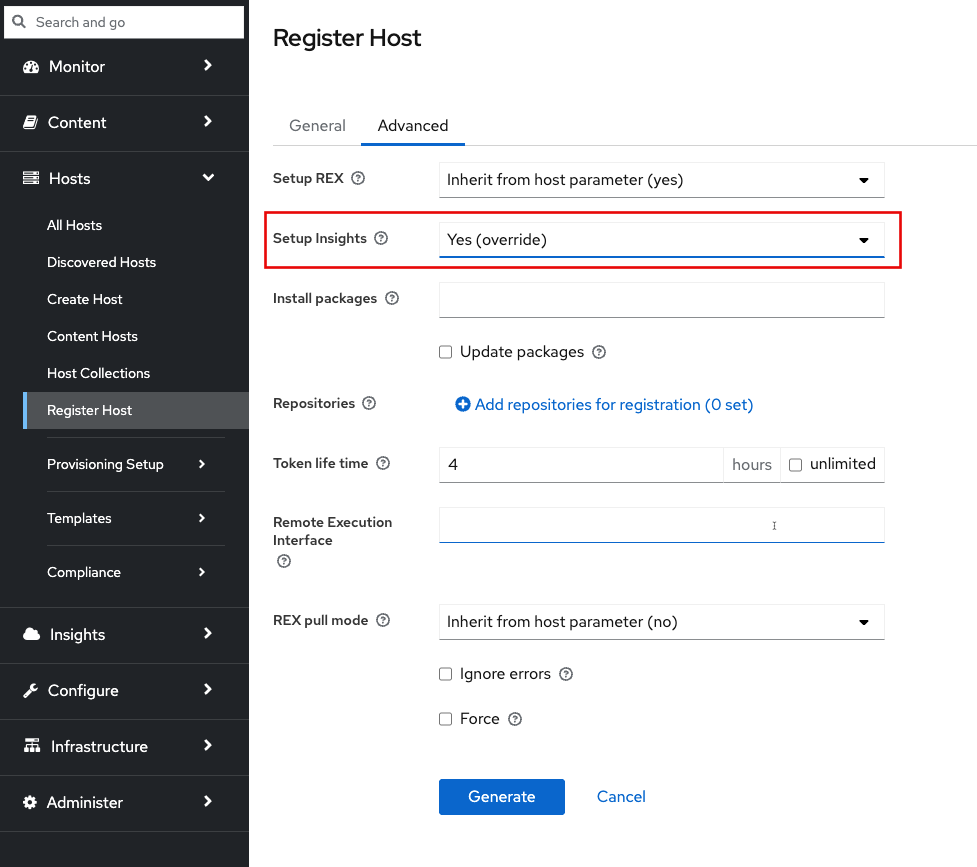
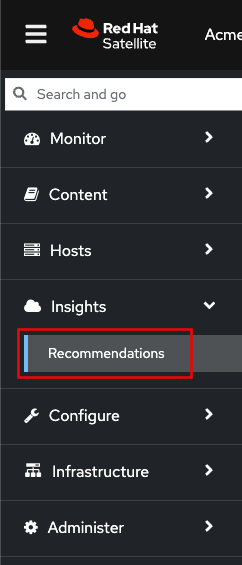
Once your host has been registered, log into the Red Hat Satellite WebUI and navigate to the Insights and Recommendations menu.
In the Red Hat Insights menu you'll be provided with a list of hosts, recommendations associated with the host, and an Ansible Playbook to automatically remediate the host.
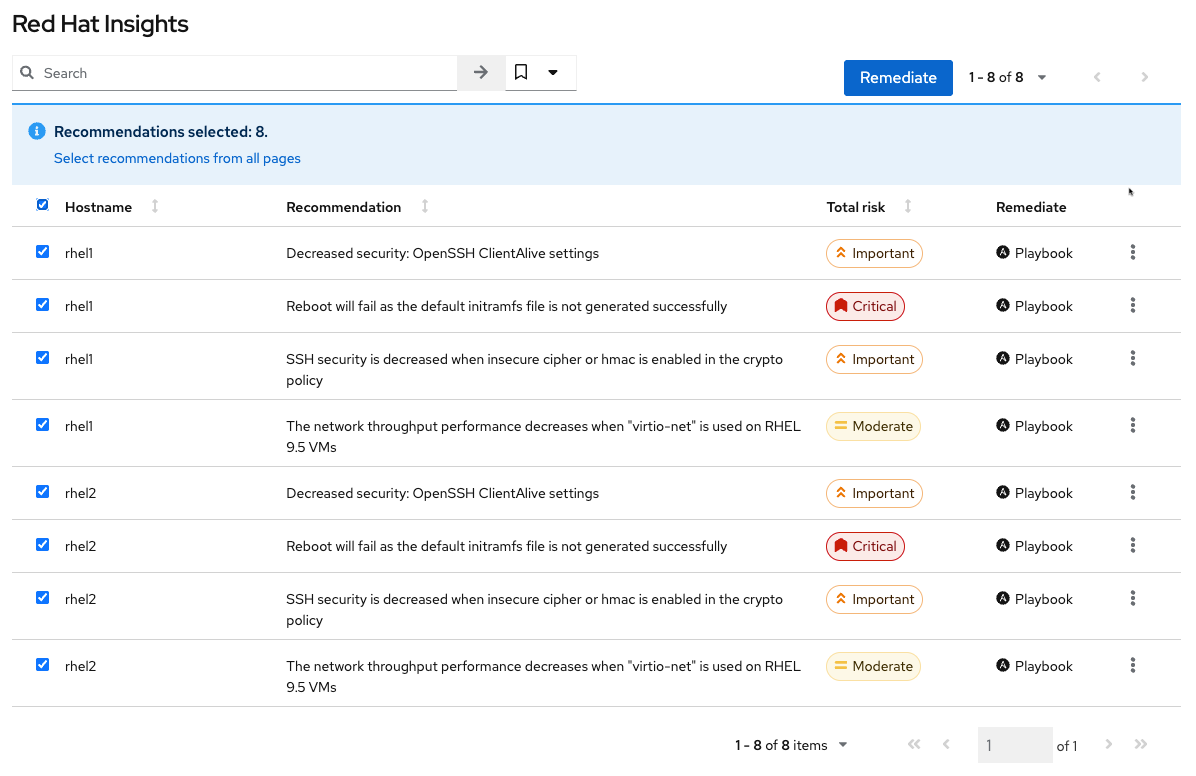
Here you can see a summary of the recommended remediations.

In the Satellite interface, click the Remediate button to use remote execution and run a playbook that fixes the issues. Not all recommendations have playbooks, but most do. This can greatly simplify systems management and help you get a Red Hat view of your systems without sending data outside your network.
You will get updates to advisor recommendations when you install Satellite upgrades.
Try it
The Red Hat Satellite basics lab contains a working version of the Red Hat Insights advisor in Satellite feature. You can
Insights advisor in Satellite is available for Red Hat Satellite 6.17. For more information on Red Hat Satellite 6.17, please visit the Red Hat Satellite home page, and read the full documentation. Once you get started, download this cheatsheet as a quick reference for what you can do with Insights.
저자 소개
John Spinks is a Senior Principal Technical Marketing Manager for Red Hat. He acts as a subject matter expert for Red Hat Management products including Satellite and Insights. Previous experience includes almost 10 years as a Technical Marketing Engineer for NetApp in RTP, NC.
As a Senior Principal Technical Marketing Manager in the Red Hat Enterprise Linux business unit, Matthew Yee is here to help everyone understand what our products do. He joined Red Hat in 2021 and is based in Vancouver, Canada.
유사한 검색 결과
Ansible Automation Platform 2.7: 시각적 실행 환경 빌더 및 콘텐츠 검색 가이드
안정적인 코드를 재작성하지 마세요: Lightwell로 귀사의 수익과 개발자의 속도를 보호하는 방법
Can agentic AI patch the internet?
Random Acts Of Automation | Compiler
채널별 검색

오토메이션
기술, 팀, 인프라를 위한 IT 자동화 최신 동향

인공지능
고객이 어디서나 AI 워크로드를 실행할 수 있도록 지원하는 플랫폼 업데이트

오픈 하이브리드 클라우드
하이브리드 클라우드로 더욱 유연한 미래를 구축하는 방법을 알아보세요

보안
환경과 기술 전반에 걸쳐 리스크를 감소하는 방법에 대한 최신 정보

엣지 컴퓨팅
엣지에서의 운영을 단순화하는 플랫폼 업데이트

인프라
세계적으로 인정받은 기업용 Linux 플랫폼에 대한 최신 정보

애플리케이션
복잡한 애플리케이션에 대한 솔루션 더 보기

가상화
온프레미스와 클라우드 환경에서 워크로드를 유연하게 운영하기 위한 엔터프라이즈 가상화의 미래
