
Red Hat OpenShift operators automate the creation, configuration and management of instances of Kubernetes-native applications. Operators provide automation at every level of the stack: from managing the parts that make up the platform, all the way to applications that are provided as a managed service.
Red Hat OpenShift uses the power of operators to run the entire platform in an autonomous fashion while exposing configuration natively through Kubernetes objects, allowing for quick installation and frequent, robust updates. In addition to the automation advantages of operators for managing the platform, OpenShift makes it easier to find, install and manage operators running on your clusters.
Included in OpenShift is the OperatorHub, a registry of operators from software vendors and open source projects. Within the embedded OperatorHub, you can browse and install a library of operators that have been verified to work with OpenShift and that have been packaged for easy lifecycle management.
OpenShift’s operator lifecycle manager (OLM) is designed to work with internet access. But, sometimes we have to deal with a disconnected environment that does not have internet access, thus preventing us from installing operators. To make things more difficult, some operators need related images (declared on their CSV) to work properly.
How are these two solutions related? OperatorHub is the marketplace and OLM is the tool that consumes it through a catalog.
Creating a local disconnected registry and uploading operator images to it is not enough to get things up and running.
So, what should you do to solve this?
Custom repository catalog
Before you proceed, it is important to understand a few things. Some Red Hat operators are self-contained and don’t need related images, but some of them do. The process of pruning an index catalog is suitable for operators that don’t need extra images. However, you must know how the operator was built to determine which method is right for you.
Use a command like the one below to get some information about the operator requisites:
# oc get packagemanifests quay-operator -o yaml

(...)
      relatedImages:
      - registry.redhat.io/quay/clair-rhel8@sha256:bc7eab15a3047951f559fa9e5eb1c4f8993796307a1404198e2391efd7759b27
      - registry.redhat.io/quay/quay-builder-rhel8@sha256:7175525fc0db5ee2f35230d029d39d8fe6f2b733d7a91b89d8144b6216bb61e6
      - registry.redhat.io/quay/quay-builder-qemu-rhcos-rhel8@sha256:ea4fca6fa4a1dbf32ed0d300e930c46fa0b53cdeeaf1cb1b055abda1e161a43f
      - registry.redhat.io/rhel8/postgresql-10@sha256:a52ad402458ec8ef3f275972c6ebed05ad64398f884404b9bb8e3010c5c95291
      - registry.redhat.io/rhel8/redis-6@sha256:b15335d88b240bd6bbedeb7fe26f0a1de2f6c330af9758b0fb2edab7ca69f6df
      - registry.redhat.io/quay/quay-operator-rhel8@sha256:2b17143553e30e62aa15f9c63d0be55b89dd02c5d032aa58c279dbb8bb5100b1
      - registry.redhat.io/quay/quay-rhel8@sha256:0bfb107a07c6b275d8064e3fba32836cf94d20383edb115da6ee25d1fa52ec9d
(...)
What options are available?
The easy approach is to mirror the entire operator OLM catalog. But this will take up to 1.5TB of disk space (at the time of this writing), making this approach nearly impossible to adopt on the vast majority of disconnected OpenShift clusters.
It is entirely possible to work with a complete catalog mirror. But maybe that’s not what you’re looking for.
Mirror operators with related images
Some operators require related Images that aren’t downloaded in the index prune stage. Look at your operator CSV to search if it requires additional images.
For example, an OCS image requires the addition of related images:
image:
registry.redhat.io/ocs4/ocs-operator-bundle@sha256:64cdf16dbf585e2829b1c145bc2f4649716b0e8487bd863b4f2578d64a14ee9d"

relatedImages:
registry.redhat.io/rhceph/rhceph-4-rhel8@sha256:4b16d6f54a9ae1e43ab0f9b76f1b0860cc4feebfc7ee0e797937fc9445c5bb0a
registry.redhat.io/openshift4/ose-csi-external-provisioner@sha256:e90420f29e9cbf9e7c23ad910c721bea793811fc76c852aef2fa826aa6c3b2c6
registry.redhat.io/ocs4/mcg-core-rhel8@sha256:2e9993a365a1032d84610563817453aade2de343e1e1abfc09b4e8d7f24f91c0
registry.redhat.io/ocs4/ocs-rhel8-
(...)
If that’s the case, you should upload the related images to your private registry in the same catalog as the operator bundle, otherwise your operator installation will fail.
Now that you understand that some operators need additional content, let’s understand how to solve this issue.
Update catalog with related images
You can do the whole process of creating a new catalog containing all the necessary content manually, but everything becomes more time-consuming and complex.
To make things easier, you can use a Python script developed by the Red Hat Community of Practice to download the operator images from a predefined list, alongside with its related images. You should run it from your bastion host, or from a host that has access to OpenShift.
Assumptions
- OpenShift version 4.8 (newer versions will also work).
- Registry: You already have a local private registry up and running
- If you don’t have a local private registry, I wrote about building a secure one on the Red Hat blog.
- Local registry URL: registry.rhbrlabs.com
- Bastion (or the host being used to access OpenShift) has access to the internet.
You can adjust the OpenShift version to reflect your current environment.
External registry access
Install the Python script requisites according to the README.md file. Then do the logins to the required registries:
[root@bastion ocp]# podman login registry.rhbrlabs.com:5000
[root@bastion ocp]# podman login registry.redhat.io
[root@bastion ocp]# podman login quay.io
This will generate the ${XDG_RUNTIME_DIR}/containers/auth.json file. Save it, so you can use it later.
- /run/user/0 is the user namespace for root user (id 0). If you run as another user the id will be different. ${XDG_RUNTIME_DIR} is the env variable that references the folder of the auth file by the user id.
Mirror list
Edit the files "offline_operators_list" and "offline_operators_list.yaml" to include the operators you wish to mirror.
In my scenario, I needed Quay and OCS with their related images. These operators also need "local-storage" (not declared in the CSV). It is also important to install "cluster-logging."
I’d recommend always enabling both.
[root@bastion openshift-disconnected-operators-master]# cat offline_operators_list

local-storage-operator
ocs-operator
quay-operator
openshift-marketplace
ocs-must-gather-rhel8
odf-operator
cluster-logging

[root@bastion openshift-disconnected-operators-master]# cat offline_operators_list.yaml

operators:
 - name: local-storage-operator
 - name: ocs-operator
 - name: quay-operator
 - name: openshift-marketplace
 - name: ocs-must-gather-rhel8
 - name: odf-operator
 - name: cluster-logging
Now, run the mirror process:
[root@bastion openshift-disconnected-operators-master]# ./mirror-operator-catalogue.py \
--catalog-version v4.8 \
--authfile ~/ocp/localregistry/openshift-disconnected-operators-master/auth.json \
--registry-olm registry.rhbrlabs.com:5000/repository \
--registry-catalog registry.rhbrlabs.com:5000/repository \
--operator-file ~/ocp/localregistry/openshift-disconnected-operators-master/offline_operators_list \
--icsp-scope=namespace \
--ocp-version 4.8 \
--operator-channel 4.8
At the end of the process, you should see messages like this:
Finished mirroring related images.
Creating Image Content Source Policy YAML...
Creating Mapping File...
Creating Image manifest file...
Creating Catalog Source YAML...
Catalogue creation and image mirroring complete
See Publish folder for the image content source policy and catalog source yaml files to apply to your cluster
The mirror process will generate some YAML files in the "publish" directory:
[root@bastion openshift-disconnected-operators-master]# ls publish/

image_manifest.txt  mapping.txt  mirror_log.txt  olm-icsp.yaml  rh-catalog-source.yaml
Custom mirrored catalog
The default catalog assumes that operators will be downloaded from the internet. For a disconnected environment, we will need to disable the default OLM catalog sources:
[root@bastion publish]# oc patch OperatorHub cluster --type json -p '[{"op": "add", "path": "/spec/disableAllDefaultSources", "value": true}]'
Apply the YAML files in the "publish" directory. The "image content source policy" will create a new MCO (machine config operator) render, which will start a rolling reboot of your cluster nodes. Keep this in mind before performing this step. You have to wait until this is complete before attempting to install operators from the catalog.
[root@bastion publish]# oc create -f olm-icsp.yaml
imagecontentsourcepolicy.operator.openshift.io/olm-image-content-source created

[root@bastion publish]# oc create -f rh-catalog-source.yaml
catalogsource.operators.coreos.com/custom-redhat-operators created
After OLM automatically polls the index image referenced in the catalog source at its regular interval (30 minutes), verify that the new packages are successfully added:
[root@bastion localregistry]# oc get packagemanifests -n openshift-marketplace
NAME                     CATALOG             AGE
quay-operator            Red Hat Operators   42m
ocs-operator             Red Hat Operators   42m
cluster-logging          Red Hat Operators   42m
local-storage-operator   Red Hat Operators   42m
Now go to your OperatorHub and check the available operators.
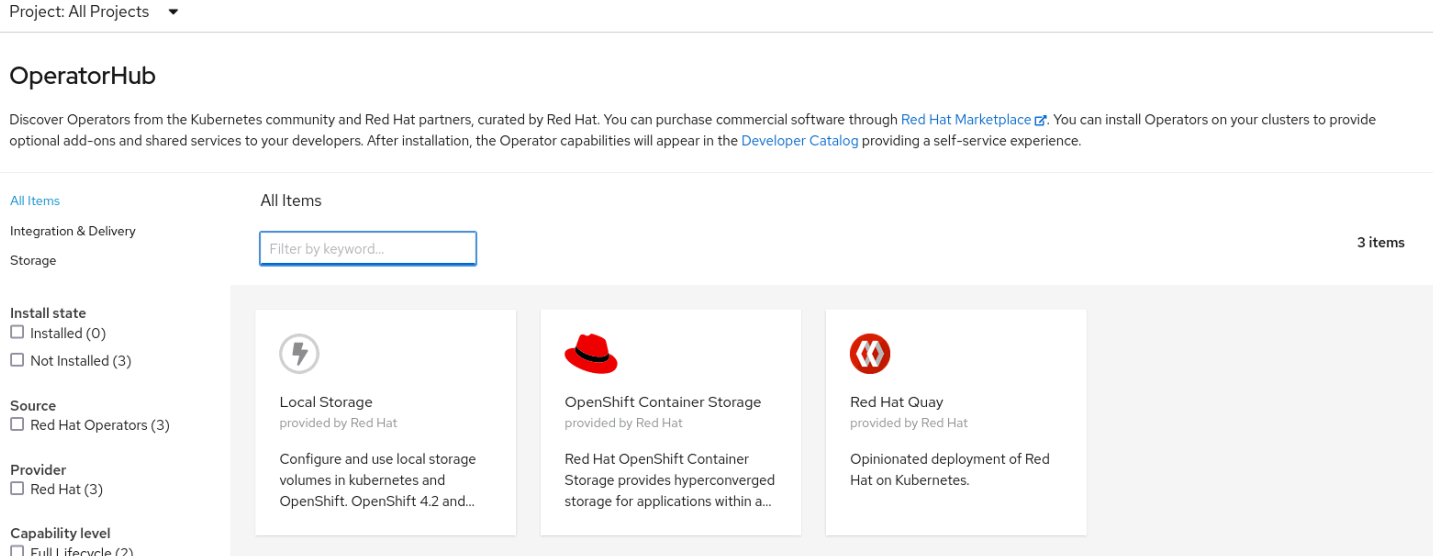
Disconnected custom catalog
The operators added their related images, making them complete in terms of requisites. Install them to check if everything is in place.
You can have as many custom catalogs as you need. Go to OpenShift Global Configuration and search for OperatorHub for the list of available catalogs.
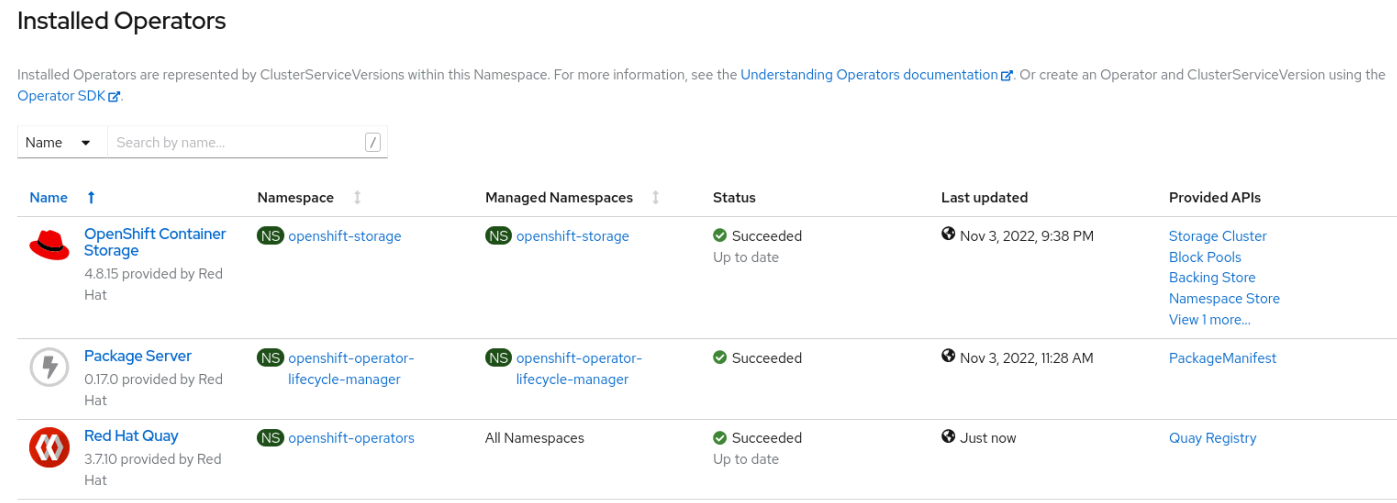
Disconnected operators installed
I hope this post was useful to you. Have a nice day!
Learn more
저자 소개
Andre Rocha is a Consultant at Red Hat focused on OpenStack, OpenShift, RHEL and other Red Hat products. He has been at Red Hat since 2019, previously working as DevOps and SysAdmin for private companies.
유사한 검색 결과
Red Hat Ansible 올스타: 네트워크 및 인프라 자동화의 미래를 주도합니다
AI 시대 인프라 자동화의 진화: Red Hat Summit 2026의 4가지 핵심 내용
Random Acts Of Automation | Compiler
Untangling Networks | Compiler
채널별 검색

오토메이션
기술, 팀, 인프라를 위한 IT 자동화 최신 동향

인공지능
고객이 어디서나 AI 워크로드를 실행할 수 있도록 지원하는 플랫폼 업데이트

오픈 하이브리드 클라우드
하이브리드 클라우드로 더욱 유연한 미래를 구축하는 방법을 알아보세요

보안
환경과 기술 전반에 걸쳐 리스크를 감소하는 방법에 대한 최신 정보

엣지 컴퓨팅
엣지에서의 운영을 단순화하는 플랫폼 업데이트

인프라
세계적으로 인정받은 기업용 Linux 플랫폼에 대한 최신 정보

애플리케이션
복잡한 애플리케이션에 대한 솔루션 더 보기

가상화
온프레미스와 클라우드 환경에서 워크로드를 유연하게 운영하기 위한 엔터프라이즈 가상화의 미래
